Archive for the ‘Oracle EBS Application’ Category

Workflow Notification Mailer Setup in Oracle Apps R12/12i

May 16th, 2021, posted in Oracle EBS Application
Share

On popular demand from readers, I am going to cover Workflow Notification Mailer in Oracle Applications R12/12i.
Workflow notification mailer setup in R12 is similar to 11i ( In both release 11i (OWF.H and higher in 11i) & R12 are Java Mailer)
* Previous version of Notification Mailer in 11i was based on C also called as C Mailer

Things To Note :
1. You use Oracle Application Manager (OAM) to configure Workflow Notification Mailer.
2. There are two kind of Notification (Outbound & Inbound) in Workflow Mailer
3. For Outbound Notification, CM (Concurrent Manager) node should be able to connect to SMTP (Simple Mail Transfer Protocol) server/relay.
4. For Inbound Notification (Optional), CM node should be able to connect to IMAP (Internet Message Access Protocol) Server.
5. Log file for Workflow Mailer Notification are at $APPLCSF/$APPLLOG/FNDC*.txt
6. Workflow Notification Mailer in background run as Concurrent Manager (Workflow Mailer ServiceWorkflow Agent Listener Service)
7. If you don’t wish to send mail notification to end user (from Dev/Test instance) then configure Test Address in configuration screen.


Step to configure Workflow Notification Mailer :

1. Login to Apps R12 with System Administrator Reponsibility
2. under Workflow : Oracle Applications Manager click on Workflow Manager

oracle apps,Oracle dba,Oracle application,oracle mail setup.oracle apps dba,

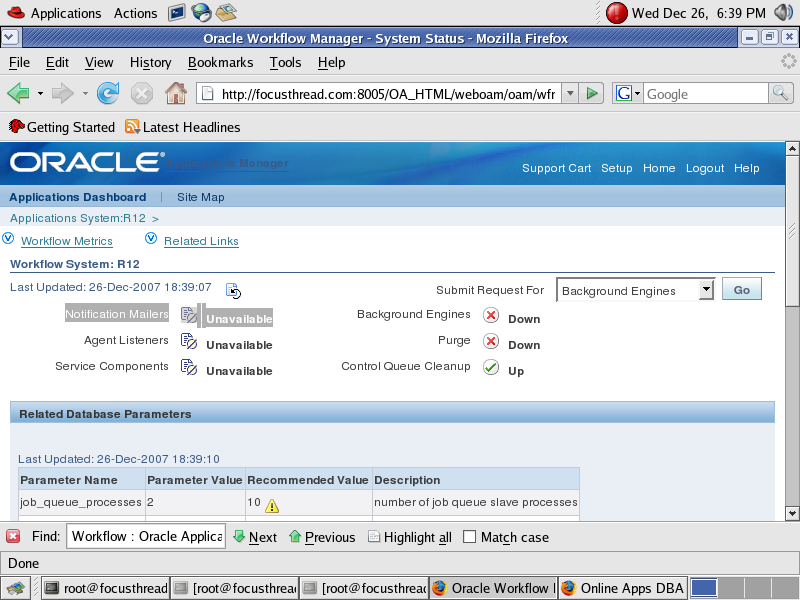
If this is first time you are configuring Workflow Notification Mailer in Oracle Apps R12/12i you will see Notification Mailers as unavailable as shown in screenshot

Click on Notification Mailers
 

oracle apps,Oracle dba,Oracle application,oracle mail setup.oracle apps dba,


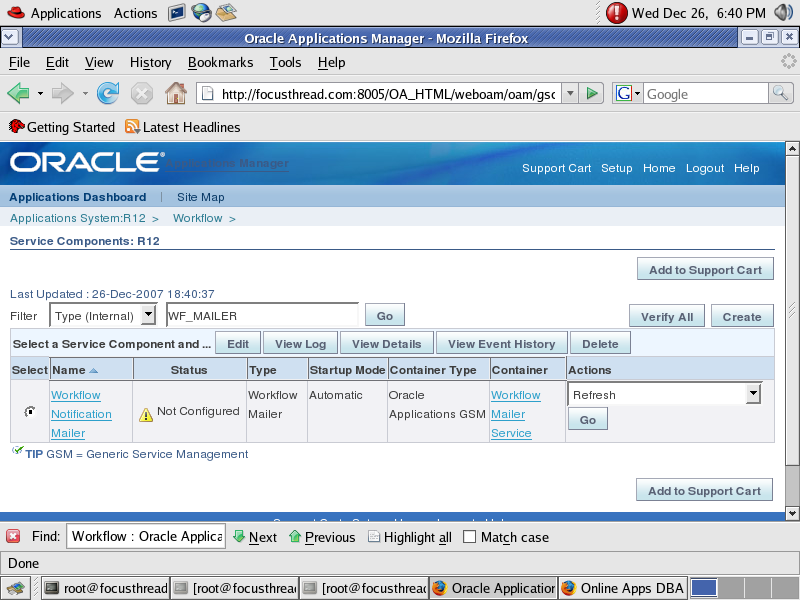
In next screen (as shown below, click on Edit Button)
oracle apps,Oracle dba,Oracle application,oracle mail setup.oracle apps dba,

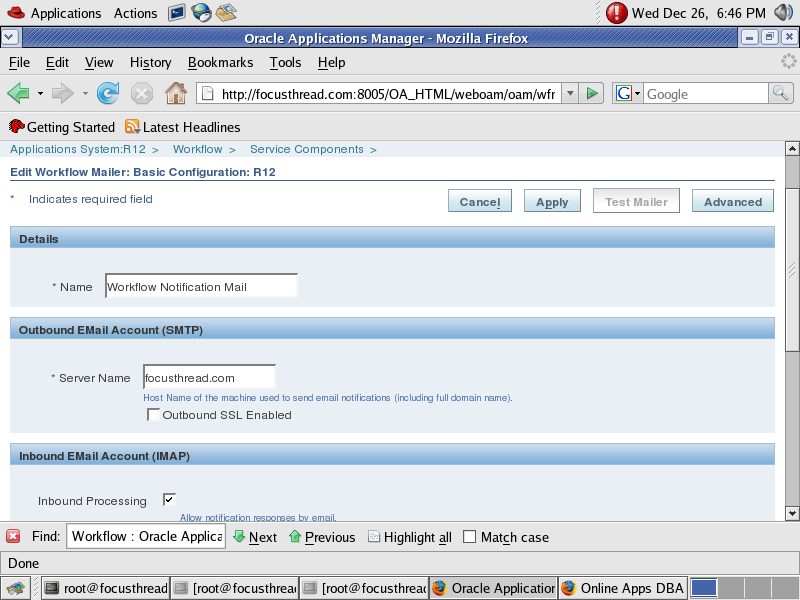
Here you have option to select Inbound notification setup or Just outgoing Notification Setup.
oracle apps,Oracle dba,Oracle application,oracle mail setup.oracle apps dba,


Provide SMTP Server Name (ensure that CM node should be able to connect to SMTP Server or SMTP Relay)
 

oracle apps,Oracle dba,Oracle application,oracle mail setup.oracle apps dba,


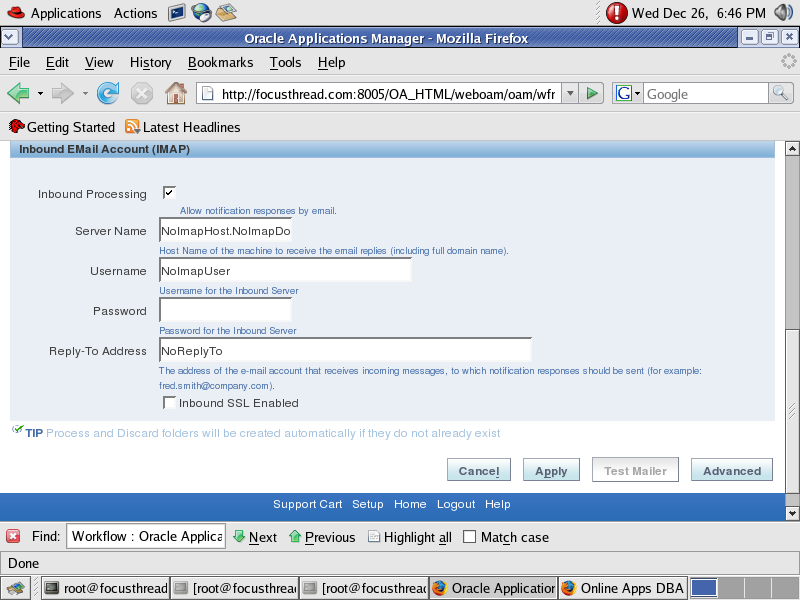
Uncheck Inbound Processing (from above screen), if you don’t wish to configure Inbound Notification Mailer.

If you wish to configure Inbound Notification as well then ensure IMAP Server should be configured with a valid user (create InboxProcessed Discard folder for this User)

Click on Apply button to finish configuration, at this stage Notification Mailer will test SMTP Server & IMAP Server connectivity.

For Advanced setup, click on Advanced at top right of configuration screen.

Metalink Notes for Notification Mailer
1. 453137.1 Oracle Workflow Best Practices Release 12 and Release 11i
2. 274764.1 Oracle Workflow Cartridge Workflow Java Mailer Setup Test
3. 433359.1 Tracking Workflow Notification Event Messages
4. 456921.1 Queries Related to Alert and Mailer Integration Post RUP4
5. 454706.1 How to Stop mails from Workflow Notification Mailer

Share

Hide Username And Password in URL for Oracle FORMS

February 1st, 2021, posted in Oracle EBS Application
Share

Username & password which is presented in addressbar like this :

For example the address is like this :

http://test.domain.com:7778/forms/frmservlet?form=login_testform.fmx&userid=username/password@instance

This shows that security is very low !!!

However, if all your users use the same username/password, you could specify this information in the FORMSWEB.CFG file; for example:

Go to you servers form configuration :

C:\DevSuiteHome_1\forms\server

And go and do this :

# Forms runtime argument: database connection details
userlogin: userid=username/password@instance%*

For now the address will be like this :

http://test.domain.com:7778/forms/frmservlet?form=login_testform.fmx&userlogin

You can also set the value in this file instead of setting it in URL.

Here is what URL look like

http://test.domain.com:7778/forms/frmservlet?config=ogidev_f

and here is some setting you can set in the config file

Code: [Select all] [Show/ hide]Hide Username & Password in URL for Oracle FORMS,Oracle FORMS,Hide Username and Password,form,formsweb.cfg
[ogidev_f]
envfile=OGIDEV_F.env
separateFrame=True
form=sag00m01.fmx
userid=user/pass@db
otherparams=p_code_lang_ora=F
logo=no
width=800
height=600
Share

How To Update EBS XML Publisher Temporary Directory

January 5th, 2021, posted in Oracle EBS Application, Oracle Queries
Share
SQL> select value from apps.XDO_CONFIG_VALUES WHERE  property_code = 'SYSTEM_TEMP_DIR';
VALUE
--------------------------------------------------------------------------------
/u1/appl/SHAIK1/wrongdir_tmp


SQL> update apps.XDO_CONFIG_VALUES set value='/u01/share/temp' WHERE  property_code = 'SYSTEM_TEMP_DIR';
1 row updated.


SQL> commit;
Commit complete.


SQL> select value from apps.XDO_CONFIG_VALUES WHERE  property_code = 'SYSTEM_TEMP_DIR';
VALUE
--------------------------------------------------------------------------------
/u01/share/temp

Reference:-
How To Find the EBS XML Publisher Temporary Directory Via SQL? (Doc ID 1189723.1)


https://sites.google.com/site/shareapps4u/learning-topic/xml-publisher/how-to-use-xml-bursting-to-send-xml-report-via-email?tmpl=%2Fsystem%2Fapp%2Ftemplates%2Fprint%2F&showPrintDialog=1

Share

Change Allowed In Items Primary UOM in Oracle EBS R12.2.9 And Higher Versions

December 1st, 2020, posted in Oracle EBS Application
Share

Allowed to change Item’s Primary UOM in Oracle EBS R12.2.9 and higher versions


Prior to Oracle EBS R12.2.9, Item’s Primary Unit Of Measure(UOM) can be selected only at the time of item creation and cannot be updated once the item is saved.

There is a new feature added in Oracle EBS 12.2.9 latest version, where it is allowed change item’s primary UOM after the item is created When no transactions exist like material transactions, Sales Orders, Purchase Orders, Work Orders, Onhand etc.,

Item’s UOM won’t be updated if there are transactions or related records exists. This is to Maintain data Integrity and avoid corruption.

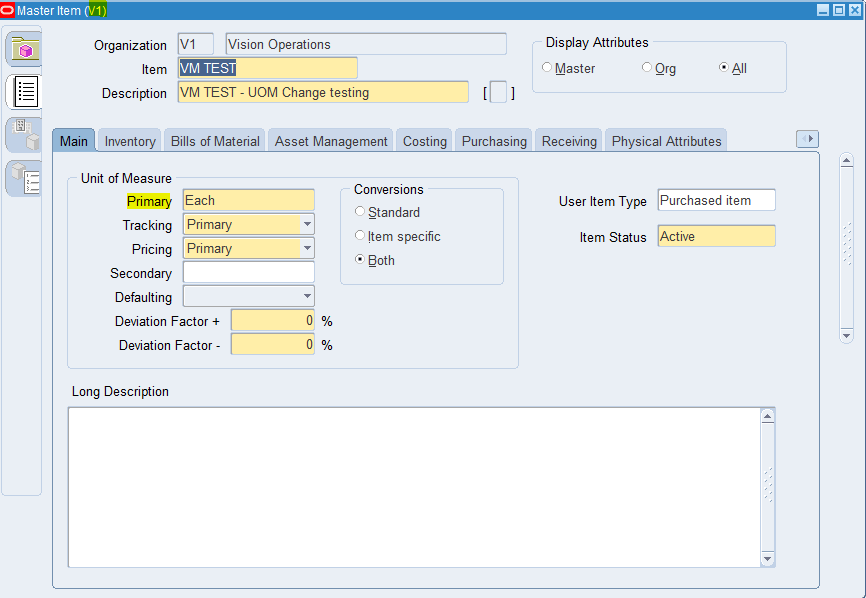
  1. Creating “VM TEST” master item with primary uom as Each.

oracle application,oracle ebs,oracle master item,oracle inventory master items,oracle apps dba

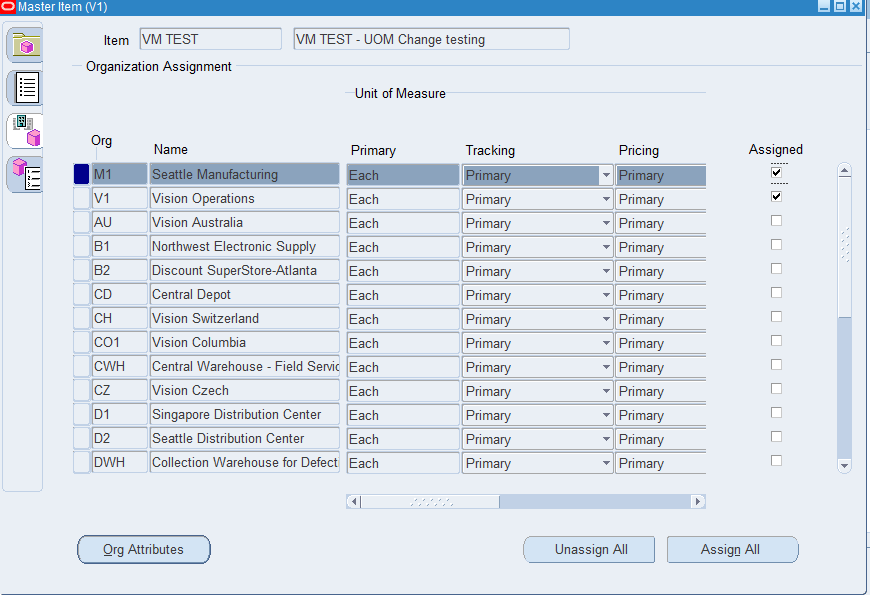
2. Extending “VM TEST” item to M1 inventory org.

oracle application,oracle ebs,oracle master item,oracle inventory master items,oracle apps dba

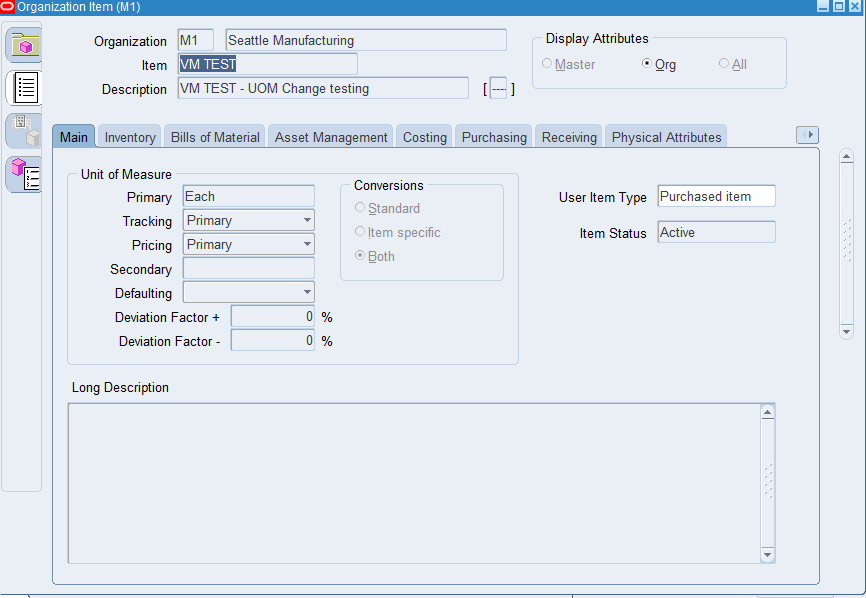
3. Query “VM TEST” item in M1 inventory org.

oracle application,oracle ebs,oracle master item,oracle inventory master items,oracle apps dba

Initially the item is created with primary UOM as “Each”. This item is newly created and there are no transactions exist.

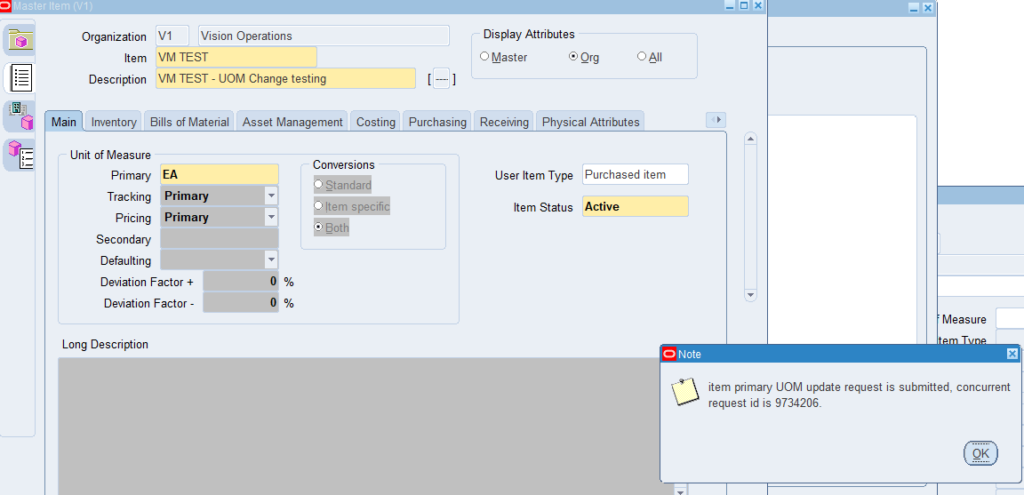
4. Change primary uom from EACH to EA in the master item form ( primary UOM is master controlled item attribute) -> A concurrent request will be submitted when UOM is changed and saved.

oracle application,oracle ebs,oracle master item,oracle inventory master items,oracle apps dba

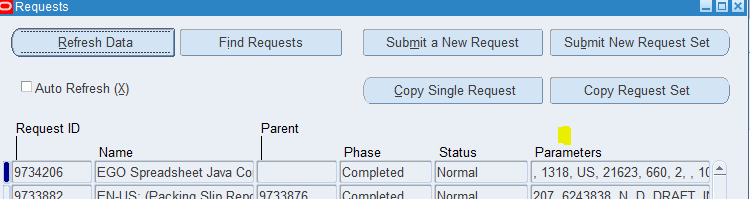
5. It runs “EGO Spreadsheet Java Concurrent Program” process and completes normal when the UOM is changed.

oracle application,oracle ebs,oracle master item,oracle inventory master items,oracle apps dba,EGO Spreadsheet Java Concurrent Program

Note: The concurrent program will have error like below if there are any transactions exists.

MESSAGE NAME: INV_UOM_CANNOT_UPDATE
ERROR MESSAGE : You cannot update UOM field when the inventory transactions exist in current or one of child orgs.

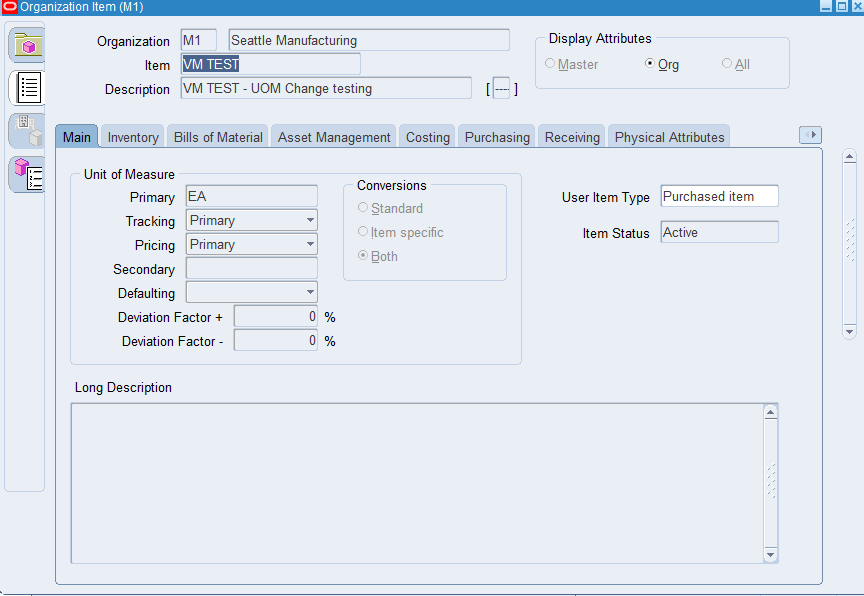
6. Re-Query “VM TEST” in the organization items form for M1 inventory org. You can see that primary UOM is changed to EA

oracle application,oracle ebs,oracle master item,oracle inventory master items,oracle apps dba,UOM is changed

Share

TSPITR Issue By Doing Mount Clone Database

November 15th, 2020, posted in Oracle EBS Application, Oracle Queries
Share

alter database mount clone database is a statement that forces all datafiles to be put OFFLINE when mounting the target instance.ORA-19588: archived log RECID 1003 STAMP 2001986 is no longer valid,oracle error,imam dba,dba imam,immam dba,dba immam,rman error
You’ll see it’s being used in the background when you run RMAN commands like:

transport tablespace
recover tablespace .. auxiliary destination ..
“recover table”  (12c feature)

In my case, i was trying to recover an 11.2.0.4 dropped table using “Tablespace Point In Time Recovery” by following the MOS note “How to Recover From a DROP / TRUNCATE / DELETE TABLE with RMAN (Doc ID 223543.1)“. The basic steps are:

– create pfile
– restore controlfile
– mount with “alter database mount clone database;”
– restore and recover a subset of the database with an RMAN script similar to:

RMAN> connect target /
        run {
        allocate channel c1 device type DISK;
        set until time "to_date( '13-01-2016 13:50', 'DD-MM-YYYY HH24:MI')";
        set newname for datafile 1 to "+RECO";
        set newname for datafile 3 to "+RECO";
        set newname for datafile 4 to "+RECO";
        set newname for datafile 23 to "+RECO";
        restore tablespace SYSTEM, UNDOTBS01, UNDOTBS02, TOOLS;
        switch datafile all;
        sql "alter database datafile 1,3,4,23 online";
        recover database skip forever tablespace TEMP,INDX,USERS,etc.;
        sql "alter database rename file ''+RECO/xxx/onlinelog/group_1.281.739547347'' to ''+RECO''";
        sql "alter database rename file ''+RECO/xxx/onlinelog/group_2.282.739547353'' to ''+RECO''";
        sql "alter database rename file ''+RECO/xxx/onlinelog/group_3.283.739547359'' to ''+RECO''";
        sql "alter database rename file ''+RECO/xxx/onlinelog/group_4.284.739547365'' to ''+RECO''";
release channel c1;
}

After completing the required steps, recovery raised the following error:

ORA-01547: warning: RECOVER succeeded but OPEN RESETLOGS would get error below
ORA-01152: file 1 was not restored from a sufficiently old backup

Of course i got the error when tried to open with resetlogs. After struggling with possible causes, i found an internal support note similar with my issue: “ORA-1547 After Recovery When Database Was Mounted As Clone (Doc ID 252181.1)“. The interesting part was this note was published at Oct 23, 2003 for versions 8.1.7.4 to 9.2.0.4 and the fix was:

Use the following workaround until the bug gets resolved :
Do not mount the database as CLONE as in :
SQL> alter database mount clone database;
but mount is as normal database with :
SQL> alter database mount;

But there’s no bug number stated in the note. Even i thought that mysterious bug must have been fixed many years ago, desperation made me try the workaround with mounting the instance with “alter database mount” and manually taking the required datafiles offline. Suprisingly it worked and i was able to open the database with resetlogs.

As a result, it’s fine for me that RMAN uses “mount clone database” statement internally, however when I’ll do TSPITR again you can be sure that I’ll mount the instance with the way I used to !!

Share