Archive for the ‘Oracle EBS Application’ Category

Get Current Patch Set Level of Oracle Applications Products For R12

October 11th, 2020, posted in Oracle EBS Application, Oracle Queries
Share

1) Login to OAM

(Responsibility “Oracle Applications Manager“, menu “OAM Support Cart“)

and Navigate: Support Cart -> Applications Signature -> Collect -> Check “Product Information” box -> Click on “View” (eyeglasses)

In R12

(Responsibility “System Administrator“, Menu “Oracle Application Manager“)
and Navigate : Applications Usage >> Products Installed

This will display the following patchset information :

Application Name
Current Patch Level
Product Version
Status (Installed, Shared Product, Inactive)

2) The patchset level information can be retrieved directly via sqlplus with the following diagnostic script :
$AD_TOP/sql/adutconf.sql

3) Use the below query to pull out the details

SQL>

SELECT fav.application_id,
fav.application_short_name, 
fav.application_name,
fav.basepath,
fav.creation_date,
fpi.status,
fpi.patch_level,
fpi.product_version,
fpi.TABLESPACE,
fpi.index_tablespace,
fpi.temporary_tablespace
FROM fnd_application_vl fav,
fnd_product_installations fpi
WHERE fav.application_id = fpi.application_id(+) 
ORDER BY creation_date DESC
Share

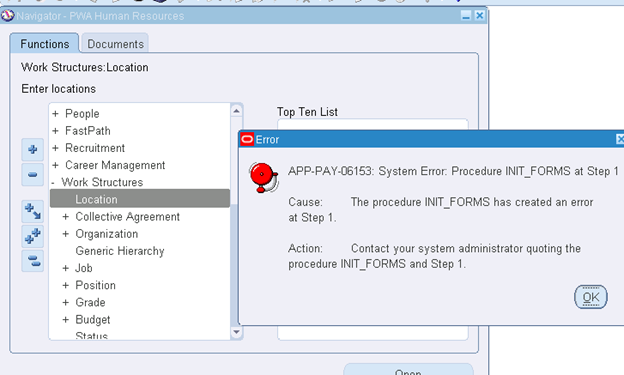
APP-PAY-06153:System Error. Procedure INIT_FORMS on Step 1

October 4th, 2020, posted in Oracle EBS Application
Share

APP-PAY-06153:System Error. Procedure INIT_FORMS on Step 1


Issue :

APP-PAY-06153:System Error. Procedure INIT_FORMS at Step 1 :

N:->Human Resources->Work Structures->Location

Oracle Application, Oracle Error,Oracle DBA,Oracle Apps DBA,APPS DBA

Solution :

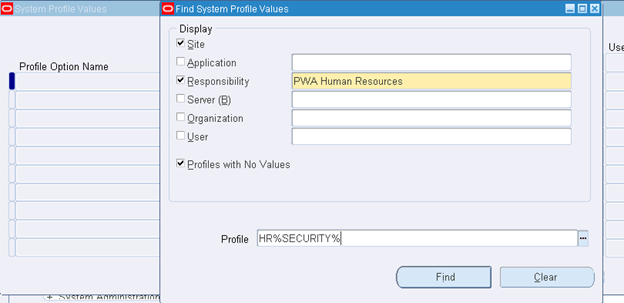
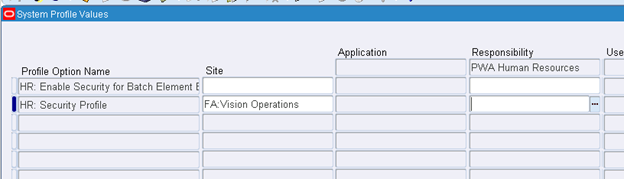
N: System Administrator->Profile->System

Click find

Assign Site: FA: Vision Operations

Save and close

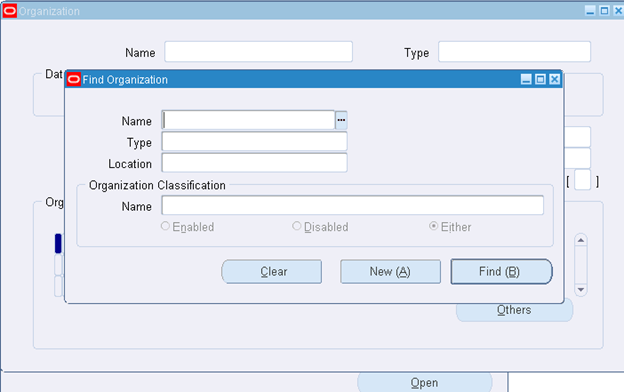
N:->Human Resource->Work Structure->Organization


Form is opened

Share

How to Check JSP Environment For Oracle Application

November 17th, 2019, posted in Oracle EBS Application
Share

Access the following URL and complete all tests. Upload the result output to the associated metalink SR

http://host.domain:port/OA_HTML/jsp/fnd/aoljtest.jsp 
http://[your web server]:[your port]/OA_HTML/test.jsp 

(Replace the host, domain, port value with your instance details ) 

Share

Autoconfig Error on Appstier Tier: Context Value Management Failed

October 29th, 2019, posted in Oracle EBS Application
Share

After clone, while running adautocfg.sh getting the following error.

Context Value Management will now update the Context file


Updating Context file...COMPLETED


Attempting upload of Context file and templates to database...Exception 
in thread "main" java.lang.AbstractMethodError: oracle.sql.LnxLibThin.lnxnuc([BILjava/lang/String;)
at oracle.sql.NUMBER.toInt(NUMBER.java:413) 
at oracle.jdbc.dbaccess.DBConversion.NumberBytesToInt(DBConversion.java: 2959) 
at oracle.jdbc.driver.OracleStatement.getIntValue(OracleStatement.java:4583) 
at oracle.jdbc.driver.OracleCallableStatement.getInt(OracleCallableStatement.java:635) 
at oracle.apps.ad.autoconfig.oam.InDbCtxFile.uploadCtx(InDbCtxFile.java: 216) 
at oracle.apps.ad.autoconfig.oam.CtxSynchronizer.uploadToDb(CtxSynchronizer.java:328) 
at oracle.apps.ad.tools.configuration.FileSysDBCtxMerge.updateDBCtx(FileSysDBCtxMerge.java:678) 
at oracle.apps.ad.tools.configuration.FileSysDBCtxMerge.updateDBFiles(FileSysDBCtxMerge.java:222) 
at oracle.apps.ad.context.CtxValueMgt.processCtxFile(CtxValueMgt.java:1586) 
at oracle.apps.ad.context.CtxValueMgt.main(CtxValueMgt.java:665) 
Error returned from java. Context Value Management was aborted 
ERROR: Context Value Management Failed. 
Terminate. 


The logfile for this session is located at: 
%APPL_TOP%\admin\%CONTEXT_NAME%\log\\adconfig.log immam_dba,dba immam,imam dba,dba imam,oracle clone issue,oracle database,oracle application,oracle clone issue,ora oracle,Autoconfig Error on Appstier Tier: Context Value Management Failed,Imam_DBA ORACLE


Solution :

The reason for this error is that JAVA_TOP/oracle/sql contain the following two files
LnxLibThin.class,
LdxLibThin.class
Need to remove and re-run autoconfig again.

As part of the 11.5.10 Maintenance Pack, these files should have been removed by adpatch
After successfully removed these two files, need to re-run the autoconfig from Applmgr user

Cheers!!!

Share