


Archive for June, 2014



Enable direct root Logins for Solaris 10 or Allow root SSH login for Solaris 10
June 10th, 2014, posted in Solaris
To enable/allow root login from SSH you must complete the following three steps after ensuring that you really want to enable root ssh access.
Steps to allow root to login using SSH as below:
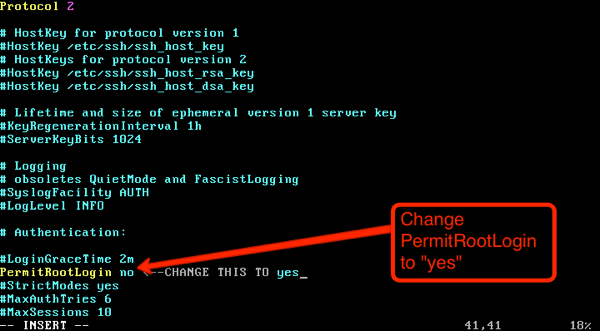
- Change PermitRootLogin from no to yes in: /etc/ssh/sshd_config
(you will need super user access to edit this file.) - Restart SSHD: /lib/svc/method/sshd restart
———————————————————————————–
After fresh Install of Solaris OS , You will not be able to login directly as root with Putty as its disabled.
To enable the same follow below steps.
===============================================================================================================
1) Login as oracle/any other user from putty and follow from point 3) to enable direct root login.
OR
2) Login as root from GUI console and follow from point 3) to enable direct root login.
3) Switch user to root
-bash-3.00$ su –
Password:
Oracle Corporation SunOS 5.10 Generic Patch January 2005
# ls -ltr /etc/default/login
-r–r–r– 1 root sys 2258 Aug 6 2010 /etc/default/login
# cp -pr /etc/default/login /etc/default/login.old
#
# ls -ltr /etc/default/login*
-r–r–r– 1 root sys 2258 Aug 6 2010 /etc/default/login.old
-r–r–r– 1 root sys 2258 Aug 6 2010 /etc/default/login
#
Comment the below parameter
=============================
vi /etc/default/login
#CONSOLE=/dev/console
backup the file /etc/ssh/sshd_config
======================================
# ls -ltr /etc/ssh/sshd_config
-rw-r–r– 1 root sys 5025 Aug 6 2010 /etc/ssh/sshd_config
#
cp -pr /etc/ssh/sshd_config /etc/ssh/sshd_config.old
# ls -ltr /etc/ssh/sshd_config*
-rw-r–r– 1 root sys 5025 Aug 6 2010 /etc/ssh/sshd_config.old
-rw-r–r– 1 root sys 5025 Aug 6 2010 /etc/ssh/sshd_config
#
Change the below parameter from “no” to “yes” as below
======================================================
vi /etc/ssh/sshd_config
#PermitRootLogin no
PermitRootLogin yes
Restart ssh service
===========================================
svcadm restart ssh
************************* End of task *************************