Archive for the ‘MOBiLE’ Category

How to Capture Screenshots in Samsung Galaxy Y

November 7th, 2012, posted in Android
Share
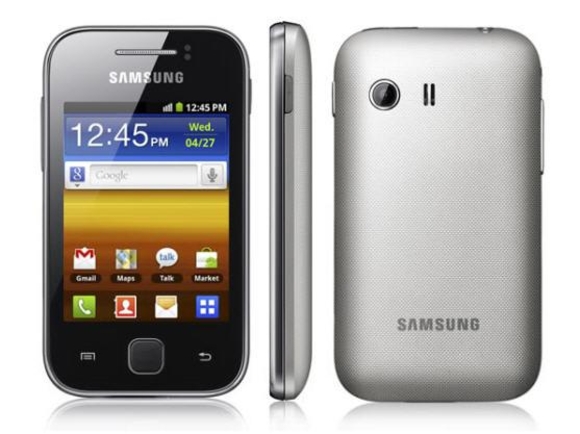
Samsung Galaxy Y
This post is in particular reply to some people who are asking me if I know how to take screenshots in Samsung Galaxy Y. Honestly I did not know the answer at first so I did some fiddling with the combinations of the available buttons in the Galaxy Y and luckily I was able to discover the right combination.
Do you want to take a screenshot in your Samsung Galaxy Y S5360? We all know that by default on an Android phone, there is no such screenshot application installed. Yes, there are some apps for taking screenshots like Screen Capture Shortcut which can be downloaded from Android market but what if you don’t want to install any app specifically for this purpose. Yes, there is a workaround.

It seems that Google have taken a good step in providing native support for capturing screenshots. But the main thing is that you must be knowing the correct key combination. There are different key combinations for different phones.

Capturing screenshot in Samsung Galaxy Y

Let’s not make the process complicated. Here is the process:

  • Open/navigate to the screen from where you want to take the screenshot
  • Press the Home button and hold it (don’t release the button)
  • Now press lock/power button and then immediately release it (If it doesn’t work, try again. Perfect “timing” is very important here)
  • As soon as this is done, you will hear a click sound, similar to the sound when you capture a photo from camera.
  • Also you will get this message “Screen captured. Saved as image file”.
  • Now you can navigate to the Gallery to view this screenshot. This screenshot will be saved in a new folder named as “Screenshot”.

The home key is that big button in the middle. The screenshots are saved in PNG format. You will need to try this key combination for some 2-3 times. It may happen that first time you may not be successful. But keep trying. It’s somewhat tricky.

Share

How to take a screenshot on your Samsung Galaxy Nexus

November 6th, 2012, posted in Android
Share

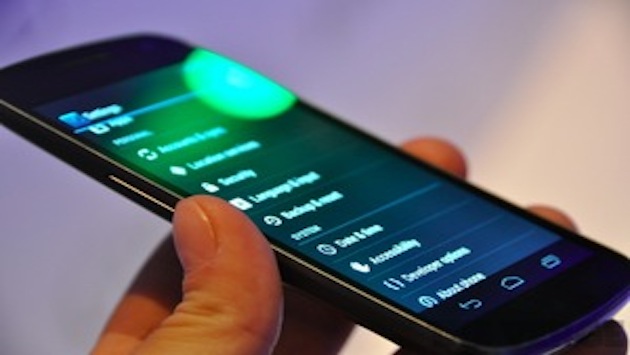
Galaxy Nexus

Sharing screenshots is pretty fun, especially when you receive a fun message or see something hilarious on your smartphone. Screenshots can also be pretty useful, especially on a device like the Galaxy Nexus.

What’s that ??
You don’t know how to take a screenshot ??
No problem !!
Our quick guide below will have you snapping screening in no time. It’s darn easy.

Anyway, to start taking screenshots on the Galaxy Nexus, just follow these easy steps:

  1. Wake your Samsung Galaxy Nexus
  2. Hold down the Power button and then press the Volume Down rocker (hold the buttons for two seconds)
  3. OK, you’re done. You’ll see a message appear on the screen that says “screenshot saved to camera shots.” Your screenshot will then be available in the Android Gallery app on your app drawer

Now head on out and start snapping some awesome screenshots to share.

Share

MMS Setting For Ufone, Warid, Telenor

July 16th, 2012, posted in MOBiLE, PAKiSTAN
Share

***************************************************************

Ufone MMS Settings

***************************************************************

ufone

To be able to use Ufone MMS you need to have MMS enabled on your number and a compatible handset.

You can get MMS & GPRS settings for your handset by:

– Sending your phone’s model number in an SMS to 222, Example: P910i or 6600 or razr v3

– By Ufone Help Line or by visiting the nearest Customer Services Center.

MMS Charges:

The cost of sending a local MMS to any network or an email address is Rs. 5.00 + Tax per 64KB

Uth MMS is charged at Rs. 1 + Tax per 64KB

Incoming MMS is absolutely free.

How to Subscribe:

To subscribe to Daily MMS Package simply send SMS with keyword SUB to 665

PACKAGES SUBSCRIPTION NO. OF FREE MMS VALIDITY SMS ‘SUB’ TO
Daily MMS Package Rs. 3.99 + tax 150 24 Hours 665

For ufone details check this link :

http://www.ufone.com/mobpro_mobileinternet.aspx

***************************************************************

Telenor MMS Settings

***************************************************************telenor MMS

Send a text message to 131 with your handset make and model to receive your handset settings:

For Example:

For Internet

  • Write “Internet” and SMS it to 131

For WAP

  • Write “wap” and SMS it to 131.

For MMS

  • Write “mms” and SMS it to 131.

For All handset setting

  • Write “All” and SMS it to 131.

For more telenor mms details visit this website :
http://www.telenor.com.pk/telenor-handset-settings

***************************************************************

Warid MMS Settings

***************************************************************

MMS (Multimedia Messaging Service)warid MMS

With MMS, messaging is fun, colorful and musical. Add pictures, animations, polyphonic & true tones, and even video clips to messages, and show the world how amazing communication can be.

How it works?

Please consult your mobile phone instruction manual to see exactly how this is done on your particular phone.

Next, you need to configure your handset with Warid MMS settings. Please follow these simple steps to get the MMS configuration:

Method 1

Go to: Warid>Messaging>Multimedia Settings>MMS

Enter handset make (e.g. nokia) & model number (e.g. 6020) when prompted.

  • SMS is generated from your handset
  • You will receive a message with the settings. Please select ‘yes’ to save the settingsNote: Before using MMS, please ensure to subscribe to the GPRS service and have your handset configured

Method 2

Type ‘SET MMS’ & Send to 1190

You will receive the MMS settings via a message.

Please select ‘yes’ to save the settings

Note: There are certain mobiles that do not support this setting process. Please contact our Customer Service Center for assistance.;

Mobile Internet

This powerful service offers you complete flexibility to view the internet on your cell phone or laptop. So whenever you are on the move and want to look for information on the internet, simply setup the internet connection from your GPRS/ WAP/EDGE enabled handset. You can also use your handset as a GPRS modem and connect it to your laptop wirelessly using Bluetooth, infrared or a cable.

How it works?

Consult your handset instructions manual to find out if your handset supports GPRS/ WAP/EDGE. Alternately call our Customer Care Center on 321 from your Warid phone or simply dial our UAN 111-111-321 from any other phone.Please also ensure, you have subscribed to GPRS before configuring these settings.

  • Go to: Warid Menu>Messaging>Mutimedia Settings>WAP/GPRS
  • Enter the handset make (e.g nokia) and model number( e.g 6020) when prompted.
  • SMS will be generated from your handset
  • You will receive a message with the settings. Please select ‘yes’ to save the settings in your handset

Note: Before using mobile internet, please subscribe to the GPRS service and have your handset configured.

For more detail for Warid MMS , visit this website :
http://www.waridtel.com/products/mobile_wizard/index.php

*********************************************************************************************************************************************************
Note : We am just providing you the detials … Please confirm it yourself as well… We are not responsible for anything..
*********************************************************************************************************************************************************
Share

Ufone Call Pakacges

May 3rd, 2012, posted in MOBiLE, PAKiSTAN
Share

ufone logo

Ufone Lady’s Package:

Ufone + PTCL Numbers (Rs 2/hour) (10am to 5pm)

Ufone + PTCL Numbers (Rs 1.25/minute) (5pm to 10am)

All other networks (Rs 1.25/minute ) (24 hours)

SMS (Ufone to Ufone) (50 Paisas)

SMS (Ufone to other networks) (Re 1 )

A package that suits Ladies the best. So now Sub Manain Gaay!

To convert to Lady’s Package simply dial *34#

Super Ghanta Package:

Talk from 4 a.m. in the morning to 5 p.m. in the evening to not only any Ufone number but to any PTCL landline and Vfone number as well across the country, all for only Rs. 3.50/hour. So don’t waste another minute to get this marvelous hourly package.

Super Ghanta Package tariff details
SERVICE CHARGES  DAILY RS. 5.99

Ufone to Ufone    0400 Hrs to 1659 Hrs    Rs 3.50 / Hr
Ufone to Ufone    1700 Hrs to 0359 Hrs    Rs 1.00 / Min
Ufone to Other Mobiles    24 Hours    Rs 1.60 / Min
Ufone to PTCL    0400 Hrs to 1659 Hrs    Rs 3.50 / Hr
Ufone to PTCL    1700 Hrs to 0359 Hrs    Rs 1.60 / Min

Ufone Ghanta Package

Talk for practically the entire day from 9 am to 5 pm for only 5.99/hour.

Ufone Ghanta Package tariff details

SERVICE CHARGES DAILY  RS. 3.99

Ufone to Ufone    0900 – 1659    Rs. 5.99 / hr
Ufone to PTCL    0900 – 1659    Rs. 5.99 / hr
Ufone to Ufone     0000 – 0859 &  1700 – 2359 Rs. 1.00 / minute
Ufone to Other Mobiles    24 Hours    Rs. 1.60 / minute
Ufone to PTCL     0000 – 0859  &  1700 – 2359 Rs. 1.60 / minute

Ufone 5 ka 15

Each 5 min call gives you the next 10 minutes absolutely free…and if Ufone says it’s free, it is FREE.

Call rate for first 5 minutes from Ufone to Ufone is Rs.1.125 per 30 seconds.
Call rate from Ufone to other networks is Rs.1.25 per 30 seconds.
SMS rates nationwide at 25 paisas
Ucircle is not available with this offer.

5/15 tariff details

Ufone to Ufone*    24 Hours    Rs 1.125 / 30 sec
Ufone to Other Mobiles    24 Hours    Rs 1.25 / 30 sec
Ufone to PTCL    24 Hours    Rs 1.25 / 30 sec
Ufone to International    24 Hours    Standard rates apply

Ufone U-won Package

U won package talk for only Rs.1.00/minute to any Ufone number and only Rs.1.60/minute to any other number.

Ufone Uwon tariff details

Ufone to Ufone    24 Hours    Re 1.00 / Min
Ufone to Other Mobiles    24 Hours    Rs 1.60 / Min
Ufone to PTCL    24 Hours    Rs 1.60 / Min

Ufone Public Demand:

Ufone to Ufone    24 Hours    Re 0.99 / 30 sec
Ufone to Other Mobiles    24 Hours    Re 0.99 / 30 sec
Ufone to PTCL    24 Hours    Re 0.99 / 30 sec

3 Minute Package

Talk for full 3 minutes and get charged for just two minutes, meaning the third minute is absolutely FREE and that comes down to just 66 paisas per minute! So now you don’t need to worry about the bill if your call is a little longer than expected, because for us, it’s all about U!

Ufone 3 Minute Package tariff details

Ufone to Ufone    24 Hours    Rs 2.00 / 3 Min
Ufone to Other Mobiles    24 Hours    Rs 3.20 / 3 Min
Ufone to PTCL    24 Hours    Rs 3.20 / 3 Min

60 Paisa Offer

From this Ufone call package You can CALL ANY NETWORK, ANYTIME for only 60 paisa’s per 30 seconds!

Call Ufone to Ufone or any other network for only 60 paisas.
To subscribe to this service, SMS ‘sub’ to 717 or dial 710 from your ufone.
Note: Super Bundle Offer costs Rs 90/- and is valid for 10 days

Ufone Life Plus

Talk late night from 12 am (midnight) to 7 am for only Rs.2.50 per hour. To top it off, calls made on Saturday and Sunday between 9 am to 5pm cost only Rs.4.99 per hour.
WEEKDAYS:
Ufone to Ufone    0000 – 0659    Rs. 2.50 / hr
Ufone to Ufone    0700 – 2359    Rs. 1.125 / 30 sec
Ufone to Other Mobiles    24 Hours    Rs. 1.25 / 30 sec
Ufone to PTCL    24 Hours    Rs. 1.25 / 30 sec
Ufone to International    24 Hour    Standard rates apply
WEEKENDS:
Ufone to Ufone    0900 – 1659    Rs. 4.99 / hr
Ufone to Ufone    0700 – 0859 and  1700 – 2359    Rs. 1.125 / 30 sec
Ufone to Ufone    0000 – 0659    Rs. 2.50 / hr
Ufone to Other Mobiles    24 hrs    Rs. 1.25 / 30 sec
Ufone to PTCL    24 hrs    Rs. 1.25 / 30 sec

U-Circle ( Friends and Family )

WEEKDAYS
UCircle (Ufone to Ufone)    0000 – 0659    Rs. 2.50 / hr
UCircle (Ufone to Ufone)    0700 – 2359    Rs. 0.45 / 30 sec
UCircle (Ufone to PTCL)    24 Hours    Rs. 0.45 / 30 sec
WEEKENDS
UCircle (Ufone to Ufone)    0900 – 1659    Rs. 4.99 / hr
UCircle (Ufone to Ufone)    0000 – 0659    Rs. 2.50 / hr
UCircle (Ufone to PTCL)    24 hrs    Rs. 0.45 / 30 sec

To activate any of these package dial 444 from your Ufone sim.

Ufone Youth Package

ufone youth package

Now any call you make to any Ufone number It’ll be FREE after the first 2 minutes ALL 24 hours 7 days a week!  You can still keep enjoying tons of SMS daily to any network for only Rs. 1.99 and hourly calls to 5 Friends and Family numbers at the low rate of Rs. 2.99 per hour.
How to:
Dial *22# and get all the talk out of your system.
Note:
A change has also been made in the 30 second pulse charges which will take effect from May 15, 2011 changing the previous rate of Re. 1 per 30 seconds to Rs.1.25 per30 seconds on calls made from Uth Package Non Stop Offer to all Ufone numbers.
Terms & Conditions:
Dial *22# to avail Uth Package Non-Stop Offer
Tax charges on all outgoing calls from Uth Package Non-Stop Offer to Ufone numbers have been revised from Rs. 1 per 30 seconds to Rs. 1.25 per 30 seconds, effective from 15th May, 2011.
All charges per 30 seconds are exempted from tax. Daily charges of Rs. 1 plus tax will apply.
Free calls apply in case of Ufone to Ufone numbers only.
5 Friends & Family numbers must be Ufone or PTCL numbers (or both).
To activate Friends and Family numbers, dial 363.
Change in any Friends & Family number is subject to charges of Rs. 10 plus tax. Friends and Family numbers activation charges amount to Rs. 10 plus tax.
To avail the package, one-time charges of Rs. 15 plus tax apply.
Customers who have been availing Uth Package since July 2010 can avail this offer for a one-time charge of Rs. 30 plus tax.
For further information, call 111-333-100 from your PTCL number, dial 333 from your Ufone number
19.5% FED on usage and 11.5% withholding tax at recharge or bill applies.
Using SIMS without proper documentation is a crime – PTA
Terms and Conditions apply.


Note : These details can be out-dated. Please do check ufone webiste or your near by ufone office. The website is not responsible for any actions you take.


Share

Now I Know How Shazam Works

March 14th, 2012, posted in MOBiLE
Share
There is a cool service called Shazam, which take a short sample of music, and identifies the song.  There are couple ways to use it, but one of the more convenient is to install their free app onto an iPhone.  Just hit the “tag now” button, hold the phone’s mic up to a speaker, and it will usually identify the song and provide artist information, as well as a link to purchase the album.

What is so remarkable about the service, is that it works on very obscure songs and will do so even with extraneous background noise.  I’ve gotten it to work sitting down in a crowded coffee shop and pizzeria.
So I was curious how it worked, and luckily there is a paper written by one of the developers explaining just that.  Of course they leave out some of the details, but the basic idea is exactly what you would expect:  it relies on fingerprinting music based on the spectrogram.
Here are the basic steps:
1. Beforehand, Shazam fingerprints a comprehensive catalog of music, and stores the fingerprints in a database.
2. A user “tags” a song they hear, which fingerprints a 10 second sample of audio.
3. The Shazam app uploads the fingerprint to Shazam’s service, which runs a search for a matching fingerprint in their database.
4. If a match is found, the song info is returned to the user, otherwise an error is returned.
Here’s how the fingerprinting works:
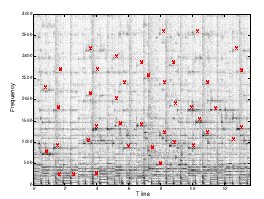
You can think of any piece of music as a time-frequency graph called a spectrogram.  On one axis is time, on another is frequency, and on the 3rd is intensity.  Each point on the graph represents the intensity of a given frequency at a specific point in time. Assuming time is on the x-axis and frequency is on the y-axis, a horizontal line would represent a continuous pure tone and a vertical line would represent an instantaneous burst of white noise.  Here’s one example of how a song might look:

There is a cool service called Shazam, which take a short sample of music, and identifies the song.  There are couple ways to use it, but one of the more convenient is to install their free app onto an iPhone.  Just hit the “tag now” button, hold the phone’s mic up to a speaker, and it will usually identify the song and provide artist information, as well as a link to purchase the album.
What is so remarkable about the service, is that it works on very obscure songs and will do so even with extraneous background noise.  I’ve gotten it to work sitting down in a crowded coffee shop and pizzeria.
So I was curious how it worked, and luckily there is a paper written by one of the developers explaining just that.  Of course they leave out some of the details, but the basic idea is exactly what you would expect:  it relies on fingerprinting music based on the spectrogram.
Here are the basic steps:
1. Beforehand, Shazam fingerprints a comprehensive catalog of music, and stores the fingerprints in a database.2. A user “tags” a song they hear, which fingerprints a 10 second sample of audio.3. The Shazam app uploads the fingerprint to Shazam’s service, which runs a search for a matching fingerprint in their database.4. If a match is found, the song info is returned to the user, otherwise an error is returned.

Here’s how the fingerprinting works:
You can think of any piece of music as a time-frequency graph called a spectrogram.  On one axis is time, on another is frequency, and on the 3rd is intensity.  Each point on the graph represents the intensity of a given frequency at a specific point in time. Assuming time is on the x-axis and frequency is on the y-axis, a horizontal line would represent a continuous pure tone and a vertical line would represent an instantaneous burst of white noise.  Here’s one example of how a song might look:

shazam-spectrogram

Spectrogram of a song sample with peak intensities marked in red. Wang, Avery Li-Chun. An Industrial-Strength Audio Search Algorithm. Shazam Entertainment, 2003.Â

The Shazam algorithm fingerprints a song by generating this 3d graph, and identifying frequencies of “peak intensity.”  For each of these peak points it keeps track of the frequency and the amount of time from the beginning of the track.  Based on the paper’s examples, I’m guessing they find about 3 of these points per second. [Update: A commenter below notes that in his own implementation he needed more like 30 points/sec.]  So an example of a fingerprint  for a 10 seconds sample might be :


Frequency in Hz Time in seconds
823.44 1.054
1892.31 1.321
712.84 1.703
. . . . . .
819.71 9.943

Shazam builds their fingerprint catalog out as a hash table, where the key is the frequency.  When Shazam receives a fingerprint like the one above, it uses the first key (in this case 823.44), and it searches for all matching songs.  Their hash table might look like the following:


Frequency in Hz Time in seconds, song information
823.43 53.352, “Song A” by Artist 1
823.44 34.678, “Song B” by Artist 2
823.45 108.65, “Song C’ by Artist 3
. . . . . .
1892.31 34.945, “Song B” by Artist 2

[Some extra detail: They do not just mark a single point in the spectrogram, rather they mark a pair of points: the “peak intensity” plus a second “anchor point”.  So their key is not just a single frequency, it is a hash of the frequencies of both points.  This leads to less hash collisions which in turn speeds up catalog searching by several orders of magnitude by allowing them to take greater advantage of the table’s constant (O(1)) look-up time.  There’s many interesting things to say about hashing, but I’m not going to go into them here, so just read around the links in this paragraph if you’re interested.]

Top graph: Songs and sample have many frequency matches, but they do not align in time, so there is no match. Bottom Graph: frequency matches occur at the same time, so the song and sample are a match. Wang, Avery Li-Chun. An Industrial-Strength Audio Search Algorithm. Shazam Entertainment, 2003. Fig. 2B.

If a specific song is hit multiple times (based on examples in the paper I think it needs about 1 frequency hit per second), it then checks to see if these frequencies correspond in time.  They actually have a clever way of doing this  They create a 2d plot of frequency hits, on one axis is the time from the beginning of the track those frequencies appear in the song, on the other axis is the time those frequencies appear in the sample.  If there is a temporal relation between the sets of points, then the points will align along a diagonal.  They use another signal processing method to find this line, and if it exists with some certainty, then they label the song a match.

Share