Archive for the ‘Oracle Queries’ Category

Find Concurrent Manager Jobs By Query

May 6th, 2018, posted in Oracle Queries
Share

Query :


select sess.sid,
 sess.sql_hash_value,
 oracle_process_id OS_PROCESS_ID,
 fusr.description user_name ,
 fcp.user_concurrent_program_name progName,
 to_char(actual_Start_date,'DD-MON-YYYY HH24:MI:SS') StartDate,
 request_id RequestId,
 (sysdate - actual_start_date)*24*60 ETime_in_Mins
from apps.fnd_concurrent_requests fcr,
 apps.fnd_concurrent_programs_tl fcp,
 apps.fnd_user fusr,
 v$session sess
where fcp.concurrent_program_id = fcr.concurrent_program_id
 and fcr.program_application_id = fcp.application_id
 and fcp.language = 'US'
 and fcr.phase_code = 'R'
 and fcr.status_code = 'R'
 and fcr.requested_by = fusr.user_id
 and fcr.oracle_session_id = sess.audsid (+)
-- and p.addr = sess.paddr
 order by 6 DESC
Share

RECEIPT APPLICATION ERROR: APP-FND-00531

April 28th, 2018, posted in Oracle Queries
Share
제품 : FIN_AR
작성날짜 : 2003-11-18
RECEIPT APPLICATION ERROR: APP-FND-00531
========================================
PURPOSE
-------
Receipt Application 시 발생하는 error를 효과적으로 해결한다.
Problem Description
-------------------
Applications 11.0.3:
Transaction을 생성 한 후 Receipt 과 Apply 할 때 다음과 같은 error 가 발생하였다.
APP-FND-00531 Amount Cannot Be Correctly Formatted
The Amount XXX.XXX Could Not Be Formally Formatted.
The Correct Format Is 999.99 And -999.99

Workaround
----------
1. 해당 data 를 bakcup 받아 놓는다.
2. 다음 update script을 수행한다.
Update ar_payment_schedules_all
set amount_due_original = round(amount_due_original,2),
amount_due_remaining= round(amount_due_remaining,2),
acctd_amount_due_remaining = round (acctd_amount_due_remaining, 2)
where customer_trx_id=xxx
update ra_customer_trx_lines_all
set extended_amount=round(extended_amount,2)
where customer_trx_id=xxx and line_type='TAX'
update ra_cust_trx_line_gl_dist_all
set amount=round(amount,2)
where customer_trx_id=xxx

Solution Description
--------------------------
Applications 11.0.3에서 Tax / Freight Defaultation Program이 rounding 처리를 잘 못하여 ra_cust_trx_line_gl_dist_all 에 데이타가 corrupted 된 것으로 보인다.
잘 못된 data를 rounding 처리하여 저장해준다.
Reference Documents
-------------------
Note 247018.1
Share

Select Number And Convert Number From English To Arabic In Oracle

April 23rd, 2018, posted in Oracle Queries
Share
CREATE FUNCTION numToEasternArabic(
  in_value IN NUMBER
) RETURN NVARCHAR2 DETERMINISTIC
IS
  p_num  VARCHAR2(100) := TO_CHAR( in_value );
  p_char CHAR(1);
  o_str  NVARCHAR2(100);
BEGIN
  FOR i IN 1 .. LENGTH( p_num ) LOOP
    p_char := SUBSTR( p_num, i, 1 );
    o_str := o_str
          || CASE p_char
             WHEN '.'
             THEN N'.'
             ELSE UNISTR(
                    '\' || TO_CHAR(
                             TO_NUMBER( p_char ) + 660,
                             'FM0000'
                           )
                  )
             END;
  END LOOP;
  RETURN o_str;
END;
/


Query 1:

SELECT numToEasternArabic( 1438 )
FROM   DUAL

Results:

| NUMTOEASTERNARABIC(1438) |
|--------------------------|
|                     ١٤٣٨ |
 
Share

Change Oracle Database Character Set WE8MSWIN1252 to AL32UTF8

April 15th, 2018, posted in Oracle Queries
Share

How to change Oracle database character set WE8MSWIN1252 to AL32UTF8,Oracle database character set WE8MSWIN1252 to AL32UTF8.How to change Oracle database character set WE8MSWIN1252,How to change Oracle database character set AL32UTF8,How to change Oracle database character set english to arabic,Oracle dba,oracle apps dba,oracle database character set,oracle database, character set,nls database parameters,database parameters,oracle nls database parameters,oralce NLS LANGUAGE,Oracle database NLS LANGUAGE


Changing character set for Oracle database.

My scenario is to support Arabic data format.

My existing oracle database character set is : WE8MSWIN1252

My requirement is to change this character set to  AL32UTF8 ( Which will support Arabic format)

Step :1

Set your ORACLE_HOME and SID .

Windows :

SET  ORACLE_HOME= E:\app\7stl\product\11.1.0\db_1

SET SID=ORCL

Linux : Use export command to set ORACLE_HOME and SID.
How to change Oracle database character set WE8MSWIN1252 to AL32UTF8,Oracle database character set WE8MSWIN1252 to AL32UTF8.How to change Oracle database character set WE8MSWIN1252,How to change Oracle database character set AL32UTF8,How to change Oracle database character set english to arabic,Oracle dba,oracle apps dba,oracle database character set,oracle database, character set,nls database parameters,database parameters,oracle nls database parameters,oralce NLS LANGUAGE,Oracle database NLS LANGUAGE


Step 2 :

Connect sqlplus through command prompt.

Enter user name as below shown in screenshot.
user-name:    / as sysdba

How to change Oracle database character set WE8MSWIN1252 to AL32UTF8,Oracle database character set WE8MSWIN1252 to AL32UTF8.How to change Oracle database character set WE8MSWIN1252,How to change Oracle database character set AL32UTF8,How to change Oracle database character set english to arabic,Oracle dba,oracle apps dba,oracle database character set,oracle database, character set,nls database parameters,database parameters,oracle nls database parameters,oralce NLS LANGUAGE,Oracle database NLS LANGUAGE


step 3:

Shutdown your database immediate or normal by using below command.

shutdown normal
How to change Oracle database character set WE8MSWIN1252 to AL32UTF8,Oracle database character set WE8MSWIN1252 to AL32UTF8.How to change Oracle database character set WE8MSWIN1252,How to change Oracle database character set AL32UTF8,How to change Oracle database character set english to arabic,Oracle dba,oracle apps dba,oracle database character set,oracle database, character set,nls database parameters,database parameters,oracle nls database parameters,oralce NLS LANGUAGE,Oracle database NLS LANGUAGE


Step 4 :

mount your database by using below command

startup mount

How to change Oracle database character set WE8MSWIN1252 to AL32UTF8,Oracle database character set WE8MSWIN1252 to AL32UTF8.How to change Oracle database character set WE8MSWIN1252,How to change Oracle database character set AL32UTF8,How to change Oracle database character set english to arabic,Oracle dba,oracle apps dba,oracle database character set,oracle database, character set,nls database parameters,database parameters,oracle nls database parameters,oralce NLS LANGUAGE,Oracle database NLS LANGUAGE


step 5:

Now execute below commands

SQL> ALTER SYSTEM ENABLE RESTRICTED SESSION;
System altered.

SQL> ALTER SYSTEM SET JOB_QUEUE_PROCESSES=0;
System altered.

SQL> ALTER SYSTEM SET AQ_TM_PROCESSES=0;
System altered.

How to change Oracle database character set WE8MSWIN1252 to AL32UTF8,Oracle database character set WE8MSWIN1252 to AL32UTF8.How to change Oracle database character set WE8MSWIN1252,How to change Oracle database character set AL32UTF8,How to change Oracle database character set english to arabic,Oracle dba,oracle apps dba,oracle database character set,oracle database, character set,nls database parameters,database parameters,oracle nls database parameters,oralce NLS LANGUAGE,Oracle database NLS LANGUAGE


Step 6:

SQL> ALTER DATABASE OPEN;
Database altered.

How to change Oracle database character set WE8MSWIN1252 to AL32UTF8,Oracle database character set WE8MSWIN1252 to AL32UTF8.How to change Oracle database character set WE8MSWIN1252,How to change Oracle database character set AL32UTF8,How to change Oracle database character set english to arabic,Oracle dba,oracle apps dba,oracle database character set,oracle database, character set,nls database parameters,database parameters,oracle nls database parameters,oralce NLS LANGUAGE,Oracle database NLS LANGUAGE


Step 7:

Now change the character set by using below command.

ALTER DATABASE CHARACTER SET AL32UTF8;

If you facing this error ” ORA-12712: new character set must be a superset of old character set”
use below command to overcome from this issue.

ALTER DATABASE CHARACTER SET INTERNAL_USE AL32UTF8;

If you facing below error while executing above command then follow below steps:

ERROR at line 1:
ORA-00604: error occurred at recursive SQL level 1
ORA-30556: functional index is defined on the column to be modified

Execute this command first then followed by character set command.

How to change Oracle database character set WE8MSWIN1252 to AL32UTF8,Oracle database character set WE8MSWIN1252 to AL32UTF8.How to change Oracle database character set WE8MSWIN1252,How to change Oracle database character set AL32UTF8,How to change Oracle database character set english to arabic,Oracle dba,oracle apps dba,oracle database character set,oracle database, character set,nls database parameters,database parameters,oracle nls database parameters,oralce NLS LANGUAGE,Oracle database NLS LANGUAGE


SQL> alter system set “_system_trig_enabled”=FALSE

System altered.

Step 8:

SQL> ALTER DATABASE CHARACTER SET INTERNAL_USE AL32UTF8;

Database altered.

How to change Oracle database character set WE8MSWIN1252 to AL32UTF8,Oracle database character set WE8MSWIN1252 to AL32UTF8.How to change Oracle database character set WE8MSWIN1252,How to change Oracle database character set AL32UTF8,How to change Oracle database character set english to arabic,Oracle dba,oracle apps dba,oracle database character set,oracle database, character set,nls database parameters,database parameters,oracle nls database parameters,oralce NLS LANGUAGE,Oracle database NLS LANGUAGE


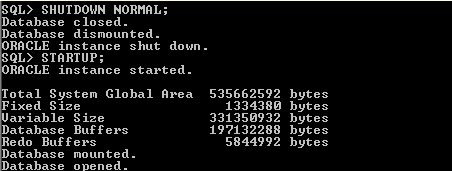
Step 9:

SQL> SHUTDOWN NORMAL;
Database closed.
Database dismounted.
ORACLE instance shut down.

SQL> STARTUP;

How to change Oracle database character set WE8MSWIN1252 to AL32UTF8,Oracle database character set WE8MSWIN1252 to AL32UTF8.How to change Oracle database character set WE8MSWIN1252,How to change Oracle database character set AL32UTF8,How to change Oracle database character set english to arabic,Oracle dba,oracle apps dba,oracle database character set,oracle database, character set,nls database parameters,database parameters,oracle nls database parameters,oralce NLS LANGUAGE,Oracle database NLS LANGUAGE


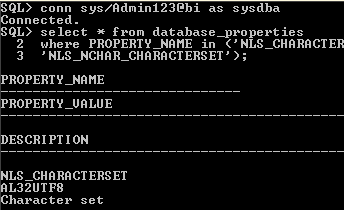
Now query your Database to confirm the change in CHARACTER SET.

Use below query :

select * from database_properties where PROPERTY_NAME in (‘NLS_CHARACTERSET’,  ‘NLS_NCHAR_CHARACTERSET’);

How to change Oracle database character set WE8MSWIN1252 to AL32UTF8,Oracle database character set WE8MSWIN1252 to AL32UTF8.How to change Oracle database character set WE8MSWIN1252,How to change Oracle database character set AL32UTF8,How to change Oracle database character set english to arabic,Oracle dba,oracle apps dba,oracle database character set,oracle database, character set,nls database parameters,database parameters,oracle nls database parameters,oralce NLS LANGUAGE,Oracle database NLS LANGUAGE


Your character set has changed successfully.

Share

Fixing the ORA-27102: out of memory Error in Oracle on Solaris 10

April 8th, 2018, posted in Oracle Queries, Solaris
Share

Symptom:

As part of a database tuning effort you increase the SGA/PGA sizes; and Oracle greets with anORA-27102: out of memoryerror message. The system had enough free memory to serve the needs of Oracle.

SQL> startup
ORA-27102: out of memory
SVR4 Error: 22: Invalid argument

Diagnosis

$ oerr ORA 27102
27102, 00000, "out of memory"
// \*Cause: Out of memory
// \*Action: Consult the trace file for details


Not so helpful. Let’s look the alert log for some clues.


% tail -2 alert.log
WARNING: EINVAL creating segment of size 0x000000028a006000
fix shm parameters in /etc/system or equivalent


Oracle is trying to create a 10G shared memory segment (depends on SGA/PGA sizes), but operating system (Solaris in this example) responded with an invalid argument (EINVAL) error message. There is a little hint about setting shm parameters in/etc/system.

Prior to Solaris 10,shmsys:shminfo_shmmaxparameter has to be set in/etc/systemwith maximum memory segment value that can be created. 8M is the default value on Solaris 9 and prior versions; where as 1/4th of the physical memory is the default on Solaris 10 and later. On a Solaris 10 (or later) system, it can be verified as shown below:


% prtconf | grep Mem
Memory size: 32760 Megabytes
% id -p
uid=59008(oracle) gid=10001(dba) projid=3(default)
% prctl -n project.max-shm-memory -i project 3
project: 3: default
NAME    PRIVILEGE       VALUE    FLAG   ACTION                       RECIPIENT
project.max-shm-memory
        privileged      7.84GB      -   deny                                 -
        system          16.0EB    max   deny                                 -


Now it is clear that the system is using the default value of 8G in this scenario, where as the application (Oracle) is trying to create a memory segment (10G) larger than 8G. Hence the failure.

So, the solution is to configure the system with a value large enough for the shared segment being created, so Oracle succeeds in starting up the database instance.

On Solaris 9 and prior releases, it can be done by adding the following line to/etc/system, followed by a reboot for the system to pick up the new value.

set shminfo_shmmax = 0x000000028a006000Howevershminfo_shmmaxparameter was obsoleted with the release of Solaris 10; and Sun doesn’t recommend setting this parameter in/etc/systemeven though it works as expected.

On Solaris 10 and later, this value can be changed dynamically on a per project basis with the help of resource control facilities . This is how we do it on Solaris 10 and later:


% prctl -n project.max-shm-memory -r -v 10G -i project 3
% prctl -n project.max-shm-memory -i project 3
project: 3: default
NAME    PRIVILEGE       VALUE    FLAG   ACTION                       RECIPIENT
project.max-shm-memory
        privileged      10.0GB      -   deny                                 -
        system          16.0EB    max   deny                                 -


Note that changes made with theprctlcommand on a running system are temporary, and will be lost when the system is rebooted. To make the changes permanent, create a project withprojaddcommand and associate it with the user account as shown below:


% projadd -p 3  -c 'eBS benchmark' -U oracle -G dba  -K 'project.max-shm-memory=(privileged,10G,deny)' OASB
% usermod -K project=OASB oracle


Finally make sure the project is created withprojects -lorcat /etc/projectcommands.


% projects -l
...
...
OASB
        projid : 3
        comment: "eBS benchmark"
        users  : oracle
        groups : dba
        attribs: project.max-shm-memory=(privileged,10737418240,deny)
% cat /etc/project
...
...
OASB:3:eBS benchmark:oracle:dba:project.max-shm-memory=(privileged,10737418240,deny)


With these changes, Oracle would start the database up normally.


SQL> startup
ORACLE instance started.
Total System Global Area 1.0905E+10 bytes
Fixed Size                  1316080 bytes
Variable Size            4429966096 bytes
Database Buffers         6442450944 bytes
Redo Buffers               31457280 bytes
Database mounted.
Database opened.


Addendum : Oracle RAC settings

Anonymous Bob suggested the following settings for Oracle RAC in the form of a comment for the benefit of others who run into similar issue(s) when running Oracle RAC. I’m pasting the comment as is (Disclaimer: I have not verified these settings):

Thanks for a great explanation, I would like to add one comment that will help those with an Oracle RAC installation. Modifying the default project covers oracle processes great and is all that is needed for a single instance DB. In RAC however, the CRS process starts the DB and it is a root owned process and root does not use the default project. To fix ORA-27102 issue for RAC I added the following lines to an init script that runs before the init.crs script fires.


# Recommended Oracle RAC system params
ndd -set /dev/udp udp_xmit_hiwat 65536
ndd -set /dev/udp udp_recv_hiwat 65536
# For root processes like crsd
prctl -n project.max-shm-memory -r -v 8G -i project system
prctl -n project.max-shm-ids -r -v 512 -i project system
# For oracle processes like sqlplus
prctl -n project.max-shm-memory -r -v 8G -i project default
prctl -n project.max-shm-ids -r -v 512 -i project default

So simple yet it took me a week working with Oracle and SUN to come up with that answer…Hope that helps someone out.


Share