Replacing MacBook Batteries
The battery life of an Apple MacBook is something that PC laptop users dream about. It’s normal for MacBook Air users to get 12 hours on a single charge, and MacBook Pro users should get several hours, even if the laptop is a few years old. But, the battery life will get worse over time. There is nothing that anybody can do to prevent that. The issue comes when it is time to replace the battery. They are not designed to be replaceable by members of the public, which makes some people think that they are not replaceable at all.
That’s not true. The battery in a MacBook, whether it’s a MacBook Pro or Air, can be replaced with a new model and many more years use can be had.
How to tell if you need a new Mac battery
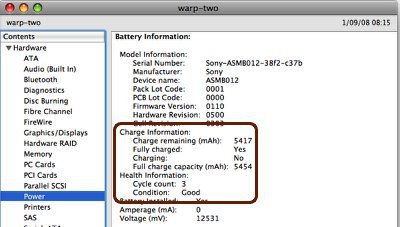
The fastest way to check if your MacBook is in need of a new battery is to open System Profiler. This is located in Applications > Utilities and can also be accessed by going to the Apple menu > About This Mac > More Info. Click on the Power section in the list and you’ll find information like the cycle count and condition rating. The condition rating can be “Normal”, “Replace Soon”, “Replace Now”, or “Service Battery”. If your battery is listed as anything except, Condition: Normal, then you should replace your battery.
How to access information about your Mac battery:
- Your first step will vary depending on which version of Mac OS X you are using:
- OS X Snow Leopard v10.6.8 or earlier: Open Apple System Profiler by choosing “About this Mac” from the Apple Menu. Then, click More Info.
- OS X Lion v10.7 or later: Open System Information by choosing “About this Mac” from the Apple Menu. Click System Report.
- Click Power in the Contents list (under the Hardware section as shown below).
Battery Cycles
Use of your MacBook battery is counted in the form of charge cycles. A charge cycle means using all of the battery’s power, but that doesn’t necessarily mean a single charge. For instance, you could use your MacBook for an hour or more one day, using half its charge, and then recharge it fully. If you did the same thing the next day, it would count as one charge cycle, not two, so it may take several days to complete a cycle.
Batteries have a limited amount of charge cycles before they are considered to be consumed. Once consumed, a replacement battery is recommended. You can use your battery after it reaches its maximum cycle count, but you may notice a reduction in your battery life. Knowing how many charge cycles are on your battery and how many are left can help you determine when a battery replacement is required. For optimal performance, replace your battery before you reach the maximum cycle count.
Computer |
Maximum Cycle Count |
|---|---|
MacBook |
|
| MacBook (13-inch, Mid 2010) MacBook (13-inch, Late 2009) |
1000 |
| MacBook (13-inch Aluminium, Late 2008) | 500 |
| MacBook (Mid 2009) MacBook (Early 2009) MacBook (Late 2008) MacBook (Early 2008) MacBook (Late 2007) MacBook (Mid 2007) MacBook (Late 2006) MacBook (13-inch) |
300 |
MacBook Pro |
|
| MacBook Pro (Retina, 13-inch, Late 2013) MacBook Pro (Retina, 13-inch, Early 2013) MacBook Pro (Retina, 13-inch, Late 2012) MacBook Pro (13-inch, Mid 2012) MacBook Pro (13-inch, Late 2011) MacBook Pro (13-inch, Early 2011) MacBook Pro (13-inch, Mid 2010) MacBook Pro (13-inch, Mid 2009) MacBook Pro (Retina, 15-inch, Late 2013) MacBook Pro (Retina, 15-inch, Early 2013) MacBook Pro (Retina, Mid 2012) MacBook pro (15-inch, Mid 2012) MacBook Pro (15-inch, Late 2011) MacBook Pro (15-inch, Early 2011) MacBook Pro (15-inch, Mid 2010) MacBook Pro (15-inch, 2.53 GHz, Mid 2009) MacBook Pro (15-inch Mid 2009) MacBook Pro (17-inch, Late 2011) MacBook Pro (17-inch, Early 2011) MacBook Pro (17-inch, Mid 2010) MacBook Pro (17-inch, Mid 2009) MacBook Pro (17-inch, Early 2009) |
1000 |
| MacBook Pro (15-inch Late 2008) | 500 |
| MacBook Pro (15-inch, Early 2008) MacBook Pro (15-inch, 2.4/2.2GHz) MacBook Pro (15-inch, Core 2 Duo) MacBook Pro (15-inch Glossy) MacBook Pro (15-inch) MacBook Pro (17-inch, Late 2008) MacBook Pro (17-inch, Early 2008) MacBook Pro (17-inch, 2.4GHz) MacBook Pro (17-inch Core 2 Duo) MacBook Pro (17-inch) |
300 |
MacBook Air |
|
| MacBook Air (11-inch, Early 2014) MacBook Air (11-inch, Mid 2013) MacBook Air (11-inch, Mid 2012) MacBook Air (11-inch, Mid 2011) MacBook Air (11-inch, Late 2010) MacBook Air (13-inch, Early 2014) MacBook Air (13-inch, Mid 2013) MacBook Air (13-inch, Mid 2012) MacBook Air (13-inch, Mid 2011) MacBook Air (13-inch, Late 2010) |
1000 |
| MacBook Air (Mid 2009) | 500 |
| MacBook Air (Late 2008) MacBook Air |
300 |