

select object_name, v.session_id SID, v.oracle_username,type,lmode,request
       from v$locked_object v, v$lock l, dba_objects o
       where l.sid=v.session_id
       and v.object_id=o.object_id
       and l.block > 0;
select
      (select osuser from v$session where sid=a.sid) blocker,
      a.sid,
      (select serial# from v$session where sid=a.sid) serial#,
      ' blocks ',
      (select osuser from v$session where sid=b.sid) blockee,
      b.sid, c.username username
    from v$lock a, v$lock b, v$session c
    where a.block = 1
    and b.request > 0
    and a.id1 = b.id1
    and a.id2 = b.id2
    and b.sid = c.sid
SQL> alter system kill session 'sid,serial#';
*********************************************************************************************************************
Also Check : http://aliimmam.com/locking-and-unlocking-tables-in-oracle/
Also Check : http://aliimmam.com/forms-could-not-reserve-record-2-tries-keep-trying/
Note : Please not do make backups before using these queries and also confirm them yourself or by aother means as well.*********************************************************************************************************************
What port should you chose for your SMTP server when you’re setting it on a mail client?
Simply put, computer ports are the communication endpoints of a computer connected to a network. They are separated to differentiate the several processes and make it easier to handle them: so each one has a particular purpose and is associated to a specific protocol.
Usually an outgoing server employs port 25: it’s the default SMTP port. However, some IPs deny its use because of the massive spam and malware traffic by which is affected. This issue is raised in particular when you need to switch to another ISP – for instance, when you’re travelling and connecting to a new provider. In this case you can try to use port 587 or port 465 to avoid the block.
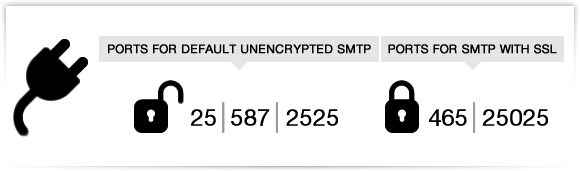
More in detail: port 587 is supported by almost every outgoing SMTP server and it’s useful for unencrypted or TLS connections; while port 465 is the right choice if you need to connect via SSL.
turboSMTP can work both on port 587 and 465, but also on 2525 and 25025. Moreover, it completely avoids the “another ISP” issue: in fact, once you have set our SMTP as default you don’t need to configure it again or switch to other ports.