


How To Find Out Which Users Are Logged On To An Apps Instance
June 6th, 2016, posted in Oracle QueriesFND_USER table stores the details of all the end users. If we give this query:
select user_name,to_char(last_logon_date,'DD-MON-YYYY HH24:MI:SS')
from apps.fnd_user
where to_char(last_logon_date,'DD-MON-YYYY')=to_char(sysdate,'DD-MON-YYYY');

USER_NAME TO_CHAR(LAST_LOGON_DATE,'D
------------------------------------
GUEST 05-FEB-2008 16:01:47
SYSADMIN 05-FEB-2008 16:02:06
USER1 05-FEB-2008 07:31:19
USER2 05-FEB-2008 04:58:12
USER3 05-FEB-2008 09:46:00
USER4 05-FEB-2008 05:00:38
USER5 05-FEB-2008 08:45:07
USER6 05-FEB-2008 09:09:17
The above query can give you a good idea who is logged on.
For a more accurate result, refer to metalink note 269799.1 which says:
You can run the Active Users Data Collection Test diagnostic script to get information about all active users currently logged into Oracle Applications.This diagnostic test will list users logged into Self Service Web Application, users logged into forms, and users running concurrent programs. Please note that to collect the audit information about the users who have logged into Forms, the “Sign-On:Audit Level” profile option should be set to Form. You can access this Diagnostic test via Metalink Note# 233871.1.

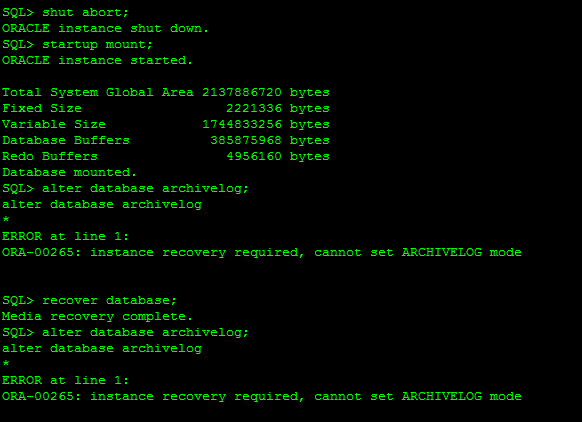
ORA-00265: Instance recovery required cannot set ARCHIVELOG mode
June 3rd, 2016, posted in Oracle QueriesToday, I came across the “ORA-00265: instance recovery required, cannot set ARCHIVELOG mode” while
converting database into archive log mode.
This error usually caused when database crashed unfortunately or we shutdown database with the help of database shutdown command as: shutdown abort, startup force mount or shutdown abort. These types of command will required instance recovery in next startup. In short it need clean database startup.
SQL> alter database archivelog;
alter database archivelog
*
ERROR at line 1:
ORA-00265: instance recovery required, cannot set ARCHIVELOG mode
Reason :
ORA-00265: instance recovery required, cannot set ARCHIVELOG mode
 *Cause:  The database either crashed or was shutdown with the ABORT
          option. Media recovery cannot be enabled because the online
          logs may not be sufficient to recover the current datafiles.
 *Action: Open the database and then enter the SHUTDOWN command with the
          NORMAL or IMMEDIATE option.

Solution:

SQL> select status from v$instance;
STATUS
————————————
MOUNTED
SQL> alter database open;
Database altered.
SQL> shutdown immediate;
Database closed.
Database dismounted.
ORACLE instance shut down.
SQL> startup mount;
ORACLE instance started.
Total System Global Area 293601280 bytes
Fixed Size 1248600 bytes
Variable Size 88081064 bytes
Database Buffers 197132288 bytes
Redo Buffers 7139328 bytes
Database mounted.
SQL> alter database archivelog;
Database altered.
SQL> alter database open;
Database altered.
