Database Log Switch Intervals

December 4th, 2017, posted in Oracle Queries
Share

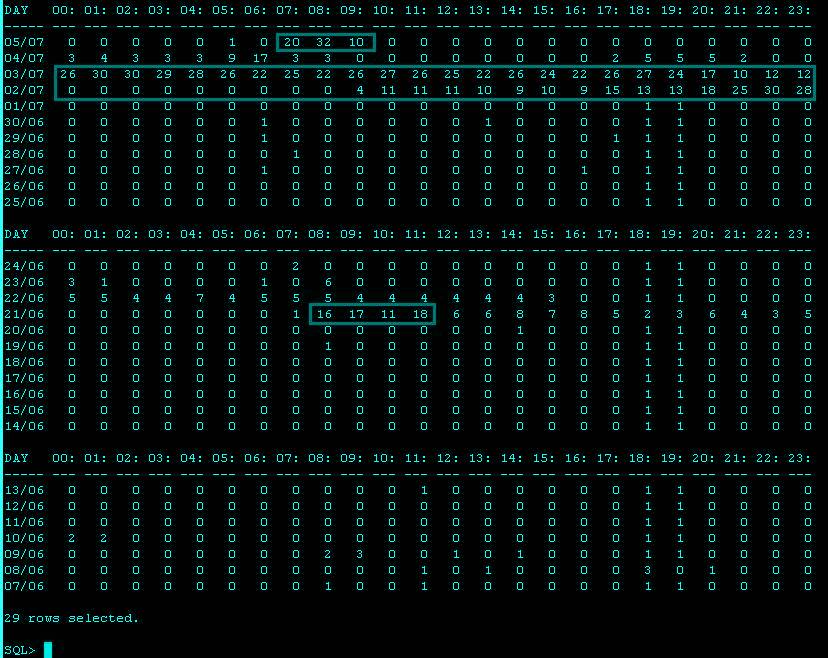
Oracle Database Log Switch Intervals :


Hourly Log Switch breakdown :


SELECT * FROM (
SELECT * FROM (
SELECT   TO_CHAR(FIRST_TIME, 'DD/MM') AS "DAY"
       , TO_CHAR(SUM(DECODE(TO_CHAR(FIRST_TIME, 'HH24'), '00', 1, 0)), '99') "00:00"
       , TO_CHAR(SUM(DECODE(TO_CHAR(FIRST_TIME, 'HH24'), '01', 1, 0)), '99') "01:00"
       , TO_CHAR(SUM(DECODE(TO_CHAR(FIRST_TIME, 'HH24'), '02', 1, 0)), '99') "02:00"
       , TO_CHAR(SUM(DECODE(TO_CHAR(FIRST_TIME, 'HH24'), '03', 1, 0)), '99') "03:00"
       , TO_CHAR(SUM(DECODE(TO_CHAR(FIRST_TIME, 'HH24'), '04', 1, 0)), '99') "04:00"
       , TO_CHAR(SUM(DECODE(TO_CHAR(FIRST_TIME, 'HH24'), '05', 1, 0)), '99') "05:00"
       , TO_CHAR(SUM(DECODE(TO_CHAR(FIRST_TIME, 'HH24'), '06', 1, 0)), '99') "06:00"
       , TO_CHAR(SUM(DECODE(TO_CHAR(FIRST_TIME, 'HH24'), '07', 1, 0)), '99') "07:00"
       , TO_CHAR(SUM(DECODE(TO_CHAR(FIRST_TIME, 'HH24'), '08', 1, 0)), '99') "08:00"
       , TO_CHAR(SUM(DECODE(TO_CHAR(FIRST_TIME, 'HH24'), '09', 1, 0)), '99') "09:00"
       , TO_CHAR(SUM(DECODE(TO_CHAR(FIRST_TIME, 'HH24'), '10', 1, 0)), '99') "10:00"
       , TO_CHAR(SUM(DECODE(TO_CHAR(FIRST_TIME, 'HH24'), '11', 1, 0)), '99') "11:00"
       , TO_CHAR(SUM(DECODE(TO_CHAR(FIRST_TIME, 'HH24'), '12', 1, 0)), '99') "12:00"
       , TO_CHAR(SUM(DECODE(TO_CHAR(FIRST_TIME, 'HH24'), '13', 1, 0)), '99') "13:00"
       , TO_CHAR(SUM(DECODE(TO_CHAR(FIRST_TIME, 'HH24'), '14', 1, 0)), '99') "14:00"
       , TO_CHAR(SUM(DECODE(TO_CHAR(FIRST_TIME, 'HH24'), '15', 1, 0)), '99') "15:00"
       , TO_CHAR(SUM(DECODE(TO_CHAR(FIRST_TIME, 'HH24'), '16', 1, 0)), '99') "16:00"
       , TO_CHAR(SUM(DECODE(TO_CHAR(FIRST_TIME, 'HH24'), '17', 1, 0)), '99') "17:00"
       , TO_CHAR(SUM(DECODE(TO_CHAR(FIRST_TIME, 'HH24'), '18', 1, 0)), '99') "18:00"
       , TO_CHAR(SUM(DECODE(TO_CHAR(FIRST_TIME, 'HH24'), '19', 1, 0)), '99') "19:00"
       , TO_CHAR(SUM(DECODE(TO_CHAR(FIRST_TIME, 'HH24'), '20', 1, 0)), '99') "20:00"
       , TO_CHAR(SUM(DECODE(TO_CHAR(FIRST_TIME, 'HH24'), '21', 1, 0)), '99') "21:00"
       , TO_CHAR(SUM(DECODE(TO_CHAR(FIRST_TIME, 'HH24'), '22', 1, 0)), '99') "22:00"
       , TO_CHAR(SUM(DECODE(TO_CHAR(FIRST_TIME, 'HH24'), '23', 1, 0)), '99') "23:00"
    FROM V$LOG_HISTORY
    WHERE extract(year FROM FIRST_TIME) = extract(year FROM sysdate)
GROUP BY TO_CHAR(FIRST_TIME, 'DD/MM')
) ORDER BY TO_DATE(extract(year FROM sysdate) || DAY, 'YYYY DD/MM') DESC
) WHERE ROWNUM < 30
/
Archive, Archive Log, Archive Log Mode, Check Oracle Archived, Check Oracle Archived Redo Log, Check Oracle Archiving, Check Oracle Redo Log, How to disable Archive Log Mode, How to Enable Archive Log, Log Mode, Oracle, Oracle Archived Redo, Oracle Archiving, Oracle Archiving Log, Oracle Database 10g, Oracle Database 11g, Oracle DBA, Oracle DBA Task, Redo Lob, Redo Log, Steps To Configure Archive Log Mode in Oracle Database 10g and 11g, Steps To Configure Archive Log Mode in Oracle Database 11g
Share

Geniuses Are Always Branded As Crazy

December 2nd, 2017, posted in ChARACtERs, DAtEs iN a YeAR, POEPLes, TV Shows
Share

Geniuses are always branded as crazy.”— Pablo Escobar


Share

How To Copy From Right Click Disabled Websites

November 29th, 2017, posted in Apple, Microsoft, SOCiAL NEtWORkS, TEChNoLoGY
Share

Ways To Copy Text From Right Click Disabled Pages :

There are numerous way through one can copy contents from Right Click protected sites

  • By disabling browser JavaScript in browser
  • Using Proxy Sites
  • By Using the source code of the site


Disabling JavaScript in Browsers [Google Chrome]

In Chrome browser, you can quickly disable JavaScript by going to settings. See the screenshot for better explanation:

  • Goto Setting >> UnderHood Tab >> Content Settings
  • or enter  chrome://settings/content
  • Then Select Do not allow any site to run JavaScript

Similarly if you are using Firefox, you can remove the tick from “Enable JavaScript” option.


Using Proxy Sites

There are many proxy sites, which let you disable JS while browsing. All you need to use those proxy sites, which offer such features and you can quickly use right-click on click disabled sites.


Through Viewing Source Code

If you have to copy the specific text content and you can take care of HTML tags, you can use browser view source options. All the major browser give an option to source of the page, which you can access directly using the format below or by right click. Since, right click is out of question here, we will simply open chrome browser and type: view-source: before the post URl Like

  • view-source:https://www.shoutmeloud.com

And find the paragraph or text you want to copy and then paste it into any text editor.

Well, using this trick ethically or unethically is in user hand but for a normal blogger like me and you, this tip will certainly help. Do you use any other plugin or add-on to copy content of pages with right click disabled? Do you also see this feature as bad user experience?

Share

Bruce Lee Quotes

November 27th, 2017, posted in ChARACtERs, MESSAGEs, POEPLes, Scarface'S DIARY
Share

Inspiring Quotes,Inspiring Bruce Lee,,Bruce Lee,Bruce, Lee, Quotes,Bruce Lee Quotes,

Share