
제품 : FIN_AR
작성날짜 : 2003-11-18
RECEIPT APPLICATION ERROR: APP-FND-00531
========================================
PURPOSE
-------
Receipt Application 시 발생하는 error를 효과적으로 해결한다.
Problem Description
-------------------
Applications 11.0.3:
Transaction을 생성 한 후 Receipt 과 Apply 할 때 다음과 같은 error 가 발생하였다.
APP-FND-00531 Amount Cannot Be Correctly Formatted
The Amount XXX.XXX Could Not Be Formally Formatted.
The Correct Format Is 999.99 And -999.99

Workaround
----------
1. 해당 data 를 bakcup 받아 놓는다.
2. 다음 update script을 수행한다.
Update ar_payment_schedules_all
set amount_due_original = round(amount_due_original,2),
amount_due_remaining= round(amount_due_remaining,2),
acctd_amount_due_remaining = round (acctd_amount_due_remaining, 2)
where customer_trx_id=xxx
update ra_customer_trx_lines_all
set extended_amount=round(extended_amount,2)
where customer_trx_id=xxx and line_type='TAX'
update ra_cust_trx_line_gl_dist_all
set amount=round(amount,2)
where customer_trx_id=xxx

Solution Description
--------------------------
Applications 11.0.3에서 Tax / Freight Defaultation Program이 rounding 처리를 잘 못하여 ra_cust_trx_line_gl_dist_all 에 데이타가 corrupted 된 것으로 보인다.
잘 못된 data를 rounding 처리하여 저장해준다.
Reference Documents
-------------------
Note 247018.1

Posts Tagged ‘Oracle APPs DBA’
RECEIPT APPLICATION ERROR: APP-FND-00531
April 28th, 2018, posted in Oracle QueriesChange Oracle Database Character Set WE8MSWIN1252 to AL32UTF8
April 15th, 2018, posted in Oracle Queries
Changing character set for Oracle database.
My scenario is to support Arabic data format.
My existing oracle database character set is : WE8MSWIN1252
My requirement is to change this character set to AL32UTF8 ( Which will support Arabic format)
Step :1
Set your ORACLE_HOME and SID .
Windows :
SET ORACLE_HOME= E:\app\7stl\product\11.1.0\db_1
SET SID=ORCL
Linux : Use export command to set ORACLE_HOME and SID.

Step 2 :
Connect sqlplus through command prompt.
Enter user name as below shown in screenshot.
user-name: / as sysdba

step 3:
Shutdown your database immediate or normal by using below command.
shutdown normal

Step 4 :
mount your database by using below command
startup mount

step 5:
Now execute below commands
SQL> ALTER SYSTEM ENABLE RESTRICTED SESSION;
System altered.
SQL> ALTER SYSTEM SET JOB_QUEUE_PROCESSES=0;
System altered.
SQL> ALTER SYSTEM SET AQ_TM_PROCESSES=0;
System altered.

Step 6:
SQL> ALTER DATABASE OPEN;
Database altered.

Step 7:
Now change the character set by using below command.
ALTER DATABASE CHARACTER SET AL32UTF8;
If you facing this error ” ORA-12712: new character set must be a superset of old character set”
use below command to overcome from this issue.
ALTER DATABASE CHARACTER SET INTERNAL_USE AL32UTF8;
If you facing below error while executing above command then follow below steps:
ERROR at line 1:
ORA-00604: error occurred at recursive SQL level 1
ORA-30556: functional index is defined on the column to be modified
Execute this command first then followed by character set command.

SQL> alter system set “_system_trig_enabled”=FALSE
System altered.
Step 8:
SQL> ALTER DATABASE CHARACTER SET INTERNAL_USE AL32UTF8;
Database altered.

Step 9:
SQL> SHUTDOWN NORMAL;
Database closed.
Database dismounted.
ORACLE instance shut down.
SQL> STARTUP;
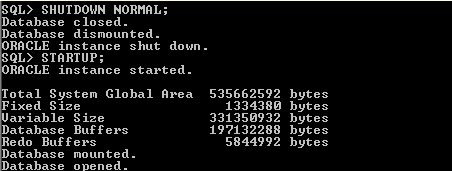
Now query your Database to confirm the change in CHARACTER SET.
Use below query :
select * from database_properties where PROPERTY_NAME in (‘NLS_CHARACTERSET’, ‘NLS_NCHAR_CHARACTERSET’);
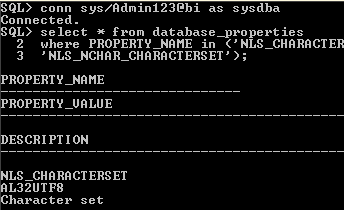
Your character set has changed successfully.
APP-PAY-06153 System Error Procedure INITFORMS at Step 1
February 18th, 2018, posted in OracleProblem :
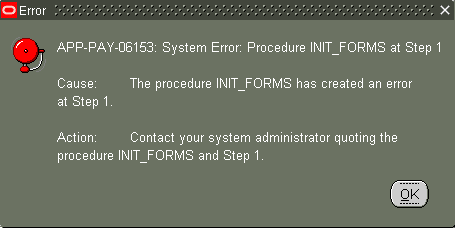
APP-PAY-06153: System Error : Procedure INIT_FORMS at Step 1

Cause: The procedure INIT_FORMS has created an error at Step 1.

Action : Contact your system administrator quoting the procedure INIT_FORMS and Step 1.
Solution :
Navigate : System Administrator->Profile->System
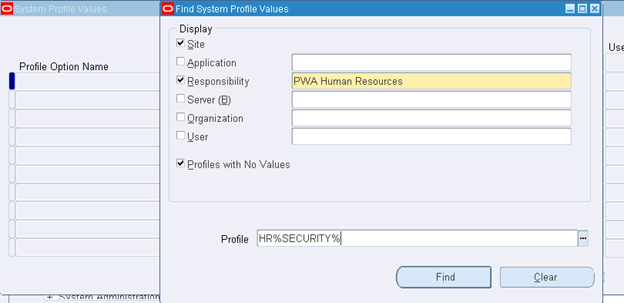
Click find
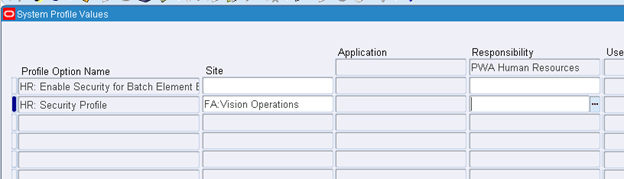
Assign Site: FA: Vision Operations
Save and close
Navigate:->Human Resource->Work Structure->Organization
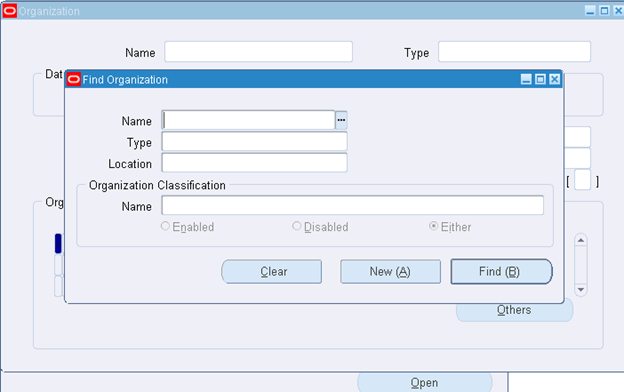
Form is opened
adcfgclone.pl dbTechStack – RC-50004 Error occurred in CloneContext Target System Domain Name
February 4th, 2018, posted in Oracle, SolarisRC-50004: Error occurred in CloneContext – Target System Domain Name in
adcfgclone.pl dbTechStack :

Error:
Target System Domain Name : worths.co.za
RC-50004: Error occurred in CloneContext:
null
Check Clone Context logfile
/ebsdbprd_app/oracle/product/ebsdbprd/db/tech_st/11.2.0/appsutil/clone/bin/CloneContext_0418120037.log for details.

ERROR: Context creation not completed successfully.
For additional details review the file /tmp/adcfgclone_4849738.err if present.

Solution :
Ensure that your hostname is fully populated in the /etc/hosts file
Not like this:
3 $ grep ebsdbprdp7 /etc/hosts
19.36.148.157   ebsdbprdp7
w@ebsdbprdp7:/
4 $
Should look like this
3 $ grep ebsdbprdp7 /etc/hosts
19.36.148.157   ebsdbprdp7.domain.co.za  ebsdbprdp7
w@ebsdbprdp7:/
4 $