Posts Tagged ‘Oracle APPs DBA’

FRM-92102 : A Network Error Has Occured

September 19th, 2017, posted in Oracle, Solaris
Share

FRM-92102 is Gerneric Error maybe occur for more than one reasons :

1-Network 
2-Proxy
3-http
4-Session Time 


But today i will discuss the problem On oracle Application server 10g .
Description for the problem like the following when you try to connect on your deploy application On OAS 10g it’s gives the above error from 1-5 minutes.

I will give you more than one solution maybe it will be related to the above problem and you try them separately to see which one will be valid for you : 

1-Netowrk Parameters :

You will find it $ORACLE_HOME/forms/server/default.env
Just increase the value .

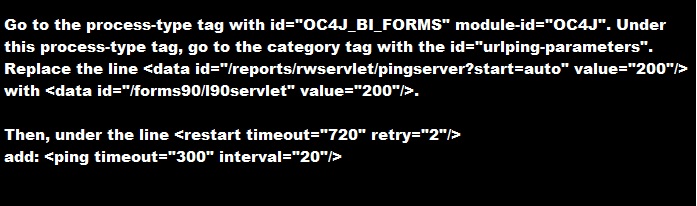
2-do the following change in opmn.xml (under $ORACLE_HOME/opmn/conf/):


3-SET Inbound_connection_timeout In sqlnet.ora to ZERO .

Sqlnet.Inbound_connection_timeout = 0

Note : if your can’t find this parameter in the SQLNET.ORA you cant add it .

5- Change the following $ORACLE_HOME/opmn/conf/opmn.xml


Hope this will work 

Share

Oracle EBS Upgrade 12.1.1 to 12.1.3

September 18th, 2017, posted in Oracle Queries
Share

oracle dba,oracle apps dba,apps dba,dba,oracle application,oracle database,oracle,Oracle EBS Upgrade 12.1.1 to 12.1.3,Oracle EBS Upgrade,12.1.1 to 12.1.3,Oracle EBS Upgrade DBA,DBA EBS Upgrade 12.1.1 to 12.1.3,EBS Upgrade,oracle ebs,oracle upgrade,

Some Links To Oracle EBS Upgrade 12.1.1 to 12.1.3 :

http://sankaramaddi.blogspot.com/2015/11/ebs-upgrade-1211-to-1213.html

http://ermanarslan.blogspot.com/2013/09/ebs-1211-to-1213-upgrade-steps.html

https://oracleminds.wordpress.com/2011/12/22/how-did-i-upgrade-our-oracle-ebs-from-r12-1-1-to-12-1-3/

http://otn-world.blogspot.com/2013/12/upgrade-oracle-ebs-r1211-to-1213.html

http://oracledbawings.blogspot.com/2011/07/upgrade-ebs-1211-to-1213.html

http://chandrasekarsivasamy.blogspot.com/2012/08/oracle-applications-upgrade-from-1211.html

Share

Refresh Materialized View

February 16th, 2017, posted in Oracle
Share

Problem sys@standby> startup mount; ORACLE instance started. Total System Global Area 835104768 bytes Fixed Size 2217952 bytes Variable Size 490735648 bytes Database Buffers 335544320 bytes Redo Buffers 6606848 bytes Database mounted. sys@standby> alter database recover managed standby database using current logfile disconnect; alter database recover managed standby database using current logfile disconnect * ERROR at line 1: ORA-01153: an incompatible media recovery is active Cause This indicates a currently running media recovery process. Action sys@standby> alter database recover managed standby database cancel; sys@standby> alter database recover managed standby database using current logfile disconnect; Note When shutting down physical standby database, firstly turn off media recovery process. Otherwise the next time when starting up redo apply again, you will encounter error ORA-01153.

Refresh Materialized View

NAME: Refresh Materialized View
SHORT CODE: OZFEARNMV
MODULE: Oracle Trade Management

Description: Refresh Materialized Views for Promotional Payments and Indirect Inventorty Tracking
Navigation: Oracle Trade Management Responsibility -> View -> Requests -> Submit a new request -> Select Single Request -> Click ‘OK’ -> Select Name of concurrent program / report.

Report Parameters:

  • mv_name : Name of the Materialized View
Share

ORA-0131 Insufficient privileges

December 11th, 2016, posted in Oracle Queries
Share

ORA-0131: Insufficient privileges,ORA-0131,Insufficient privileges,ORA 0131,ORA Error, Insufficient, privileges,DEBUG CONNECT SESSION,system privilege,Debugging requires the DEBUG CONNECT,ORA Debugging,ORA Debugging,ORA Debugging requires,Oracle APPS DBA,ORACLE DBA,ORACLE DB,
Title :
Getting “ORA-01031: insufficient privileges” error when trying to Debug.

Description :
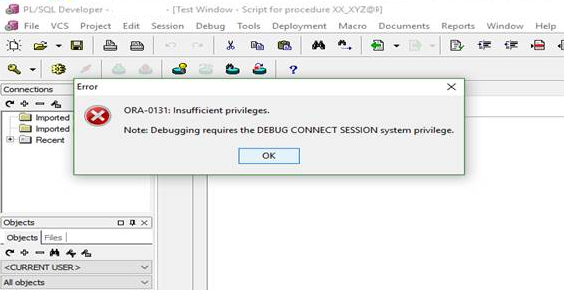
When trying to debug a procedure, package, etc., the following error messages are received:

ORA-01031: insufficient privileges

Cause :
The Oracle user or schema account does not have the required Oracle rights to debug an object.

Resolution :
Ensure the User or Schema has all the required Oracle privileges granted for debugging objects on that database.

1. connect as sysdba
2. exec the sql:
 grant debug connect session to XXXXXX;

or
grant DEBUG ANY PROCEDURE to XXXXXX;;

Share