Archive for February, 2013

C Program Remove Spaces, Blanks From A String

February 23rd, 2013, posted in C
Share

C code to remove spaces or excess blanks from a string, For example consider the string

“c programming”

There are two spaces in this string, so our program will print a string

“c programming”. It will remove spaces when they occur more than one time consecutively in string anywhere.

C programming code :

#include <stdio.h>

int main()
{
   char text[100], blank[100];
   int c = 0, d = 0;

   printf("Enter some textn");
   gets(text);

   while (text[c] != '')
   {
      if (!(text[c] == ' ' && text[c+1] == ' ')) {
        blank[d] = text[c];
        d++;
      }
      c++;
   }

   blank[d] = '';

   printf("Text after removing blanksn%sn", blank);

   return 0;
}

C Programming Code Using Pointers :

#include<stdio.h>
#include<string.h>
#include<stdlib.h>
#define SPACE ' '

main()
{
   char string[100], *blank, *start;
   int length, c = 0, d = 0;

   printf("Enter a stringn");
   gets(string);

   length = strlen(string);

   blank = string;

   start = (char*)malloc(length+1);

   if ( start == NULL )
      exit(EXIT_FAILURE);

   while(*(blank+c))
   {
      if ( *(blank+c) == SPACE && *(blank+c+1) == SPACE )
      {}
      else
      {
         *(start+d) = *(blank+c);
	 d++;
      }
      c++;
   }
   *(start+d)='';

   printf("%sn", start);

   free(start);     

   return 0;
}

Compiler used:

GCC

Output of program:
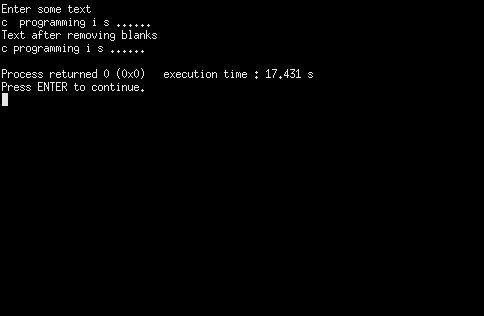
get blanks in c program


Share

Josh Malihabadi

February 22nd, 2013, posted in DAtEs iN a YeAR, PAKiSTAN, POEPLes
Share

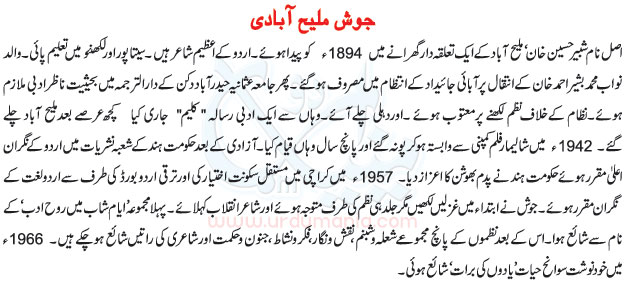
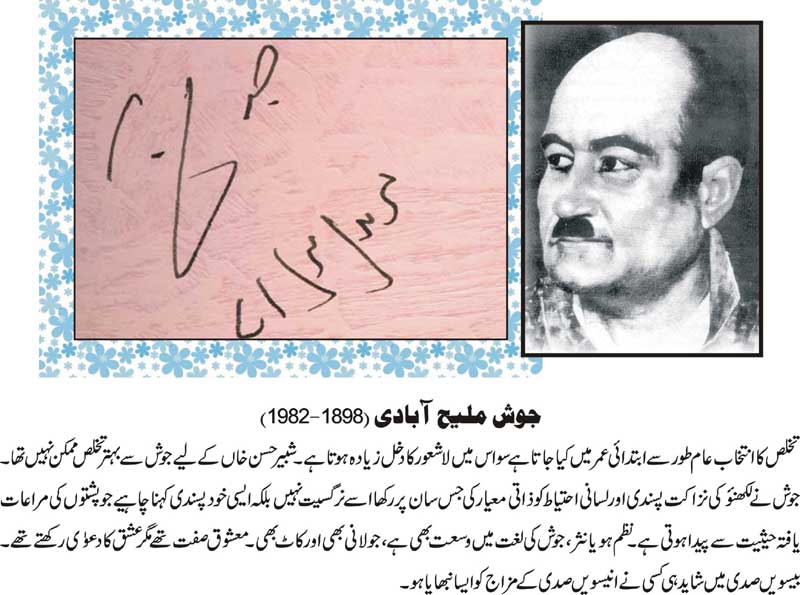
josh,urdu literature,urdu,poetry,india,22 feb,pakistan,paki,Padma Bhushan,Malihabad,Lucknow, Shabbir Hasan Khan,poet,Doyen of the Progressive Writers’ Movement, Josh Malihabadi dominated the Urdu literary scene of the 20th century Indian sub-continent. Born on December 5, 1898 as Shabbir Hasan Khan in Malihabad, near Lucknow he studied at St Peter’s College, Agra and passed his Senior Cambridge examination in 1914. Josh subsequently studied Arabic and Persian and, in 1918, spent six months at Tagore’s university at Shantiniketan.

While working as in charge of the translation department of Jamia Osamania, Hyderabad, Josh wrote a poem against the oppressive Nizam and was exiled from the state. Josh then worked for Shalimar Film Company in Poona as songwriter for about four years.

Josh was known as “Shair-e-Inqilab”. He also got actively involved in the freedom struggle and became close to quite a few of the political leaders of that era, specially Jawahar Lal Nehru. His first collection of poems was published under the title of Rooh-e-Adab. The collections of his poetry include Shola-o-Shabnam, Junoon-o-Hikmat, Naqsh-o-Nigar, Fikr-o-Nishaat, Sunbal-o-Salaasal, Harf-o-Hikaayat and Sarod-o-Kharosh. Josh was editor of Aaj Kal and advisor to the All India Radio. He was honoured with the Padma Bhushan in 1954 by the President of India.

Josh was concerned with the state of Urdu in independent India and migrated to Pakistan in 1956, but was not well-received by the authorities and pro-establishment media of Pakistan for his iconoclastic ideas and socialistic leanings. His autobiography Yadon Ki Barat was published in 1966. He died on February 22, 1982.

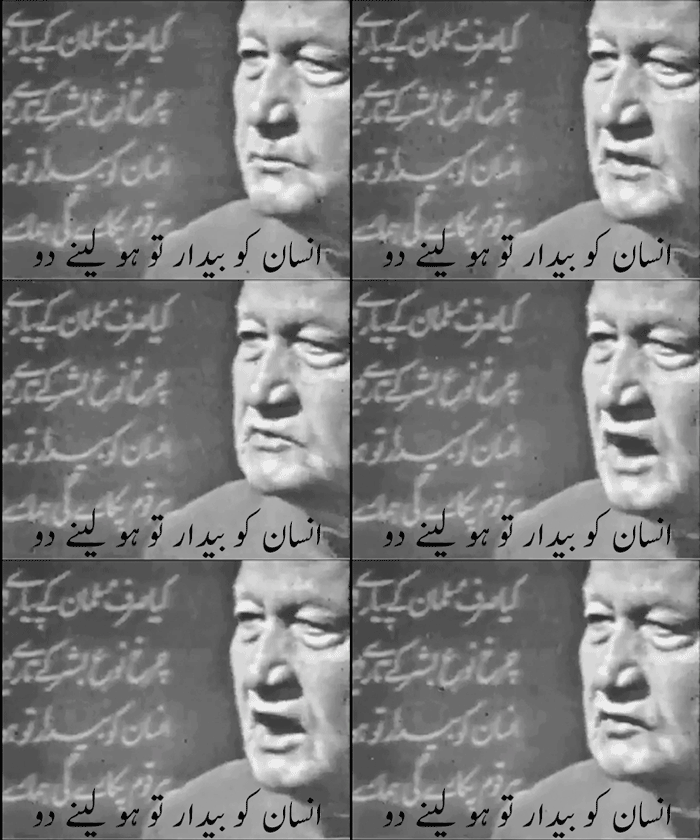
http://www.tumblr.com/tagged/josh%20malihabadihttp://www.tumblr.com/tagged/josh%20malihabadijosh,urdu literature,urdu,poetry,india,22 feb,pakistan,paki,Padma Bhushan,Malihabad,Lucknow, Shabbir Hasan Khan,Inssan ko bedaar tou ho ly ny doujosh,urdu literature,urdu,poetry,india,22 feb,pakistan,paki,Padma Bhushan,Malihabad,Lucknow, Shabbir Hasan Khan,Inssan ko bedaar tou ho ly ny dou

Share

Quotes of Imam Ali from Nahjul Balagha

February 22nd, 2013, posted in Islamic Teachings, Saying Of Hazrat Ali ( A.S )
Share

A wonderful blog where you would get a glimpse of Quotes of Imam Ali from Nahjul Balagha :

http://www.sufiblog.com/#!hazrat-imam-ali-quotes/c9cb

Share

Another One By Allama Iqbal

February 21st, 2013, posted in Allama Iqbal
Share

Allama Iqbal

Share

C Program To Shutdown Or Turn Off Computer

February 20th, 2013, posted in C
Share

To shutdown immediately use “C:\WINDOWS\System32\ shutdown /s /t 0”. To restart use /r instead of /s.

C Program to shutdown your computer: This program turn off i.e shutdown your computer system. Firstly it will asks you to shutdown your computer if you press ‘y’ the your computer will shutdown in 30 seconds, system function of “stdlib.h” is used to run an executable file shutdown.exe which is present in C:WINDOWSsystem32 in Windows XP. You can use various options while executing shutdown.exe for example -s option shutdown the computer after 30 seconds, if you wish to shutdown immediately then you can write “shutdown -s -t 0” as an argument to system function. If you wish to restart your computer then you can write “shutdown -r”.

If you are using Turbo C Compiler then execute your file from folder. Press F9 to build your executable file from source program. When you run from within the compiler by pressing Ctrl+F9 it may not work.

C programming code for Windows XP

#include <stdio.h>
#include <stdlib.h>

main()
{
   char ch;

   printf("Do you want to shutdown your computer now (y/n)n");
   scanf("%c",&ch);

   if (ch == 'y' || ch == 'Y')
      system("C:\WINDOWS\System32\shutdown -s");

   return 0;
}


C programming code for Windows 7

#include <stdio.h>
#include <stdlib.h>

main()
{
   char ch;

   printf("Do you want to shutdown your computer now (y/n)n");
   scanf("%c",&ch);

   if (ch == 'y' || ch == 'Y')
      system("C:\WINDOWS\System32\shutdown /s");

   return 0;
}

To shutdown immediately use “C:\WINDOWS\System32\ shutdown /s /t 0”. To restart use /r instead of /s.

C programming code for Ubuntu Linux

#include <stdio.h>

int main() {
  system("shutdown -P now");
  return 0;
}


You need to be logged in as root user for above program to execute otherwise you will get the message shutdown: Need to be root, now specifies that you want to shutdown immediately. ‘-P’ option specifes you want to power off your machine. You can specify minutes as:

shutdown -P “number of minutes”

For more help or options type at terminal: man shutdown.

Share