Archive for the ‘TEChNoLoGY’ Category

How To Reset Password On Galaxy A7 When Locked

October 25th, 2017, posted in Android
Share

How To Reset Password On Galaxy A7 When Locked Out,How To Reset Password,Galaxy A7 When Locked Out,How To Reset Password On A7 When Locked Out,Reset Password On Galaxy A7 When Locked Out,Reset Password On Galaxy A7,How To Reset Password with Samsung Find My Mobile,Reset Password with Samsung Find My Mobile,Reset Password with Samsung Find My Mobile,Password Reset with Android Device Manager,Galaxy A7 with Samsung,Samsung Galaxy A7,

If you own a Samsung Galaxy A7, it’s very common to forget the passcode and then need to reset the password. Many solutions to reset the password on the Galaxy A7 require completing a hard factory reset which can delete all your files and data on the smartphone. For those that don’t have their Samsung Galaxy backed up, we’ve created several different ways to reset the password on the Galaxy A7 when locked out without having to lose data or files. The following is a guide that will teach you three different ways how to reset the lock screen password on the Galaxy A7 when you get locked out.


Reset Password with Factory Reset

  1. Turn off the Galaxy A7.
  2. Press and hold the Volume up button, the Home button, and the Powerbutton at the same time until you see the Android icon.
  3. Using the Volume down select wipe data/factory resetoption and press the Power button to select it.
  4. Using the Volume down highlight Yes – delete all user dataand press Power to select it.
  5. After the Galaxy A7 has rebooted, then use the Power button to select it.
  6. When the Galaxy A7 restarts, everything will be wiped and will be ready to set up again.


Read this guide to learn an alternative method to factory reset the Galaxy A7. It’s important to note that before you go to do a factory reset on the Galaxy A7, you should back up all files and information to prevent any data from being lost.


Reset Password with Samsung Find My Mobile

Another method would be to use Samsung’s Find My Mobile (Find My Android), similar to Find My iPhone. You can use the “Remote Controls” feature on your Samsung Galaxy A7 which will allow you to temporarily reset the password and bypass the lock screen on the Galaxy A7. If you have not already registered the Galaxy A7 with Samsung, try registering it as soon as possible

  1. Register the Galaxy A7 with Samsung
  2. Use the Find My Mobile service to temporary reset the password
  3. Bypass the lock screen using the new temporary password
  4. Set a new password


Password Reset with Android Device Manager

The first way to reset the password on both the Galaxy A7 is for those that have already registered their Galaxy A7 with Android Device Manage. When using Android Device Manger to reset the password, all you need to do is activate the “Lock” feature. The “Lock” feature on Android Device Manger will allow you to get the Galaxy A7 password to reset when you have forgotten the password on the Galaxy A7. Follow the instructions below:

  1. Go to the Android Device Manager from a computer
  2. Find your Galaxy A7 on the screen
  3. Enable “Lock & Erase” feature
  4. Then follow the given steps on the page to lock your phone
  5. Set a temporary password
  6. Enter the temporary password
  7. Create a new password
Share

Query To Find Users Who Have A Responsibility

October 22nd, 2017, posted in Oracle Queries
Share

Enabling And Checking the Status of Flashback On Database,Oracle Database,Oracle DBA,Enabling Flashback On Database,Checking the Status of Flashback On Database, Status of Flashback On Database, Enable Flashback On Database, Enabling Flashback On Database,Enable Flashback On Oracle Database, Enabling Flashback On Oracle Database,ORA-01153: an incompatible media recovery is active,ORA-01153,Oracle Error,Ora Error,Oracle DBA,Oracle Database Error,Oracle Database Solution,an incompatible media recovery is active,Ora : an incompatible media recovery is active,Oracle an incompatible media recovery is active,Oracle Error Solution,Database DBA,oracle data guard,oracle data guard issues,oracle data guard error

select usr.user_id, usr.user_name, res.RESPONSIBILITY_ID, res.RESPONSIBILITY_NAME
from apps.FND_USER usr, apps.FND_RESPONSIBILITY_TL res, apps.FND_USER_RESP_GROUPS grp
where upper(res.RESPONSIBILITY_NAME) like upper('%' || NVL('&EnterRespName', 'INV')|| '%')
and upper(res.RESPONSIBILITY_NAME) NOT like '%AX%'
and upper(res.RESPONSIBILITY_NAME) NOT like '%OPM%'
and grp.responsibility_id = res.responsibility_id
and grp.user_id = usr.user_id;
Share

FRM-92102 : A Network Error Has Occured

September 19th, 2017, posted in Oracle, Solaris
Share

FRM-92102 is Gerneric Error maybe occur for more than one reasons :

1-Network 
2-Proxy
3-http
4-Session Time 


But today i will discuss the problem On oracle Application server 10g .
Description for the problem like the following when you try to connect on your deploy application On OAS 10g it’s gives the above error from 1-5 minutes.

I will give you more than one solution maybe it will be related to the above problem and you try them separately to see which one will be valid for you : 

1-Netowrk Parameters :

You will find it $ORACLE_HOME/forms/server/default.env
Just increase the value .

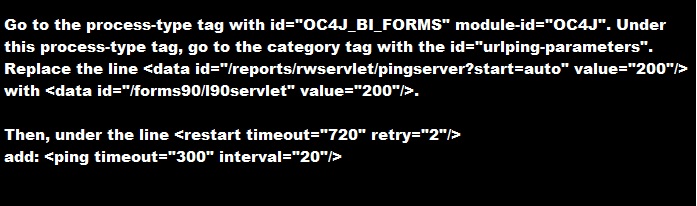
2-do the following change in opmn.xml (under $ORACLE_HOME/opmn/conf/):


3-SET Inbound_connection_timeout In sqlnet.ora to ZERO .

Sqlnet.Inbound_connection_timeout = 0

Note : if your can’t find this parameter in the SQLNET.ORA you cant add it .

5- Change the following $ORACLE_HOME/opmn/conf/opmn.xml


Hope this will work 

Share

Oracle EBS Upgrade 12.1.1 to 12.1.3

September 18th, 2017, posted in Oracle Queries
Share

oracle dba,oracle apps dba,apps dba,dba,oracle application,oracle database,oracle,Oracle EBS Upgrade 12.1.1 to 12.1.3,Oracle EBS Upgrade,12.1.1 to 12.1.3,Oracle EBS Upgrade DBA,DBA EBS Upgrade 12.1.1 to 12.1.3,EBS Upgrade,oracle ebs,oracle upgrade,

Some Links To Oracle EBS Upgrade 12.1.1 to 12.1.3 :

http://sankaramaddi.blogspot.com/2015/11/ebs-upgrade-1211-to-1213.html

http://ermanarslan.blogspot.com/2013/09/ebs-1211-to-1213-upgrade-steps.html

https://oracleminds.wordpress.com/2011/12/22/how-did-i-upgrade-our-oracle-ebs-from-r12-1-1-to-12-1-3/

http://otn-world.blogspot.com/2013/12/upgrade-oracle-ebs-r1211-to-1213.html

http://oracledbawings.blogspot.com/2011/07/upgrade-ebs-1211-to-1213.html

http://chandrasekarsivasamy.blogspot.com/2012/08/oracle-applications-upgrade-from-1211.html

Share

To find the ROW Counts of tables that belongs to a Particular Schema

September 12th, 2017, posted in Oracle Queries
Share
select table_name,num_rows counter from dba_tables where owner=’Schema_name’ order by table_name;
Share