

Archive for the ‘TEChNoLoGY’ Category

Unprotect An Excel Sheet Without Password

December 6th, 2015, posted in Microsoft, Programming
Share

Unprotect An Excel Sheet Without Password,How Unprotect An Excel Sheet Without Password,How Unprotect An Excel Sheet ,Without Password,Unprotect An Excel Without Password,An Excel Without Password,Forgot Excel Sheet Password,Excel Sheet Password,Excel Sheet ,Password

This document will tel you how to unprotect an excel spread sheet without having the password

This procedure works in Excel 2010 and earlier but in Excel 2013 this will not work.

In case of a password protect worksheet you are unable to Edit the data on the Excel Sheet. If you do not Remember the Password or do not know the password to unprotect the sheet just follow the below simple steps.
Unprotect An Excel Sheet Without Password,How Unprotect An Excel Sheet Without Password,How Unprotect An Excel Sheet ,Without Password,Unprotect An Excel Without Password,An Excel Without Password,Forgot Excel Sheet Password,Excel Sheet Password,Excel Sheet ,Password

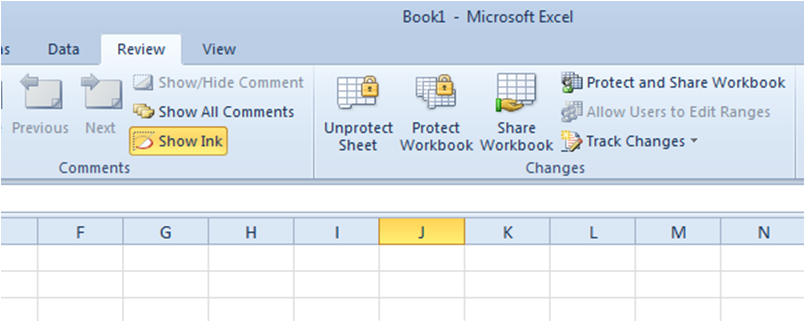
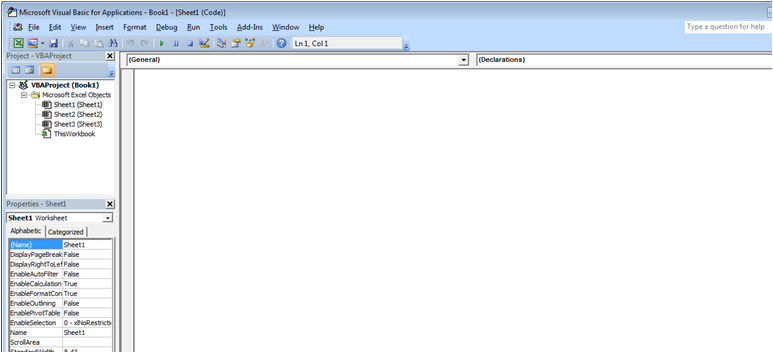
Press ALT +  F11 or click on View Code in Developers Tabs
Unprotect An Excel Sheet Without Password,How Unprotect An Excel Sheet Without Password,How Unprotect An Excel Sheet ,Without Password,Unprotect An Excel Without Password,An Excel Without Password,Forgot Excel Sheet Password,Excel Sheet Password,Excel Sheet ,Password


In the Above White Space Enter the below Code. Do not change the code just copy paste:


Sub PasswordBreaker()
    'Breaks worksheet password protection.
    Dim i As Integer, j As Integer, k As Integer
    Dim l As Integer, m As Integer, n As Integer
    Dim i1 As Integer, i2 As Integer, i3 As Integer
    Dim i4 As Integer, i5 As Integer, i6 As Integer
    On Error Resume Next
    For i = 65 To 66: For j = 65 To 66: For k = 65 To 66
    For l = 65 To 66: For m = 65 To 66: For i1 = 65 To 66
    For i2 = 65 To 66: For i3 = 65 To 66: For i4 = 65 To 66
    For i5 = 65 To 66: For i6 = 65 To 66: For n = 32 To 126
    ActiveSheet.Unprotect Chr(i) & Chr(j) & Chr(k) & _
        Chr(l) & Chr(m) & Chr(i1) & Chr(i2) & Chr(i3) & _
        Chr(i4) & Chr(i5) & Chr(i6) & Chr(n)
    If ActiveSheet.ProtectContents = False Then
        MsgBox "One usable password is " & Chr(i) & Chr(j) & _
            Chr(k) & Chr(l) & Chr(m) & Chr(i1) & Chr(i2) & _
            Chr(i3) & Chr(i4) & Chr(i5) & Chr(i6) & Chr(n)
         Exit Sub
    End If
    Next: Next: Next: Next: Next: Next
    Next: Next: Next: Next: Next: Next
End Sub

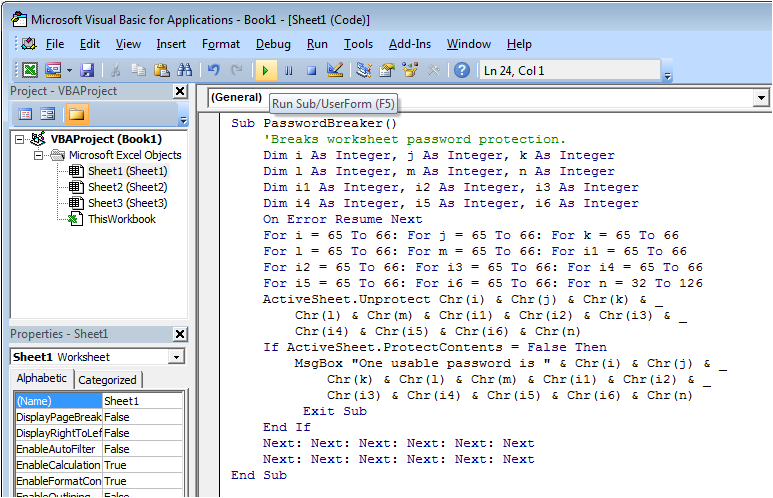
Now Click on the Run Button or press F5:
Unprotect An Excel Sheet Without Password,How Unprotect An Excel Sheet Without Password,How Unprotect An Excel Sheet ,Without Password,Unprotect An Excel Without Password,An Excel Without Password,Forgot Excel Sheet Password,Excel Sheet Password,Excel Sheet ,Password


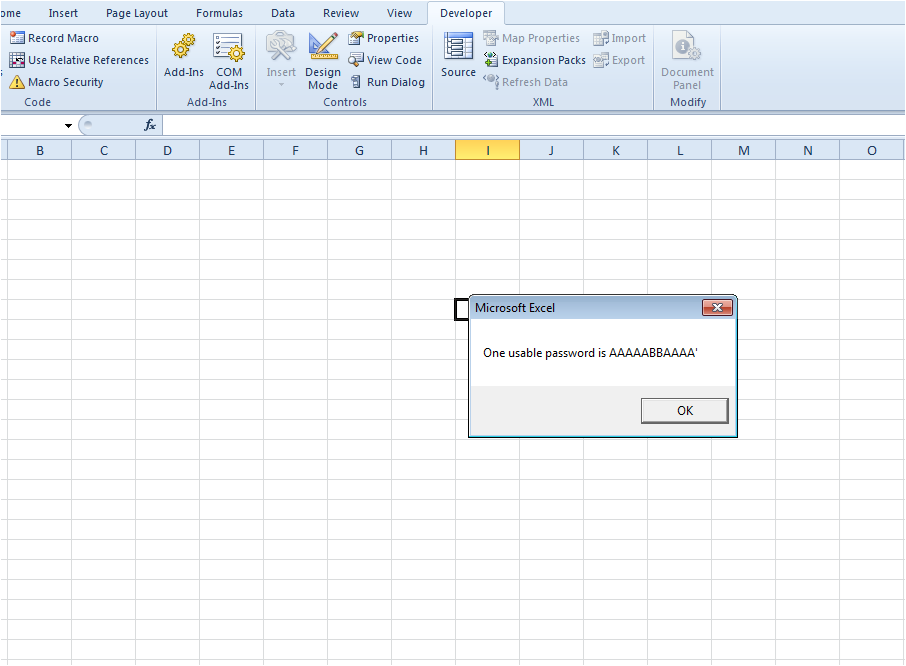
And there you go the sheet is unprotected for you now. Also you would be getting a message in the pop up window.

This Message is contains the password which can be used to unprotect the other sheets in the same workbook.

On my modest PC it takes about 80 seconds to crack the password and it seems to come up with a password such as AABBAAABBB^ which isn’t the original password but nevertheless works. Spreadsheet is now unprotected. Try it for yourself.
Unprotect An Excel Sheet Without Password,How Unprotect An Excel Sheet Without Password,How Unprotect An Excel Sheet ,Without Password,Unprotect An Excel Without Password,An Excel Without Password,Forgot Excel Sheet Password,Excel Sheet Password,Excel Sheet ,Password


(courtesy of University of Wisconsin-Green Bay)

Share

Oracle : Up And Down of Oracle Application And Oracle Database

December 2nd, 2015, posted in Oracle, Solaris
Share

Shutdown Oracle Application :

Go to the path :
/u88/appprodinst/apps/ListenerName_ServerName/admin/scripts

Run Command from Bash
bash-3.00$ ./adstpall.sh


Shutdown Oracle Database :

Go to the path :
/u77/oraprod/prod/db/tech_st/11.1.0/appsutil/scripts/ListenerName_serverName

bash-3.00$ ./addbctl.sh stop

If its taking to much time. You can use this command on extreme cases only :
ps -ef|grep pmon

Than Stop Listener :
bash-3.00$ ./addlnctl.sh stop ListenerName

————–

Start Oracle Database :

Go to the path :

/u77/oraprod/prod/db/tech_st/11.1.0/appsutil/scripts/ListenerName_serverName

bash-3.00$ ./addbctl.sh start

bash-3.00$ ./addlnctl.sh start ListenerName


Start Oracle Application :

Go to the path :
/u88/appprodinst/apps/ListenerName_ServerName/admin/scripts

Run Command from Bash
bash-3.00$ ./adstrtal.sh

Share

ORA-01153: an incompatible media recovery is active

November 16th, 2015, posted in Oracle Queries
Share

Problem :


ALTER DATABASE RECOVER MANAGED STANDBY DATABASE USING CURRENT LOGFILE DISCONNECT FROM SESSION;
ALTER DATABASE RECOVER MANAGED STANDBY DATABASE USING CURRENT LOGFILE DISCONNECT FROM SESSION
*
ERROR at line 1:
ORA-01153: an incompatible media recovery is active

-----------------------------------------------------------------------------------------------------
                                          OR
-----------------------------------------------------------------------------------------------------


ALTER DATABASE RECOVER MANAGED STANDBY DATABASE DISCONNECT FROM SESSION;
ALTER DATABASE RECOVER MANAGED STANDBY DATABASE DISCONNECT FROM SESSION
*
ERROR at line 1:
ORA-01153: an incompatible media recovery is active


Solution :

This indicates that currently running media recovery process i.e. standby active
SQL> alter database recover managed standby database cancel; --- Cancel first
Database altered. 


SQL> ALTER DATABASE RECOVER MANAGED STANDBY DATABASE USING CURRENT LOGFILE DISCONNECT FROM SESSION;
Database altered.

Enabling And Checking the Status of Flashback On Database,Oracle Database,Oracle DBA,Enabling Flashback On Database,Checking the Status of Flashback On Database, Status of Flashback On Database, Enable Flashback On Database, Enabling Flashback On Database,Enable Flashback On Oracle Database, Enabling Flashback On Oracle Database,ORA-01153: an incompatible media recovery is active,ORA-01153,Oracle Error,Ora Error,Oracle DBA,Oracle Database Error,Oracle Database Solution,an incompatible media recovery is active,Ora : an incompatible media recovery is active,Oracle an incompatible media recovery is active,Oracle Error Solution,Database DBA,oracle data guard,oracle data guard issues,oracle data guard error

Share

Enable Java in Google Chrome 45 : Solution for application/x-java-applet

October 11th, 2015, posted in Microsoft, Oracle, TEChNoLoGY
Share

Google released Chrome 45 on September 1, 2015. Unlike its predecessors, Chrome 45 does not support NPAPI plugins like Java and Silverlight. Although Chrome 42 to 44 provided the option for users to enable NPAPI plugins, the option was removed in Chrome 45. Quite simply, if you would like to know how to enable Java in Google Chrome 45 or later, you can’t — at least not directly.  But all hope is not lost!

Chrome users who encounter Java content will be greeted by a yellow notification bar at the top of the browser window that says, This site uses a plugin (Java TM)) that is unsupported. The notification also includes a link to more information about why Java is no longer supported by Chrome.

How to enable Java in Google Chrome 45

The Java content in the web page itself will display as a gray area with a puzzle piece. If you mouse over the puzzle piece, you will see This plugin is not supported.

How to enable Java in Google Chrome 45

If you right-click inside the Java content area, the right-click menu displays application/x-java-applet and an opportunity to Hide this plugin. It no longer includes the Run this pluginselection.

How to enable Java in Google Chrome 45

All in all, it is not tremendously helpful information apart from informing you of what is demonstrably obvious. A trip to the Java.com web site would seem to be in order. Perhaps they would know what to do.

How to enable Java in Google Chrome 45

Perhaps not. A notification confirms, “The Chrome browser does not support NPAPI plug-ins and therefore will not run all Java content.” For a deeper explanation, click the More info link to visit their Java and Google Chrome article.

View Java content in Chrome using the IE Tab extension

One method to view Java content in Chrome is to install the IE Tab extension. The “IE” in IE Tab is an abbreviation for Internet Explorer. Available for Chrome from the Chrome Web Store, IE Tab is used to emulate Internet Explorer within a Chrome browser window. The extension uses the Internet Explorer rendering engine so you can view Java content (as well as ActiveX and Silverlight content). It is easy to install, and even easier to use. It is important to note that IE Tab works on Windows only. Watch the Video.

Visit the IE Tab page in the Chrome Web Store. Click the blue Add To Chrome How to enable Java in Google Chrome 45 button. A dialog will display asking you if you want to Add IE Tab, accompanied by a list of functions it can perform. Click the Add extension button.

How to enable Java in Google Chrome 45

Once installed, the IE Tab icon How to enable Java in Google Chrome 45 will display next to the Chrome’s address bar. Click the icon to open an IE Tab. In the IE Tab, input the web address of the page that contains Java content. In the example below, we successfully verified our Java version, which uses a Java detection applet, using Google Chrome 45 using an IE Tab.

How to enable Java in Google Chrome 45

If you attempt the same verification process in a regular Google Chrome 45 tab, the notification that Chrome does not support NPAPI plugins displays instead.

How to enable Java in Google Chrome 45

View Java content using an alternate web browser

Alternatively, as suggested by Oracle, if you want to display Java content on your computer, you can also use an alternate web browser. The top-tier web browsers that support NPAPI plugins like Java are Firefox, Internet Explorer and Safari. Other alternate web browsers that continue to support Java are Opera and Torch. The web browsers that support Java are available for free. With at least five great web browsers from which to choose, your Java content is truly still readily accessible.

Share

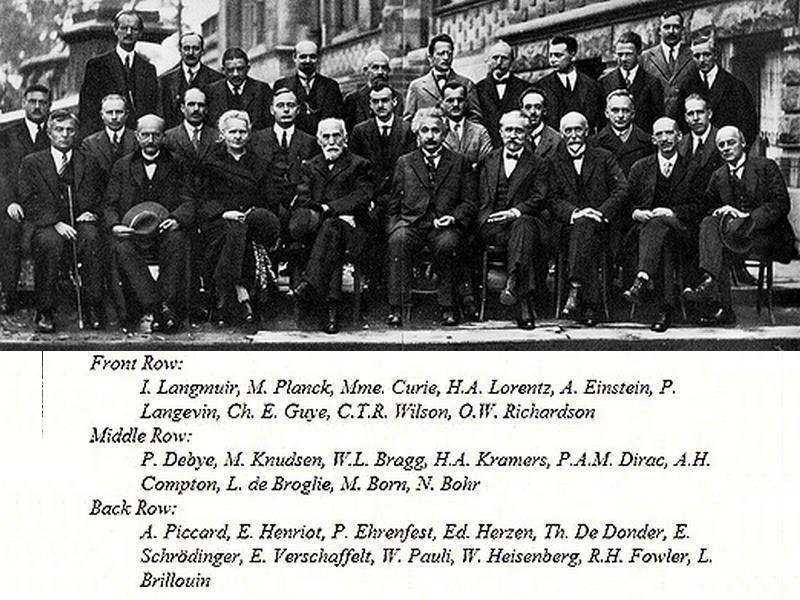
The 1927 Solvay Conference in Brussels

October 5th, 2015, posted in DAtEs iN a YeAR, Physics
Share

The 1927 Solvay Conference in Brussels was the fifth world physics conference

The 1927 Solvay Conference in Brussels,The 1927 Solvay Conference in Brussels was the fifth world physics conference,The 1927 Solvay Conference in Brussels ,the fifth world physics conference,world physics conference,physics conference,physics ,conference,Solvay Conference in Brussels ,Solvay Conference , Brussels,Solvay ,Conference in Brussels

The 1927 Solvay Conference in Brussels,The 1927 Solvay Conference in Brussels was the fifth world physics conference,The 1927 Solvay Conference in Brussels ,the fifth world physics conference,world physics conference,physics conference,physics ,conference,Solvay Conference in Brussels ,Solvay Conference , Brussels,Solvay ,Conference in Brussels

Share