

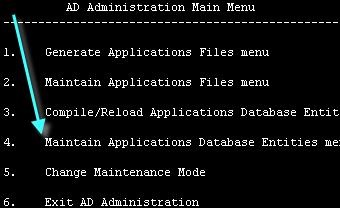
AdAdmin
Ad admin is a utility which is used to perform
Login as a Applmgr user:
[applmgr@apps ~]$ adadmin
Preliminary Tasks:
1. Running the environment file.
2. Verifying that ORACLE_HOME set properly.
3. Ensuring that ORACLE_HOME/bin and AD_TOP/bin are in your path.
4. Shutting down the concurrent managers when relinking certain files or performing certain database tasks.
5. Ensuring Sufficient temporary disk space.
Ad administration prompts:
Your default directory is ‘/u01/app/apps/uatappl’.
Is this the correct APPL_TOP [Yes]
Filename [adadmin.log] :
APPL_TOP is set to /u01/app/apps/uatappl
Please enter the batchsize [1000] :
Enter the password for your ‘SYSTEM’ ORACLE schema: manager
Enter the ORACLE password of Application Object Library [APPS] : apps
Ad admin Log files:
The main AD Administration log file is called adadmin.log by default. This name can be
Changed when starting up AD Administration.
Errors and warnings are listed in the log file
/u01/app/apps/uatappl/admin/UAT/log/adadmin.log
General Applications file menu
There are five functional choices in the generate applications file menu.
1. Generate Message Files:
This task generates message binary files in the $PROD_TOP/mesg directory from oracle application object library tables.
We generally perform this task only when instructed to do so in a readme file of a patch.
2. Generate Form Files:This task generate binary oracle forms file for all installed languages from the form definition files. Extension (*.fmx)
Perform this task whenever we have issue with a form or set forms.
Oracle application uses these binary files to display the data entry forms.
When we choose Generate form files:
It prompts following:
Generate Report files:
This task generates binary report files for all installed languages. Extension of the file name like (*.rdf)
When we choose Generate report files menu, it prompts the following.
Generate Graphics files:
This task generates Oracle graphics files for all installed languages. Extension of the file name like (*.ogd)
The serious of prompts and actions in this task are very similar to the prompts and actions in the Generate form files task.
Generate Product JAR files:
This generate product jar files task prompts
Do you wish to force generation of all jar files? [No]
If we choose No, it only generates JAR (Jave Archive) files that are missing or out of date.
Choose yes for this option when generating JAR files after upgrading the developer technology stack or after updating your Java version.
Maintain Applications Files tasks
Relink Application programs:
This task relinks all your oracle applications binary executables.
Select this task after us:
1. Install new version of the database or a technology stack component.
2. Install an underlying technology component used with oracle applications.
3. Apply a patch to the application technology stack.
4. Apply a patch to the operating systems
These tasks execute AD relink utility. Use AD admin, not the AD relink utility directly, to relink non AD-executables.
Create Applications environment file:
Select this task when you want to:
1. Create an environment file with settings that are different from your current environment file.
2. Recreate an environment file that is missing or currept.
Copy files to destinations:
The copy files to destinations task copies files from each product area to central locations where they can easily referenced by oracle applications.
Use this option to update the java, HTML and media files in the common directories (such as JAVA_TOP, OA_TOP) when users have issues accessing them.
1. Java file are copied to JAVA_TOP
2. HTML files are copied to OAH_TOP
3. Media files are copied to OAM_TOP
Convert Character Set:
1. This task converts the character set of all translatable files in APPL_TOP.
2. You should select this task when changing the base language or adding additional languages to oracle applications
3. You may need to convert database character set and file system character set to one that will support the additional languages.
Maintain snapshot information:
1. This task record details for each file in the APPL_TOP (like file name and file version).
2. They also record summary information’s about patches that have been applied to the APPL_TOP.
3. The maintain snapshot information task stores information about files, file versions and bug fixes present in an APPL_TOP.
4. You must run Maintain snapshot information option once for each APPL_TOP before you apply any patch that contains a “compatible feature prereq” line on that APPL_TOP.
Check for Missing files:
1. The check for missing files task verifies files needed to install, upgrade, or run oracle applications for the current configuration are in the current APPL_TOP.
2. Choose this task if you suspect there are files missing in your APPL_TOP.
Maintain Database Entries tasks:
Validate Apps Schema:
Validate apps schema task run SQL script (advrfapp.sql) against the apps schema to verify the integrity of the schema.
It determines:
1. Problems you must fix(not specific to apps schema)
2. problems you must fix(specific to apps schema)
3. Issues you may want to address(specific to apps schema)
A report called APPSschemaname.lst is produced in APPL_TOP/admin//out.
This report contains information about how to fix the issues. We can find following things by running the Validate Apps schema.
1. Missing or invalid package.
2. Missing or invalid synonyms.
3. Invalid objects in apps schema.
This task is more effective if run:
1. Immediately after an upgrading or applying maintenance pack
2. After a patch is applied.
3. After performing export/import (migration)
4. When doing custom development in the apps schema.
Recreate Grants and Synonyms:
This task recreates grants and synonyms for oracle application public schema (applsyspub)
Recreate grants on some packages from system to apps
Run this task when grants and synonyms are missing from the database. This may occur as a result of
1. Custom development
2. Incomplete database migrations
3. Patches and administrative sessions that failed to run successfully to completion
Maintain multi-lingual tables:
MLS or multilingual support is oracle application’s ability to operate in a multi languages simultaneously. When running Maintain multi-lingual task you can select the number of parallel workers. In generally run during the NLS install and maintenance processes. This task runs the NLINS.sql script for every product. It invokes pl/sql routines that maintain multilingual tables and untranslated rows.
Check Dual Tables:
This task looks for a dual table accessible by oracle applications and ensures the correct grants are set up. If such table not exists or if an existing DUAL table has more than one row, AD administration displays error. If a DUAL table containing only one row exists, AD admin completes successfully.
Maintain multiple reporting currencies:
This option varies depending on whether you currently have multiple reporting currencies (MRC) enabled or not.
If MRC functionality is implemented in your database, the option reads maintain multiple reporting currencies.
Convert to multiple organizations:
To convert in to multiple-org does the following thing:
1. Confirms that you want to run the task
2. Asks for the number of parallel workers
3. Create script to disable and re-enable triggers in the APPS schema
4. Disable all triggers in the apps schema
5. Converts seed data and transaction data to multiple organizations in parallel.
6. Re-enable all previously disabled triggers in the apps schema.
Compile and Reload Database Entries tasks:

Compile Apps Schema:
This task compiles uncompiled program units (pl/sql and java) in the apps schema.
You can perform this task with multiple workers.
When running this task, AD administration prompts,
Run Invoker’s Rights processing in incremental mode [No]?
Type Yes at this prompt to run Invoker Rights processing only on packages that have changed
Since Invoker Rights processing was last run or accept the default to run Invoker Rights
Processing on all packages.
During the upgrade progress.
Compile Menu Information:
This option compiles menu data structures.
Choose this task after uploading menu entries.
It asks if you want to force compilation for all menus,
1. If you choose the default [no] only menus with changes are saved
2. If you enter yes all menus are compiled
Compile flexfield:
Run this task if the readme of a patch indicates that this step should be performed.
Details of the task with a list of compilation status of every flexfield are written to a log file.
The name of the log file is in the format .req. The main AD Administration log file contains the exact name of this log file.
Reload JAR Files to Database:
This option runs the loadjava utility to reload all appropriate oracle applications
JAR files into the database.
Change Maintenance mode:

1. Must be enabled before patching oracle applications
2. Improves patching performance
3. Restricts users access to system
4. Is enabled and disabled using AD administration

