Posts Tagged ‘Oracle’

Toad : Toad For Oracle

January 18th, 2013, posted in Oracle
Share

ToadReview

As a beginner of Toad for Oracle. I came up with an issue. Maybe you guys mgiht go through same phase.

So for this solution here is it :

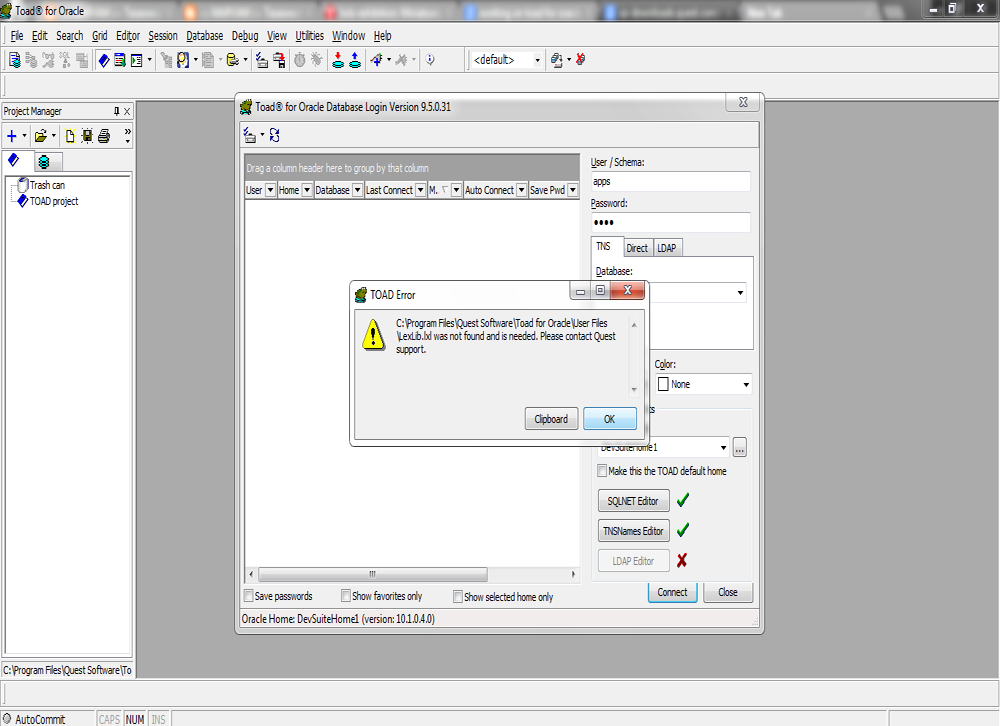
After installing the Toad this was the issue came up. It was shutting down by the error.  Well this was the issue which came up as soon as Toad get started :

C:Program FilesQuest SoftwareToad For Rracle user fileslexlib.lxl was not found and is needed. Please contact quest support.

Output :

oracle toad issue

The Solution for the problem is quite simple. You might be running toad on Windows 7 or Vista. All you have to do is to run this application on Administartor mode. Thats it.

Select Toad and right click on it and run it as Administrator.

Try it and I hope it might work for you as well. Will be waiting for feedback . Have a good day

*********************************************************************************************************************
Note : Please not do make backups before using these queries and also confirm them yourself or by aother means as
 well.
*********************************************************************************************************************
Share

Oracle : Built-in Data Types

January 14th, 2013, posted in Oracle
Share
The built-in data types is twenty types but these divide in to six group in oracle :
  1. Character Datatypes           : CHAR, NCHAR, NVARCHAR2, VARCHAR2
  2. Number Datatypes               : NUMBER, BINARY_FLOAT, BINARY_DOUBLE
  3. Datetime Datatypes             : DATE, TIMESTAMP, INTERVAL YEAR TO MONTH, INTERVAL DAY TO SECOND
  4. Row ID Datatypes                 : ROWID, UROWID
  5. Long and Row Datatypes   : LONG, LONG RAW, RAW
  6. Large Object Datatypes      : BLOB, CLOB, NCLOB, BFILE
Share

Oracle : What is tablespace and types of tablespace

January 13th, 2013, posted in Oracle Queries
Share
Tablespace :
The tablespace is a logical storage units and database divided into one or more logical storage units. The tablespace is not visible in the data file system.
Syntax :
Create tablespace “tablespace name”;
Example :
SQL> Create tablespace test datafile
2 ‘C:/ORACLE/PRODUCT/10.2.0/oradata/orcl/test.dbf’
3 size 10M;
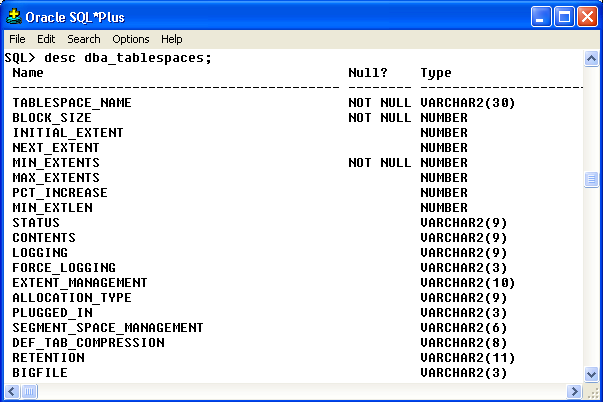
We can see all tablespace through this command:
SQL> desc dba_tablespaces;
Output :

oracle Create tablespace


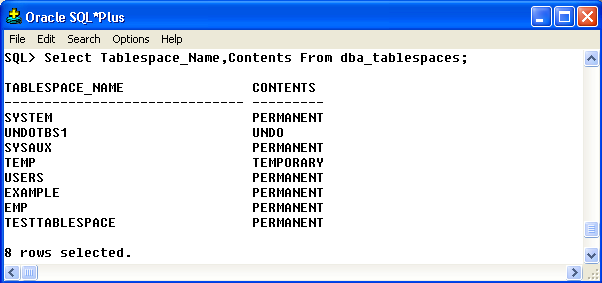
SQL> Select Tablespace_Name,Contents From dba_tablespaces;

Output :
oracle Create tablespace

Types of tablespace in Oracle:

  • System Tablespace
  • Sysaux Tablespace
  • undo Tablespace
  • Temporary Tablespace
  • User/Normal Tablespace
  • Example Tablespace

1. System Tablespace:
The system tablespace is create by default. The system tablespace is a permanent tablespace. The system tablespace owner is sys and within all data dictionary. The all data dictionary tables is store in the datafiles. The system tablespace is always online when the database is open.

2. Sysaux Tablespace:
The sysaux tablespace is a permanent tablespace. The sysaux tablespace is a new feature of the Oracle 10g. The sysaux tablespace is a system tablespace and auxiliary tablespace. The sysaux tablespace is a optional database components.

3. Undo Tablespace:
The undo tablespace is show always from undotbs1 name in the database. The undo tablespace is contains the undo data after any updating, deleting of database object. The undo tablespace is used for rolling back transaction.

Create Undo Tablespace:

SQL> Create undo tablespace undo01 datafile

2 ‘C:ORACLEPRODUCT10.2.0ORADATAORCLundo01.dbf’

3 size 100M;

4. Temporary Tablespace:
The temporary tablespace show always from temp name in the database. The temporary tablespace is store in tempfile. All temporary operation are perform in temporary tables. The temporary tablespace is used for the shorting temporary tables.

For example:

SQL> Select * from employee order by salary desc;

Create Temporary Tablespace:

SQL> Create temporary tablespace temp3 tempfile

2 ‘C:ORACLEPRODUCT10.2.0ORADATAORCLTEMP03.dbf’

3 size 10M;

5. User/Normal Tablespace:
The user and normal tablespace is a permanent tablespace. All user tablespace information store/show in the user tablespace.

Create User Tablespace:

SQL> Create user tablespace user02 userfile

2 ‘C:ORACLEPRODUCT10.2.0ORADATAORCLuser02.dbf’

3 size 10M;

6. Example Tablespace:
We will create database through the Database Configuration Assistant when we will select sample schemas option. This sample schemas is create a example tablespace. The sample schemas provide a comman platform for examples.

*********************************************************************************************************************
Note : Please not do make backups before using these queries and also confirm them yourself or by aother means as
 well.

*********************************************************************************************************************


Share

Oracle : How to Show Time with Date in a Session ?

January 8th, 2013, posted in Oracle
Share

If your want to show time with date in your sql environment like, working with Sql Developer or Sql Plus or iSql Plus then change the value of NLS_DATE_FORMAT.


To change the value log in the sql environment and write:

alter session set NLS_DATE_FORMAT =’DD-MON-RRRR HH:MI:SS AM’;

then check the value…you are done..!!!

 Time with Date in a Session of Oracle

*********************************************************************************************************************
Note : Please not do make backups before using these queries and also confirm them yourself or by aother means as
 well.
*********************************************************************************************************************
Share

Oracle : How To show/ get First Date of the Month ?

January 7th, 2013, posted in Oracle
Share

If you want to show or if you need the month first day, last time I check there was no built-in function in Oracle. But you can get it easily by using some other single-row date function. Here bellow an example of this.

SELECT LAST_DAY(ADD_MONTHS(SYSDATE,-1))+1
FROM DUAL;

Run the above sql and you will get the first day of current month.

For last day of current month just use the LAST_DAY function like this LAST_DAY(SYSDATE)

Need more help ? Just Leave you comments…

*********************************************************************************************************************
Note : Please not do make backups before using these queries and also confirm them yourself or by aother means as
 well.
*********************************************************************************************************************
Share