
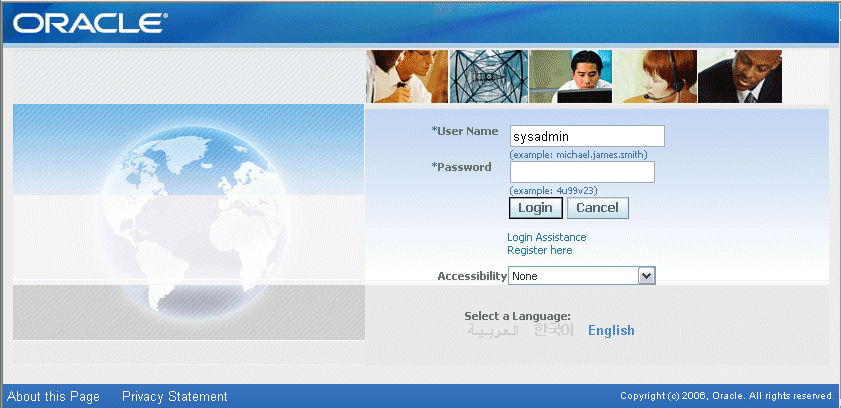
Query to get the front end URL from back-end
SELECT home_url FROM   icx_parameters;
http://hostname.domainname.com:8000/OA_HTML/AppsLogin

Run the following query to find out who are the Oracle Apps Users currently Logged into the application.
  SELECT DISTINCT icx.session_id,
                  icx.user_id,
                  fu.user_name,
                  fu.description
    FROM icx_sessions icx, fnd_user fu
   WHERE     disabled_flag != 'Y'
         AND icx.pseudo_flag = 'N'
         AND (last_connect +
              DECODE (fnd_profile.VALUE ('ICX_SESSION_TIMEOUT'),
                      NULL, limit_time,
                      0   , limit_time,
                      fnd_profile.VALUE ('ICX_SESSION_TIMEOUT')/60) / 24) > SYSDATE
         AND icx.counter < limit_connects
         AND icx.user_id = fu.user_id;
From Oracle database 12c on-wards, whole architecture was changed. And it comes with many new features. Oracle also changed the policy of releasing database patches and version. Now we are seeing new version every year from 2018 on-wards, i.e. 18c in the year of 2018, 19, in the year of 2019 and now very soon 20c is coming this year.
Here I am highlighting Oracle database new features which was introduce in different Oracle database versions. My focus is to highlight most important features from version 12c onwards up to 19c.
This will help you to understand which feature we can use in which version.
|
Category
|
DB
Versions |
|||
|
12.1
|
12.2
|
18c
|
19c
|
|
|
High
Availability |
Comprehensive HA and disaster
recovery functionality |
Sharding
|
Sharded RAC
|
Data Guard DML Redirect
|
|
Oracle Golden Gate for heterogeneous replication
|
Autonomous Health Framework
|
User-defined Sharding Methods
|
Sharding: Supports multiple PDB shards in a CDB
Unique sequence number generation per shard |
|
|
Zero Downtime Grid Infrastructure
Patching |
||||
|
PDB Recovery Catalog
|
||||
|
Improvements to Application
Continuity |
||||
|
Category
|
DB Versions
|
|||
|
12.1
|
12.2
|
18c
|
19c
|
|
|
Performance and Salability
|
In-Memory Column Store
|
In Memory JSON Queries
|
Memory Optimized Row
Store |
Fast ingest support for
IoT type workloads |
|
Engineered Systems
|
In Memory Active Standby
|
New Approximate Functions
|
Quarantine for SQL Statements
|
|
|
Optimizer Adaptive
Feature |
Optimizer Adaptive
Feature |
Stats Only Queries
|
||
|
Approximate Query Processing
|
New Approximate Functions
|
Improvements for COUNT DISTINCT and GROUP BY queries
|
||
|
Optimizer Statistics
Advisor |
Automatic Indexing
|
|||
|
Realtime Statistics
|
||||
|
Automatic Resolution of
SQL Plan Regressions |
||||
|
Category
|
DB Versions
|
|||
|
12.1
|
12.2
|
18c
|
19c
|
|
|
Multitenant
|
Container managed
database virtualization |
Online cloning &
relocation |
Transportable backups
|
DBCA Silent mode
operations for PDB |
|
Manage Many as one
|
Incremental refresh of test/dev master
|
Snapshot carousel
|
RAT and ADDM at PDB level
|
|
|
Patching, Backup,
Security, Online Cloning, Online Relocation |
Application containers
|
Refreshable PDB
switchover |
Automated PDB Relocation
|
|
|
Category
|
DB Versions
|
|||
|
12.1
|
12.2
|
18c
|
19c
|
|
|
Security
|
Security In-Depth
Access Controls, Encryption, Redaction, Masking, Auditing, SQL Firewalls Key Vault |
Online encryption
|
Integration with Active
Directory |
Data Dictionary
Encryption |
|
Audit Vault Database Firewall
|
Password-less schema creation
|
Password-less Schema-only Oracle accounts
|
||
|
Security Assessment Tool
|
Database Vault Operations
Control |
|||
|
Privilege Analysis available in EE
|
||||
|
Category
|
DB Versions
|
|||
|
12.1
|
12.2
|
18c
|
19c
|
|
|
Application
Development
|
Application Express 5.1
|
Long Identifiers
|
Improved JSON Support
|
SQL JSON Enhancements
|
|
Comprehensive Language support
PL/SQL, SQL , Python, Node.js, PHP, Java, C, .NET, REST JSON |
Case Insensitive Databases
|
C, Python, JavaScript JSON SODA API
|
Materialized View for JSON_TABLE
|
|
|
Private Temporary Tables
|
Partial JSON Update
support |
|||
|
Realtime SQL Monitoring for Developers
|
||||
|
Category
|
DB Versions
|
|||
|
12.1
|
12.2
|
18c
|
19c
|
|
|
Data Warehousing and Big Data
|
Partitioning,
Compression, SQL, Analytical Views, Analytical SQL, Data Mining |
Partitioned External
Tables |
In-Memory for external
tables |
Hybrid Partitioned Tables
|
|
Easily analyze data held in Hadoop with Big Data SQL
|
Analytical Views
|
Automatic propagation of nologged data to standby
|
Stats only Queries
|
|
|
Big Data Appliance
|
Machine Learning :
Random Forrest, Neural Network |
|||
|
Category
|
DB Versions
|
|||
|
12.1
|
12.2
|
18c
|
19c
|
|
|
Other
Improvements
|
EZConnect Improvements
|
|||
|
Oracle Database XE
Free to use Includes most EE features no RAC, Data Guard, GoldenGate |
||||
|
Oracle Database 19c RPM
Install, Yum install of Oracle Instant Clients |
||||
|
Oracle Read Only Homes
|
||||
|
No click through client
software install |
||||
|
Oracle Docker images
|
||||
|
SQLDeveloper Web
|
||||
|
Oracle Data REST Services (ORDS)
|
||||
[apdba@oracledb1 ~]$ cd $GL_TOP

[apdba@oracledb1 12.0.0]$ ls

admin  forms  html  lib  mds    mesg  patch    sql

bin    help   java  log  media  out   reports


[apdba@oracledb1 12.0.0]$ cd reports/


[apdba@oracledb1 reports]$ ls

US

[apdba@oracledb1 reports]$ cd US/

[apdba@oracledb1 US]$ ls

GLCRDR.rdf    GLRTB2.rdf    GLXCLVAL.rdf  GLXRBUDA.rdf  GLXRLRUR.rdf

GLGDOCDE.rdf  GLRTBD.rdf    GLXCOCRR.rdf  GLXRCAUT.rdf  GLXRLSEG.rdf

GLGENCRE.rdf  GLRTR1.rdf    GLXDALST.rdf  GLXRCTRS.rdf  GLXRLSUS.rdf

GLGVFNAV.rdf  GLWACCTR.rdf  GLXDDA.rdf    GLXRDRTS.rdf  GLXRLTCL.rdf

GLGVOPEN.rdf  GLXACDAL.rdf  GLXDFLST.rdf  GLXRLACH.rdf  GLXRLVAT.rdf

GLRFCLD.rdf   GLXAVADT.rdf  GLXDFUSR.rdf  GLXRLBOL.rdf  GLXRSUOM.rdf

GLRFGNJ.rdf   GLXAVTRB.rdf  GLXETB.rdf    GLXRLCOA.rdf  GLXUSA.rdf

GLRGCBGT.rdf  GLXBCRBC.rdf  GLXJETAX.rdf  GLXRLFBL.rdf  GLXXTB.rdf

GLRGNJ.rdf    GLXBCSD.rdf   GLXLSLST.rdf  GLXRLHST.rdf  GLYRLBGE.rdf

GLRGNL.rdf    GLXBOR.rdf    GLXRBCR.rdf   GLXRLMAB.rdf  GLYRLGLG.rdf

GLRJED.rdf    GLXBTB.rdf    GLXRBDHR.rdf  GLXRLRFL.rdf  GLYRLJGE.rdf

GLRSGNJ.rdf   GLXCAR.rdf    GLXRBJRN.rdf  GLXRLRUD.rdf  GLYRLJRE.rdf

Take backup of two .rdf files and we will regenerate them using adadmin


[apdba@oracledb1 US]$ mv GLCRDR.rdf       GLCRDR.rdf.bkp

[apdba@oracledb1 US]$ mv GLYRLJRE.rdf   GLYRLJRE.rdf.bkp

[apdba@oracledb1 US]$

[apdba@oracledb1 US]$

[apdba@oracledb1 US]$ adadmin

                     Copyright (c) 2002 Oracle Corporation

                        Redwood Shores, California, USA

                     Oracle Applications AD Administration

                                 Version 12.0.0

NOTE: You may not use this utility for custom development

      unless you have written permission from Oracle Corporation.

Your default directory is '/u01/apdba/apps/apps_st/appl'.

Is this the correct APPL_TOP [Yes] ?

AD Administration records your AD Administration session in a text file

you specify.  Enter your AD Administration log file name or press [Return]

to accept the default file name shown in brackets.

Filename [adadmin.log] :

************* Start of AD Administration session *************

AD Administration version: 12.0.0

AD Administration started at: Mon Apr 08 2013 09:00:20

APPL_TOP is set to /u01/apdba/apps/apps_st/appl

You can be notified by email if a failure occurs.

Do you wish to activate this feature [No] ?

Please enter the batchsize [1000] :

Please enter the name of the Oracle Applications System that this

APPL_TOP belongs to.

The Applications System name must be unique across all Oracle

Applications Systems at your site, must be from 1 to 30 characters

long, may only contain alphanumeric and underscore characters,

and must start with a letter.

Sample Applications System names are: "prod", "test", "demo" and

"Development_2".

Applications System Name [PROD] : PROD *

NOTE: If you do not currently have certain types of files installed

in this APPL_TOP, you may not be able to perform certain tasks.

Example 1: If you don't have files used for installing or upgrading

the database installed in this area, you cannot install or upgrade

the database from this APPL_TOP.

Example 2: If you don't have forms files installed in this area, you cannot

generate them or run them from this APPL_TOP.

Example 3: If you don't have concurrent program files installed in this area,

you cannot relink concurrent programs or generate reports from this APPL_TOP.

Do you currently have files used for installing or upgrading the database

installed in this APPL_TOP [YES] ? YES *

Do you currently have Java and HTML files for HTML-based functionality

installed in this APPL_TOP [YES] ? YES *

Do you currently have Oracle Applications forms files installed

in this APPL_TOP [YES] ? YES *

Do you currently have concurrent program files installed

in this APPL_TOP [YES] ? YES *

Please enter the name Oracle Applications will use to identify this APPL_TOP.

The APPL_TOP name you select must be unique within an Oracle Applications

System, must be from 1 to 30 characters long, may only contain

alphanumeric and underscore characters, and must start with a letter.

Sample APPL_TOP Names are: "prod_all", "demo3_forms2", and "forms1".

APPL_TOP Name [oracledb1] : oracledb1 *

You are about to use or modify Oracle Applications product tables

in your ORACLE database 'PROD'

using ORACLE executables in '/u01/apdba/apps/tech_st/10.1.2'.

Is this the correct database [Yes] ?

AD Administration needs the password for your 'SYSTEM' ORACLE schema

in order to determine your installation configuration.

Enter the password for your 'SYSTEM' ORACLE schema:

The ORACLE username specified below for Application Object Library

uniquely identifies your existing product group: APPLSYS

Enter the ORACLE password of Application Object Library [APPS] :

AD Administration is verifying your username/password.

The status of various features in this run of AD Administration is:

Saving product information.

AD code level : [B.1]

            AD Administration Main Menu

   --------------------------------------------------
Generate Applications Files menu
Maintain Applications Files menu
Compile/Reload Applications Database Entities menu
Maintain Applications Database Entities menu
Change Maintenance Mode
Exit AD Administration
Enter your choice [6] : 1

         Generate Applications Files

   ----------------------------------------
Generate message files
Generate form files
Generate report files
Generate product JAR files
Return to Main Menu
Enter your choice [5] : 3

AD utilities can support a maximum of 999 workers. Your

current database configuration supports a maximum of 73 workers.

Oracle recommends that you use between 4 and 8 workers.

Enter the number of workers [4] :

Your current character set is "UTF8".

Do you want to generate Oracle Reports objects

using this character set [Yes] ?

Do you want to regenerate Oracle Reports PL/SQL library files [Yes] ?

Do you want to regenerate Oracle Reports executable files [Yes] ?

Enter list of products ('all' for all products) [all] : GL

Generate specific reports objects for each selected product [No] ?

The current set of installed languages is: US

Please select languages for generating Oracle Reports files.

You may select all of the above languages, or just a subset.

Enter list of languages ('all' for all of the above) [all] :

You selected the following languages: US

Is this the correct set of languages [Yes] ?

Reading product report information...

Selecting Oracle Reports PL/SQL library files to generate...

Selecting library files for General Ledger...

Selecting product reports to generate...

Selecting reports for General Ledger...

Generating Oracle Reports objects...

Creating the AD_UTIL_PARAMS table...

Table AD_UTIL_PARAMS already exists, so dropping the table and recreating it.

Creating FND_INSTALL_PROCESSES table...

Writing dependencies of jobs to run to appldep.txt file...

There are now 60 jobs remaining (current phase=admin+1):

    0 running, 60 ready to run and 0 waiting.

Reading completed jobs from restart file (if any).

There are now 60 jobs remaining (current phase=admin+1):

    0 running, 60 ready to run and 0 waiting.

Determining which java executables are supported by adJavaWorker...

Starting worker processes.

Worker process 1 started.

Worker process 2 started.

************* Start of AD Worker session *************

AD Worker version: 12.0.0

AD Worker started at: Mon Apr 08 2013 09:02:04

APPL_TOP is set to /u01/apdba/apps/apps_st/appl

Worker process 3 started.

************* Start of AD Worker session *************

AD Worker version: 12.0.0

AD Worker started at: Mon Apr 08 2013 09:02:04

APPL_TOP is set to /u01/apdba/apps/apps_st/appl

************* Start of AD Worker session *************

AD Worker version: 12.0.0

AD Worker started at: Mon Apr 08 2013 09:02:04

APPL_TOP is set to /u01/apdba/apps/apps_st/appl

Worker process 4 started.

Checking if all jobs have their actual and symbolic arguments in sync....

Done.

Writing jobs to run to restart file.

Reading jobs from FND_INSTALL_PROCESSES table ...

************* Start of AD Worker session *************

AD Worker version: 12.0.0

AD Worker started at: Mon Apr 08 2013 09:02:04

APPL_TOP is set to /u01/apdba/apps/apps_st/appl

Done reading jobs from FND_INSTALL_PROCESSES table ...

Telling workers to read 'todo' restart file.

Done.

Starting phase 1001 (admin+1): Generate Report Files

There are now 60 jobs remaining (current phase=admin+1):

    0 running, 60 ready to run and 0 waiting.

There are now 0 jobs remaining (current phase=Done):

    0 running, 0 ready to run and 0 waiting.

Telling workers to quit...

All workers have quit.

Dropping FND_INSTALL_PROCESSES table...

FND_INSTALL_PROCESSES table dropped.

Dropping AD_DEFERRED_JOBS table...

AD_DEFERRED_JOBS table dropped.

Copying files to destination ...

Done copying files to destination.

Review the messages above, then press [Return] to continue.

Backing up restart files, if any......Done.

Now go and check in $GL_TOP


[apdba@oracledb1 ~]$ cd $GL_TOP

[apdba@oracledb1 12.0.0]$ ls

admin  forms  html  lib  mds    mesg  patch    sql

bin    help   java  log  media  out   reports


[apdba@oracledb1 12.0.0]$ cd reports/

[apdba@oracledb1 reports]$ ls

US

[apdba@oracledb1 reports]$ cd US/

[apdba@oracledb1 US]$ ls  GLCRDR.rdf   GLYRLJRE.rdf
GLYRLJRE.rdf  GLYRLJRE.rdf
Note: Regenerating of report files is completely dependant on licensing
Rename anyone of the report under INV_TOP and try to recreate it using adadmin.

[applvision@apps US]$ ls -tlrh /apps/vision/apps/apps_st/appl/inv/12.0.0/reports/US/INVIRSLO.rdf
-rw-r--r-- 1 applvision applmgr 184K Mar  9  2013 /apps/vision/apps/apps_st/appl/inv/12.0.0/reports/US/INVIRSLO.rdf
[applvision@apps US]$ mv /apps/vision/apps/apps_st/appl/inv/12.0.0/reports/US/INVIRSLO.rdf /apps/vision/apps/apps_st/appl/inv/12.0.0/reports/US/INVIRSLO.rdf_15sep2013
[applvision@apps US]$ ls -tlrh /apps/vision/apps/apps_st/appl/inv/12.0.0/reports/US/INVIRSLO.rdf
ls: /apps/vision/apps/apps_st/appl/inv/12.0.0/reports/US/INVIRSLO.rdf: No such file or directory
[applvision@apps US]$


[applvision@apps ~]$ adadmin

                     Copyright (c) 2002 Oracle Corporation
                        Redwood Shores, California, USA

                     Oracle Applications AD Administration

                                 Version 12.0.0

NOTE: You may not use this utility for custom development
      unless you have written permission from Oracle Corporation.

Your default directory is '/apps/vision/apps/apps_st/appl'.
Is this the correct APPL_TOP [Yes] ?

AD Administration records your AD Administration session in a text file
you specify.  Enter your AD Administration log file name or press [Return]
to accept the default file name shown in brackets.

Filename [adadmin.log] : practice.log

************* Start of AD Administration session *************
AD Administration version: 12.0.0
AD Administration started at: Mon Sep 16 2013 00:59:44

APPL_TOP is set to /apps/vision/apps/apps_st/appl

You can be notified by email if a failure occurs.
Do you wish to activate this feature [No] ?

Please enter the batchsize [1000] :


Please enter the name of the Oracle Applications System that this
APPL_TOP belongs to.

The Applications System name must be unique across all Oracle
Applications Systems at your site, must be from 1 to 30 characters
long, may only contain alphanumeric and underscore characters,
and must start with a letter.

Sample Applications System names are: "prod", "test", "demo" and
"Development_2".

Applications System Name [vision] : vision *


NOTE: If you do not currently have certain types of files installed
in this APPL_TOP, you may not be able to perform certain tasks.

Example 1: If you don't have files used for installing or upgrading
the database installed in this area, you cannot install or upgrade
the database from this APPL_TOP.

Example 2: If you don't have forms files installed in this area, you cannot
generate them or run them from this APPL_TOP.

Example 3: If you don't have concurrent program files installed in this area,
you cannot relink concurrent programs or generate reports from this APPL_TOP.


Do you currently have files used for installing or upgrading the database
installed in this APPL_TOP [YES] ? YES *


Do you currently have Java and HTML files for HTML-based functionality
installed in this APPL_TOP [YES] ? YES *


Do you currently have Oracle Applications forms files installed
in this APPL_TOP [YES] ? YES *


Do you currently have concurrent program files installed
in this APPL_TOP [YES] ? YES *


Please enter the name Oracle Applications will use to identify this APPL_TOP.

The APPL_TOP name you select must be unique within an Oracle Applications
System, must be from 1 to 30 characters long, may only contain
alphanumeric and underscore characters, and must start with a letter.

Sample APPL_TOP Names are: "prod_all", "demo3_forms2", and "forms1".

APPL_TOP Name [apps] : apps *


You are about to use or modify Oracle Applications product tables
in your ORACLE database 'vision'
using ORACLE executables in '/apps/vision/apps/tech_st/10.1.2'.

Is this the correct database [Yes] ?

AD Administration needs the password for your 'SYSTEM' ORACLE schema
in order to determine your installation configuration.

Enter the password for your 'SYSTEM' ORACLE schema:


The ORACLE username specified below for Application Object Library
uniquely identifies your existing product group: APPLSYS

Enter the ORACLE password of Application Object Library [APPS] :

AD Administration is verifying your username/password.
The status of various features in this run of AD Administration is:

                                           <-Feature version in->
Feature                          Active?   APPLTOP    Data model    Flags
------------------------------   -------   --------   -----------   -----------
CHECKFILE                        Yes       1          1             Y N N Y N Y
PREREQ                           Yes       6          6             Y N N Y N Y
CONCURRENT_SESSIONS              No        2          2             Y Y N Y Y N
PATCH_TIMING                     Yes       2          2             Y N N Y N Y
PATCH_HIST_IN_DB                 Yes       6          6             Y N N Y N Y
SCHEMA_SWAP                      Yes       1          1             Y N N Y Y Y
JAVA_WORKER                      Yes       1          1             Y N N Y N Y
CODELEVEL                        Yes       1          1             Y N N Y N Y


Identifier for the current session is 16762

Reading product information from file...

Reading language and territory information from file...

Reading language information from applUS.txt ...

AD Administration warning:
 Product Data File
 /apps/vision/apps/apps_st/appl/admin/zfaprod.txt
 does not exist for product "zfa".
This product is registered in the database but the
above file does not exist in APPL_TOP.  The product
will be ignored without error.


AD Administration warning:
 Product Data File
 /apps/vision/apps/apps_st/appl/admin/zsaprod.txt
 does not exist for product "zsa".
This product is registered in the database but the
above file does not exist in APPL_TOP.  The product
will be ignored without error.


AD Administration warning:
 Product Data File
 /apps/vision/apps/apps_st/appl/admin/jtsprod.txt
 does not exist for product "jts".
This product is registered in the database but the
above file does not exist in APPL_TOP.  The product
will be ignored without error.


Reading database to see what industry is currently installed.

Reading FND_LANGUAGES to see what is currently installed.
Currently, the following language is installed:

Code   Language                                Status
----   --------------------------------------- ---------
US     American English                        Base

Your base language will be AMERICAN.

Setting up module information.
Reading database for information about the modules.
Saving module information.
Reading database for information about the products.
Reading database for information about how products depend on each other.
Reading topfile.txt ...

Saving product information.

AD code level : [B.1]

            AD Administration Main Menu
   --------------------------------------------------

   1.    Generate Applications Files menu

   2.    Maintain Applications Files menu

   3.    Compile/Reload Applications Database Entities menu

   4.    Maintain Applications Database Entities menu

   5.    Change Maintenance Mode

   6.    Exit AD Administration

Enter your choice [5] :1
         Generate Applications Files
   ----------------------------------------

   1.    Generate message files

   2.    Generate form files

   3.    Generate report files

   4.    Generate product JAR files

   5.    Return to Main Menu


Enter your choice [5] : 3


AD utilities can support a maximum of 999 workers. Your
current database configuration supports a maximum of 84 workers.
Oracle recommends that you use between 8 and 16 workers.


Enter the number of workers [8] : 6

Your current character set is "US7ASCII".

Do you want to generate Oracle Reports objects
using this character set [Yes] ?


Do you want to regenerate Oracle Reports PL/SQL library files [Yes] ?

Do you want to regenerate Oracle Reports executable files [Yes] ?

Enter list of products ('all' for all products) [all] : inv

Generate specific reports objects for each selected product [No] ? yes


The current set of installed languages is: US

Please select languages for generating Oracle Reports files.
You may select all of the above languages, or just a subset.

Enter list of languages ('all' for all of the above) [all] : US


You selected the following languages: US

Is this the correct set of languages [Yes] ?


You selected the following languages: US

Is this the correct set of languages [Yes] ?

Reading product report information...

Selecting Oracle Reports PL/SQL library files to generate...


Selecting library files for Inventory...

List of libraries in Inventory :

   INVISMMX.pll        inv.pll

Enter libraries to generate, or enter 'all' [all] :


Selecting product reports to generate...


Selecting reports for Inventory...

List of reports in Inventory :

   INVARAAS.rdf   INVARADV.rdf   INVARCLI.rdf   INVARCPA.rdf   INVARCTA.rdf
   INVARHMA.rdf   INVARORE.rdf   INVARPAR.rdf   INVARPIA.rdf   INVARPMT.rdf
   INVARPSL.rdf   INVARPTP.rdf   INVARPTS.rdf   INVARRTA.rdf   INVARUIR.rdf
   INVCCIER.rdf   INVCCTCA.rdf   INVCHGPU.rdf   INVDRRSV.rdf   INVGCORP.rdf
   INVINPSR.rdf   INVIRCAT.rdf   INVIRCIT.rdf   INVIRCOC.rdf   INVIRCXR.rdf
   INVIRDIS.rdf   INVIRDST.rdf   INVIRILC.rdf   INVIRISQ.rdf   INVIRITD.rdf
   INVIRITS.rdf   INVIRRCR.rdf   INVIRRIT.rdf   INVIRSIQ.rdf   INVIRSLO.rdf
   INVIRSNO.rdf   INVIRTMP.rdf   INVIRXRF.rdf   INVISMMX.rdf   INVKBCPR.rdf
   INVM2MQT.rdf   INVMRMQT.rdf   INVMSCHR.rdf   INVMSWHU.rdf   INVMVTEX.rdf
   INVONHSP.rdf   INVORGES.rdf   INVPOPSR.rdf   INVPRFDH.rdf   INVPRFRL.rdf
   INVRCWSR.rdf   INVSRAAL.rdf   INVSRFRT.rdf   INVSRIOS.rdf   INVSRISA.rdf
   INVSRLOC.rdf   INVSROPT.rdf   INVSRPLN.rdf   INVSRSPT.rdf   INVSRSUB.rdf
   INVSRUOM.rdf   INVSTMVT.rdf   INVTOPKL.rdf   INVTRACS.rdf   INVTRCLS.rdf
   INVTRDST.rdf   INVTRELT.rdf   INVTRHAN.rdf   INVTRLNT.rdf   INVTRREG.rdf
   INVTRSHS.rdf   INVTRSNT.rdf   INVTRSTS.rdf   INVTRVLT.rdf

Enter reports to generate, or enter 'all' [all] :


Generating Oracle Reports objects...


Creating the AD_UTIL_PARAMS table...
Table AD_UTIL_PARAMS already exists, so dropping the table and recreating it.

Creating FND_INSTALL_PROCESSES table...

Writing dependencies of jobs to run to appldep.txt file...

There are now 76 jobs remaining (current phase=admin):
    0 running, 2 ready to run and 74 waiting.

Reading completed jobs from restart file (if any).

There are now 76 jobs remaining (current phase=admin):
    0 running, 2 ready to run and 74 waiting.


Determining which java executables are supported by adJavaWorker...

Starting worker processes.

Worker process 1 started.

Worker process 2 started.

************* Start of AD Worker session *************
AD Worker version: 12.0.0
AD Worker started at: Mon Sep 16 2013 02:34:08

APPL_TOP is set to /apps/vision/apps/apps_st/appl

************* Start of AD Worker session *************
AD Worker version: 12.0.0
AD Worker started at: Mon Sep 16 2013 02:34:08

APPL_TOP is set to /apps/vision/apps/apps_st/appl

Worker process 3 started.

************* Start of AD Worker session *************
AD Worker version: 12.0.0
AD Worker started at: Mon Sep 16 2013 02:34:08

APPL_TOP is set to /apps/vision/apps/apps_st/appl

Worker process 4 started.

************* Start of AD Worker session *************
AD Worker version: 12.0.0
AD Worker started at: Mon Sep 16 2013 02:34:08

APPL_TOP is set to /apps/vision/apps/apps_st/appl

Worker process 5 started.

************* Start of AD Worker session *************
AD Worker version: 12.0.0
AD Worker started at: Mon Sep 16 2013 02:34:08

APPL_TOP is set to /apps/vision/apps/apps_st/appl

Worker process 6 started.

Checking if all jobs have their actual and symbolic arguments in sync....

Done.

Writing jobs to run to restart file.

Reading jobs from FND_INSTALL_PROCESSES table ...


Done reading jobs from FND_INSTALL_PROCESSES table ...

Telling workers to read 'todo' restart file.
************* Start of AD Worker session *************

Done.AD Worker version: 12.0.0
AD Worker started at: Mon Sep 16 2013 02:34:08

APPL_TOP is set to /apps/vision/apps/apps_st/appl


Starting phase 1000 (admin): Generate Report Libraries


There are now 76 jobs remaining (current phase=admin):
    0 running, 2 ready to run and 74 waiting.

 Assigned: file INVISMMX.pll on worker  1 for product au  username APPLSYS.
 Assigned: file inv.pll      on worker  2 for product au  username APPLSYS.
Completed: file inv.pll      on worker  2 for product au  username APPLSYS.
Completed: file INVISMMX.pll on worker  1 for product au  username APPLSYS.

Starting phase 1001 (admin+1): Generate Report Files


There are now 74 jobs remaining (current phase=admin+1):
    0 running, 74 ready to run and 0 waiting.

 Assigned: file INVARAAS.rdf on worker  1 for product inv username INV.
 Assigned: file INVARADV.rdf on worker  2 for product inv username INV.
 Assigned: file INVARCLI.rdf on worker  3 for product inv username INV.
 Assigned: file INVARCPA.rdf on worker  4 for product inv username INV.
 Assigned: file INVARCTA.rdf on worker  5 for product inv username INV.
 Assigned: file INVARHMA.rdf on worker  6 for product inv username INV.
Completed: file INVARAAS.rdf on worker  1 for product inv username INV.
 Assigned: file INVARORE.rdf on worker  1 for product inv username INV.
Completed: file INVARHMA.rdf on worker  6 for product inv username INV.
 Assigned: file INVARPAR.rdf on worker  6 for product inv username INV.
Completed: file INVARCLI.rdf on worker  3 for product inv username INV.
Completed: file INVARCPA.rdf on worker  4 for product inv username INV.
 Assigned: file INVARPIA.rdf on worker  3 for product inv username INV.
 Assigned: file INVARPMT.rdf on worker  4 for product inv username INV.
Completed: file INVARADV.rdf on worker  2 for product inv username INV.
 Assigned: file INVARPSL.rdf on worker  2 for product inv username INV.
Completed: file INVARCTA.rdf on worker  5 for product inv username INV.
 Assigned: file INVARPTP.rdf on worker  5 for product inv username INV.
Completed: file INVARPIA.rdf on worker  3 for product inv username INV.
 Assigned: file INVARPTS.rdf on worker  3 for product inv username INV.

There are now 67 jobs remaining (current phase=admin+1):
    6 running, 61 ready to run and 0 waiting.

Completed: file INVARORE.rdf on worker  1 for product inv username INV.
 Assigned: file INVARRTA.rdf on worker  1 for product inv username INV.
Completed: file INVARPMT.rdf on worker  4 for product inv username INV.
 Assigned: file INVARUIR.rdf on worker  4 for product inv username INV.
Completed: file INVARPTP.rdf on worker  5 for product inv username INV.
 Assigned: file INVCCIER.rdf on worker  5 for product inv username INV.
Completed: file INVARPAR.rdf on worker  6 for product inv username INV.
 Assigned: file INVCCTCA.rdf on worker  6 for product inv username INV.
Completed: file INVARRTA.rdf on worker  1 for product inv username INV.
 Assigned: file INVCHGPU.rdf on worker  1 for product inv username INV.
Completed: file INVARUIR.rdf on worker  4 for product inv username INV.
 Assigned: file INVDRRSV.rdf on worker  4 for product inv username INV.
Completed: file INVCCTCA.rdf on worker  6 for product inv username INV.
 Assigned: file INVGCORP.rdf on worker  6 for product inv username INV.
Completed: file INVARPSL.rdf on worker  2 for product inv username INV.
Completed: file INVARPTS.rdf on worker  3 for product inv username INV.
 Assigned: file INVINPSR.rdf on worker  2 for product inv username INV.
 Assigned: file INVIRCAT.rdf on worker  3 for product inv username INV.
Completed: file INVCCIER.rdf on worker  5 for product inv username INV.
 Assigned: file INVIRCIT.rdf on worker  5 for product inv username INV.

There are now 57 jobs remaining (current phase=admin+1):
    6 running, 51 ready to run and 0 waiting.
Completed: file INVTRLNT.rdf on worker  2 for product inv username INV.
Completed: file INVTRSHS.rdf on worker  4 for product inv username INV.
 Assigned: file INVTRVLT.rdf on worker  2 for product inv username INV.
Completed: file INVTRSNT.rdf on worker  1 for product inv username INV.
Completed: file INVTRREG.rdf on worker  3 for product inv username INV.
Completed: file INVTRSTS.rdf on worker  6 for product inv username INV.
Completed: file INVTRHAN.rdf on worker  5 for product inv username INV.
Completed: file INVTRVLT.rdf on worker  2 for product inv username INV.

Telling workers to quit...

5 workers have quit.  Waiting for 1 more.

All workers have quit.


Dropping FND_INSTALL_PROCESSES table...


FND_INSTALL_PROCESSES table dropped.


Dropping AD_DEFERRED_JOBS table...


AD_DEFERRED_JOBS table dropped.


Copying files to destination ...

Done copying files to destination.


Review the messages above, then press [Return] to continue.


Now check generated report which we moved.
========================================

[applvision@apps US]$ ls -tlrh /apps/vision/apps/apps_st/appl/inv/12.0.0/reports/US/INVIRSLO.rdf
ls: /apps/vision/apps/apps_st/appl/inv/12.0.0/reports/US/INVIRSLO.rdf: No such file or directory
[applvision@apps US]$ date
Mon Sep 16 02:37:02 IST 2013
[applvision@apps US]$


Note :
We cannot generate reports by using above procedure.
It is done through rwcon60 in oracle application 11i .