
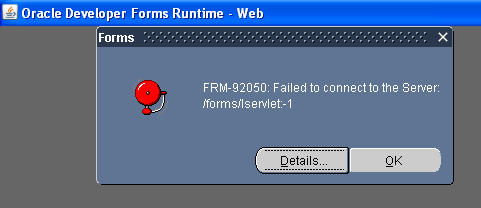
Solution :
MSIE 8 —>Tools > Internet Options >
Security Settings –>Custom Level >
Scroll down to entry “Enable XSS Filter” > Select Disable XSS Filter button.

@echo off
sqlplus username/password@connect_identifier @C:UsersrizDesktopmYmy.sql
spool C:UsersmeDesktopmYmy_log.txt
set linesize 50
set pagesize 50
prompt Purpose:
prompt To run Daily
SELECT TO_CHAR (SYSDATE, 'MM-DD-YYYY HH24:MI:SS') "NOW" FROM DUAL;
select * from v$instance;
SELECT TO_CHAR (SYSDATE, 'MM-DD-YYYY HH24:MI:SS') "NOW" FROM DUAL;
exit
spool off;
And you are all done.
The first select will give you time so that you may know when it started, the second seelct will give you the instance details and the third select will give you time again so that you can check when it ended.
These are the few Muslim Apps that would come real helpful especially in Ramazan / Ramadan :
1) My Prayer – صلاتي :
This app calculates Muslims prayer times using the phone’s location (latitude and longitude) based on different conventions.
Application Features:
– A widget that shows today’s prayers times.
– A horizontal widget the shows a time bar between the previous and next prayer.
– Notification for each prayer and Iqamah reminders, with the ability to adjust their times.
– Ability to select notification tone (Athan) from the SD card.
– Switching the phone to silent automatically during prayer times, with settings for each prayer.
– Finding the location automatically using Network or GPS, or manually by searching in the Internet.
– A Compass to show the Qibla direction.
– Fajr (and Sahoor) Alarm, and it can be configured from Settings.
– A Date Converter, to convert Hijri to Gregorian and vice versa, and calculate the prayers for that date.
– Ability to adjust prayer times manually.
– Can be used in both languages, English or Arabic, and with two colors, White or Black.
For More Detials : https://play.google.com/store/apps/details?id=com.haz.prayer
================================================
2) iSupplicate Dua & Ziyarat :
iSupplicate brings you over 100 of the best Duas & Ziyarat by the Ahlul Bayt (as) available in Audio, Video and Text. Gone are the days of carrying a big dua book everywhere, now you just need iSupplicate.
For More Detials : https://play.google.com/store/apps/details?id=com.isupplicate.isupplicate
=================================================
3) Shia Toolkit : 
Shia Isna Asheri Toolkit is compilation of following sections:
1. Complete Holy Quran with English Translation, Transliteration and audio recitation with translation in 14 different languages
Arabic, English, Urdu, Persian, Hindi, French, Spanish, Portuguese, Gujarati, Bengali, Turkish, German, Chinese, Korean
2. Dua Directory
3. Ziaraat Directory
4. Daily Taqibaat
5. Monthly Amaal (Muharram, Rajab, Shaban, Ramadhan)
6. Namaz/Salaat Index and Method
7. Daily/Monthly Prayer Timings as per Shia Ithna Asheri schedule
– Auto detect location
– Manual location setting
– Daily prayer time display on main screen.
– Monthly prayer timings for previous, current and upcoming months.
– Time adjustment option
8. Hijri Date
For More Detials : https://play.google.com/store/apps/details?id=anywheresoftware.b4a.SIAToolKit
==========================================
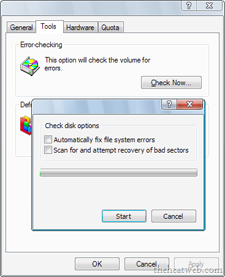
This will show you how to run Check Disk or chkdsk in Windows 7 to check a selected hard disk for file system errors and bad sectors on it.