Archive for the ‘TEChNoLoGY’ Category

Oracle : How to Show Time with Date in a Session ?

January 8th, 2013, posted in Oracle
Share

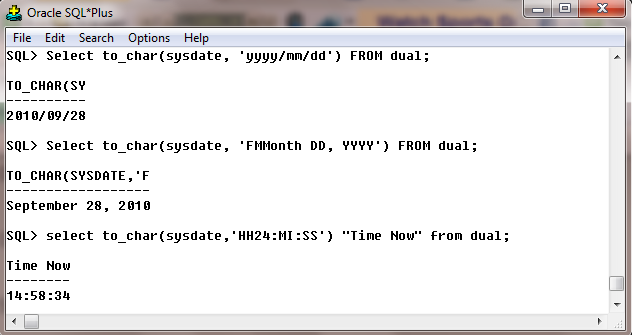
If your want to show time with date in your sql environment like, working with Sql Developer or Sql Plus or iSql Plus then change the value of NLS_DATE_FORMAT.


To change the value log in the sql environment and write:

alter session set NLS_DATE_FORMAT =’DD-MON-RRRR HH:MI:SS AM’;

then check the value…you are done..!!!

 Time with Date in a Session of Oracle

*********************************************************************************************************************
Note : Please not do make backups before using these queries and also confirm them yourself or by aother means as
 well.
*********************************************************************************************************************
Share

Oracle : How To show/ get First Date of the Month ?

January 7th, 2013, posted in Oracle
Share

If you want to show or if you need the month first day, last time I check there was no built-in function in Oracle. But you can get it easily by using some other single-row date function. Here bellow an example of this.

SELECT LAST_DAY(ADD_MONTHS(SYSDATE,-1))+1
FROM DUAL;

Run the above sql and you will get the first day of current month.

For last day of current month just use the LAST_DAY function like this LAST_DAY(SYSDATE)

Need more help ? Just Leave you comments…

*********************************************************************************************************************
Note : Please not do make backups before using these queries and also confirm them yourself or by aother means as
 well.
*********************************************************************************************************************
Share

Oracle : Display Current Date

January 5th, 2013, posted in Oracle
Share

Go to column properties then set initial value $date$ for user machine sysdate or use$dbdate$ for server machine sysdate.

If need sysdate with time then write $datetime$ or $dbdatetime$

*********************************************************************************************************************
Note : Please not do make backups before using these queries and also confirm them yourself or by aother means as
 well.
*********************************************************************************************************************
Share

Oracle : Install Oracle Developer Suite 10g on Windows 7

January 2nd, 2013, posted in Microsoft, Oracle
Share

Install Oracle Developer Suite 10g

When you try to install Oracle Developer Suite on your windows Vista or Windows 7 PC but it’s failing giving an error message

Checking Operating system version must be 5.0, 5.1 or 5.2….. Actual 6.0 or 6.1 – Failed

What will you do ??

Don’t worry, simply follow the following steps, and it will works.
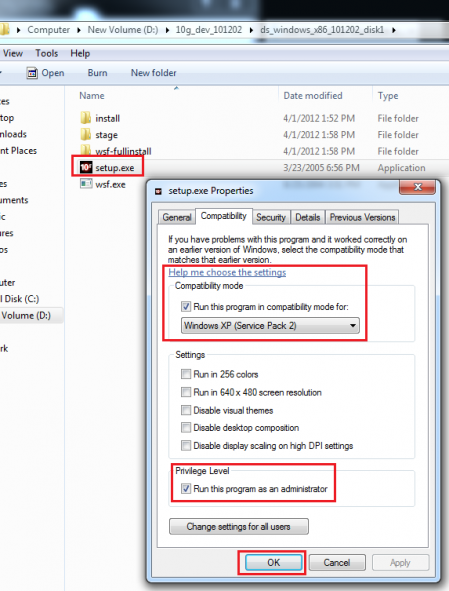
Before installation, right click on setup.exe then click properties, from the tab select compatibility and select windows xp service pac3/pac2 from compatibility mode settings.

Click okay !

And now try to install… it works

Oracle Developer 10g on windows 7

Share

Oracle : Oracle Database Connection Strings in PHP

December 29th, 2012, posted in Oracle
Share
It’s easy to get confused as to how to specificy your Oracle database connection string, and there’s a handy new feature in Oracle 10g that makes this a whole lot easier. So here’s a little rundown of the three ways to connect to Oracle databases. You can use the:
  • tnsnames.ora file
  • Full connection string
  • Easy connect string
These examples show how to specificy an Oracle connection string using the new OCI8 functions in PHP.


tnsnames.ora File

The tnsnames.ora file is a client side
file that maps an alias used by client programs to a database service. It is used to connect to a non-default database. Here you have to have an entry in the tnsnames.ora file, and
reference the alias to that entry in your connection code.
PHP code:
oci_connect($un, $pw, ‘MYDB’);
tnsnames.ora entry
MYDB = (DESCRIPTION =
(ADDRESS = (PROTOCOL = TCP)
(HOST = mymachine.mydomain)(PORT = 1521))
(CONNECT_DATA =
(SERVER = DEDICATED)
(SERVICE_NAME = MYDB.AU.ORACLE.COM)) )


Full Connection String

The full connection string does not require the use of a tnsnames.ora file.
You need to enter the full connection string when you connect to the database in your code.
PHP code:
oci_connect($un, $pw,
‘(DESCRIPTION=(ADDRESS=(PROTOCOL=TCP)(HOST=mymachine.mydomain)(PORT=1521))
(CONNECT_DATA=(SERVER=DEDICATED)
(SERVICE_NAME = MYDB)))’);


Easy Connect String

This is one Oracle 10g feature that I use daily. As I constantly connect to so many different databases in my day, this has saved me so much time as I don’t have to configure anything, just know the machine name and the database alias and I’m off.
The easy connect string does not require the use of a tnsnames.ora file, and is an abbreviated version of the full connection string. you must have the Oracle 10g client-side libraries to use the easy connect string.
PHP code:
oci_connect($un, $pw, ‘//mymachine.mydomain:port/MYDB’);
Share