Archive for January, 2013

Oracle : Built-in Data Types

January 14th, 2013, posted in Oracle
Share
The built-in data types is twenty types but these divide in to six group in oracle :
  1. Character Datatypes           : CHAR, NCHAR, NVARCHAR2, VARCHAR2
  2. Number Datatypes               : NUMBER, BINARY_FLOAT, BINARY_DOUBLE
  3. Datetime Datatypes             : DATE, TIMESTAMP, INTERVAL YEAR TO MONTH, INTERVAL DAY TO SECOND
  4. Row ID Datatypes                 : ROWID, UROWID
  5. Long and Row Datatypes   : LONG, LONG RAW, RAW
  6. Large Object Datatypes      : BLOB, CLOB, NCLOB, BFILE
Share

Oracle : What is tablespace and types of tablespace

January 13th, 2013, posted in Oracle Queries
Share
Tablespace :
The tablespace is a logical storage units and database divided into one or more logical storage units. The tablespace is not visible in the data file system.
Syntax :
Create tablespace “tablespace name”;
Example :
SQL> Create tablespace test datafile
2 ‘C:/ORACLE/PRODUCT/10.2.0/oradata/orcl/test.dbf’
3 size 10M;
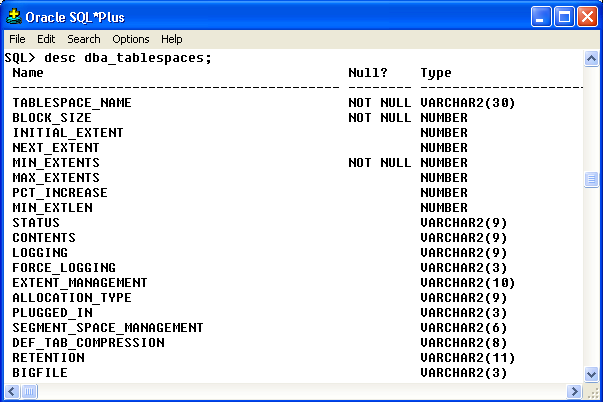
We can see all tablespace through this command:
SQL> desc dba_tablespaces;
Output :

oracle Create tablespace


SQL> Select Tablespace_Name,Contents From dba_tablespaces;

Output :
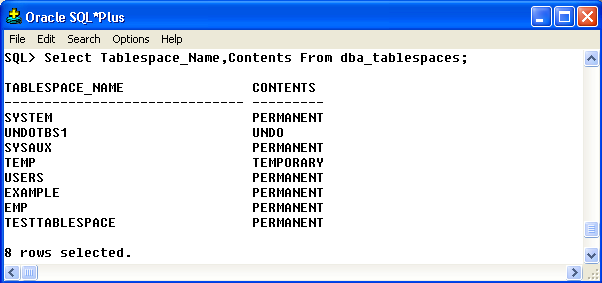
oracle Create tablespace

Types of tablespace in Oracle:

  • System Tablespace
  • Sysaux Tablespace
  • undo Tablespace
  • Temporary Tablespace
  • User/Normal Tablespace
  • Example Tablespace

1. System Tablespace:
The system tablespace is create by default. The system tablespace is a permanent tablespace. The system tablespace owner is sys and within all data dictionary. The all data dictionary tables is store in the datafiles. The system tablespace is always online when the database is open.

2. Sysaux Tablespace:
The sysaux tablespace is a permanent tablespace. The sysaux tablespace is a new feature of the Oracle 10g. The sysaux tablespace is a system tablespace and auxiliary tablespace. The sysaux tablespace is a optional database components.

3. Undo Tablespace:
The undo tablespace is show always from undotbs1 name in the database. The undo tablespace is contains the undo data after any updating, deleting of database object. The undo tablespace is used for rolling back transaction.

Create Undo Tablespace:

SQL> Create undo tablespace undo01 datafile

2 ‘C:ORACLEPRODUCT10.2.0ORADATAORCLundo01.dbf’

3 size 100M;

4. Temporary Tablespace:
The temporary tablespace show always from temp name in the database. The temporary tablespace is store in tempfile. All temporary operation are perform in temporary tables. The temporary tablespace is used for the shorting temporary tables.

For example:

SQL> Select * from employee order by salary desc;

Create Temporary Tablespace:

SQL> Create temporary tablespace temp3 tempfile

2 ‘C:ORACLEPRODUCT10.2.0ORADATAORCLTEMP03.dbf’

3 size 10M;

5. User/Normal Tablespace:
The user and normal tablespace is a permanent tablespace. All user tablespace information store/show in the user tablespace.

Create User Tablespace:

SQL> Create user tablespace user02 userfile

2 ‘C:ORACLEPRODUCT10.2.0ORADATAORCLuser02.dbf’

3 size 10M;

6. Example Tablespace:
We will create database through the Database Configuration Assistant when we will select sample schemas option. This sample schemas is create a example tablespace. The sample schemas provide a comman platform for examples.

*********************************************************************************************************************
Note : Please not do make backups before using these queries and also confirm them yourself or by aother means as
 well.

*********************************************************************************************************************


Share

Oracle : Date and Time Formats with example

January 12th, 2013, posted in Oracle Queries
Share
In this blog, we will learn Date and Time Formants with example in Oracle.

The date and time formants like the TO_CHAR and TO_DATE function in Oracle. The date and time formants is very important and useful in Oracle. From Oracle version 9 onwards it has became possible to represent Oracle date – time points in the form of time and time intervals while using ANSI SQL data types likes interval and timestamp.

Oracle Date Formats used by TO_CHAR or TO_DATE functions :


Oracle functions TO_CHAR and TO_DATE returns a formatted Oracle date or Oracle time string. The TO_DATE function converts a string to a date.
TRUNC : Using TRUNC in Oracle date formats by TO_CHAR or TO_DATE functions returns 1st day of the period.
ROUND : Using ROUND in Oracle date formats by TO_CHAR or TO_DATE functions rounds up the values at mid-year or mid-month (July 1 or 16th day).

Syntax :
TO_CHAR(Expression, [‘Format’], [Nls_lang])
TO_DATE(Expression, [ Format], [ nls_lang ] )

Keyword :

TO_CHAR                       : The Date, Number or Expression to convert
Format                               : Format To USE
Nls_lang                           : The international language to use.
TO_CHAR Function   : The TO_CHAR function converts a number or date to a string. The interval value of DATE,TIMESTAMP,TIMESTAMP WITH TIME ZONE, OR TIMESTAMP WITH LOCAL TIME ZONE etc.

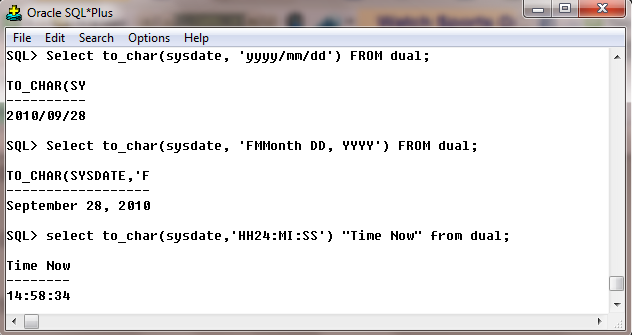
Example : In this example, we will use TO_CHAR with SYSDATE.  By default DATE value is returned by the function “SYSDATE” as current date & current time of the system.

SQL> Select To_char(sysdate, ‘yyyy/mm/dd’) FROM dual;
SQL> Select To_char(sysdate, ‘FMMonth DD, YYYY’) FROM dual;
SQL> select To_char(sysdate,’HH24:MI:SS’) “Time Now” from dual;

Output :

Oracle Date time session

TO_DATE Function : TO_DATE converts char of CHAR, VARCHAR2,NCHAR OR NVARCHAR2 datatype to a value of DATE datatype. The fmt is a datetime model format specifying the format of char.

Example :

SQL> SELECT
2 To_char(add_months(to_date('28-SEP-2010', 'DD-MON-YYYY'),1 * 12),'DD-MON-YYYY') y2000,
3 To_char(add_months(to_date('28-SEP-2010', 'DD-MON-YYYY'),2 * 12),'DD-MON-YYYY') y2003,
4 To_char(add_months(to_date('28-SEP-2010', 'DD-MON-YYYY'),7 * 12),'DD-MON-YYYY') y2007,
5 To_char(add_months(to_date('28-SEP-2010', 'DD-MON-YYYY'),52 * 12),'DD-MON-YYYY') y2025
6 FROM
7 DUAL;

Output :

Time and date session oracle example

Date and Time Formats in Oracle :


ORACLE DATE FORMATS FOR CENTURIES

CC:

Outputs Century

SCC:

Outputs Century BC prefixed with –

ORACLE DATE FORMATS FOR YEARS

YYYY:

Outputs Year 1956

SYYY:

Outputs Year BC prefixed with –

IYYY:

Outputs ISO Year 1956

YY :

Outputs Year 56

RR:

Outputs Year 56 rollover for Y2K compatibility

RRRR:

Outputs Year rollover by (accepting 2 digits & returning 4 digits

YEAR:

Outputs Year spelled out

SYEAR:

Outputs Year spelled out BC prefixed with –

BC :

Outputs AD/BC Indicator

ORACLE DATE FORMATS FOR MONTHS

Q:

Outputs Quarter For example Jan-Mar=1, Apr-Jun=2, Jul-Sep=3, Oct-Dec=4

MM:

Outputs Month of year For example 01, 02, 03, 04, …12

MON:

Outputs Month of the year in short. For example JAN, FEB, MAR…

MONTH:

Outputs Month of the year in full. For example January, February, …, December

FMMONTH:

Outputs Month of the year in full. For example January, February, …, December

RM:

Outputs Roman Month of the year. For example I, II, III, IV, …XII

ORACLE DATE FORMATS FOR WEEKS

WW:

Outputs Week of the year. For example 1-52

W:

Outputs Week of the month. For example 1-5

IW:

Outputs ISO std week of the year

ORACLE DATE FORMATS FOR DAYS

DDD:

Outputs Day of year. For example 1-366

DD:

Outputs Day of month. For example 1-31

D:

Outputs Day of week. For example 1-7

DAY:

Outputs Day of week in full. For example Monday, Tuesday,…,Sunday

FMDAY:

Outputs Day of week in full. For example Monday, Tuesday,…,Sunday

DY:

Outputs Day of week In short. For example MON…SUN

DDTH:

Outputs ordinal day For example 7TH

DDSPTH:

Outputs spelled out ordinal For example SEVENTH

J:

Outputs Julian Day (days since 31/12/4713)

ORACLE DATE FORMATS FOR HOURS

HH:

Outputs Hours of day For example 1-12

HH12:

Outputs Hours of day For example 1-12

HH24:

Outputs Hours of day For example 1-24

SPHH:

Outputs SEVEN

AM:

Outputs pm or am of hour

PM:

Outputs pm or am of hour

A.M.:

Outputs p.m. or a.m. of hour

P.M.:

Outputs p.m. or a.m. or hour

TH :

Convert and outputs to the ordinal format. For example 1 is converted to 1st

ORACLE DATE FORMATS FOR MINUTES

MI:

Outputs Minutes For example 0-59

SS:

Outputs Seconds For example 0-59

SSSSS:

Outputs Seconds past midnight For example 0-86399

ORACLE DATE FORMATS FOR TIME

TZD:

Outputs abbreviated time zone name. For example PST

TZH:

Outputs Time zone hour displacement

TZM:

Outputs Time zone minute displacement

TZR:

Outputs Time zone region


*********************************************************************************************************************
Note : Please not do make backups before using these queries and also confirm them yourself or by aother means as
 well.
*********************************************************************************************************************
 

Share

#ShiaGenocide #Terroristattack #Targetkillings #shiakilling #Quetta #Karachi #HumanRightsViolation #Pakistan #Islam

January 12th, 2013, posted in Islam, MESSAGEs, PAKiSTAN, UNiVERSE
Share

#ShiaGenocide #Terroristattack #Targetkillings #shiakilling #Quetta #Karachi #HumanRightsViolation #Pakistan #Islam

#ShiaGenocide #Terroristattack #Targetkillings #shiakilling #Quetta #Karachi #HumanRightsViolation #Pakistan #Islam


Share

Be Kind To You Wife

January 11th, 2013, posted in Islamic Teachings, Saying Of Holy Prophet ( P.B.U.H)
Share

Be Kind To You Wife,Holy Prophet (P.B.U.H)

Share