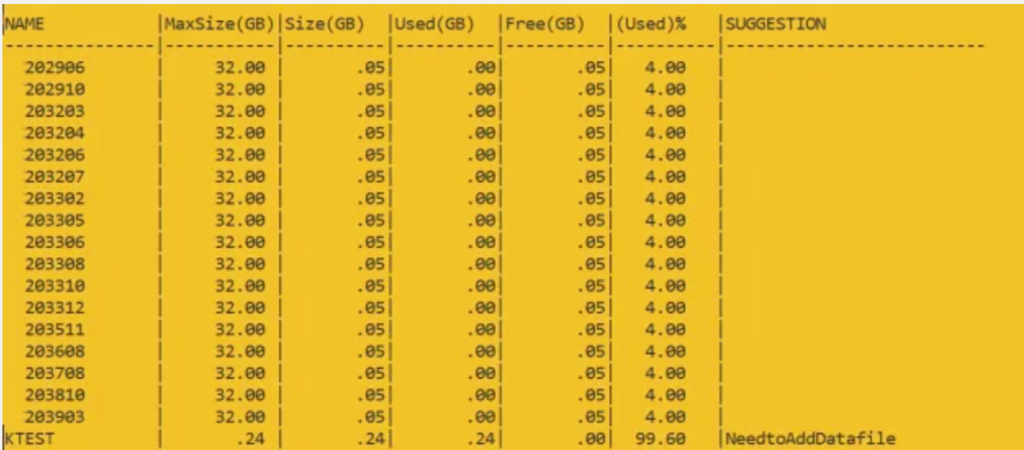
To see how full tablespaces are in an Oracle database, you might need to add a datafile. If the used size of a tablespace is more than 80% of its maximum size, consider adding a datafile. The script recommends adding a datafile when the tablespace is 80% full.
Query return the result as :
Query to suggest which datafiles to add if they are 75% full.
Explain the following query columns :
Name
Name of Tablespace
Maxsize(GB)
If autoextensible of datafile is on then it will pick sum of maxsize otherwise sum of bytes column.
Used(GB)
sum of bytes column of all datafiles
Free(GB)
space free in datafiles
USED%
check with used(GB) and free(GB) column — no n
Suggestion
Give suggesion on tablespace which space is utilized above 80%
Script to check tablespace usage and suggest adding files to the database.
set colsep |
set linesize 200 pages 100 trimspool on numwidth 14
col name format a15
col owner format a15
col "Used(GB)" format a10
col "Free(GB)" format a10
col "(Used)%" format a10
col "Size(GB)" format a10
col "MaxSize(GB)" format a11
col "(Used)%" format a10
col Suggestion format a26

select Name,"MaxSize(GB)","Size(GB)","Used(GB)","Free(GB)","(Used)%",
Case when AcctoMaxSizeUsed >= 80 then 'NeedtoAddDatafile' else '' end as Suggestion
from
(
SELECT d.status "Status", d.tablespace_name as Name,
TO_CHAR(NVL(a.maxbytes / 1024 / 1024 /1024, 0),'999999.90') "MaxSize(GB)",
TO_CHAR(NVL(a.bytes / 1024 / 1024 /1024, 0),'999999.90') "Size(GB)",
TO_CHAR(NVL(a.bytes - NVL(f.bytes, 0), 0)/1024/1024 /1024,'999999.90') "Used(GB)",
TO_CHAR(NVL(f.bytes / 1024 / 1024 /1024, 0),'999999.90') "Free(GB)",
TO_CHAR(NVL((a.bytes - NVL(f.bytes, 0)) / a.bytes * 100, 0), '990.00') "(Used)%",
TO_CHAR(NVL( (NVL(a.bytes, 0)) / a.maxbytes * 100, 0), '990.00') as AcctoMaxSizeUsed
FROM sys.dba_tablespaces d,
(select tablespace_name, sum(bytes) bytes, SUM( CASE WHEN autoextensible = 'YES' THEN maxbytes ELSE bytes END ) as maxbytes from dba_data_files group by tablespace_name) a,
(select tablespace_name, sum(bytes) bytes from dba_free_space group by tablespace_name) f WHERE
d.tablespace_name = a.tablespace_name(+) AND d.tablespace_name = f.tablespace_name(+) AND NOT
(d.extent_management like 'LOCAL' AND d.contents like 'TEMPORARY')
UNION ALL
SELECT d.status
"Status", d.tablespace_name as Name,
TO_CHAR(NVL(a.maxbytes / 1024 / 1024 /1024, 0),'999999.90') "MaxSize(GB)",
TO_CHAR(NVL(a.bytes / 1024 / 1024 /1024, 0),'999999.90') "Size(GB)",
TO_CHAR(NVL(t.bytes,0)/1024/1024 /1024,'999999.90') "Used(GB)",
TO_CHAR(NVL((a.bytes -NVL(t.bytes, 0)) / 1024 / 1024 /1024, 0),'999999.90') "Free(GB)",
TO_CHAR(NVL(t.bytes / a.bytes * 100, 0), '990.00') "(Used)%" ,
TO_CHAR(NVL( NVL(a.bytes, 0) / a.maxbytes * 100, 0), '990.00') as AcctoMaxSizeUsed
FROM sys.dba_tablespaces d,
(select tablespace_name, sum(bytes) bytes,SUM( CASE WHEN autoextensible = 'YES' THEN maxbytes ELSE bytes END ) as maxbytes from dba_temp_files group by tablespace_name) a,
(select tablespace_name, sum(bytes_cached) bytes from v$temp_extent_pool group by tablespace_name) t
WHERE d.tablespace_name = a.tablespace_name(+) AND d.tablespace_name = t.tablespace_name(+) AND
d.extent_management like 'LOCAL' AND d.contents like 'TEMPORARY'
) k order by suggestion
After getting the recommendation of adding datafile in tablespace.
Check the datafiles present in the tablespace :
select file_name from dba_Data_Files where tablespace_name = 'TEST';
Or
set line 999 pages 999 col FILE_NAME format a50 col tablespace_name format a15 Select tablespace_name, file_name, autoextensible, bytes/1024/1024/1024 "USEDSPACE GB", maxbytes/1024/1024/1024 "MAXSIZE GB" from dba_data_files
If you need to add datafiles, use the following commands:
alter tablespace USERS add datafile 'D:\ORACLE11204\ORADATA\PEGA\USERS02.DBF' size 1G autoextend on next 500M maxsize 16G;