Archive for the ‘Solaris’ Category

oc4j_socket_recvfull Timed Out

December 20th, 2017, posted in Oracle, Solaris
Share
[Wed Nov 1 11:37:28 2016][warn] [client 10.10.1.61] oc4j_socket_recvfull timed out
[Wed Nov 1 11:37:28 2016] [error] [client 10.10.1.61] [ecid: 1509525146:10.10.7.85:1275:0:45,0] mod_oc4j:
request to OC4J bi.erp.com:21500 failed: recv failed (errno=4)


Troubleshooting MOD_OC4J_0080 MOD_OC4J_0058 MOD_OC4J_0035 MOD_OC4J_0121 MOD_OC4J_0013 Errors In the HTTP Server error_log file [ID 329456.1]

The MOD_OC4J* errors basically convey that the HTTP Server (through mod_oc4j) is unable to communicate with the OC4J instance in question. Some of the possible causes are :

  • 1. Internet Explorer (KeepAlive) Bug
  • 2. Firewalls
  • 3. Connection timeouts between HTTP Server/mod_oc4j & OC4J
  • 4. OC4J instance running short on memory
  • 5. OC4J JVMs loaded
  • 6. Application(s) blocking up OC4J

Connection timeouts between HTTP Server/mod_oc4j & OC4J

In $ORACLE_HOME/Apache/Apache/conf/httpd.conf, increase the Timeout directive value to, say, 600 seconds. (This should be smaller than the Firewall timeout setting, if any)

In $ORACLE_HOME/Apache/Apache/conf/mod_oc4j.conf below the tag add the following:

Oc4jCacheSize 0

Oc4jConnTimeout 600 (This is again in seconds &, again, should be smaller than the Firewall timeout setting, if any)

Update the configuration as follows:

$ORACLE_HOME/dcm/bin/dcmctl updateconfig -ct ohs
$ORACLE_HOME/opmn/bin/opmnctl restartproc process-type=HTTP_Server

Share

Out Of Memory Not Enough Space Solaris 11

December 17th, 2017, posted in Oracle, Solaris
Share
SQL> startup mount ;Out Of Memory Not Enough Space Solaris 11,Out Of Memory , Not Enough Space Solaris 11,Solaris 11,Solaris 10,Oracle 12c on Solaris 11.3,Oracle 12c,Solaris 11.3,
ORA-27102: out of memory
SVR4 Error: 12: Not enough space
Additional information: 1671
Additional information: 16106127360
Additional information: 64424509440


The Above error appeared When trying to start Oracle 12c on Solaris 11.3, this is published bug
Bug:20635316 – 12C DATABASE INSTANCE STARTUP FAILS WITH ORA-27102: OUT OF MEMORY
Solaris using something called OSM , Optimized Shared memory You can know more about it here 


To avoid this error as workaround just set the parameter
_use_osm=FALSE
Share

FRM-92102 : A Network Error Has Occured

September 19th, 2017, posted in Oracle, Solaris
Share

FRM-92102 is Gerneric Error maybe occur for more than one reasons :

1-Network 
2-Proxy
3-http
4-Session Time 


But today i will discuss the problem On oracle Application server 10g .
Description for the problem like the following when you try to connect on your deploy application On OAS 10g it’s gives the above error from 1-5 minutes.

I will give you more than one solution maybe it will be related to the above problem and you try them separately to see which one will be valid for you : 

1-Netowrk Parameters :

You will find it $ORACLE_HOME/forms/server/default.env
Just increase the value .

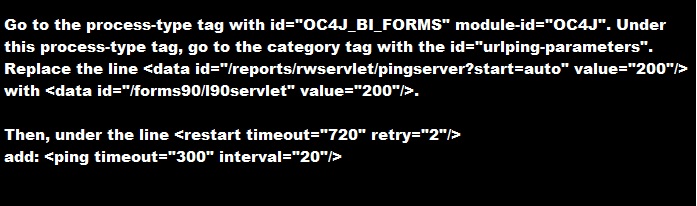
2-do the following change in opmn.xml (under $ORACLE_HOME/opmn/conf/):


3-SET Inbound_connection_timeout In sqlnet.ora to ZERO .

Sqlnet.Inbound_connection_timeout = 0

Note : if your can’t find this parameter in the SQLNET.ORA you cant add it .

5- Change the following $ORACLE_HOME/opmn/conf/opmn.xml


Hope this will work 

Share

Transferring The DBC File From The Application Server

June 6th, 2017, posted in Oracle, Solaris
Share

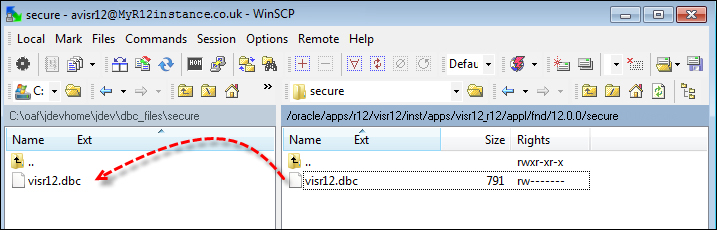
We will now transfer the database connection file (DBC) from the application server of our EBS environment. We will transfer this to our local directory so that we can create database connections for JDeveloper so that we can run our OAF pages locally during development.


How to do it :

To transfer the .dbc file, perform the following tasks:

  1. Open WinSCP or FileZilla etc and connect to the application server.
  2. FTP the .dbc file to your local PC from the $INST_TOP/appl/fnd/12.0.0.0/secure dor you can say its path is something like this /u99/appprod52/inst32/apps/PROD_DB/appl/fnd/12.0.0/secure  directory on the application server to the jdevhome\jdev\dbc_files\secure directory as shown in the following screenshot:


    Transferring The DBC File From The Application Server,Oracle DBA,DBA,Oracle Apps,Oracle DBC
Share

Unix for DBA

May 24th, 2017, posted in Solaris
Share

Below are some of the basic unix commands which will be useful for Oracle DBA.

How to kill all similar processes with single command (in this case opmn)

ps -ef | grep opmn |grep -v grep | awk ‘{print $2}’ |xargs -i kill -9 {}

Locating Files under a particular directory

find . -print |grep -i test.sql

Using AWK in UNIX

To remove a specific column of output from a UNIX command – for example to determine the UNIX process Ids for all Oracle processes on server (second column)

ps -ef |grep -i oracle |awk ‘{ print $2 }’

Changing the standard prompt for Oracle Users

Edit the .profile for the oracle user

PS1=”`hostname`*$ORACLE_SID:$PWD>”

Display top 10 CPU consumers using the ps command

/usr/ucb/ps auxgw | head -11

Show number of active Oracle dedicated connection users for a particular ORACLE_SID

ps -ef | grep $ORACLE_SID|grep -v grep|grep -v ora_|wc -l

Display the number of CPU’s in Solaris

psrinfo -v | grep “Status of processor”|wc -l

Display the number of CPU’s in AIX

lsdev -C | grep Process|wc -l

Display RAM Memory size on Solaris

prtconf |grep -i mem

Display RAM memory size on AIX

First determine name of memory device

lsdev -C |grep mem

then assuming the name of the memory device is ‘mem0’

lsattr -El mem0

Swap space allocation and usage

Solaris : swap -s or swap -l

Aix : lsps -a

Total number of semaphores held by all instances on server

ipcs -as | awk ‘{sum += $9} END {print sum}’

View allocated RAM memory segments

ipcs -pmb

Manually deallocate shared memeory segments

ipcrm -m ‘<ID>’

Show mount points for a disk in AIX

lspv -l hdisk13

Display amount of occupied space (in KB) for a file or collection of files in a directory or sub-directory

du -ks * | sort -n| tail

Display total file space in a directory

du -ks .

Cleanup any unwanted trace files more than seven days old

find . *.trc -mtime +7 -exec rm {} \;

Locate Oracle files that contain certain strings

find . -print | xargs grep rollback

Locate recently created UNIX files (in the past one day)

find . -mtime -1 -print

Finding large files on the server (more than 100MB in size)

find . -size +102400 -print

Crontab :

To submit a task every Tuesday (day 2) at 2:45PM

45 14 2 * * /opt/oracle/scripts/tr_listener.sh > /dev/null 2>&1

To submit a task to run every 15 minutes on weekdays (days 1-5)

15,30,45 * 1-5 * * /opt/oracle/scripts/tr_listener.sh > /dev/null 2>&1

To submit a task to run every hour at 15 minutes past the hour on weekends (days 6 and 0)

15 * 0,6 * * opt/oracle/scripts/tr_listener.sh > /dev/null 2>&1

Share