
Archive for the ‘TEChNoLoGY’ Category

ORA-38760: This database instance failed to turn on flashback database

October 24th, 2021, posted in Oracle Queries
Share
Error :

Starting recover at 24-APR-18
using target database control file instead of recovery catalog
allocated channel: ORA_DISK_1
channel ORA_DISK_1: SID=1072 device type=DISK

starting media recovery
media recovery failed
RMAN-00571: ===========================================================
RMAN-00569: =============== ERROR MESSAGE STACK FOLLOWS ===============
RMAN-00571: ===========================================================
RMAN-03002: failure of recover command at 04/24/2018 14:54:07
ORA-00283: recovery session canceled due to errors
RMAN-11003: failure during parse/execution of SQL statement: alter database recover if needed
start until cancel using backup controlfile
ORA-00283: recovery session canceled due to errors
ORA-38760: This database instance failed to turn on flashback database

Cause :

Database was in flashback mode.

Solution :

trun off flashback mode and rerun recovery.

SQL> alter database flashback off;
Database altered.

SQL>

RMAN> run
{
set until sequence 576;
recover database;
}2> 3> 4> 5>

executing command: SET until clause

Starting recover at 24-APR-18
using target database control file instead of recovery catalog
allocated channel: ORA_DISK_1
channel ORA_DISK_1: SID=1072 device type=DISK

starting media recovery

channel ORA_DISK_1: starting archived log restore to default destination
channel ORA_DISK_1: restoring archived log
archived log thread=1 sequence=573
channel ORA_DISK_1: restoring archived log
archived log thread=1 sequence=574
channel ORA_DISK_1: restoring archived log
archived log thread=1 sequence=575
channel ORA_DISK_1: reading from backup piece /d02/dbbackup/RMAN_backup1/RMAN_BKPMon_23Apr18/ar_974238549_2165_1
channel ORA_DISK_1: errors found reading piece handle=/d02/dbbackup/RMAN_backup1/RMAN_BKPMon_23Apr18/ar_974238549_2165_1
channel ORA_DISK_1: failover to piece handle=/d01/oracln/backup/RMAN_BKPMon_23Apr18/ar_974238549_2165_1 tag=TAG20180423T211704
channel ORA_DISK_1: restored backup piece 1
channel ORA_DISK_1: restore complete, elapsed time: 00:02:25
archived log file name=/d01/oracln/data/archive1_573_970862557.dbf thread=1 sequence=573
archived log file name=/d01/oracln/data/archive1_574_970862557.dbf thread=1 sequence=574
archived log file name=/d01/oracln/data/archive1_575_970862557.dbf thread=1 sequence=575
media recovery complete, elapsed time: 00:00:27
Finished recover at 24-APR-18

RMAN>
Recovery Manager complete.
Share

REMOVE A FILE STARTING WITH A Dash “-“

September 26th, 2021, posted in Solaris
Share

$ ls |grep -i file
–file1

$ rm –file1
rm: illegal option — file1
usage: rm [-fiRr] file …

$ rm “–file1”
rm: illegal option — file1
usage: rm [-fiRr] file …

Solution:
$ rm ./–file1
$ ls|grep -i file

Share

ENABLE HTTPS ON ORACLE M SERIES SERVERS(XSCF)

September 4th, 2021, posted in Solaris
Share

If you have not enabled https on your M series servers, this is how you enable it.


Description From Oracle :
Hypertext Transfer Protocol (HTTP) over an authenticated/encrypted connection allows you to use the XSCF web browser securely. This is called the HTTPS service. Authentication is provided with a certificate authority and private keys. To use the HTTPS service, you must enable it, and provide an optional port number. The default port is 443. To enable HTTPS service, use the sethttps command”


1) Login to your xscf of the server through ssh
Assuming you have already configured network on xscf and enable ssh. If not, you can login through console/console server, configure network interface on xscf and then you can proceed with further steps.


2) Once you are in xscf, check the status of https
XSCF> showhttps
HTTPS status: disabled


3) Generate a self signed certificate.
XSCF> sethttps -c selfsign US California Irvine mycompany myemail@myemail.com
CA key and CA cert already exist. Do you still wish to update? [y|n] :y
Enter passphrase:
Verifying – Enter passphrase:


4) Check the HTTPS Status
XSCF> showhttps
HTTPS status: disabled
Server key: installed in Jul 16 12:46:20 MST 2013
CA key: installed in Jul 16 12:46:18 MST 2013
CA cert: installed in Jul 16 12:46:18 MST 2013
CSR:
—–BEGIN CERTIFICATE REQUEST—–
MIIB0zCCATwCAQAwgZIxCzAJBgNVBAYTAlVTMRMwEQYDVQQIEwpDYWxpZm9ybmlh
MQ8wDQYDVQQHEwZDdWx2ZXIxDTALBgNVBAoTBENpdHkxDDAKBgNVBAsTA1NQRTER
MA8GA1UEAxMIRUlTLVVOSVgxLTArBgkqhkiG9w0BCQEWHmVpcy11bml4LXNlcnZp
Y2VzQHNwZS5zb255LmNvbTCBnzANBgkqhkiG9w0BAQEFAAOBjQAwgYkCgYEA54QN
BSBfflQBtIgL3LqRKTqHixMP/TTmeMANy8yz723hcLDBTT9EarKkDb2IVqHE
ENb5mp8N7hJpGDzUPhn3XdD0+XoP2iaFeqQtihMqCob/bC21Me6gQDIdZoRK4sRj
FJ0ODjdB9sDj4KFKUkE4TIh3Jimz8wHn4VXbqGECAwEAAaAAMA0GCSqGSIb3DQEB
BAUAA4GBALMsMV5NugRnZwJfGiQbB6KNILMbCHg8xrF9IarFopt7uLDOxUoKvjQb
NDoGF+/tjxrADEZqSAmWeqiVZyI/0e2lU58si4TFZwEtjv6wopJVRkyg9XLfNe7
FB5DkBOI2Rihn6+SP0C3c/OOWNKo5BKekbeXennuWMJJbHDvRW6U
—–END CERTIFICATE REQUEST—–
It will be still disabled, we haven’t enabled the https yet.


5) Now we shall enable https:
XSCF> sethttps -c enable
Continue? [y|n] :y
Please reset the XSCF by rebootxscf to apply the https settings.


6) Reset XSCF
XSCF> rebootxscf
The XSCF will be reset. Continue? [y|n] :y
execute S10ioxoffXSCF>   —  complete
Jul 16 12:48:35 myhost XSCF[104]: XSCF shutdown sequence start
execute K000end  —  complete
execute K100end  —  complete
execute K101end  —  complete
<Lines Omitted>


7) Once the XSCF is up check the https status, now it will be enabled.
XSCF> showhttps
HTTPS status: enabled
Server key: installed in Jul 16 12:52:04 MST 2013
CA key: installed in Jul 16 12:52:04 MST 2013
CA cert: installed in Jul 16 12:52:04 MST 2013
CSR:
—–BEGIN CERTIFICATE REQUEST—–
MIIB0zCCATwCAQAwgZIxCzAJBgNVBAYTAlVTMRMwEQYDVQQIEwpDYWxpZm9ybmlh
MQ8wDQYDVQQHEwZDdWx2ZXIxDTALBgNVBAoTBENpdHkxDDAKBgNVBAsTA1NQRTER
MA8GA1UEAxMIRUlTLVVOSVgxLTArBgkqhkiG9w0BCQEWHmVpcy11bml4LXNlcnZp
Y2VzQHNwZS5zb255LmNvbTCBnzANBgkqhkiG9w0BAQEFAAOBjQAwgYkCgYEA54QN
BSBfflQBtIgL3LqRKTqHixMP/TTmeMANy8yz723hcLDBTT9EarKkDb2IVqHE
ENb5mp8N7hJpGDzUPhn3XdD0+XoP2iaFeqQtihMqCob/bC21Me6gQDIdZoRK4sRj
FJ0ODjdB9sDj4KFKUkE4TIh3Jimz8wHn4VXbqGECAwEAAaAAMA0GCSqGSIb3DQEB
BAUAA4GBALMsMV5NugRnZwJfGiQbB6KNILMbCHg8xrF9IarFopt7uLDOxUoKvjQb
NDoGF+/tjxrADEZqSAmWeqiVZyI/0e2lU58si4TFZwEtjv6wopJVRkyg9XLfNe7
FB5DkBOI2Rihn6+SP0C3c/OOWNKo5BKekbeXennuWMJJbHDvRW6U
—–END CERTIFICATE REQUEST—–


8) Login to XSCF from your web browser and confirm everything is operational.
https://<your_xscf_hostname_or_ip>


REFERENCES :
Share

Output File Was Found But Is Zero Sized – Deleted

August 18th, 2021, posted in Concurrent Request, Oracle EBS Application
Share

Got a call from our developer that request are completing in warning status.
On investigation i found blow errors in OPP logs.

Error

[092618_131735369][][EXCEPTION] [DEBUG]  [sun.cpu.isalist]:[]
[9/26/18 1:17:35 PM] [1648558:RT19832034] Output file was found but is zero sized – Deleted
[9/26/18 1:17:35 PM] [UNEXPECTED] [1648558:RT19832034] java.io.FileNotFoundException: /d01/Prod/temp_xml/xdo6QGDTbJCca092618_1317356982.fo (Permission denied)
        at java.io.FileOutputStream.open(Native Method)
        at java.io.FileOutputStream.<init>(FileOutputStream.java:194)
        at java.io.FileOutputStream.<init>(FileOutputStream.java:145)
        at oracle.apps.xdo.common.tmp.TmpFile.createTmpFileJDK118(TmpFile.java:146)
        at oracle.apps.xdo.common.tmp.TmpFile.createTmpFile(TmpFile.java:113)
        at oracle.apps.xdo.template.fo.util.FOUtility.generateFO(FOUtility.java:987)
        at oracle.apps.xdo.template.fo.util.FOUtility.generateFO(FOUtility.java:212)
        at oracle.apps.xdo.template.FOProcessor.createFO(FOProcessor.java:1647)
        at oracle.apps.xdo.template.FOProcessor.generate(FOProcessor.java:941)
        at oracle.apps.xdo.oa.schema.server.TemplateHelper.runProcessTemplate(TemplateHelper.java:5936)
        at oracle.apps.xdo.oa.schema.server.TemplateHelper.processTemplate(TemplateHelper.java:3459)
        at oracle.apps.xdo.oa.schema.server.TemplateHelper.processTemplate(TemplateHelper.java:3548)
        at oracle.apps.fnd.cp.opp.XMLPublisherProcessor.process(XMLPublisherProcessor.java:302)
        at oracle.apps.fnd.cp.opp.OPPRequestThread.run(OPPRequestThread.java:176)

[9/26/18 1:17:35 PM] [1648558:RT19832034] Completed post-processing actions for request 19832034.

Cause 

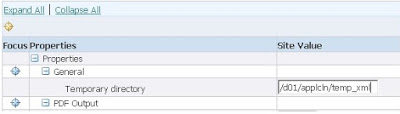
The Temporary directory for XML Publisher has not been modified after making the clone so it was pointing to non existing location and getting error out.

Solution

1. Create a new Temporary Directory on OS level for the cloned environment.
2. Make sure that the application owner (APPLMGR) has Read and Write permission this directory.
3. Setup this new directory for XML Publisher via : XML Publisher Administrator responsibility: Properties -> General -> Temporary Directory.
3. Restart the Server.
4. Test again with a XML Publisher Report.


XML Publisher Report

Share