Archive for the ‘TEChNoLoGY’ Category

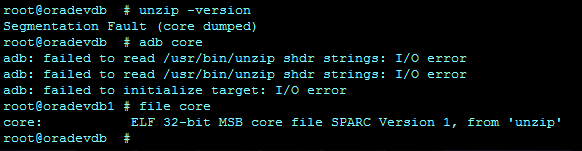
Segmentation Fault (core dumped)

September 4th, 2018, posted in Solaris
Share

Segmentation Fault or Segmentation Fault (core dumped)

Cause

Segmentation faults usually come from a programming error. This message is usually accompanied by a core dump, except on read-only file systems.

Action

To see which program produced a core(4) file, run either the file(1) command or the adb(1) command. The following examples show the output of the file(1) and adb(1) commands on a core file from the dtmail program.

$ file core
core: ELF 32-bit MSB core file SPARC Version 1, from `dtmail'
$ adb core
core file = core -- program `dtmail'
SIGSEGV  11: segmentation violation
^D      (use Control-d to quit the adb rogram)


Segmentation Fault (core dumped) or Segmentation Fault,Segmentation Fault (core dumped), Segmentation Fault,core dumped,solaris,solaris 10,Solaris Common Messages and Troubleshooting Guide,Solaris Common Messages,Troubleshooting Guide,Solaris Troubleshooting,

Segmentation Fault (core dumped) or Segmentation Fault,Segmentation Fault (core dumped), Segmentation Fault,core dumped,solaris,solaris 10,Solaris Common Messages and Troubleshooting Guide,Solaris Common Messages,Troubleshooting Guide,Solaris Troubleshooting ,

Share

RC-20200: Fatal: Could not find Unzip. At this time only Native UnZip 5.X is supported

September 2nd, 2018, posted in Oracle, Solaris
Share

[orastg@eboso bin]$ perl adcfgclone.pl dbconfig /clone/oracle/product/11.2.0/appsutil/CLONE_ebso.xml

                      Copyright (c) 2002 Oracle Corporation

                        Redwood Shores, California, USA

                         Oracle Applications Rapid Clone

                                  Version 12.0.0

                       adcfgclone Version 120.31.12010000.8

 Enter the APPS password :

 Running Rapid Clone with command:

perl /clone/oracle/product/11.2.0/appsutil/clone/bin/adclone.pl java=/clone/oracle/product/11.2.0/appsutil/clone/bin/../jre mode=apply stage=/clone/oracle/product/11.2.0/appsutil/clone component=dbconfig method=CUSTOM dbctxtg=/clone/oracle/product/11.2.0/appsutil/CLONE_ebso.xml showProgress contextValidated=false

Running:

perl /clone/oracle/product/11.2.0/appsutil/clone/bin/adclone.pl java=/clone/oracle/product/11.2.0/appsutil/clone/bin/../jre mode=apply stage=/clone/oracle/product/11.2.0/appsutil/clone component=dbconfig method=CUSTOM dbctxtg=/clone/oracle/product/11.2.0/appsutil/CLONE_ebso.xml showProgress contextValidated=false

APPS Password :

 Beginning dbconfig Apply – Fri May 17 01:37:14 2013

 /clone/oracle/product/11.2.0/appsutil/clone/bin/../jre/bin/java -Xmx600M -DCONTEXT_VALIDATED=false  -Doracle.installer.oui_loc=/clone/oracle/product/11.2.0/oui -classpath /clone/oracle/product/11.2.0/appsutil/clone/jlib/xmlparserv2.jar:/clone/oracle/product/11.2.0/appsutil/clone/jlib/ojdbc5.jar:/clone/oracle/product/11.2.0/appsutil/clone/jlib/java:/clone/oracle/product/11.2.0/appsutil/clone/jlib/oui/OraInstaller.jar:/clone/oracle/product/11.2.0/appsutil/clone/jlib/oui/ewt3.jar:/clone/oracle/product/11.2.0/appsutil/clone/jlib/oui/share.jar:/clone/oracle/product/11.2.0/appsutil/clone/jlib/oui/srvm.jar:/clone/oracle/product/11.2.0/appsutil/clone/jlib/ojmisc.jar  oracle.apps.ad.clone.ApplyDatabase -e /clone/oracle/product/11.2.0/appsutil/CLONE_ebso.xml -stage /clone/oracle/product/11.2.0/appsutil/clone   -showProgress   -noRmanRecovery yes -checkDBConnection

APPS Password : Log file located at /clone/oracle/product/11.2.0/appsutil/log/CLONE_ebso/ApplyDatabase_05170137.log

  |      0% completed       RC-20200: Fatal: Could not find Unzip. At this time only Native UnZip 5.X is supported.

Please make sure you have UnZip 5.X in your path and try again…

 ERROR while running Apply…

 ERROR: Failed to execute /clone/oracle/product/11.2.0/appsutil/clone/bin/adclone.pl

  Please check logfile.

[orastg@ebso bin]$


Summary 
During the post cloning steps at the dbTier of an E-Business Suite R12.1.3 i get the error:

RC-20200 Fatal: Could Not Find Unzip. At This Time Only Native UnZip 5.X is Supported

I check my unzip version:
$ unzip -version 
$ which uzip 
And i found out that i have Unzip version 6 !!

But at the source system i do have the version UnZip 5.52

Workaround: 
Copy from the source system the unzip version 5.52 and put it under target system:
/usr/bin/unzip 
/system_base_directory/db/tech_st/11.2.0/bin/unzip 

MyOracle Support offers a solution with a patch:
RC-20200: Fatal: Could not find Unzip. At this time only Native UnZip 5.X is supported [ID 1410514.1] 

Tip: 
After solving the issue with unzip and running again the dbTier post cloning steps you might get the error:

[AutoConfig Error Report]
The following report lists errors AutoConfig encountered during each
phase of its execution.  Errors are grouped by directory and phase.
The report format is:
          

  [INSTANTIATE PHASE]
  AutoConfig could not successfully instantiate the following files:
    Directory: /u01/saudi_arabia_ar/db/tech_st/11.2.0/appsutil/install/PRODAR_ebsdbprd
      adcrdb.sh               INSTE8


AutoConfig is exiting with status 1

RC-50014: Fatal: Execution of AutoConfig was failed
Raised by oracle.apps.ad.clone.ApplyDBTechStack

The problem now is that the file:
/u01/saudi_arabia_ar/db/tech_st/11.2.0/appsutil/template/adcrdb.sh is Deleted from the first failed clone process.

Workaround:
Copy again all the template directory from the source system and put it to the “target” system.
Run again $ perl adcfgclone.pl dbTier

Share

Add resources in Oracle VM for SPARC

August 28th, 2018, posted in Solaris
Share

Add Memmory in Oracle VM for SPARC Add Memmory in Oracle VM for SPARC,Add Ram in Oracle VM for SPARC Add Ram in Oracle VM for SPARC,Add resources in Oracle VM for SPARC Add resources in Oracle VM for SPARC,Oracle Solaris VM for SPARC Oracle Solaris VM for SPARC,Oracle VM for SPARC Oracle VM for SPARC,OVM SPARC OVM SPARC,Solaris VM for SPARC Solaris VM for SPARC,Solaris VM SPARC Solaris VM SPARC,Oracle VM,OVM

The beauty of LDOM or Oracle VM for SPARC is that resources can be dynamically added or removed from the domains(Primary/Guest). This will help you to perform the load balancing between the guest domains on the physical server. Dynamic resource allocation is only possible if the guest domain operating system is booted.If you add the resource during the guest domain OS start-up, allocation will fail.

Share

System Hold, Fix Manager before resetting counters

August 15th, 2018, posted in Oracle, Solaris
Share

System Hold Fix Manager before resetting counters

http://appsdbastuff.blogspot.com/2012/03/concurrent-manager-not-running-manager.html

【Oracle EBS】Cocurrent Manager HANG system hold fix manager before resetting counters

http://sureshsappsdba.blogspot.com/2015/01/ebs-system-hold-fix-manager-before.html

http://mammqm.blogspot.com/2016/03/manager-status-shows-system-hold-fix.html

http://oracleappstechguide.blogspot.com/2016/08/how-to-create-soft-link-for-host-program.html


Share

Chmod With Examples Along With Quick Reference

July 1st, 2018, posted in Solaris
Share

What is chmod ?

chmod ( Change Mode ) is a command line utility in Unix , Linux and other Unix like systems to change the read, write, execute permissions of a file for owner , group and others.

How to use chmod?

Chmod command is used in two ways :
1. Using octal value & position : Sets the permission for owner, group and others with octal values , 4 for read , 2 for write , 1 for execute and any sum of these number to get cumulative permissions.

chmod syntax using octal mode
chmod [OPTION] MODE FILE

2. Using symbolic values to add, remove the file permission
u for user , g for group , o for others a for all ; r for read , w for write , x for execute , + , – & = for adding , removing and assigning r w x permissions.

chmod syntax for symbolic values
chmod [OPTION] MODE1,MODE2 FILE

3. chmod options

-R – Recursively change the permissions in the file under the directory.

chmod examples using octal mode :

  • First column shows the chmod command ,
  • second column shows how the value is calculated for the permission
  • last columns of owner, group, others shows individual octal values and actual bit set on file as seen by ls -l.
  • For setting any other permission combination for owner, group & other , pick corresponding value from each column and use with chmod command , for example chmod 264 file , chmod 400 file , chmod  755 file etc.
OWNER GROUP OTHERS
Permissions Value octal value & bit set
rwx
Read write Execute
$chmod 777 file
4+2+1 7
rwx
7
rwx
7
rwx
rw
Read & Write
$chmod 666 file
4+2 6
rw_
6
rw_
6
rw_
rx
Read & Execute
$chmod 555 file
4+1 5
r_ x
5
r_ x
5
r_ x
r
Read only
$chmod 444 file
4 4
r_ _
4
r_ _
4
r_ _
w
Write only
$chmod 222 file
2 2
_w_
2
_w_
2
_w_
x
Execute only
$chmod 111 file
1 1
_ _ x
1
_ _ x
1
_ _ x

chmod examples using symbolic mode :

Symbol are used to assign the permissions :

  • u – user , g – group,  o – others ,  a – all
  • +  to add permission  ,    to remove permission ,  = to assign permission
  • r w x   is used for read , write,execute ,  s  is used to set the sticky bit

Examples

  • chmod  ug+x file   ;  assign execute permission to user and group in file
  • chmod a+x  <file>  ;  assign execute permission to all in file
  • chmod o-x  <file>  ;  remove execute permission to others in file
  • chmod go+r  <file>  ;  assign read permission to group & others in file
  • chmod u+rwx ,g+rw,o+r  file

Special permissions – sticky bit , setuid , setguid bit

sticky bit

when sticky bit is set the file or script is kept in swap space and loaded in to memory on next request. This makes memory loading faster.

sticky bit is represented by t in symbol mode , for example

$chmod +t file.sh

In octal mode sticky bit is represented by 1

$chmod 1755 file.sh

Set user id – setuid and set group id –  setguid bits

when these bits are set for user or groups , they are given effective permission of owner of the file during run time

for example , if file.txt is owned by root and you need to give just run time root permission to some user , you can set the setuid for file.

Following examples sets the setuid , setguid on file along with normal 755 permission.

$chmod 4755 file.txt

you need to give just run time root permission to some group of users , you can set the setgid for file.

$chmod 4755 file.txt

Share