
Archive for the ‘TEChNoLoGY’ Category

ORA-00265: Instance recovery required cannot set ARCHIVELOG mode

June 3rd, 2016, posted in Oracle Queries
Share

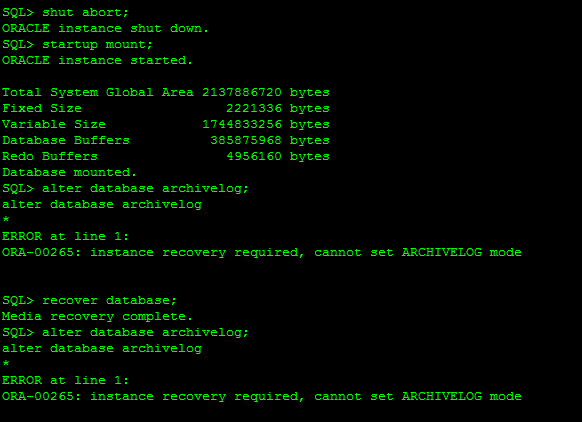
Today, I came across the “ORA-00265: instance recovery required, cannot set ARCHIVELOG mode” while
converting database into archive log mode.Problem sys@standby> startup mount; ORACLE instance started. Total System Global Area 835104768 bytes Fixed Size 2217952 bytes Variable Size 490735648 bytes Database Buffers 335544320 bytes Redo Buffers 6606848 bytes Database mounted. sys@standby> alter database recover managed standby database using current logfile disconnect; alter database recover managed standby database using current logfile disconnect * ERROR at line 1: ORA-01153: an incompatible media recovery is active Cause This indicates a currently running media recovery process. Action sys@standby> alter database recover managed standby database cancel; sys@standby> alter database recover managed standby database using current logfile disconnect; Note When shutting down physical standby database, firstly turn off media recovery process. Otherwise the next time when starting up redo apply again, you will encounter error ORA-01153.

This error usually caused when database crashed unfortunately or we shutdown database with the help of database shutdown command as: shutdown abort, startup force mount or shutdown abort. These types of command will required instance recovery in next startup. In short it need clean database startup.


SQL> alter database archivelog;
alter database archivelog
*
ERROR at line 1:
ORA-00265: instance recovery required, cannot set ARCHIVELOG mode

Reason :

ORA-00265: instance recovery required, cannot set ARCHIVELOG mode
 *Cause:  The database either crashed or was shutdown with the ABORT
          option. Media recovery cannot be enabled because the online
          logs may not be sufficient to recover the current datafiles.
 *Action: Open the database and then enter the SHUTDOWN command with the
          NORMAL or IMMEDIATE option.

ORA-00265: Instance recovery required cannot set ARCHIVELOG mode,ORA-00265,Instance recovery required, cannot set ARCHIVELOG mode,ARCHIVELOG mode,ARCHIVELOG Error,Oracle DBA,Oracle Database,Oracle Archive issue,Oracle Ora,

Solution:

SQL> select status from v$instance;
STATUS
————————————
MOUNTED

SQL> alter database open;
Database altered.

SQL> shutdown immediate;
Database closed.
Database dismounted.
ORACLE instance shut down.
SQL> startup mount;
ORACLE instance started.
Total System Global Area 293601280 bytes
Fixed Size 1248600 bytes
Variable Size 88081064 bytes
Database Buffers 197132288 bytes
Redo Buffers 7139328 bytes
Database mounted.
SQL> alter database archivelog;
Database altered.
SQL> alter database open;
Database altered.
Share

Find Fiber Host Bus Adapter (Fiber HBA) WWN On Solaris UNIX

May 31st, 2016, posted in Solaris
Share

SOLARIS: Finding Fiber HBA WWN


fcinfo hba-port
prtpicl -v -c scsi-fcp

Here is sample output (I have two HBAs installed)


# fcinfo hba-port
HBA Port WWN: 210000e08b91ab98
OS Device Name: /dev/cfg/c4
Manufacturer: QLogic Corp.
Model: 375-3294-01
Firmware Version: 4.2.2
FCode/BIOS Version: BIOS: 1.4; fcode: 1.11; EFI: 1.0;
Type: N-port
State: online
Supported Speeds: 1Gb 2Gb 4Gb
Current Speed: 4Gb
Node WWN: 200000e08b91ab98
HBA Port WWN: 210100e08bb1ab98
OS Device Name: /dev/cfg/c5
Manufacturer: QLogic Corp.
Model: 375-3294-01
Firmware Version: 4.2.2
FCode/BIOS Version: BIOS: 1.4; fcode: 1.11; EFI: 1.0;
Type: N-port
State: online
Supported Speeds: 1Gb 2Gb 4Gb
Current Speed: 4Gb
Node WWN: 200100e08bb1ab98
#

# prtpicl -v -c scsi-fcp
SUNW,qlc (scsi-fcp, 8600000614)
:_fru_parent (8600000d18H)
...
...
:node-wwn 20 00 00 e0 8b 91 ab 98
:port-wwn 21 00 00 e0 8b 91 ab 98
:model QLA2462
:manufacturer QLGC
:version QLA2462 Host Adapter Driver(SPARC): 1.11 10/03/05
...
...
:devfs-path /pci@1f,700000/pci@0,2/SUNW,qlc@1
:driver-name qlc
:binding-name pci1077,2422
...
...
:node-wwn 20 01 00 e0 8b b1 ab 98
:port-wwn 21 01 00 e0 8b b1 ab 98
:model QLA2462
:manufacturer QLGC
:version QLA2462 Host Adapter Driver(SPARC): 1.11 10/03/05
...
...
:devfs-path /pci@1f,700000/pci@0,2/SUNW,qlc@1,1
:driver-name qlc
:binding-name pci1077,2422
...
...
#

Other Useful Commands

Sponsored Links

And just for a bonus, other useful Solaris commands for machine discovery

grep [string] /var/sadm/install/contents : similar to “locate” on linux, this is a list of everything installed by package manager)

prtconf -V : machine discovery

prtconf -v : machine discovery

prstat similar to “top”

psrinfo : machine discovery

showrev -p : patches

pkginfo : software packages

prtdiag : more machine discovery

Share

How to check Oracle EBS/APPS Version

May 22nd, 2016, posted in Oracle Queries
Share

To check Oracle EBS/APPS Version

Run following SQL from apps user :Problem sys@standby> startup mount; ORACLE instance started. Total System Global Area 835104768 bytes Fixed Size 2217952 bytes Variable Size 490735648 bytes Database Buffers 335544320 bytes Redo Buffers 6606848 bytes Database mounted. sys@standby> alter database recover managed standby database using current logfile disconnect; alter database recover managed standby database using current logfile disconnect * ERROR at line 1: ORA-01153: an incompatible media recovery is active Cause This indicates a currently running media recovery process. Action sys@standby> alter database recover managed standby database cancel; sys@standby> alter database recover managed standby database using current logfile disconnect; Note When shutting down physical standby database, firstly turn off media recovery process. Otherwise the next time when starting up redo apply again, you will encounter error ORA-01153.

select RELEASE_NAME from fnd_product_groups; 

You should see output like :

RELEASE_NAME
-----------------------
11.5.10.2
Share

Check OS BIT is 32 or 64 For Solaris and Linux

May 15th, 2016, posted in Solaris
Share

Is my Operating System 64-bit?

In Solaris, from the command line (you don’t have to be root in most cases) run this command:
/usr/bin/isainfo -kv

If your OS is 64-bit, you will see output like:
64-bit sparcv9 kernel modules

If your OS is 32-bit, you will get this output:
32-bit sparc kernel modules

For Linux users :

If you are running Linux, you can check your distribution with the uname command:

uname -m

The output will read x86_64 for 64-bit and i686 or similar for 32-bit.

How about this Oracle install? Is it 64-bit?

The question here is weather your Oracle binaries are 64-bit. While some of the binaries associated with Oracle may be 32-bit, the important ones will be 64 bit. To check those, follow these steps from the command line:

cd $ORACLE_HOME/bin
file oracl*

This will display the file type of your oracle binaries. If you are running 64-bit binaries, the output should look like this:

oracle: ELF 64-bit MSB executable SPARCV9 Version 1, dynamically linked, not stripped
oracleO: ELF 64-bit MSB executable SPARCV9 Version 1, dynamically linked, not stripped

If your binaries are 32-bit, the output will look like this:

oracle: ELF 32-bit MSB executable SPARC Version 1, dynamically linked, not stripped

Share

ORA-06502 : PL/SQL: numeric or valur error: Character string buffer too small

May 1st, 2016, posted in Oracle Queries
Share
ORA-06502 ,Ora Error,Oracle Error,numeric or value error,Oracle numeric or value error,Oracle DBA,Oracle Developer,Oracle Solution,Solution for ORA-06502,Character string buffer too small,Oracle numeric,Oracle value error,ORA-06502 : PL/SQL
Problem

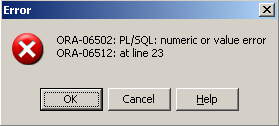
ORA-06502: PL/SQL: numeric or value error: character string buffer too small
ORA-06512: at line 23


Cause

a varchar2(2000);


Action

FIXED by changing how I declared the variable “a” to:

a varchar2(9000);


Note

Change the declared variable according to your requirements.


Share