Archive for the ‘TEChNoLoGY’ Category

Important Data Guard Queries

January 6th, 2016, posted in Oracle Queries
Share

Some Data Guard Queries,Oracle Data Guard Queries,Important Data Guard Queries,Oracle Important Data Guard Queries,Oracle DBA,Important Oracle Data Guard Queries,Oracle Data Guard Queries,Oracle Queries

Standby Database Process Status:


You can run following query on standby database to see what MRP and RFS processes are doing, which block of which archivelog sequences are being shipped or being applied.

SQL> select process, status, thread#, sequence#, block#, blocks from v$managed_standby ;
PROCESS   STATUS          THREAD#  SEQUENCE#     BLOCK#     BLOCKS
--------- ------------ ---------- ---------- ---------- ----------
ARCH      CLOSING               1      69479     932864        261
ARCH      CLOSING               1      69480     928768        670
ARCH      CLOSING               2      75336     933888        654
ARCH      CLOSING               2      78079     930816        842
ARCH      CLOSING               1      69475     943104         79
RFS       IDLE                  0          0          0          0
...
RFS       RECEIVING             1      69481     688130       1024
MRP0      WAIT_FOR_LOG          2      78080          0          0
RFS       IDLE                  2      78080     873759          3
 

Last Applied Log:


Run this query on the standby database to see the last applied archivelog sequence number for each thread.

 SQL> SELECT thread#, max(SEQUENCE#) FROM V$ARCHIVED_LOG where APPLIED='YES' group by thread#;
   THREAD# MAX(SEQUENCE#)
---------- --------------
         1          69479

              2                       78079


Apply/transport lags:


v$dataguard_stats view will show the general synchronization status of standby database.

Better to use on 11gR2 even with the latest PSU (Check bugs : 13394040, 7119382, 9968073, 7507011, 13045332, 6874522).

SQL> set lines 200
SQL> col name format a40
SQL> col value format a20
SQL> select * from v$dataguard_stats;
NAME                     VALUE             UNIT        TIME_COMPUTED         DATUM_TIME
------------------------ ----------------- ------      --------------------- ---------------------
transport lag            +00 00:09:44      …           07/01/2013 15:49:29   07/01/2013 15:49:27
apply lag                +00 00:09:44      …           07/01/2013 15:49:29   07/01/2013 15:49:27
apply finish time        +00 00:00:00.001  …           07/01/2013 15:49:29
estimated startup time   27                second      07/01/2013 15:49:29   

Apply rate:


To find out the speed of media recovery in a standby database, you can use this query:

SQL> set lines 200
SQL> col type format a30
SQL> col ITEM format a20
SQL> col comments format a20
SQL> select * from v$recovery_progress;
START_TIM TYPE             ITEM                 UNITS        SOFAR      TOTAL TIMESTAMP COMMENTS
--------- ---------------- -------------------- ------------------ ---------- --------- ----
20-JUN-13 Media Recovery   Log Files            Files         3363          0
20-JUN-13 Media Recovery   Active Apply Rate    KB/sec       21584          0
20-JUN-13 Media Recovery   Average Apply Rate   KB/sec        3239          0
20-JUN-13 Media Recovery   Maximum Apply Rate   KB/sec       48913          0
20-JUN-13 Media Recovery   Redo Applied         Megabytes  2953165          0
20-JUN-13 Media Recovery   Last Applied Redo    SCN+Time         0          0 01-JUL-13
20-JUN-13 Media Recovery   Active Time          Seconds     233822          0
20-JUN-13 Media Recovery   Apply Time per Log   Seconds         57          0
20-JUN-13 Media Recovery   Checkpoint Time per  Seconds         11          0
                           Log
20-JUN-13 Media Recovery   Elapsed Time         Seconds     933565          0
20-JUN-13 Media Recovery   Standby Apply Lag    Seconds        483          0
11 rows selected.

You can also use below before 11gR2. (Deprecated in 11gR2):

SQL> select APPLY_RATE from V$STANDBY_APPLY_SNAPSHOT;

To check Redo apply mode on physical standby database:

SQL> SELECT RECOVERY_MODE FROM V$ARCHIVE_DEST_STATUS where dest_id=2;
RECOVERY_MODE
-----------------------
MANAGED

To check what MRP process is waiting:

select a.event, a.wait_time, a.seconds_in_wait from gv$session_wait a, gv$session b where a.sid=b.sid and b.sid=(select SID from v$session where PADDR=(select PADDR from v$bgprocess where NAME='MRP0'))
EVENT                                           WAIT_TIME SECONDS_IN_WAIT
---------------------------------------------- ---------- ---------------
parallel recovery control message reply                 0               0


Archive Lag Histogram:


The  V$STANDBY_EVENT_HISTOGRAM view came with 11gR2 and shows the historical occurance of archive lags in terms of seconds. For example following output shows that in 07/01/2013 archive lag reached 5 hours and in 06/15/2013 gap was 22 hours which was resolved after more than a week.

SQL> col name format a10
SQL> select * from  V$STANDBY_EVENT_HISTOGRAM;
NAME             TIME UNIT             COUNT LAST_TIME_UPDATED
---------- ---------- ------------  -------- --------------------
apply lag           0 seconds              0
apply lag           1 seconds              1 04/13/2013 01:40:23
apply lag           2 seconds              1 04/13/2013 01:40:24
apply lag           3 seconds              1 04/13/2013 01:40:25
apply lag           4 seconds              1 04/13/2013 01:40:26
...
apply lag          25 seconds              3 05/21/2013 06:31:19
apply lag          26 seconds              3 05/21/2013 06:31:20
apply lag          27 seconds              3 05/21/2013 06:31:23
apply lag          28 seconds              5 05/21/2013 06:31:22
apply lag          29 seconds              1 05/15/2013 07:47:46
apply lag          30 seconds              4 05/21/2013 06:31:24
...
apply lag          44 seconds              8 06/26/2013 00:33:14
apply lag          45 seconds              8 06/26/2013 00:33:15
apply lag          46 seconds              8 06/26/2013 00:33:17
apply lag          47 seconds              8 06/26/2013 00:33:18
apply lag          48 seconds              9 06/26/2013 00:33:19
...
apply lag          57 seconds             29 06/26/2013 06:33:02
apply lag          58 seconds             25 06/26/2013 06:33:27
apply lag          59 seconds             28 06/26/2013 06:33:28
apply lag           1 minutes              0
apply lag           2 minutes           9316 06/30/2013 18:33:45
apply lag           3 minutes          94601 07/01/2013 14:23:11
apply lag           4 minutes         209262 07/01/2013 14:56:13
apply lag           5 minutes         355744 07/01/2013 16:02:33
apply lag           6 minutes         522176 07/01/2013 16:03:30
apply lag           7 minutes         634199 07/01/2013 16:01:10
...
apply lag          47 minutes          28174 07/01/2013 05:14:53
apply lag          48 minutes          28231 07/01/2013 05:14:49
apply lag          49 minutes          27099 07/01/2013 05:14:44
apply lag          50 minutes          26532 07/01/2013 05:14:40
...
apply lag           3 hours           564493 07/01/2013 05:00:08
apply lag           4 hours           511628 06/22/2013 07:43:26
apply lag           5 hours           448572 06/22/2013 07:34:03
apply lag           6 hours           369037 06/22/2013 07:09:59
apply lag           7 hours           206117 06/21/2013 00:53:27
apply lag           8 hours           137932 06/21/2013 00:33:53
apply lag           9 hours           137091 06/21/2013 00:03:33
apply lag          10 hours            98103 06/20/2013 23:26:34
apply lag          11 hours           104157 06/20/2013 22:53:12
apply lag          12 hours           102141 06/20/2013 22:14:07
apply lag          13 hours            89214 06/20/2013 21:32:22
apply lag          14 hours            64880 06/20/2013 21:04:29
apply lag          15 hours            43471 06/20/2013 21:01:45
apply lag          16 hours            38075 06/20/2013 20:59:37
apply lag          17 hours            38449 06/20/2013 20:55:34
apply lag          18 hours            22049 06/16/2013 01:22:55
apply lag          19 hours            19873 06/16/2013 00:53:55
apply lag          20 hours            15985 06/15/2013 23:52:16
apply lag          21 hours            13290 06/15/2013 03:08:49
apply lag          22 hours             7330 06/15/2013 02:07:26
apply lag          23 hours             1606 02/15/2013 22:16:11
apply lag           1 days              3216 02/15/2013 22:00:42
apply lag           2 days             16768 02/15/2013 20:54:06
144 rows selected.


Redo switch report of primary database can be seen with the following query. This information may be helpful when investigating the possible causes of archive gaps, apply lags or data guard performance issues.

SQL> SET PAGESIZE 9999
SQL> col day format a15
SQL> SELECT A.*, Round(A.Count#*B.AVG#/1024/1024) Daily_Avg_Mb FROM(SELECT To_Char(First_Time,'YYYY-MM-DD') DAY, Count(1) Count#, Min(RECID) Min#, Max(RECID) Max# FROM gv$log_history GROUP BY To_Char(First_Time,'YYYY-MM-DD') ORDER BY 1 DESC) A,(SELECT Avg(BYTES) AVG#, Count(1) Count#, Max(BYTES) Max_Bytes, Min(BYTES) Min_Bytes FROM gv$log ) B;
DAY                 COUNT#       MIN#       MAX# DAILY_AVG_MB
--------------- ---------- ---------- ---------- ------------
2013-07-01             442     147345     147566       452608
2013-06-30             526     147083     147347       538624
2013-06-29             532     146817     147082       544768
2013-06-28             928     146353     146816       950272
2013-06-27             760     145973     146352       778240
2013-06-26             708     145619     145972       724992
2013-06-25             560     145338     145618       573440
2013-06-24             498     145090     145339       509952
2013-06-23             104     145038     145089       106496
2013-06-22             338     144869     145037       346112
2013-06-21             748     144495     144868       765952
2013-06-20             748     144121     144494       765952
2013-06-19             952     143645     144120       974848
2013-06-18             882     143204     143644       903168
2013-06-17             914     142746     143203       935936
2013-06-16             454     142520     142747       464896
2013-06-15            1520     141760     142519      1556480
2013-06-14            1862     140829     141759      1906688
2013-06-13             970     140343     140828       993280
2013-06-12             598     140045     140345       612352
2013-06-11             550     139770     140044       563200
2013-06-10             516     139511     139769       528384
2013-06-09             178     139423     139512       182272
2013-06-08             296     139275     139422       303104
2013-06-07             490     139030     139274       501760
2013-06-06             572     138744     139029       585728
2013-06-05             488     138499     138743       499712

Following PL/SQL code can be used to find out time difference between primary and standby database. (Run on primary database, not for real-time apply)
Following output shows 10 minutes and 54 seconds of time difference.

set serveroutput on;
DECLARE
   v_diff NUMBER := 0;
   v_hrs NUMBER := 0;
   v_min NUMBER := 0;
   v_sec NUMBER := 0;
   p_dte1 DATE;
   p_dte2 DATE;
   date1 long;
   date2 long;
   BEGIN
   date1 := 'select sysdate from dual';
   date2 := 'select MAX (next_time) FROM gv$archived_log where APPLIED=''YES''';
   execute immediate date1 into p_dte1;
   execute immediate date2 into p_dte2;
   v_diff := ABS(p_dte2 - p_dte1);
   v_hrs := TRUNC(v_diff, 0)*24;
   v_diff := (v_diff - TRUNC(v_diff, 0))*24;
   v_hrs := v_hrs + TRUNC(v_diff, 0);
   v_diff := (v_diff - TRUNC(v_diff, 0))*60;
   v_min := TRUNC(v_diff, 0);
   v_sec := TRUNC((v_diff - TRUNC(v_diff, 0))*60, 0);
   DBMS_OUTPUT.put_line(
   TO_CHAR(v_hrs) ||' '||
   TO_CHAR(v_min) ||' '||
   TO_CHAR(v_sec) );
END;
/
0 10 54
PL/SQL procedure successfully completed.

This one will give the same output with the above code, but this must be run on standby database.

set serveroutput on;
DECLARE
   v_diff NUMBER := 0;
   v_hrs NUMBER := 0;
   v_min NUMBER := 0;
   v_sec NUMBER := 0;
   p_dte1 DATE;
   p_dte2 DATE;
   date1 long;
   date2 long;
   BEGIN
   date1 := 'select sysdate from dual';
   date2 := 'select max(TIMESTAMP) from v$recovery_progress';
   execute immediate date1 into p_dte1;
   execute immediate date2 into p_dte2;
   v_diff := ABS(p_dte2 - p_dte1);
   v_hrs := TRUNC(v_diff, 0)*24;
   v_diff := (v_diff - TRUNC(v_diff, 0))*24;
   v_hrs := v_hrs + TRUNC(v_diff, 0);
   v_diff := (v_diff - TRUNC(v_diff, 0))*60;
   v_min := TRUNC(v_diff, 0);
   v_sec := TRUNC((v_diff - TRUNC(v_diff, 0))*60, 0);
   DBMS_OUTPUT.put_line(
   TO_CHAR(v_hrs) ||' '||
   TO_CHAR(v_min) ||' '||
   TO_CHAR(v_sec) );
END;
/
0 10 54
PL/SQL procedure successfully completed.

The last one is a shell command and lists the archive log apply records of standby database alert log with the corresponding times at the end of the line. This is useful to see a clean picture of redo apply status on the standby database.

tail -10000 /u01/app/oracle/product/diag/rdbms/testdb/TESTDB/trace/alert_TESTDB.log |awk -v x="" '{if (index($0,"Media Recovery Log ")!=0) print $0" "x; else if($1=="Mon"||$1=="Tue"||$1=="Wed"||$1=="Thu"||$1=="Fri"||$1=="Sat"||$1=="Sun") x=$0}'
Media Recovery Log +DATA/…/thread_1_seq_69468.904.819643305 Mon Jul 01 14:42:14 2013
Media Recovery Log +DATA/…/thread_1_seq_69469.899.819643701 Mon Jul 01 14:48:51 2013
Media Recovery Log +DATA/…/thread_2_seq_78072.741.819643579 Mon Jul 01 14:49:24 2013
Media Recovery Log +DATA/…/thread_1_seq_69470.956.819643639 Mon Jul 01 14:50:30 2013
Media Recovery Log +DATA/…/thread_2_seq_78073.1129.819644003 Mon Jul 01 14:53:55 2013
Media Recovery Log +DATA/…/thread_1_seq_69471.1123.819643961 Mon Jul 01 14:54:10 2013
Media Recovery Log +DATA/…/thread_1_seq_69472.861.819644303 Mon Jul 01 14:58:54 2013
Media Recovery Log +DATA/…/thread_2_seq_78074.1136.819644507 Mon Jul 01 15:02:14 2013
Media Recovery Log +DATA/…/thread_1_seq_69473.1024.819644695 Mon Jul 01 15:05:24 2013
Media Recovery Log +DATA/…/thread_2_seq_78075.936.819644933 Mon Jul 01 15:09:25 2013
Media Recovery Log +DATA/…/thread_1_seq_69474.904.819645085 Mon Jul 01 15:11:57 2013
Media Recovery Log +DATA/…/thread_1_seq_69475.911.819645509 Mon Jul 01 15:19:01 2013
Media Recovery Log +DATA/…/thread_2_seq_78076.899.819645377 Mon Jul 01 15:19:17 2013
Media Recovery Log +DATA/…/thread_1_seq_69476.1018.819646001 Mon Jul 01 15:27:12 2013
Media Recovery Log +DATA/…/thread_2_seq_78077.1060.819645837 Mon Jul 01 15:27:53 2013
Media Recovery Log +DATA/…/thread_1_seq_69477.956.819645995 Mon Jul 01 15:28:48 2013
Media Recovery Log +DATA/…/thread_2_seq_78078.861.819646339 Mon Jul 01 15:32:50 2013
Media Recovery Log +DATA/…/thread_1_seq_69478.1123.819646363 Mon Jul 01 15:33:17 2013
Media Recovery Log +DATA/…/thread_1_seq_69479.741.819646705 Mon Jul 01 15:38:57 2013
Media Recovery Log +DATA/…/thread_2_seq_78079.890.819646767 Mon Jul 01 15:40:00 2013
Media Recovery Log +DATA/…/thread_1_seq_69480.904.819647027 Mon Jul 01 15:44:21 2013
Media Recovery Log +DATA/…/thread_2_seq_78080.911.819647307 Mon Jul 01 15:48:59 2013
Media Recovery Log +DATA/…/thread_1_seq_69481.1136.819647365 Mon Jul 01 15:49:57 2013
Media Recovery Log +DATA/…/thread_1_seq_69482.1018.819647679 Mon Jul 01 15:55:10 2013
Media Recovery Log +DATA/…/thread_2_seq_78081.936.819647855 Mon Jul 01 15:58:03 2013
Media Recovery Log +DATA/…/thread_1_seq_69483.1024.819648003 Mon Jul 01 16:00:35 2013

 

Some Data Guard Queries,Oracle Data Guard Queries,Important Data Guard Queries,Oracle Important Data Guard Queries,Oracle DBA,Important Oracle Data Guard Queries,Oracle Data Guard Queries,Oracle Queries
Share

The difference between U8 , U8S and U8L(U8 Plus)

January 4th, 2016, posted in Android, Apple
Share

The Difference Between U8 , U8S and U8L(U8 Plus) Smart Wrist WatchThe Difference Between U8 , U8S and U8L(U8 Plus) Smart Wrist Watch,U8 and U8L(U8 Plus) difference,U8 and U8S ,Remote Camera and SMS Synchronous,support IOS system,IOS system,Android system,Android OS system,Support Android system,Smart watch, U8 Smart Watch,U8L(U8 Plus) Smart Watch,U8S Smart Watch,

The first generation U watch–U8,SKU132282,
http://www.banggood.com/U8-Sport-U-Watch-1_48-Inch-Bluetooth-Smart-Wrist-Sports-Watch-Bracelet-p-922313.html

The second generation U watch–U8S,SKU165339,
http://www.banggood.com/Waterproof-U8S-Sport-U-Watch-Bluetooth-Smart-Wrist-Sports-Watch-p-945581.html

The third generation U watch—U8L(U8 Plus),SKU190483,
http://www.banggood.com/U8L-Sport-Watch-Bluetooth-Smart-Wrist-Sports-Watch-for-iPhone-Android-p-959429.html

They are the same as a whole,their apperance and functions.
But you should note here is that which systems they support.


U8 and U8S just difference between waterproof.

U8S is waterproof,and U8 is not.
Both of U8 and U8S APK does not support IOS system (only support Android system), so customer use iPhone or iPad (IOS system) could not use Remote Camera or SMS Synchronous functions.
Apart that, other functions support IOS system.


U8 and U8L(U8 Plus) difference between support systems.

U8L(U8 Plus) support IOS and Android system and all functions.
U8 APK does not support IOS system in Remote Camera and SMS Synchronous two functions.

Share

Keyboard Shortcut Keys In Oracle Apps 11i

December 20th, 2015, posted in Oracle
Share

Below are keyboard shortcut keys in Oracle Apps 11i. Use these to flaunt your skills in apps.. Problem sys@standby> startup mount; ORACLE instance started. Total System Global Area 835104768 bytes Fixed Size 2217952 bytes Variable Size 490735648 bytes Database Buffers 335544320 bytes Redo Buffers 6606848 bytes Database mounted. sys@standby> alter database recover managed standby database using current logfile disconnect; alter database recover managed standby database using current logfile disconnect * ERROR at line 1: ORA-01153: an incompatible media recovery is active Cause This indicates a currently running media recovery process. Action sys@standby> alter database recover managed standby database cancel; sys@standby> alter database recover managed standby database using current logfile disconnect; Note When shutting down physical standby database, firstly turn off media recovery process. Otherwise the next time when starting up redo apply again, you will encounter error ORA-01153.
Trust me when you do this in front of clients it works like magic 🙂

  • F4 Exit
  • F5 Clear Field
  • F6 Clear Record
  • F7 Clear Block
  • F8 Clear Form
  • F11 Query Enter
  • F12 Count Query
  • Ctrl + S Save
  • Ctrl + L List of Values
  • Ctrl + F11 Query Run
  • Ctrl + E Edit
  • Ctrl + Up Delete Record
  • Ctrl + Down Insert Record
  • Ctrl + P Print
  • Ctrl + U Update Record
  • Ctrl + B Block Menu
  • Ctrl + K Display list of Keys
  • Shift + F5 Duplicate Field
  • Shift + F6 Duplicate Record
  • Shift + F8 Next Set of Records (Same as Page Down)
  • Shift + Page Down Next Block
  • Shift + Tab Previous Field
  • Shift + Page Up Previous Block
  • Shift + Ctrl + E Display Error
  • Page Down Scroll Down (Same as Shift + F8)
  • Page Up Scroll Up
  • Tab Next Field
  • Down Arrow Next Record
  • Up Arrow Previous Record
  • Return Return


Share

Add A User From The Command Line In Solaris

December 12th, 2015, posted in Solaris
Share

Add A User From The Command Line In Solaris,Add A User From The Command Line In Solaris 10,Add A User From The Command Line, In Solaris10 ,Add A User ,The Command Line In Solaris10,The Command Line In Solaris,solaris 10,

This shows how to use useradd in Solaris to add a user.

Add A User From The Command Line In Solaris,Add A User From The Command Line In Solaris 10,Add A User From The Command Line, In Solaris10 ,Add A User ,The Command Line In Solaris10,The Command Line In Solaris,solaris 10,

You must be root (superuser) to add a user. An easy way to remember the syntax of the useradd command in Solaris is to run it with no options. Follow the resulting usage information including the parts that you require. Important options are:

-d home-directory-path
This is the new user’s home directory, typically /export/home/username

-m
make home directory and copy the default skeleton files (these files are located in /etc/skel directory).

-u uid
The uid (userid) is a number from 0 to 65535 which identifies the user on the system. uid 0 is reserved for root. If you don’t specify one, the next available uid will be used automatically.

-c “User Name”
Comment field which usually contains the name of the user. Make sure you enclose the name in quotes if it contains a space.

-s /path/to/shell
The shell to use. If you don’t specify this, it will default to /bin/sh. Make sure you specify the fully qualified path.

So, putting it together, a typical addition of a user named fred would be:

useradd -d /export/home/fred -m -s /bin/ksh -c "Fred Smith" fred

It’s a smart idea to run pwck (passwd check) whenever you make a change to the /etc/passwd file (as when adding or changing a user). This program will identify any problems with the passwd file. If it doesn’t tell you anything, then you are in good shape.

Share

Unprotect An Excel Sheet Without Password

December 6th, 2015, posted in Microsoft, Programming
Share

Unprotect An Excel Sheet Without Password,How Unprotect An Excel Sheet Without Password,How Unprotect An Excel Sheet ,Without Password,Unprotect An Excel Without Password,An Excel Without Password,Forgot Excel Sheet Password,Excel Sheet Password,Excel Sheet ,Password

This document will tel you how to unprotect an excel spread sheet without having the password

This procedure works in Excel 2010 and earlier but in Excel 2013 this will not work.

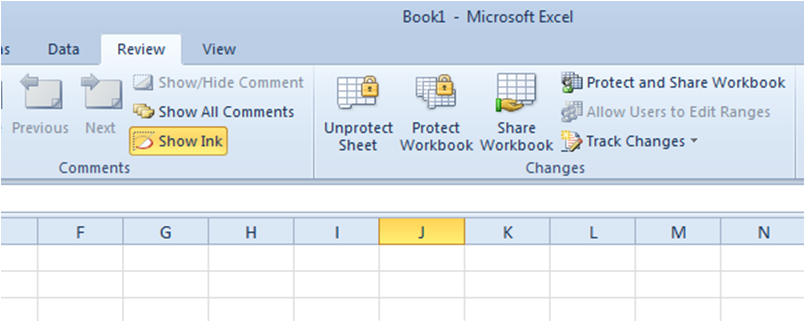
In case of a password protect worksheet you are unable to Edit the data on the Excel Sheet. If you do not Remember the Password or do not know the password to unprotect the sheet just follow the below simple steps.

Unprotect An Excel Sheet Without Password,How Unprotect An Excel Sheet Without Password,How Unprotect An Excel Sheet ,Without Password,Unprotect An Excel Without Password,An Excel Without Password,Forgot Excel Sheet Password,Excel Sheet Password,Excel Sheet ,Password

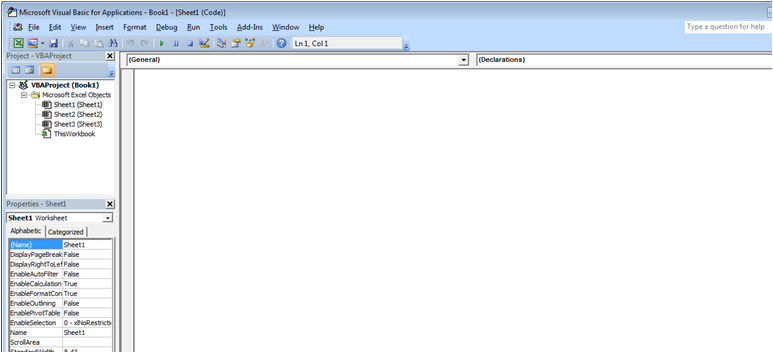
Press ALT +  F11 or click on View Code in Developers Tabs

Unprotect An Excel Sheet Without Password,How Unprotect An Excel Sheet Without Password,How Unprotect An Excel Sheet ,Without Password,Unprotect An Excel Without Password,An Excel Without Password,Forgot Excel Sheet Password,Excel Sheet Password,Excel Sheet ,Password


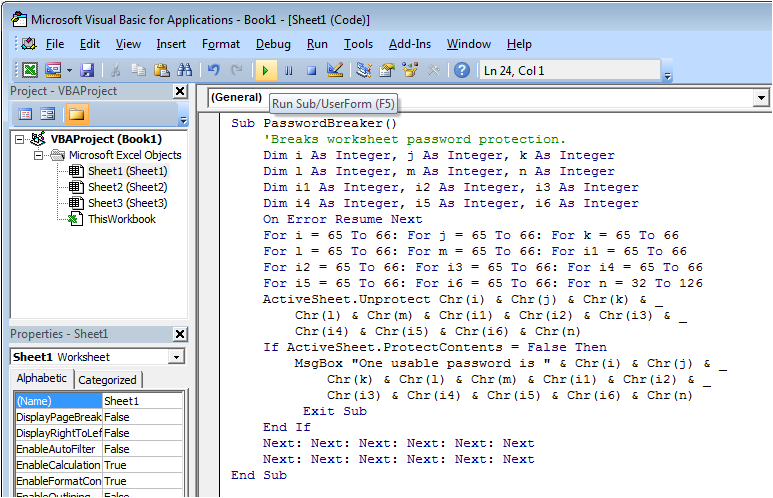
In the Above White Space Enter the below Code. Do not change the code just copy paste:


Sub PasswordBreaker()
    'Breaks worksheet password protection.
    Dim i As Integer, j As Integer, k As Integer
    Dim l As Integer, m As Integer, n As Integer
    Dim i1 As Integer, i2 As Integer, i3 As Integer
    Dim i4 As Integer, i5 As Integer, i6 As Integer
    On Error Resume Next
    For i = 65 To 66: For j = 65 To 66: For k = 65 To 66
    For l = 65 To 66: For m = 65 To 66: For i1 = 65 To 66
    For i2 = 65 To 66: For i3 = 65 To 66: For i4 = 65 To 66
    For i5 = 65 To 66: For i6 = 65 To 66: For n = 32 To 126
    ActiveSheet.Unprotect Chr(i) & Chr(j) & Chr(k) & _
        Chr(l) & Chr(m) & Chr(i1) & Chr(i2) & Chr(i3) & _
        Chr(i4) & Chr(i5) & Chr(i6) & Chr(n)
    If ActiveSheet.ProtectContents = False Then
        MsgBox "One usable password is " & Chr(i) & Chr(j) & _
            Chr(k) & Chr(l) & Chr(m) & Chr(i1) & Chr(i2) & _
            Chr(i3) & Chr(i4) & Chr(i5) & Chr(i6) & Chr(n)
         Exit Sub
    End If
    Next: Next: Next: Next: Next: Next
    Next: Next: Next: Next: Next: Next
End Sub

Now Click on the Run Button or press F5:

Unprotect An Excel Sheet Without Password,How Unprotect An Excel Sheet Without Password,How Unprotect An Excel Sheet ,Without Password,Unprotect An Excel Without Password,An Excel Without Password,Forgot Excel Sheet Password,Excel Sheet Password,Excel Sheet ,Password


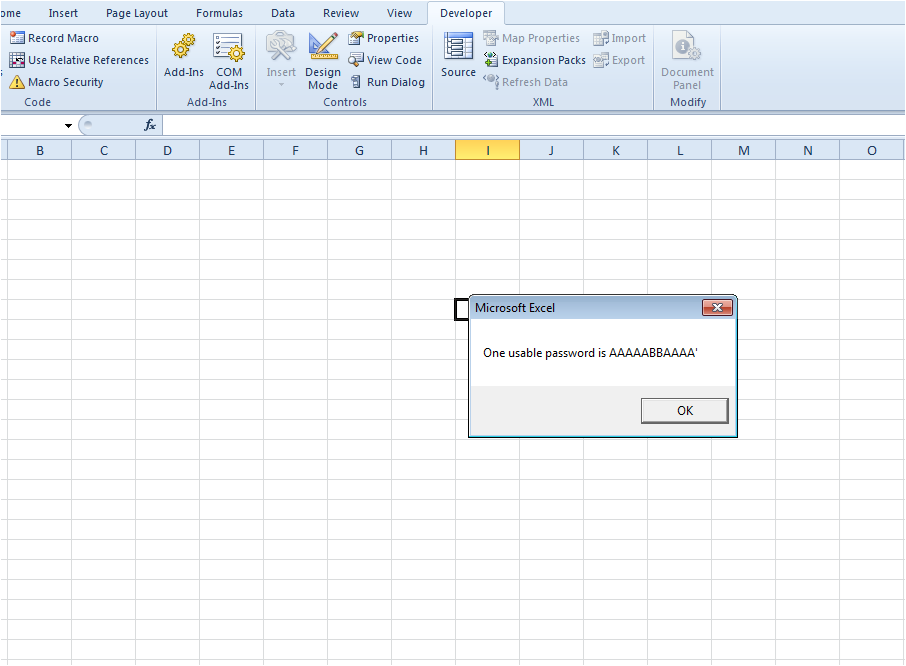
And there you go the sheet is unprotected for you now. Also you would be getting a message in the pop up window.

This Message is contains the password which can be used to unprotect the other sheets in the same workbook.

On my modest PC it takes about 80 seconds to crack the password and it seems to come up with a password such as AABBAAABBB^ which isn’t the original password but nevertheless works. Spreadsheet is now unprotected. Try it for yourself.

Unprotect An Excel Sheet Without Password,How Unprotect An Excel Sheet Without Password,How Unprotect An Excel Sheet ,Without Password,Unprotect An Excel Without Password,An Excel Without Password,Forgot Excel Sheet Password,Excel Sheet Password,Excel Sheet ,Password


(courtesy of University of Wisconsin-Green Bay)

Share