Archive for the ‘TEChNoLoGY’ Category

Compiling PL/SQL and using TOAD to write stored procedures

June 12th, 2013, posted in Oracle
Share

Compiling PL/SQL and using TOAD to write stored procedures :


  • PL/SQL compiler (version?) is quite stupid: ” Missing a semi-colon flags a line several lines below where the actual semi-colon is missing.”  Likewise for a missing single quote character
  • To escape the single quote character, double it.”  Therefore four consecutive single quotes is a string consisting of a single quote
  • When the compiler reports a compiler error at a certain line, that line # is relative to the start of the Body of stored procedure (assuming you are editing the Body and not the Spec)
  • To compile and “save” your stored procedure to the Oracle server in TOAD, be sure to use the “Execute As Script” button () in the Editor.  Do NOT use the “Execute/compile statement at caret” button.

    link : http://buildingaircastles.blogspot.com/2010/11/compiling-plsql-and-using-toad-to-write.html
  • Share

    Difference Between Http And Https

    June 8th, 2013, posted in TEChNoLoGY
    Share
    Difference Between Http And Https,Difference Between,Http,Https,Difference,Between Http And Https,Between,Difference  Http And Https,https-monitoring,http_vs_https
    HTTP stands for Hyper Text Transport Protocol, which is just a fancy way of saying it’s a protocol (a language, in a manner of speaking) for information to be passed back and forth between web servers and clients. This all is of no use. The important thing is the letter S which makes the difference between HTTP and HTTPS. The S (big surprise) stands for “Secure“.Difference Between Http And Https,Difference Between,Http,Https,Difference,Between Http And Https,Between,Difference Http And Https,https-monitoring,http_vs_https
    If you visit a website or webpage, and look at the address in the web browser, it will likely begin with the following: http://. This means that the website is talking to your browser using the regular ‘unsecure’ language. In other words, it is possible for someone to eavesdrop on your computer’s conversation with the website. If you fill out a form on the website, someone might see the information you send to that site.
    This is why you never ever enter your credit card number in an “HTTP” website..!!
    But if the web address begins with https://, that basically means your computer is talking to the website in a secure code that no one can eavesdrop on.
    If a website ever asks you to enter your credit card information, you should automatically look to see if the web address begins with https://. If it doesn’t, there’s no way you’re going to enter sensitive information like a credit card number..!!
    You won’t see anything different between the HTTP and HTTPS sites. There are only two differences you’ll notice:
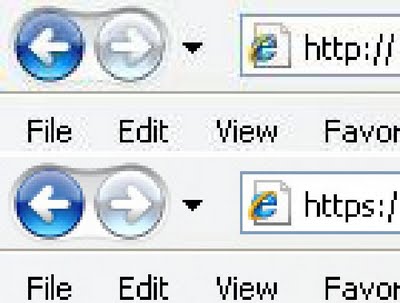
    • The web address (at the top of your web browser) will begin with https instead of http.
    • Your web browser may give you a message something like, You are about to view pages over a secure connection.
    There are some other primary differences between http and https, however, beginning with the default port, which is 80 for http and 443 for https. Https works by transmitting normal http interactions through an encrypted system, so that in theory, the information cannot be accessed by any party other than the client and end server. There are two common types of encryption layers: Transport Layer Security (TLS) and Secure Sockets Layer (SSL), both of which encode the data records being exchanged.
    Difference Between Http And Https,Difference Between,Http,Https,Difference,Between Http And Https,Between,Difference Http And Https,https-monitoring,http_vs_https,Difference Between HTTP and HTTPS 2When using an https connection, the server responds to the initial connection by offering a list of encryption methods it supports. In response, the client selects a connection method, and the client and server exchange certificates to authenticate their identities. After this is done, both parties exchange the encrypted information after ensuring that both are using the same key, and the connection is closed. In order to host https connections, a server must have a public key certificate, which embeds key information with a verification of the key owner’s identity. Most certificates are verified by a third party so that clients are assured that the key is secure.
    Https is used in many situations, such as log-in pages for banking, forms, corporate log ons, and other applications in which data needs to be secure. However, if not implemented properly, https is not infallible, and therefore it is extremely important for end users to be wary about accepting questionable certificates and cautious with their personal information while using the Internet.
    Share

    Using PHP To Keep Copyright Footer Year Current

    June 6th, 2013, posted in PHP
    Share

    Using PHP To Keep Copyright Footer Year Current,using php,copyright,current year,year,php coding,copyright-symbolUsing PHP to keep Copyright footer year current

    Here’s the start of the Web Development series as part of the new addition to my Blog, including code tutorials and code snippets free for use. This article includes a small snippet of code that you can add to your site to ensure your footer PHP date is always at the current year. I’m sure the eagle-eyed users of the web are still seeing sites stuck on ‘© 2011 Copyright’ – so here’s a few easy ways to overcome it, forever !!

    First thing you’ll need is a PHP web page. If your server handles PHP, then use the code below to insert into your website’s footer. Please note this will only work with PHP web pages not static HTML. Read more on PHP here.

    Single Year Display

    This literally just pulls in the current date using server technology, and is really easy to implement instead of manually typing the year (and forgetting about it).

    &copy; <?php echo date("Y"); ?> Copyright.
    Gives you: © 2013 Copyright.


    Website Start and Current Year

    Little longer PHP snippet – in which you set the date your website was launched, and let the PHP automatically keep the current year up to date. See below and example for details : Using PHP To Keep Copyright Footer Year Current,using php,copyright,current year,year,php coding,copyrightdate,copyright date,copyright

    &copy; <?php
    $copyYear = 2008; // Set your website start date
    $curYear = date('Y'); // Keeps the second year updated
    echo $copyYear . (($copyYear != $curYear) ? '-' . $curYear : '');
    ?> Copyright.
    Gives you: © 2008-2013 Copyright.

    Share

    Apps You Must Have On Android

    May 21st, 2013, posted in Android
    Share

    Apps You Must Have On Android,mobile,apps,free apps,
    These are the Apps you must have on Android and best part is that they all are free !!
    So here goes the list :
    • No matter what your android mobile is you must have Whatsapp.
    • Viber is another android app that you should have.
    • Skype is another must app
    • Handcent Sms is another cool app that you should have in your mobile.
    • Life Reminder is another wonderful app to keep you things remind.
    • ES File Explorer. An app that helps you Explorer through your folders.
    • Simple Note . A notepad type app so that you can make notes and save them.
    • Flashlight . A flashlight app to make you mobile use as torch. Could come handy anytime.
    • MX player. A wonderful player app.
    • Tweedle. If you are a twitter user than you must have this.
    • Facebook app is also another app that you need.
    • Profile Scheduler. An app that makes profiles for you mobile like loud,silent ,meeting etc
    • Fancy Widgets. A widget app that makes your mobile look really really cool.
    • My Prayer. An Islamic app which is just perfect to tell you prayer timings and little bit more.
    • Merriam Webster App. A wonder offline dictionary that can help you at the time of need.
    • Chrome is another app that you should have in your android mobile.
    Share

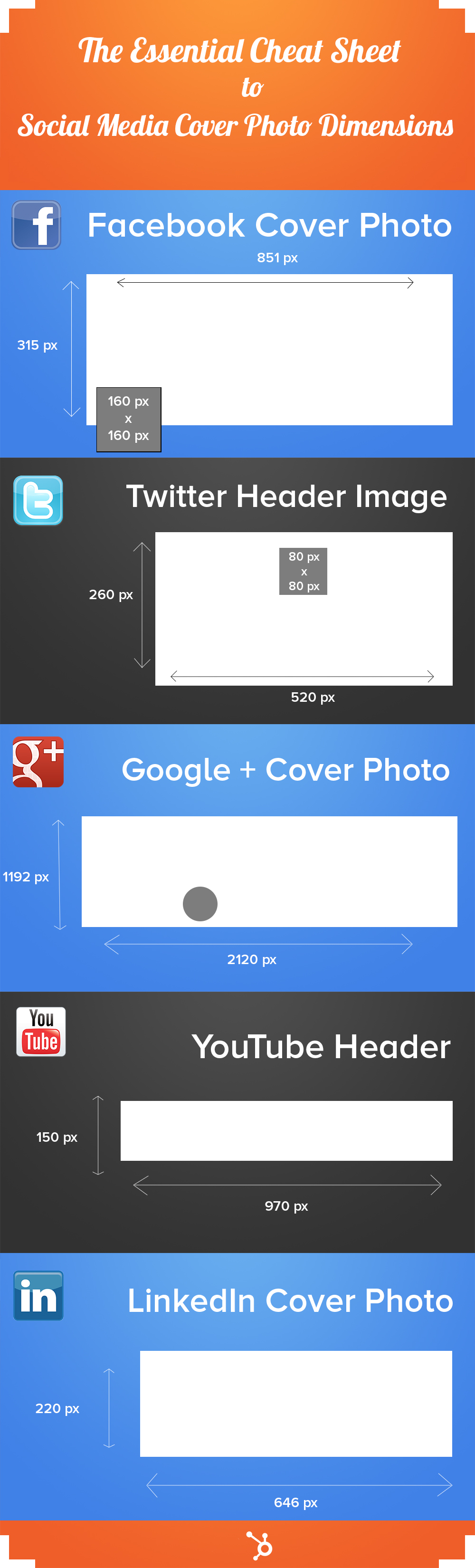
    The Cheat Sheet for Social Media Cover Photo Dimensions

    May 18th, 2013, posted in SOCiAL NEtWORkS
    Share

    The Cheat Sheet for Social Media Cover Photo Dimensions,facebook,twitter,google,linkedin,facebook images,facebook cover,facebook pages,fb

    Share