This is one the best link to put marquee tags.
Helped mE a lot…
I hope will do to you guys as well…
Cheers..
😉
Link 1 : http://www.way2tutorial.com/html/html_marquee_tag.php

This is one the best link to put marquee tags.
Helped mE a lot…
I hope will do to you guys as well…
Cheers..
😉
Link 1 : http://www.way2tutorial.com/html/html_marquee_tag.php
If you want to connect with Oracle database using PHP script you will have to do some effort. Because with the default installation of XAMPP for Windows, we don’t get PHP Oracle connectivity enabled. This can be enabled easily when you need to connect to a Oracle Database from your PHP application/script. PHP has got the OCI8 extension, which provides Oracle connectivity to PHP application, and OCI8 uses Oracle Instant Client Package to get Oracle specific functions.
I had the need to connect to a Oracle Database from a PHP script in one of my recent projects, the following is what I did to enable Oracle connectivity in XAMPP for Windows.
1. In your XAMPP Start Page, go to phpinfo, look for string oci8. If string found it indicate that connection to oracle is available, otherwise to activate connection do the following steps:
2. Open the currently used php.ini file by looking at the phpinfo, from the XAMPP folder.
3. Find string ;extension=php_oci8.dll. Remove the semicolon (;) ahead of the string to activate the oracle extension.
4. Save the php.ini file.
5. Download the “Instant Client Package – Basic†for Windows from the OTN Instant Client page. Unzip it to c:instantclient_11_1
6. Edit the PATH environment setting and add c:instantclient_11_1 before any other Oracle directories. For example, on Windows XP, follow Start -> Control Panel -> System -> Advanced -> Environment Variables and edit PATH in the System variables list.
7. Set desired Oracle globalization language environment variables such as NLS_LANG. If nothing is set, a default local environment will be assumed. See An Overview on Globalizing Oracle PHP Applications for more details.
8. Unset Oracle variables such as ORACLE_HOME and ORACLE_SID, which are unnecessary with Instant Client (if they are set previously).
9. Restart XAMPP (or Start if its not already started).
10. To make sure that connection to oracle database has successfully activated, go to phpinfo. Find string: oci8. If found, then XAMPP can now communicate with Oracle Database.
The steps to do the same on Linux are almost similar, except there you will use the Linux versions of the packages and setting PATH variables would be different.
To test the connection you can use this script
<?php

$conn = oci_connect('username', 'password', 'host:port/servicename');

$query = 'select table_name from user_tables';

$stid = oci_parse($conn, $query);

oci_execute($stid, OCI_DEFAULT);

while ($row = oci_fetch_array($stid, OCI_ASSOC)) {

foreach ($row as $item) {

echo $item." | ";

}

echo "

n";

}

oci_free_statement($stid);

oci_close($conn);

?>
*****************************************************************************************
If you need to configure your xampp installation (on winXP) to connect to the oracle
– first you need to download oracle basic instant client for windows
– After unzipping the instant client on a selected directory (i.e. c:/instantclient_11_1) you need to copy all dlls from this directory to “xampp/apache/bin/â€
– Add instant client directory to windows system variable’s path : follow Start -> Control Panel -> System -> Advanced -> Environment Variables and edit PATH in the System variables list
– now open up php.ini from “xampp/php†and remove semicolon from this line “;extension=php_oci8.dllâ€
all you have to do is restarting apache and you’re all set
Another wonderful link for this topic is : http://me2learn.wordpress.com/2008/10/18/connect-php-with-oracle-database/
c program to check leap year: c code to check leap year, year will be entered by the user. Please read the leap year article before reading the code, it will help you to understand the program.
#include <stdio.h>

int main()
{
  int year;

  printf("Enter a year to check if it is a leap yearn");
  scanf("%d", &year);

  if ( year%400 == 0)
    printf("%d is a leap year.n", year);
  else if ( year%100 == 0)
    printf("%d is not a leap year.n", year);
  else if ( year%4 == 0 )
    printf("%d is a leap year.n", year);
  else
    printf("%d is not a leap year.n", year);

  return 0;
}

Are you getting trouble of calculating average time of a filed, where data type is date time ?
Don’t worry. You are at right place to get right solution.
I’m going to calculate average time of a filed.
If there is two time value in a day, i will calculate the first one means minimum one.
SELECT TO_CHAR(TRUNC(SYSDATE)+AVG(VDATE-TRUNC(VDATE)),’HH24:MI:SS’)
FROM (SELECT MIN(DDATE) VDATE
FROM DEPT
GROUP BY TRUNC(DDATE))
C code to remove spaces or excess blanks from a string, For example consider the string
“c programming”
There are two spaces in this string, so our program will print a string
“c programming”. It will remove spaces when they occur more than one time consecutively in string anywhere.
#include <stdio.h>

int main()
{
   char text[100], blank[100];
   int c = 0, d = 0;

   printf("Enter some textn");
   gets(text);

   while (text[c] != '')
   {
      if (!(text[c] == ' ' && text[c+1] == ' ')) {
        blank[d] = text[c];
        d++;
      }
      c++;
   }

   blank[d] = '';

   printf("Text after removing blanksn%sn", blank);

   return 0;
}
C Programming Code Using Pointers :

#include<stdio.h>
#include<string.h>
#include<stdlib.h>
#define SPACE ' '

main()
{
   char string[100], *blank, *start;
   int length, c = 0, d = 0;

   printf("Enter a stringn");
   gets(string);

   length = strlen(string);

   blank = string;

   start = (char*)malloc(length+1);

   if ( start == NULL )
      exit(EXIT_FAILURE);

   while(*(blank+c))
   {
      if ( *(blank+c) == SPACE && *(blank+c+1) == SPACE )
      {}
      else
      {
         *(start+d) = *(blank+c);
	 d++;
      }
      c++;
   }
   *(start+d)='';

   printf("%sn", start);

   free(start);

   return 0;
}

Compiler used:

GCC


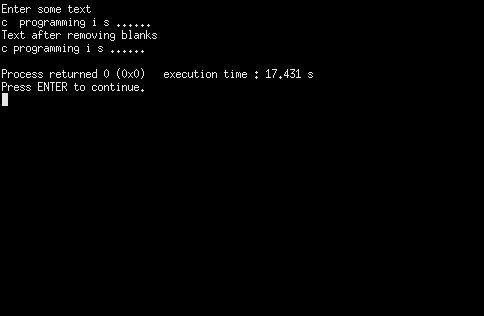
Output of program: