ORACLE ERROR : ORA-28000
The account is locked
From your command prompt, type sqlplus “/ as sysdba”
Once logged in as SYSDBA, you need to unlock the SCOTT account
SQL> alter user scott account unlock;
SQL> grant connect, resource to scott;
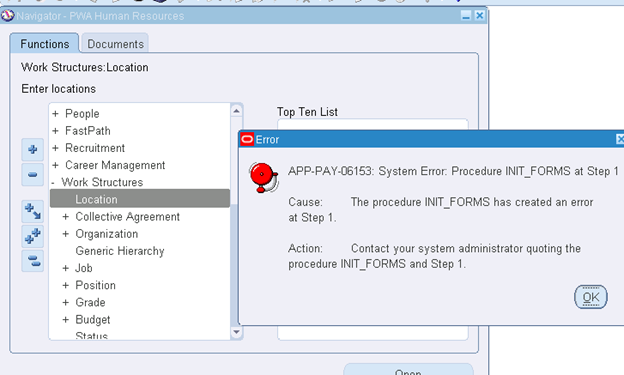
APP-PAY-06153:System Error. Procedure INIT_FORMS at Step 1 :
N:->Human Resources->Work Structures->Location
N: System Administrator->Profile->System
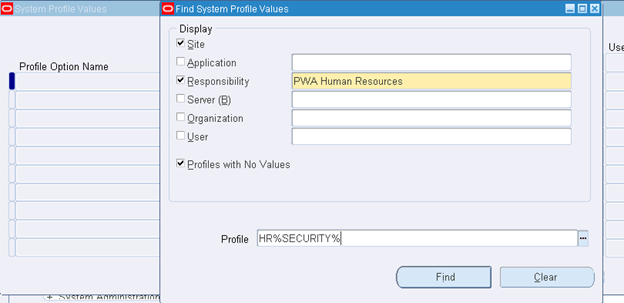
Click find
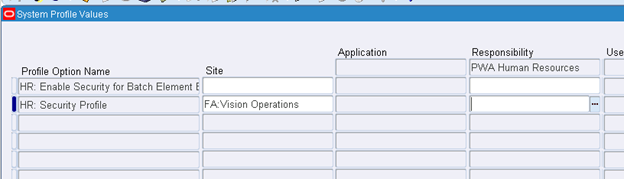
Assign Site: FA: Vision Operations
Save and close
N:->Human Resource->Work Structure->Organization
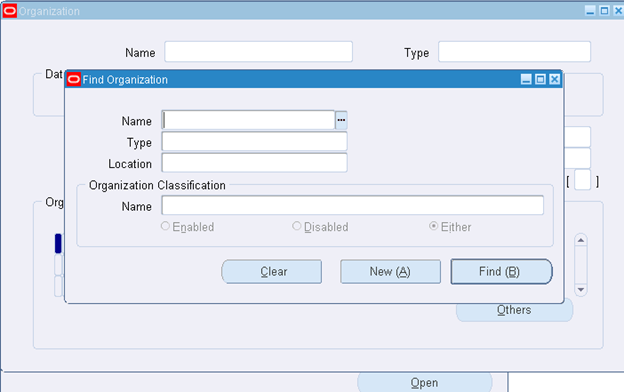
Form is opened
CAUSE :
Typically occurs when writing a new record to oracle database, but there is not enough space to write it. The data file in oracle tablespace called APPS_TS_TX_DATA should be set to AUTOEXTEND. If it is not, Oracle will not auto-increase the size of the datafile, and will raise the above error.

SOLUTION :
If all the reports end in COMPLETE – NORMAL, means its work.
If not than follow below steps.
Run a Concurrent Manager Recovery :
1. Please stop Concurrent managers by adcmctl.sh.
2. If not stopped, please abort managers by adcmctl.sh.
adcmctl.sh abort apps/****
3. Please kill if a process remains.
4. relink all (ADADMIN)
5. Please retry Concurrent Manager Recovery.
Navigate :
Oracle Applications Manager > Concurrent Managers OR Concurrent Requests > Site Map > Diagnostics and Repair > Concurrent Manager Recovery.
SOLUTION :
WARNING: This procedure should be performed by your ORACLE Database Administrator.
The SYSTEM user should have required privileges to perform this task.
Enable Autoextend on the APPS_TS_TX_DATA tablespace by executing the following Oracle PL/SQL command:
SQL > ALTER DATABASE DATAFILE '/u01/ORACLE/ORADATA/APPS_TS_TX_DATA.ORA' AUTOEXTEND ON NEXT 3072K
Error in RMAN backup log
RMAN-00571: ===========================================================
RMAN-00569: =============== ERROR MESSAGE STACK FOLLOWS ===============
RMAN-00571: ===========================================================
RMAN-03009: failure of backup command on d1 channel at 03/04/2018 23:16:26
ORA-19588: archived log RECID 1003 STAMP 2001986 is no longer valid

Recovery Manager complete.
2. Another reason might be because of few invalid or deleted records in control file.
To clean up invalid records, crosscheck the archive log:
RMAN> CROSSCHECK ARCHIVELOG ALL;

RMAN> DELETE EXPIRED ARCHIVELOG ALL;
It is recommended to use delete input option while backing up archivelog.
RMAN> backup archivelog until time 'sysdate -1' delete input;
If we want to take backup of all archivelogs, then:
——————————————————————
RMAN> backup archivelog all delete input ;