These queries provide insights into tablespace utilization, helping you identify potential storage issues :
Query 1: Check the tablespace utilization :
SELECT TABLESPACE_NAME, USED_SPACE,TABLESPACE_SIZE,USED_PERCENT FROM DBA_TABLESPACE_USAGE_METRICS ORDER BY USED_PERCENT DESC;
Query 2: Check the detail of tablespaces used, free and percentage :
Select f.tablespace_name , to_char(t.total_space,'9999,9999') "TOTAL(MB)" , to_char((t.total_space-f.free_space),'9999,9999')"USED(MB)", to_char(f.free_space,'999,999') "FREE(MB)", to_char((round(((t.total_space-f.free_space)/t.total_space)*100)),'999')||'%' PER_USED, to_char((round((f.free_space/t.total_space)*100)),'999')||'%'PER_FREE from (select tablespace_name , round (sum(blocks * ( select value/1024 from v$parameter where name='db_block_size')/1024)) free_space from dba_free_space group by tablespace_name)f , (select tablespace_name , round(sum(bytes/1048576)) total_space from dba_data_files group by tablespace_name ) t where f.tablespace_name=t.tablespace_name ;
Query 3: Give space utilization of datafiles present in tablespaces :
select tablespace_name , file_name, autoextensible , bytes/1024/1024 "USED SPACE(MB)", maxbytes/1024/1024 " MAX SIZE(MB) " from dba_data_files order by tablespace_name,file_name ;
RMAN> BACKUP AS COMPRESSED BACKUPSET DATABASE PLUS ARCHIVELOG;
Starting backup at 18-NOV-21
current log archived
using channel ORA_DISK_1
RMAN-00571: ===========================================================
RMAN-00569: =============== ERROR MESSAGE STACK FOLLOWS ===============
RMAN-00571: ===========================================================
RMAN-03002: failure of backup plus archivelog command at 11/18/2021 17:29:50
RMAN-06059: expected archived log not found, loss of archived log compromises recoverability
ORA-19625: error identifying file /u02/immam/db/apps_st/data/archive/1_500_1195296918.dbf
ORA-27037: unable to obtain file status
SVR4 Error: 2: No such file or directory
Additional information: 3
Solution :
Once in a while, there will be an archive log that is expired but not deleted. If that is the case, there is an easy answer :
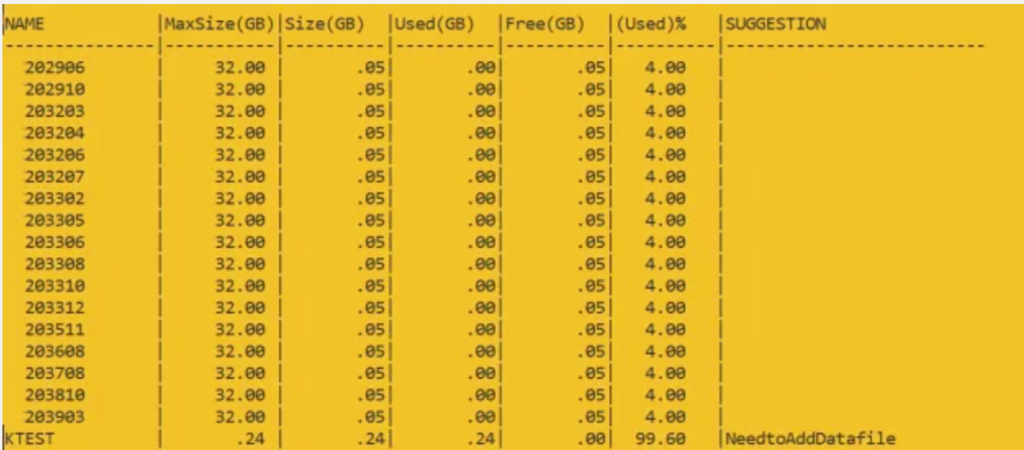
To see how full tablespaces are in an Oracle database, you might need to add a datafile. If the used size of a tablespace is more than 80% of its maximum size, consider adding a datafile. The script recommends adding a datafile when the tablespace is 80% full.
Query return the result as :
Query to suggest which datafiles to add if they are 75% full.
Explain the following query columns :
Name
Name of Tablespace
Maxsize(GB)
If autoextensible of datafile is on then it will pick sum of maxsize otherwise sum of bytes column.
Used(GB)
sum of bytes column of all datafiles
Free(GB)
space free in datafiles
USED%
check with used(GB) and free(GB) column — no n
Suggestion
Give suggesion on tablespace which space is utilized above 80%
Script to check tablespace usage and suggest adding files to the database.
set colsep |
set linesize 200 pages 100 trimspool on numwidth 14
col name format a15
col owner format a15
col "Used(GB)" format a10
col "Free(GB)" format a10
col "(Used)%" format a10
col "Size(GB)" format a10
col "MaxSize(GB)" format a11
col "(Used)%" format a10
col Suggestion format a26

select Name,"MaxSize(GB)","Size(GB)","Used(GB)","Free(GB)","(Used)%",
Case when AcctoMaxSizeUsed >= 80 then 'NeedtoAddDatafile' else '' end as Suggestion
from
(
SELECT d.status "Status", d.tablespace_name as Name,
TO_CHAR(NVL(a.maxbytes / 1024 / 1024 /1024, 0),'999999.90') "MaxSize(GB)",
TO_CHAR(NVL(a.bytes / 1024 / 1024 /1024, 0),'999999.90') "Size(GB)",
TO_CHAR(NVL(a.bytes - NVL(f.bytes, 0), 0)/1024/1024 /1024,'999999.90') "Used(GB)",
TO_CHAR(NVL(f.bytes / 1024 / 1024 /1024, 0),'999999.90') "Free(GB)",
TO_CHAR(NVL((a.bytes - NVL(f.bytes, 0)) / a.bytes * 100, 0), '990.00') "(Used)%",
TO_CHAR(NVL( (NVL(a.bytes, 0)) / a.maxbytes * 100, 0), '990.00') as AcctoMaxSizeUsed
FROM sys.dba_tablespaces d,
(select tablespace_name, sum(bytes) bytes, SUM( CASE WHEN autoextensible = 'YES' THEN maxbytes ELSE bytes END ) as maxbytes from dba_data_files group by tablespace_name) a,
(select tablespace_name, sum(bytes) bytes from dba_free_space group by tablespace_name) f WHERE
d.tablespace_name = a.tablespace_name(+) AND d.tablespace_name = f.tablespace_name(+) AND NOT
(d.extent_management like 'LOCAL' AND d.contents like 'TEMPORARY')
UNION ALL
SELECT d.status
"Status", d.tablespace_name as Name,
TO_CHAR(NVL(a.maxbytes / 1024 / 1024 /1024, 0),'999999.90') "MaxSize(GB)",
TO_CHAR(NVL(a.bytes / 1024 / 1024 /1024, 0),'999999.90') "Size(GB)",
TO_CHAR(NVL(t.bytes,0)/1024/1024 /1024,'999999.90') "Used(GB)",
TO_CHAR(NVL((a.bytes -NVL(t.bytes, 0)) / 1024 / 1024 /1024, 0),'999999.90') "Free(GB)",
TO_CHAR(NVL(t.bytes / a.bytes * 100, 0), '990.00') "(Used)%" ,
TO_CHAR(NVL( NVL(a.bytes, 0) / a.maxbytes * 100, 0), '990.00') as AcctoMaxSizeUsed
FROM sys.dba_tablespaces d,
(select tablespace_name, sum(bytes) bytes,SUM( CASE WHEN autoextensible = 'YES' THEN maxbytes ELSE bytes END ) as maxbytes from dba_temp_files group by tablespace_name) a,
(select tablespace_name, sum(bytes_cached) bytes from v$temp_extent_pool group by tablespace_name) t
WHERE d.tablespace_name = a.tablespace_name(+) AND d.tablespace_name = t.tablespace_name(+) AND
d.extent_management like 'LOCAL' AND d.contents like 'TEMPORARY'
) k order by suggestion
After getting the recommendation of adding datafile in tablespace.
Check the datafiles present in the tablespace :
select file_name from dba_Data_Files where tablespace_name = 'TEST';
Or
set line 999 pages 999 col FILE_NAME format a50 col tablespace_name format a15 Select tablespace_name, file_name, autoextensible, bytes/1024/1024/1024 "USEDSPACE GB", maxbytes/1024/1024/1024 "MAXSIZE GB" from dba_data_files
If you need to add datafiles, use the following commands:
alter tablespace USERS add datafile 'D:\ORACLE11204\ORADATA\PEGA\USERS02.DBF' size 1G autoextend on next 500M maxsize 16G;
ORA-00059: Maximum Number Of DB_FILES Exceeded in 19C database
When I am adding datafile to my 19C database facing the below error.
SQL> alter tablespace DATA  add datafile '/u01/data/data15.dbf' size 20G;
alter tablespace DATA add datafile '/u01/data/data15.dbf' size 20G
*
ERROR at line 1:
ORA-00059: maximum number of DB_FILES exceeded
SOLUTION :
Check for DB_FILES value :
SQL> sho parameter db_files;
 NAME                                 TYPE        VALUE
------------------------------------ ----------- ------------------------------
db_files                             integer    500
Check Value for Total number of datafiles in Database :
 SQL> select count(*) from dba_data_files;
COUNT(*)
----------
        496
Set the db_files parameter to a new high-value :
SQL> alter system set db_files = 1000 scope = spfile;
System altered.
Restart your database :
SQL>shutdown immediate;
SQL>startup
SQL> sho parameter db_files;
 NAME                                 TYPE        VALUE
------------------------------------ ----------- ------------------------------
db_files                             integer            1000
SQL> alter tablespace DATA  add datafile '/u01/data/data15.dbf' size 20G;