While altering parameter in parameter file got below error :
ALTER SYSTEM SET processes = 800 SCOPE=SPFILE;
ALTER SYSTEM SET processes = 800 SCOPE=SPFILE
*
ERROR at line 1:
ORA-32001: write to SPFILE requested but no SPFILE is in use
SOLUTION :
This error comes, if the database is running with pfile instead of spfile.
1. Check whether DB is running with pfile or spfile:
SQL> show parameter pfile
NAME TYPE VALUE
------ -------- ------------------------------
spfile string
Here value is showing BLANK, Means database is running with pfile. So with pfile , if we are trying to alter any init parameter in database, it will throw error. To fix it, create an spfile from the pfile and restart the database.
2. Create spfile from pfile ;
create spfile from pfile;
3. Check whether spfile has been created in $ORACLE_HOME/dbs location :
cd $ORACLE_HOME/dbs
ls -ltr spfile*
4. Restart the database :
shutdown immediate;
startup
When we start the database, if both pfile(init$ORACLE_SID.ora) and spfile(spfile$ORACLE_SID.ora) are present at dbs location, Then bydefault spfile will be used for db startup.
5. Check whether spfile is used or not :
show parameter pfile :

NAME TYPE VALUE
------------------------------------ ----------- ------------------------------
spfile string /oracle/app/oracle/product/12chome/spfiledbaclass.ora
6. Now run alter statement :
ALTER SYSTEM SET processes = 800 SCOPE=SPFILE
System altered.
To reset an Oracle EBS application user password, use the FNDCPASS utility via command line to change it instantly, or use the System Administrator responsibility in the GUI for individual users. For APPS/APPLSYS passwords in R12.2, specialized steps involving adstpall.sh and WLS datasource updates are required
Methods to Reset Oracle EBS Passwords :
FNDCPASS Utility (Command Line – Recommended for Admins): Use this method to change APPS or specific user passwords from the server terminal :
FNDCPASS apps/<apps_pwd> 0 Y SYSTEM/<system_pwd> USER <username> <new_password> Example to change user “OPERATOR” password:FNDCPASS apps/apps 0 Y system/manager USER OPERATOR welcome1.
System Administrator Responsibility (GUI) Log in to EBS as a user with System Administrator privileges (e.g., SYSADMIN).
Navigate to Security > User > Define. Query the user, enter the new password in the Password field, and save.
PL/SQL Method (Back-end):
Use FND_USER_PKG.ChangePassword to change passwords using SQL*Plus, logged in as the APPS user.
R12.2 APPS/APPLSYS Password Change :
– Shut down services using $INST_TOP/admin/scripts/adstpall.sh. – Run FNDCPASS to change the APPLSYS password. – Run AutoConfig. – Update WLS Data Source in WebLogic Console and restart services.
rman target / msglog $LOG_FILE << EOF RUN { ALLOCATE CHANNEL ch1 DEVICE TYPE disk FORMAT ‘$BACKUP_DIR/backup_%u_%s_%p_%T’; BACKUP AS COMPRESSED BACKUPSET DATABASE PLUS ARCHIVELOG; RELEASE CHANNEL ch1; BACKUP AS COPY CURRENT CONTROLFILE FORMAT ‘$BACKUP_DIR/controlfile_%u_%s_%p_%T’; } exit; EOF
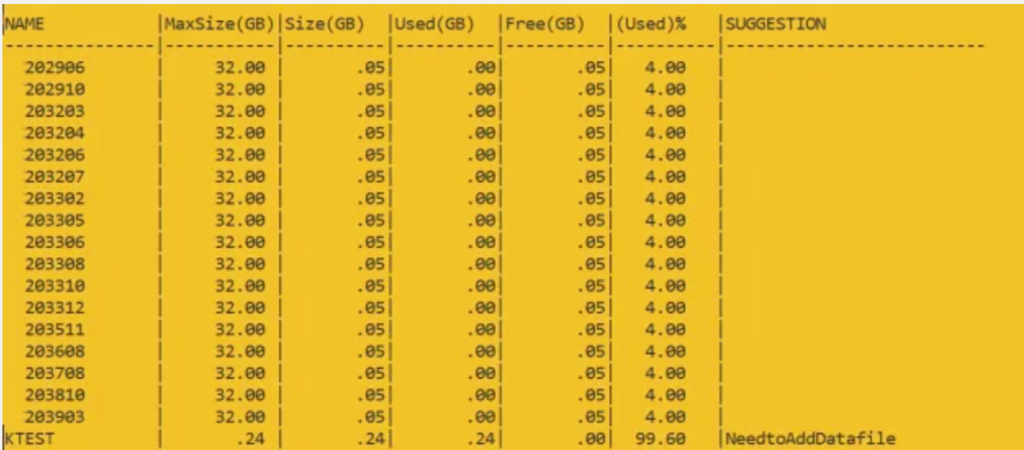
To see how full tablespaces are in an Oracle database, you might need to add a datafile. If the used size of a tablespace is more than 80% of its maximum size, consider adding a datafile. The script recommends adding a datafile when the tablespace is 80% full.
Query return the result as :
Query to suggest which datafiles to add if they are 75% full.
Explain the following query columns :
Name
Name of Tablespace
Maxsize(GB)
If autoextensible of datafile is on then it will pick sum of maxsize otherwise sum of bytes column.
Used(GB)
sum of bytes column of all datafiles
Free(GB)
space free in datafiles
USED%
check with used(GB) and free(GB) column — no n
Suggestion
Give suggesion on tablespace which space is utilized above 80%
Script to check tablespace usage and suggest adding files to the database.
set colsep |
set linesize 200 pages 100 trimspool on numwidth 14
col name format a15
col owner format a15
col "Used(GB)" format a10
col "Free(GB)" format a10
col "(Used)%" format a10
col "Size(GB)" format a10
col "MaxSize(GB)" format a11
col "(Used)%" format a10
col Suggestion format a26

select Name,"MaxSize(GB)","Size(GB)","Used(GB)","Free(GB)","(Used)%",
Case when AcctoMaxSizeUsed >= 80 then 'NeedtoAddDatafile' else '' end as Suggestion
from
(
SELECT d.status "Status", d.tablespace_name as Name,
TO_CHAR(NVL(a.maxbytes / 1024 / 1024 /1024, 0),'999999.90') "MaxSize(GB)",
TO_CHAR(NVL(a.bytes / 1024 / 1024 /1024, 0),'999999.90') "Size(GB)",
TO_CHAR(NVL(a.bytes - NVL(f.bytes, 0), 0)/1024/1024 /1024,'999999.90') "Used(GB)",
TO_CHAR(NVL(f.bytes / 1024 / 1024 /1024, 0),'999999.90') "Free(GB)",
TO_CHAR(NVL((a.bytes - NVL(f.bytes, 0)) / a.bytes * 100, 0), '990.00') "(Used)%",
TO_CHAR(NVL( (NVL(a.bytes, 0)) / a.maxbytes * 100, 0), '990.00') as AcctoMaxSizeUsed
FROM sys.dba_tablespaces d,
(select tablespace_name, sum(bytes) bytes, SUM( CASE WHEN autoextensible = 'YES' THEN maxbytes ELSE bytes END ) as maxbytes from dba_data_files group by tablespace_name) a,
(select tablespace_name, sum(bytes) bytes from dba_free_space group by tablespace_name) f WHERE
d.tablespace_name = a.tablespace_name(+) AND d.tablespace_name = f.tablespace_name(+) AND NOT
(d.extent_management like 'LOCAL' AND d.contents like 'TEMPORARY')
UNION ALL
SELECT d.status
"Status", d.tablespace_name as Name,
TO_CHAR(NVL(a.maxbytes / 1024 / 1024 /1024, 0),'999999.90') "MaxSize(GB)",
TO_CHAR(NVL(a.bytes / 1024 / 1024 /1024, 0),'999999.90') "Size(GB)",
TO_CHAR(NVL(t.bytes,0)/1024/1024 /1024,'999999.90') "Used(GB)",
TO_CHAR(NVL((a.bytes -NVL(t.bytes, 0)) / 1024 / 1024 /1024, 0),'999999.90') "Free(GB)",
TO_CHAR(NVL(t.bytes / a.bytes * 100, 0), '990.00') "(Used)%" ,
TO_CHAR(NVL( NVL(a.bytes, 0) / a.maxbytes * 100, 0), '990.00') as AcctoMaxSizeUsed
FROM sys.dba_tablespaces d,
(select tablespace_name, sum(bytes) bytes,SUM( CASE WHEN autoextensible = 'YES' THEN maxbytes ELSE bytes END ) as maxbytes from dba_temp_files group by tablespace_name) a,
(select tablespace_name, sum(bytes_cached) bytes from v$temp_extent_pool group by tablespace_name) t
WHERE d.tablespace_name = a.tablespace_name(+) AND d.tablespace_name = t.tablespace_name(+) AND
d.extent_management like 'LOCAL' AND d.contents like 'TEMPORARY'
) k order by suggestion
After getting the recommendation of adding datafile in tablespace.
Check the datafiles present in the tablespace :
select file_name from dba_Data_Files where tablespace_name = 'TEST';
Or
set line 999 pages 999 col FILE_NAME format a50 col tablespace_name format a15 Select tablespace_name, file_name, autoextensible, bytes/1024/1024/1024 "USEDSPACE GB", maxbytes/1024/1024/1024 "MAXSIZE GB" from dba_data_files
If you need to add datafiles, use the following commands:
alter tablespace USERS add datafile 'D:\ORACLE11204\ORADATA\PEGA\USERS02.DBF' size 1G autoextend on next 500M maxsize 16G;