select table_name,num_rows counter from dba_tables where owner=’Schema_name’ order by table_name;
Archive for the ‘Oracle Queries’ Category
To find the ROW Counts of tables that belongs to a Particular Schema
September 12th, 2017, posted in Oracle QueriesFind A String In Database
July 1st, 2017, posted in Oracle QueriesI’ve tried using this statement below to find an appropriate column based on what I think it should be named but it returned no results :
SELECT * from dba_objects WHERE
object_name like '%DTN%'
A column isn't an object. If you mean that you expect the column name to be like '%DTN%', the query you want is:
SELECT owner, table_name, column_name FROM all_tab_columns WHERE column_name LIKE '%DTN%';
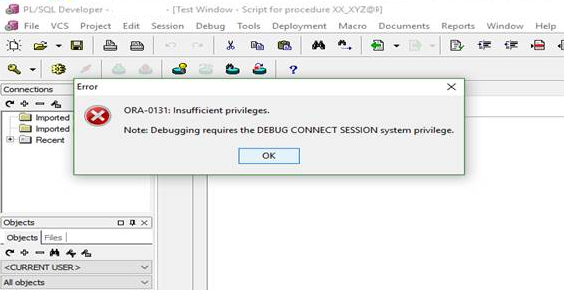
ORA-0131 Insufficient privileges
December 11th, 2016, posted in Oracle Queries
Title :
Getting “ORA-01031: insufficient privileges” error when trying to Debug.
Description :
When trying to debug a procedure, package, etc., the following error messages are received:
ORA-01031: insufficient privileges
Cause :
The Oracle user or schema account does not have the required Oracle rights to debug an object.
Resolution :
Ensure the User or Schema has all the required Oracle privileges granted for debugging objects on that database.
1. connect as sysdba
2. exec the sql:
grant debug connect session to XXXXXX;
or
grant DEBUG ANY PROCEDURE to XXXXXX;;
Check Number Of Oracle Users With Different Queries
June 17th, 2016, posted in Oracle QueriesQuery # 1 :
desc v$license Name Null? Type ----------------------------------------- -------- ---------------- SESSIONS_MAX NUMBER SESSIONS_WARNING NUMBER SESSIONS_CURRENT NUMBER SESSIONS_HIGHWATER NUMBER USERS_MAX NUMBER CPU_COUNT_CURRENT NUMBER CPU_CORE_COUNT_CURRENT NUMBER CPU_SOCKET_COUNT_CURRENT NUMBER CPU_COUNT_HIGHWATER NUMBER CPU_CORE_COUNT_HIGHWATER NUMBER CPU_SOCKET_COUNT_HIGHWATER NUMBER
Query # 2 :
select sessions_current from v$license;
Query # 3 :
select SESSIONS_CURRENT,SESSIONS_HIGHWATER,CPU_COUNT_CURRENT,CPU_COUNT_HIGHWATER from v$license;
Query # 4 :
SELECT USERNAME FROM DBA_USERS
Query # 5 :
SELECT distinct user_id from FND_LOGINS
Query # 6 :
SELECT distinct user_id from icx_sessions
Query # 7 :
SELECT distinct user_id from FND_USER
Query #8:
select application_name,responsibility_name,
security_group_name, user_name,
greatest(u.start_date, ur.start_date, r.start_date) start_date,
least(nvl(u.end_date, nvl(ur.end_date, r.end_date)),
nvl(ur.end_date, nvl(u.end_date, r.end_date)),
nvl(r.end_date, nvl(u.end_date, ur.end_date))) end_date
from fnd_user u,fnd_user_resp_groups ur,
fnd_responsibility_vl r,fnd_application_vl a,
fnd_security_groups_vl s
where a.application_id = r.application_id
and u.user_id = ur.user_id
and r.application_id = ur.responsibility_application_id
and r.responsibility_id = ur.responsibility_id
and ur.start_date sysdate
and u.start_date sysdate
and r.start_date sysdate
and ur.security_group_id = s.security_group_id
order by application_name,responsibility_name,security_group_name, user_name
Query # 9 :
select application_name,responsibility_name,
security_group_name, user_name,
greatest(u.start_date, ur.start_date, r.start_date) start_date,
least(nvl(u.end_date, nvl(ur.end_date, r.end_date)),
nvl(ur.end_date, nvl(u.end_date, r.end_date)),
nvl(r.end_date, nvl(u.end_date, ur.end_date))) end_date
from fnd_user u,fnd_user_resp_groups ur,
fnd_responsibility_vl r,fnd_application_vl a,
fnd_security_groups_vl s
where a.application_id = r.application_id
and u.user_id = ur.user_id
and r.application_id = ur.responsibility_application_id
and r.responsibility_id = ur.responsibility_id
and ur.start_date sysdate
and u.start_date sysdate
and r.start_date sysdate
and ur.security_group_id = s.security_group_id
order by application_name,responsibility_name,security_group_name, user_name
How To Find Out Which Users Are Logged On To An Apps Instance
June 6th, 2016, posted in Oracle QueriesFND_USER table stores the details of all the end users. If we give this query:
select user_name,to_char(last_logon_date,'DD-MON-YYYY HH24:MI:SS') from apps.fnd_user where to_char(last_logon_date,'DD-MON-YYYY')=to_char(sysdate,'DD-MON-YYYY'); USER_NAME TO_CHAR(LAST_LOGON_DATE,'D ------------------------------------ GUEST 05-FEB-2008 16:01:47 SYSADMIN 05-FEB-2008 16:02:06 USER1 05-FEB-2008 07:31:19 USER2 05-FEB-2008 04:58:12 USER3 05-FEB-2008 09:46:00 USER4 05-FEB-2008 05:00:38 USER5 05-FEB-2008 08:45:07 USER6 05-FEB-2008 09:09:17
The above query can give you a good idea who is logged on.
For a more accurate result, refer to metalink note 269799.1 which says:
You can run the Active Users Data Collection Test diagnostic script to get information about all active users currently logged into Oracle Applications.This diagnostic test will list users logged into Self Service Web Application, users logged into forms, and users running concurrent programs. Please note that to collect the audit information about the users who have logged into Forms, the “Sign-On:Audit Level” profile option should be set to Form. You can access this Diagnostic test via Metalink Note# 233871.1.