Archive for the ‘Oracle Queries’ Category

ORA-00265: Instance recovery required cannot set ARCHIVELOG mode

June 3rd, 2016, posted in Oracle Queries
Share

Today, I came across the “ORA-00265: instance recovery required, cannot set ARCHIVELOG mode” while
converting database into archive log mode.Problem sys@standby> startup mount; ORACLE instance started. Total System Global Area 835104768 bytes Fixed Size 2217952 bytes Variable Size 490735648 bytes Database Buffers 335544320 bytes Redo Buffers 6606848 bytes Database mounted. sys@standby> alter database recover managed standby database using current logfile disconnect; alter database recover managed standby database using current logfile disconnect * ERROR at line 1: ORA-01153: an incompatible media recovery is active Cause This indicates a currently running media recovery process. Action sys@standby> alter database recover managed standby database cancel; sys@standby> alter database recover managed standby database using current logfile disconnect; Note When shutting down physical standby database, firstly turn off media recovery process. Otherwise the next time when starting up redo apply again, you will encounter error ORA-01153.

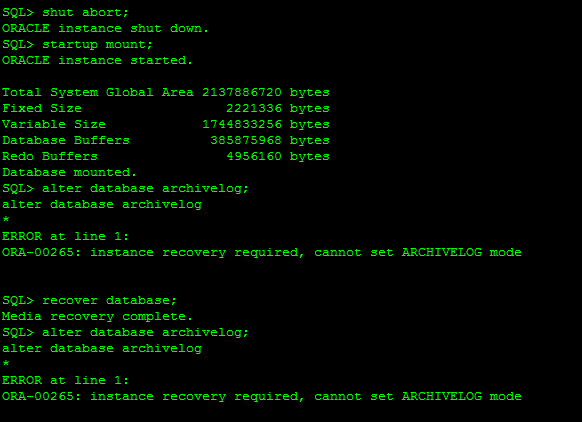
This error usually caused when database crashed unfortunately or we shutdown database with the help of database shutdown command as: shutdown abort, startup force mount or shutdown abort. These types of command will required instance recovery in next startup. In short it need clean database startup.


SQL> alter database archivelog;
alter database archivelog
*
ERROR at line 1:
ORA-00265: instance recovery required, cannot set ARCHIVELOG mode

Reason :

ORA-00265: instance recovery required, cannot set ARCHIVELOG mode
 *Cause:  The database either crashed or was shutdown with the ABORT
          option. Media recovery cannot be enabled because the online
          logs may not be sufficient to recover the current datafiles.
 *Action: Open the database and then enter the SHUTDOWN command with the
          NORMAL or IMMEDIATE option.


ORA-00265: Instance recovery required cannot set ARCHIVELOG mode,ORA-00265,Instance recovery required, cannot set ARCHIVELOG mode,ARCHIVELOG mode,ARCHIVELOG Error,Oracle DBA,Oracle Database,Oracle Archive issue,Oracle Ora,

Solution:

SQL> select status from v$instance;
STATUS
————————————
MOUNTED

SQL> alter database open;
Database altered.

SQL> shutdown immediate;
Database closed.
Database dismounted.
ORACLE instance shut down.
SQL> startup mount;
ORACLE instance started.
Total System Global Area 293601280 bytes
Fixed Size 1248600 bytes
Variable Size 88081064 bytes
Database Buffers 197132288 bytes
Redo Buffers 7139328 bytes
Database mounted.
SQL> alter database archivelog;
Database altered.
SQL> alter database open;
Database altered.
Share

How to check Oracle EBS/APPS Version

May 22nd, 2016, posted in Oracle Queries
Share

To check Oracle EBS/APPS Version

Run following SQL from apps user :Problem sys@standby> startup mount; ORACLE instance started. Total System Global Area 835104768 bytes Fixed Size 2217952 bytes Variable Size 490735648 bytes Database Buffers 335544320 bytes Redo Buffers 6606848 bytes Database mounted. sys@standby> alter database recover managed standby database using current logfile disconnect; alter database recover managed standby database using current logfile disconnect * ERROR at line 1: ORA-01153: an incompatible media recovery is active Cause This indicates a currently running media recovery process. Action sys@standby> alter database recover managed standby database cancel; sys@standby> alter database recover managed standby database using current logfile disconnect; Note When shutting down physical standby database, firstly turn off media recovery process. Otherwise the next time when starting up redo apply again, you will encounter error ORA-01153.

select RELEASE_NAME from fnd_product_groups; 

You should see output like :

RELEASE_NAME
-----------------------
11.5.10.2
Share

ORA-06502 : PL/SQL: numeric or valur error: Character string buffer too small

May 1st, 2016, posted in Oracle Queries
Share
ORA-06502 ,Ora Error,Oracle Error,numeric or value error,Oracle numeric or value error,Oracle DBA,Oracle Developer,Oracle Solution,Solution for ORA-06502,Character string buffer too small,Oracle numeric,Oracle value error,ORA-06502 : PL/SQL
Problem

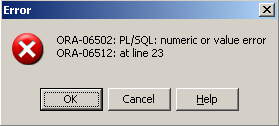
ORA-06502: PL/SQL: numeric or value error: character string buffer too small
ORA-06512: at line 23


Cause

a varchar2(2000);


Action

FIXED by changing how I declared the variable “a” to:

a varchar2(9000);


Note

Change the declared variable according to your requirements.


Share

Steps To Configure Archive Log Mode in Oracle Database 11g

April 24th, 2016, posted in Oracle Queries
Share

Mode of Logging

There are two types of logging modes in Oracle Database :

ARCHIVELOG : 
In this type of logging whatever oracle writes in a redo log file related to transactions in database, saved to another location after a log file has been filled . This location is called Archive location. if database is in Archive log mode then in case of any disaster, we can recover our database upto the last commit and user don’t have to reenter their data. Until a redo log file is not written to the Archive location it cannot be reused by oracle to write redo related data.

NOARCHIVELOG :
In this type of logging whatever oracle writes in a redo log file related to transactions in database must be overwritten when all the log files have been filled. In this type of logging we can recover our database upto the last consistent backup we have with us, after that users have to reenter their data.

How to check log mode in Oracle Database 10g/11g :

[cognos@rac1 u02]$ sqlplus
 
 SQL*Plus: Release 11.2.0.1.0 Production on Thu Oct 25 23:03:44 2012
 
 Copyright (c) 1982, 2009, Oracle.  All rights reserved.
 
 Enter user-name: /as sysdba
 
 Connected to:
 Oracle Database 11g Enterprise Edition Release 11.2.0.1.0 - Production
 With the Partitioning, Automatic Storage Management, OLAP, Data Mining
 and Real Application Testing options
 
 SQL> archive log list
 Database log mode              No Archive Mode
 Automatic archival             Disabled
 Archive destination            /backup/orcl/
 Oldest online log sequence     1
 Current log sequence           1
 SQL> select name,log_mode from v$database;
 NAME      LOG_MODE
 --------- -    -----------
 ORCL      NOARCHIVELOG
 
 Currently the ORCL database is in NOARCHIVELOG mode

To change the Oracle database in ARCHIVELOG mode. Below mentioned steps :

1. If needed set the archive log destination where you want to save your archive logs whether to a single location or to multiple location. If this is not set then Oracle save archive log files in DB_RECOVERY_FILE_DEST location if set. If you have not set your DB_RECOVERY_FILE_DEST location then you have to set your archive location before changing your database to ARCHIVELOG mode.

SQL> alter system set log_archive_dest_1='LOCATION=/u02/archive' scope=spfile;
System altered.
 
Note -- To change this parameter while database is open, your database has to run with SPFILE, if running through PFILE then shut down your database and make changes in your PFILE and then start the database in MOUNT mode using that changed PFILE
2. After this you need to shut down your database and start again in MOUNT mode
SQL> shut immediate;
Database closed.
Database dismounted.
ORACLE instance shut down.
SQL> startup mount;
ORACLE instance started.
 
Total System Global Area 1025298432 bytes
Fixed Size                  1341000 bytes
Variable Size             322963896 bytes
Database Buffers          696254464 bytes
Redo Buffers                4739072 bytes
Database mounted.
SQL> alter database archivelog;
Database altered.
SQL> alter database open;
Database altered.

SQL> archive log list

Database log mode              Archive Mode
 Automatic archival             Enabled
 Archive destination            /u02/archive
 Oldest online log sequence     1
 Next log sequence to archive   1
 Current log sequence           1
SQL> select name,log_mode from v$database;

NAME      LOG_MODE
---------      ------------
ORCL      ARCHIVELOG

Database changed to ARCHIVELOG mode.


Note :- After you changed your database to ARCHIVELOG mode, take a backup of your database immediately because in recovery scenarios you can recover your database from the last backup taken in this mode. #############################################################################

To change the Oracle database in NOARCHIVELOG mode. Below mentioned steps:


1.Shutdown your running database.


SQL> shut immediate
Database closed.
Database dismounted.
ORACLE instance shut down.

2. Start your database in MOUNT mode.

SQL> startup mount
ORACLE instance started.

Total System Global Area 1025298432 bytes
Fixed Size                  1341000 bytes
Variable Size             322963896 bytes
Database Buffers          696254464 bytes
Redo Buffers                4739072 bytes
Database mounted.

SQL> alter database noarchivelog;
Database altered.

SQL> alter database open;
Database altered.

SQL> archive log list
Database log mode              No Archive Mode
Automatic archival             Disabled
Archive destination            /u02/archive
Oldest online log sequence     1
Current log sequence           1

SQL> select name,log_mode from v$database;
NAME      LOG_MODE
---------      ------------
ORCL      NOARCHIVELOG

Database changed to NOARCHIVELOG mode !!
Share

Enabling And Checking the Status of Flashback On Database

February 6th, 2016, posted in Oracle Queries
Share

Enabling the FLASHBACK DATABASE on the standby database :Oracle : Size Of Database,Oracle,Size Of Database,Database,data files, redo log files, control files, temporary files,Oracle data files,Oracle  redo log files,Oracle  control files,Oracle  temporary files,Enabling And Checking the Status of Flashback On Database,Oracle Database,Oracle DBA,Enabling Flashback On Database,Checking the Status of Flashback On Database, Status of Flashback On Database, Enable Flashback On Database, Enabling Flashback On Database,Enable Flashback On Oracle Database, Enabling Flashback On Oracle Database,

SQL> alter database flashback on;
Database altered.


Checking the status of the flashback on the database :

SQL> select flashback_on from gv$database;

FLASHBACK_ON
——————

YES
YES

Share