
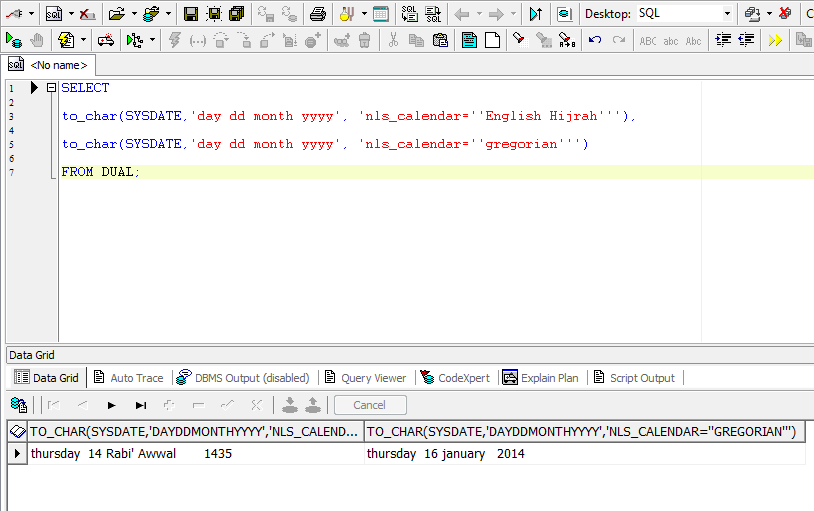
SELECT
to_char(SYSDATE,’day dd month yyyy’, ‘nls_calendar=”Arabic Hijrah”’),
to_char(SYSDATE,’day dd month yyyy’, ‘nls_calendar=”English Hijrah”’),
to_char(SYSDATE,’day dd month yyyy’, ‘nls_calendar=”gregorian”’)
FROM DUAL;

![Locking And Unlocking Tables In Oracle,Locking Tables In Oracle,Unlocking Tables In Oracle,Tables In Oracle,Oracle DBA,DBA,APPS DBA,ORA DBA,Application DBA,Database DBA,Oracle Tricks,Locking Query in Oracle,Unlocking Query in DBA,Oracle Forms Error,Oracle Application Forms Error,Forms : Could not reserve record (2 tries). Keep trying,FRM-40501,FRM-40501: COULD NOT RESERVE RECORD [2 TRIES]; ORACLE APPS RECORD-LOCKING](http://bozims.co.uk/wp-content/uploads/sites/2/2015/08/Locking-And-Unlocking-Tables-In-OracleLocking-Tables-In-OracleUnlocking-Tables-In-OracleOracle-TricksLocking-Query-in-OracleUnlocking-Query-in-DBAOracle-Forms-ErrorOracle.png)
One of your end users attempts to modify a record, and the user is prompted with a dialog box asking “Could not reserve record [2 tries]. Keep trying?” The user answers “yes” and after being prompted a few more times the user gives up. Ultimately the user gets a “FRM-40501: ORACLE error: unable to reserve record for update or delete.” When this happens it’s nice to have some scripts ready to go to quickly diagnose what is causing the contention, so appropriate action can be taken. The forms don’t wait to the obtain the lock for very long, so it’s a little more difficult to determine the blocking lock. This first script provides a listing of the possible locks and some relevant E-Business Suite information for digging further.
Query 1:
select vs.audsid audsid,
 locks.sid sid,
 vs.serial# serial#,
 vs.username oracle_user,
 vs.osuser os_user,
 vs.program program,
 vs.module module,
 vs.action action,
 vs.process process,
 decode(locks.lmode,
       1, NULL,
       2, 'Row Share',
       3, 'Row Exclusive',
       4, 'Share',
       5, 'Share Row Exclusive',
       6, 'Exclusive', 'None') lock_mode_held,
 decode(locks.request,
       1, NULL,
       2, 'Row Share',
       3, 'Row Exclusive',
       4, 'Share',
       5, 'Share Row Exclusive',
       6, 'Exclusive', 'None') lock_mode_requested,
 decode(locks.type,
       'MR', 'Media Recovery',
       'RT', 'Redo Thread',
       'UN', 'User Name',
       'TX', 'Transaction',
       'TM', 'DML',
       'UL', 'PL/SQL User Lock',
       'DX', 'Distributed Xaction',
       'CF', 'Control File',
       'IS', 'Instance State',
       'FS', 'File Set',
       'IR', 'Instance Recovery',
       'ST', 'Disk Space Transaction',
       'TS', 'Temp Segment',
       'IV', 'Library Cache Invalidation',
       'LS', 'Log Start or Log Switch',
       'RW', 'Row Wait',
       'SQ', 'Sequence Number',
       'TE', 'Extend Table',
       'TT', 'Temp Table',
       locks.type) lock_type,
 objs.owner object_owner,
 objs.object_name object_name,
 objs.object_type object_type,
 round( locks.ctime/60, 2 ) lock_time_in_minutes
from v$session vs,
         v$lock locks,
         dba_objects objs,
         dba_tables tbls
where locks.id1 = objs.object_id
 and vs.sid = locks.sid
 and objs.owner = tbls.owner
 and objs.object_name =  tbls.table_name
 and objs.owner != 'SYS'
 and locks.type = 'TM'
 order by lock_time_in_minutes;
To determine the table(s) the form is trying to lock, use the Help->Record History menu option; this provides the base table or view for the form block.
Look through the result set from Query 1 for an object_name (typically a table or view) in the same vicinity as your table or view. If you have a form block based on a view, it may be helpful to look up the tables behind the view. If the action starts with an ‘FRM:%’, then another forms session has the lock.
One thing to note: You’ll often see the same user blocking themselves. This could be a training issue, or it could be due to a previous forms session that crashed, but the f60webmx process did not die. If this is the case, you can kill the application server OS process (based on the process value in Query 1).
Query 2 provides further details for results in Query 1 that are forms sessions – simply plop in the AUDSID from Query 1.
Query 2:
SELECT
        F.AUDSID,
        S.SID,
        S.SERIAL#,
        L.USER_ID,
        L.TERMINAL_ID,
        L.LOGIN_NAME,
        R.RESP_APPL_ID,
        R.RESPONSIBILITY_ID,
        F.FORM_ID,
        F.FORM_APPL_ID,
        L.PID,
        L.PROCESS_SPID,
        NVL(F.START_TIME, NVL(R.START_TIME, L.START_TIME)) TIME,
        USR.USER_NAME,
        a.application_name,
        RSP.RESPONSIBILITY_NAME,
        FRM.USER_FORM_NAME,
        s.program,
        s.action,
        s.module,
        s.state,
        s.event,
        s.wait_class,
        s.seconds_in_wait
FROM FND_RESPONSIBILITY_TL RSP,
        FND_FORM_TL FRM,
        FND_USER USR,
        FND_LOGINS L,
        FND_LOGIN_RESPONSIBILITIES R,
        FND_LOGIN_RESP_FORMS F,
        GV$SESSION S,
        fnd_application_tl A
WHERE F.AUDSID = &ENTER_FORM_AUDSID
AND R.LOGIN_ID = F.LOGIN_ID
AND R.LOGIN_RESP_ID = F.LOGIN_RESP_ID
AND L.LOGIN_ID = R.LOGIN_ID
AND L.END_TIME IS NULL
AND R.END_TIME IS NULL
AND F.END_TIME IS NULL
AND L.USER_ID = USR.USER_ID
AND R.RESPONSIBILITY_ID = RSP.RESPONSIBILITY_ID
AND R.RESP_APPL_ID = RSP.APPLICATION_ID
AND RSP.LANGUAGE = 'US'
AND RSP.application_id = a.application_id
AND a.language = 'US'
AND F.FORM_ID = FRM.FORM_ID
AND F.FORM_APPL_ID = FRM.APPLICATION_ID
AND FRM.LANGUAGE = 'US'
AND F.AUDSID = S.AUDSID;
If a concurrent program holds the lock, Query 3 provides a bit more information. Here we can see the user, concurrent program, how long it’s been running and log/output files.
Query 3:
select fcr.request_id,
         fcr.requested_by,
         fu.user_name,
         fcr.program_application_id,
         fcr.concurrent_program_id,
         fcr.actual_start_date,
         fat.application_name,
         fcp.concurrent_program_name,
         fcpt.user_concurrent_program_name,
         fcr.description,
         fcr.logfile_node_name,
         fcr.outfile_name,
         fcr.logfile_name,
         fcr.completion_text,
         fcr.parent_request_id,
         vs.process,
         vs.state,
         vs.event,
         vs.wait_class,
         vs.seconds_in_wait
         from v$session vs,
              fnd_concurrent_requests fcr,
              fnd_application_tl fat,
              fnd_concurrent_programs fcp,
              fnd_concurrent_programs_tl fcpt,
              fnd_user fu
         where vs.audsid =  &ENTER_CONC_PROCESS_AUDSID
         and vs.process = fcr.os_process_id
         and fcr.actual_completion_date is null
         and fcr.program_application_id = fat.application_id
         and fcr.program_application_id = fcp.application_id
         and fcr.concurrent_program_id = fcp.concurrent_program_id
         and fcr.program_application_id = fcpt.application_id
         and fcr.concurrent_program_id = fcpt.concurrent_program_id
         and fcr.requested_by = fu.user_id;
This should be enough information to chase down the offender (someone out for coffee and not save that latest change first?) or possibly even point to a process that needs attention.
*********************************************************************************************************************
Also Check : http://aliimmam.com/locking-and-unlocking-tables-in-oracle/
Also Check : http://aliimmam.com/lock-tables-and-unlock-tables-syntax/
Note : Please not do make backups before using these queries and also confirm them yourself or by aother means as well. Source : http://dwhlaureate.blogspot.com/2014/07/how-to-unlock-locked-table-in-oracle.html
*********************************************************************************************************************
Oracle puts locks while performing any DDL or DML operation on oracle tables.When table locks is present on any tables in Oracle we cannot run DDL on those tables.
Some of the locks automatically set by oracle are RS and RX Locks.
SELECT … FOR UPDATE execution results in RS (row share) table lock. When you execute an INSERT, UPDATE or DELETE Oracle puts RX (row exclusive) table lock.
We have to kill the session which holds the lock in order to execute further operations. Follow the below steps to kill the session and forcibly unlock the table.
Let’s assume that ‘EMP’ table is locked,
SELECT object_id FROM dba_objects WHERE object_name='EMP';
 OBJECT_ID
----------
   7401242
If there are no locks present for the table ‘EMP’ this query won’t return any values.
SELECT sid FROM v$lock WHERE id1=7401242
SID
----------
3434
SELECT sid, serial# from v$session where sid=3434
SID SERIAL#
---------- ----------
3434 92193
ALTER SYSTEM KILL SESSION '3434,92193' ;
Once the session is killed you will be able to carry out any DDL activities on EMP table. Also you can check in TOAD if there are any active sessions associated to the SID that we killed, to make sure that the session has been killed.
*********************************************************************************************************************
Also Check : http://aliimmam.com/forms-could-not-reserve-record-2-tries-keep-trying/
Also Check : http://aliimmam.com/lock-tables-and-unlock-tables-syntax/
Note : Please not do make backups before using these queries and also confirm them yourself or by aother means as well. Source : http://www.bluegecko.net/oracle/frm-40501-could-not-reserve-record-2-tries-oracle-apps-record-locking/
*********************************************************************************************************************
@echo off
sqlplus username/password@connect_identifier @C:UsersrizDesktopmYmy.sql
spool C:UsersmeDesktopmYmy_log.txt
set linesize 50
set pagesize 50
prompt Purpose:
prompt To run Daily
SELECT TO_CHAR (SYSDATE, 'MM-DD-YYYY HH24:MI:SS') "NOW" FROM DUAL;
select * from v$instance;
SELECT TO_CHAR (SYSDATE, 'MM-DD-YYYY HH24:MI:SS') "NOW" FROM DUAL;
exit
spool off;
And you are all done.
The first select will give you time so that you may know when it started, the second seelct will give you the instance details and the third select will give you time again so that you can check when it ended.
Archive logging is essential for production databases where the loss of a transaction might be fatal. It is generally considered unnecessary in development and test environments.
To check if the ARCHIVELOG mode is enabled
ARCHIVE LOG LIST;

To see the current archiving mode, query the V$DATABASE view:
SELECT LOG_MODE FROM SYS.V$DATABASE;

LOG_MODE
------------
ARCHIVELOG
The SQL*Plus command ARCHIVE LOG LIST displays archiving information for the connected instance. For example:
SQL> ARCHIVE LOG LIST

Database log mode              Archive Mode
Automatic archival             Enabled
Archive destination            D:oracleoradataIDDB2archive
Oldest online log sequence     11160
Next log sequence to archive   11163
Current log sequence           11163
This display tells you all the necessary information regarding the archived redo log settings for the current instance:
ARCHIVELOG mode.
You can also run this UNIX/Linux/Solairs command to see if you are running in archivelog mode. If you are in ARCHIVELOG mode, you will see rows returned by this ps command:
$ ps -ef|grep -i _arc
——————————————————————-
Links :
http://www.dba-oracle.com/t_check_if_running_in_archivelog_mode.htm
http://docs.oracle.com/cd/B28359_01/server.111/b28310/archredo008.htm#ADMIN11355
http://psoug.org/reference/archivelog.html
https://support.ca.com/cadocs/0/CA%20ARCserve%20%20Backup%20r16-ENU/Bookshelf_Files/HTML/oraclewn/index.htm?toc.htm?ow_check_archivelog_mode.htm