Archive for the ‘Oracle’ Category

Workflow Notification Mailer Setup in Oracle Apps R12/12i

May 16th, 2021, posted in Oracle EBS Application
Share

On popular demand from readers, I am going to cover Workflow Notification Mailer in Oracle Applications R12/12i.
Workflow notification mailer setup in R12 is similar to 11i ( In both release 11i (OWF.H and higher in 11i) & R12 are Java Mailer)
* Previous version of Notification Mailer in 11i was based on C also called as C Mailer

Things To Note :
1. You use Oracle Application Manager (OAM) to configure Workflow Notification Mailer.
2. There are two kind of Notification (Outbound & Inbound) in Workflow Mailer
3. For Outbound Notification, CM (Concurrent Manager) node should be able to connect to SMTP (Simple Mail Transfer Protocol) server/relay.
4. For Inbound Notification (Optional), CM node should be able to connect to IMAP (Internet Message Access Protocol) Server.
5. Log file for Workflow Mailer Notification are at $APPLCSF/$APPLLOG/FNDC*.txt
6. Workflow Notification Mailer in background run as Concurrent Manager (Workflow Mailer ServiceWorkflow Agent Listener Service)
7. If you don’t wish to send mail notification to end user (from Dev/Test instance) then configure Test Address in configuration screen.


Step to configure Workflow Notification Mailer :

1. Login to Apps R12 with System Administrator Reponsibility
2. under Workflow : Oracle Applications Manager click on Workflow Manager

oracle apps,Oracle dba,Oracle application,oracle mail setup.oracle apps dba,

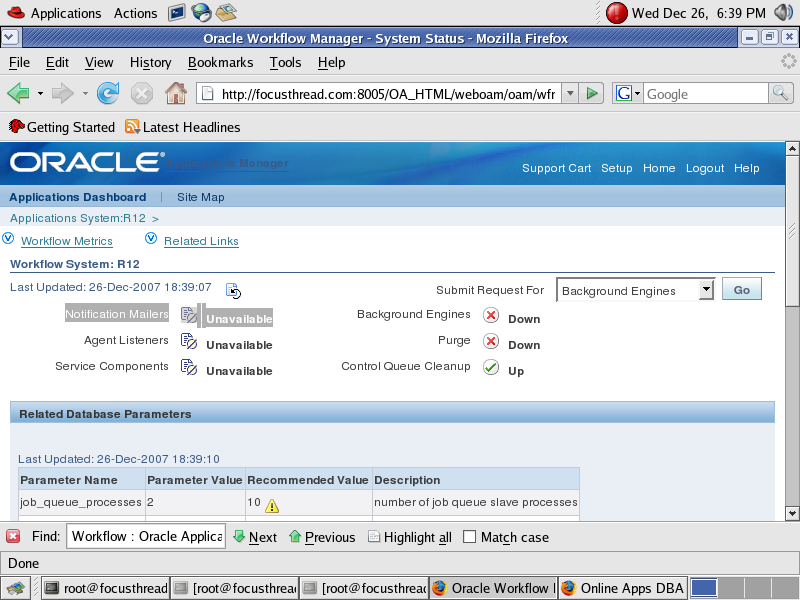
If this is first time you are configuring Workflow Notification Mailer in Oracle Apps R12/12i you will see Notification Mailers as unavailable as shown in screenshot

Click on Notification Mailers
 

oracle apps,Oracle dba,Oracle application,oracle mail setup.oracle apps dba,


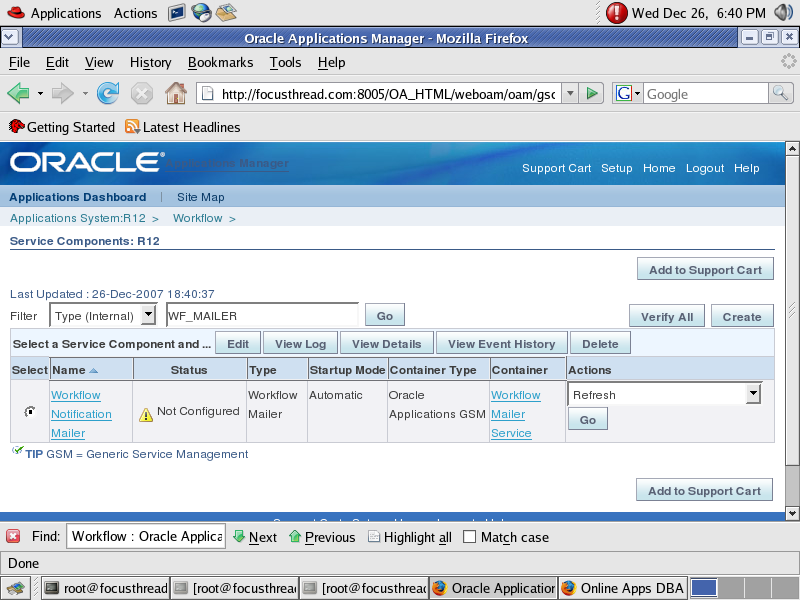
In next screen (as shown below, click on Edit Button)
oracle apps,Oracle dba,Oracle application,oracle mail setup.oracle apps dba,

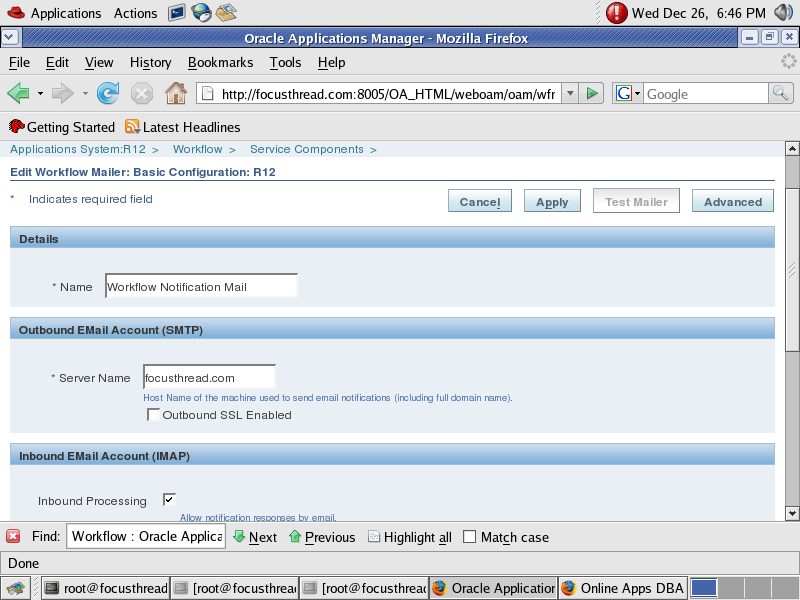
Here you have option to select Inbound notification setup or Just outgoing Notification Setup.
oracle apps,Oracle dba,Oracle application,oracle mail setup.oracle apps dba,


Provide SMTP Server Name (ensure that CM node should be able to connect to SMTP Server or SMTP Relay)
 

oracle apps,Oracle dba,Oracle application,oracle mail setup.oracle apps dba,


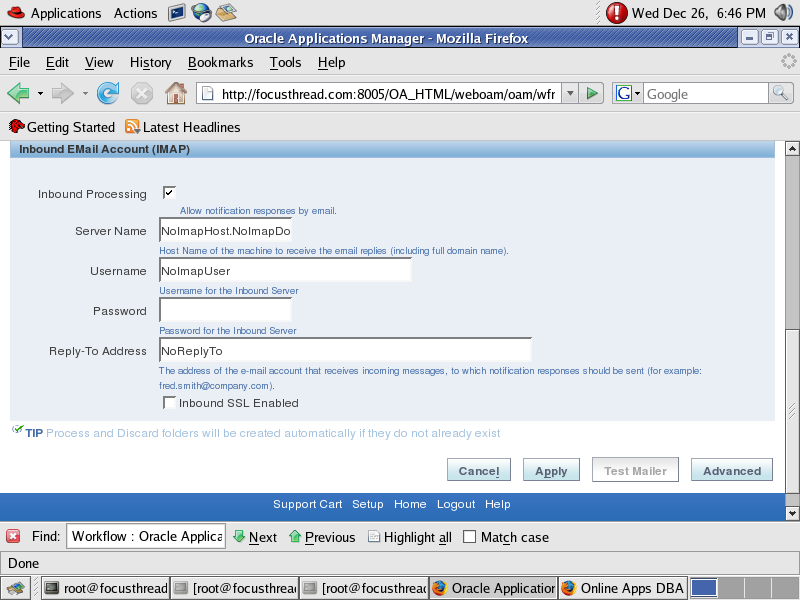
Uncheck Inbound Processing (from above screen), if you don’t wish to configure Inbound Notification Mailer.

If you wish to configure Inbound Notification as well then ensure IMAP Server should be configured with a valid user (create InboxProcessed Discard folder for this User)

Click on Apply button to finish configuration, at this stage Notification Mailer will test SMTP Server & IMAP Server connectivity.

For Advanced setup, click on Advanced at top right of configuration screen.

Metalink Notes for Notification Mailer
1. 453137.1 Oracle Workflow Best Practices Release 12 and Release 11i
2. 274764.1 Oracle Workflow Cartridge Workflow Java Mailer Setup Test
3. 433359.1 Tracking Workflow Notification Event Messages
4. 456921.1 Queries Related to Alert and Mailer Integration Post RUP4
5. 454706.1 How to Stop mails from Workflow Notification Mailer

Share

HOW TO RECOVER DELETED ORACLE DATAFILES WITH NO DOWNTIME

April 11th, 2021, posted in Oracle Queries
Share

So you have accidentally removed a datafile from your production database? First thing, DON’T PANIC !! There’s an easy way to recover deleted datafiles, for as long as your database remains up. The procedure below works on linux, however this method conceivably can work for other platforms.

This procedure will even work if your database is in NOARCHIVELOG mode.

You may have reached this posting through Google, and in a rush to get the solution right away, so here it is.

The recovery is done in two phases.

Phase 1: instant recovery to prevent Oracle errors (like ORA-27041 “unable to open file”, ORA-01110, ORA-01116)

  1. Find the PID of DBWRITER for the right database.
    ps -ef | grep dbw0_SID_OF_YOUR_DB
    oracle   12272     1  0 10:55 ?        00:00:00 ora_dbw0_test
    oracle   12941 11501  0 12:36 pts/0    00:00:00 grep dbw0_test
  2. List the deleted file handles for that DBWRITER process.
    ls -l /proc/_PID_OF_DBWRITER/fd | grep deleted
    
    lrwx------  1 oracle oinstall 64 Oct 15 11:24 10 -> /home/oracle/product/10.2.0.2/dbs/lkinsttest (deleted)
    lrwx------  1 oracle oinstall 64 Oct 15 11:24 23 -> /ra5a/orabkp/test/TEST/datafile/o1_mf_lost_3k6xzjpm_.dbf (deleted)
  3. Create a symbolic link to your datafile with the original name.
    ln -s /proc/PID_OF_DBWRITER/fd/23 /ra5a/orabkp/test/TEST/datafile/o1_mf_lost_3k6xzjpm_.dbf

    That’s all. Now you are no longer going to get errors. However, if your database goes down now, you will lose that datafile for good.

Phase 2: restore the file

ARCHIVELOG database

  1. (Optional.) Issue a checkpoint. This is to reduce the recovery time when bringing the file online, depending on activity for that datafile. Unfortunately, you can’t checkpoint a single file, so the checkpoint may take some time.
    alter system checkpoint;
  2. Backup the datafile with rman. Why rman? It’s much easier then you think. Total downtime is about one second for inactive datafiles, and more for active ones (with writes).
    rman target /
    report schema;
    backup as copy datafile YOUR_DATAFILE_NUMBER format '/location_of_your_database/new_name_for_File.dbf';
    sql 'alter database datafile YOUR_DATAFILE_NUMBER offline';
    switch datafile YOUR_DATAFILE_NUMBER to copy;
    recover datafile YOUR_DATAFILE_NUMBER;
    sql 'alter database datafile YOUR_DATAFILE_NUMBER online';
    exit;

NOARCHIVELOG database

  1. Make the tablespace with that datafile read only
    select distinct tablespace_name from dba_data_files where file_name = 'YOUR_DELETED_FILE';
    alter tablespace THE_TABLESPACE read only;
  2. Copy the file from the symlink to a new name
    cp SIM_LINK_DATA_FILE NEW_NAME_FOR_DATAFILE.dbf
  3. WARNING: Ensure your copy is complete! Then, crash the database.
    /*WAIT FOR COPY!!!*/
    shutdown abort;
  4. Remove the now invalid symlink, and rename the datafile to its original name. Be careful not to remove the wrong file now — that would be a disaster:
    rm -i SIM_LINK_DATA_FILE
    mv NEW_NAME_FOR_DATAFILE.dbf SIM_LINK_DATA_FILE
  5. Startup your database normally and make the tablespace read/write.
    startup
    alter tablespace THE_TABLESPACE read write;

I hope this helps you to get out of a nasty situation.

Here’s both cases fully captured from terminal. Note, I am using Oracle-managed files. This doesn’t change the steps.

/ra5a/orabkp/test/TEST/datafile> sqlplus '/ as sysdba'

SQL*Plus: Release 10.2.0.2.0 - Production on Mon Oct 15 12:31:55 2007

Copyright (c) 1982, 2005, Oracle.  All Rights Reserved.

Connected to:
Oracle Database 10g Release 10.2.0.2.0 - 64bit Production

SQL> 
SQL> select tablespace_name, file_name from dba_data_files

TABLESPACE_NAME                FILE_NAME
------------------------------ ------------------------------------------------------------
USERS                          /ra5a/orabkp/test/TEST/datafile/o1_mf_users_3k6xgwhb_.dbf
SYSAUX                         /ra5a/orabkp/test/TEST/datafile/o1_mf_sysaux_3k6xgwdf_.dbf
UNDOTBS1                       /ra5a/orabkp/test/TEST/datafile/o1_mf_undotbs1_3k6xgwg9_.dbf
SYSTEM                         /ra5a/orabkp/test/TEST/datafile/o1_mf_system_3k6xgwd4_.dbf
EXAMPLE                        /ra5a/orabkp/test/TEST/datafile/o1_mf_example_3k6xjdjw_.dbf
LOST                           /ra5a/orabkp/test/TEST/datafile/o1_mf_lost_3k74mq08_.dbf

6 rows selected.

SQL> select tablespace_name, table_name from dba_tables where owner = 'TESTING';

TABLESPACE_NAME                TABLE_NAME
------------------------------ ------------------------------
LOST                           LOST_TABLE

SQL> connect testing/testing
SQL> select count(*) from lost_table;

  COUNT(*)
----------
     50070

SQL> alter system flush buffer_cache;

System altered.

SQL> select count(*) from lost_table;

  COUNT(*)
----------
     50070

SQL> Disconnected from Oracle Database 10g Release 10.2.0.2.0 - 64bit Production

/ra5a/orabkp/test/TEST/datafile> ls -lF
total 1015132
-rw-r-----  1 oracle oinstall 157294592 Oct 15 12:22 o1_mf_example_3k6xjdjw_.dbf
-rw-r-----  1 oracle oinstall 104865792 Oct 15 12:22 o1_mf_lost_3k74mq08_.dbf
-rw-r-----  1 oracle oinstall 241180672 Oct 15 12:32 o1_mf_sysaux_3k6xgwdf_.dbf
-rw-r-----  1 oracle oinstall 503324672 Oct 15 12:32 o1_mf_system_3k6xgwd4_.dbf
-rw-r-----  1 oracle oinstall  20979712 Oct 15 10:17 o1_mf_temp_3k6xj9xn_.tmp
-rw-r-----  1 oracle oinstall  26222592 Oct 15 12:32 o1_mf_undotbs1_3k6xgwg9_.dbf
-rw-r-----  1 oracle oinstall   5251072 Oct 15 12:22 o1_mf_users_3k6xgwhb_.dbf

/ra5a/orabkp/test/TEST/datafile> rm o1_mf_lost_3k74mq08_.dbf
/ra5a/orabkp/test/TEST/datafile> sqlplus testing/testing

SQL*Plus: Release 10.2.0.2.0 - Production on Mon Oct 15 12:35:24 2007

Copyright (c) 1982, 2005, Oracle.  All Rights Reserved.

Connected to:
Oracle Database 10g Release 10.2.0.2.0 - 64bit Production

SQL> select count(*) from lost_table;

  COUNT(*)
----------
     50070

SQL> alter system flush buffer_cache;

System altered.

SQL> select count(*) from lost_table;
select count(*) from lost_table
*
ERROR at line 1:
ORA-01116: error in opening database file 6
ORA-01110: data file 6:
'/ra5a/orabkp/test/TEST/datafile/o1_mf_lost_3k74mq08_.dbf'
ORA-27041: unable to open file
Linux-x86_64 Error: 2: No such file or directory
Additional information: 3

SQL> 
SQL> Disconnected from Oracle Database 10g Release 10.2.0.2.0 - 64bit Production

/ra5a/orabkp/test/TEST/datafile> ps -ef|grep dbw0_test
oracle   12272     1  0 10:55 ?        00:00:00 ora_dbw0_test
oracle   12941 11501  0 12:36 pts/0    00:00:00 grep dbw0_test
/ra5a/orabkp/test/TEST/datafile> ls -l /proc/12272/fd|grep deleted
lrwx------  1 oracle oinstall 64 Oct 15 11:24 10 -> /home/oracle/product/10.2.0.2/dbs/lkinsttest (deleted)
lrwx------  1 oracle oinstall 64 Oct 15 12:17 26 -> /ra5a/orabkp/test/TEST/datafile/o1_mf_lost_3k74mq08_.dbf (deleted)

/ra5a/orabkp/test/TEST/datafile> ln -s /proc/12272/fd/26 /ra5a/orabkp/test/TEST/datafile/o1_mf_lost_3k74mq08_.dbf

/ra5a/orabkp/test/TEST/datafile> ls -lF
total 912620
-rw-r-----  1 oracle oinstall 157294592 Oct 15 12:22 o1_mf_example_3k6xjdjw_.dbf
lrwxrwxrwx  1 oracle oinstall        17 Oct 15 12:37 o1_mf_lost_3k74mq08_.dbf -> /proc/12272/fd/26
-rw-r-----  1 oracle oinstall 241180672 Oct 15 12:32 o1_mf_sysaux_3k6xgwdf_.dbf
-rw-r-----  1 oracle oinstall 503324672 Oct 15 12:32 o1_mf_system_3k6xgwd4_.dbf
-rw-r-----  1 oracle oinstall  20979712 Oct 15 10:17 o1_mf_temp_3k6xj9xn_.tmp
-rw-r-----  1 oracle oinstall  26222592 Oct 15 12:32 o1_mf_undotbs1_3k6xgwg9_.dbf
-rw-r-----  1 oracle oinstall   5251072 Oct 15 12:22 o1_mf_users_3k6xgwhb_.dbf

/ra5a/orabkp/test/TEST/datafile> sqlplus testing/testing

SQL*Plus: Release 10.2.0.2.0 - Production on Mon Oct 15 12:38:18 2007

Copyright (c) 1982, 2005, Oracle.  All Rights Reserved.

Connected to:
Oracle Database 10g Release 10.2.0.2.0 - 64bit Production

SQL> select count(*) from lost_table;

  COUNT(*)
----------
     50070

SQL> alter system flush buffer_cache;

System altered.

SQL> select count(*) from lost_table;

  COUNT(*)
----------
     50070

SQL> 
SQL> Disconnected from Oracle Database 10g Release 10.2.0.2.0 - 64bit Production

/ra5a/orabkp/test/TEST/datafile> rman target /

Recovery Manager: Release 10.2.0.2.0 - Production on Mon Oct 15 12:39:48 2007

Copyright (c) 1982, 2005, Oracle.  All rights reserved.

connected to target database: TEST (DBID=1934173752)

RMAN> report schema;

using target database control file instead of recovery catalog
Report of database schema

List of Permanent Datafiles
===========================
File Size(MB) Tablespace           RB segs Datafile Name
---- -------- -------------------- ------- ------------------------
1    480      SYSTEM               ***     /ra5a/orabkp/test/TEST/datafile/o1_mf_system_3k6xgwd4_.dbf
2    25       UNDOTBS1             ***     /ra5a/orabkp/test/TEST/datafile/o1_mf_undotbs1_3k6xgwg9_.dbf
3    230      SYSAUX               ***     /ra5a/orabkp/test/TEST/datafile/o1_mf_sysaux_3k6xgwdf_.dbf
4    5        USERS                ***     /ra5a/orabkp/test/TEST/datafile/o1_mf_users_3k6xgwhb_.dbf
5    150      EXAMPLE              ***     /ra5a/orabkp/test/TEST/datafile/o1_mf_example_3k6xjdjw_.dbf
6    100      LOST                 ***     /ra5a/orabkp/test/TEST/datafile/o1_mf_lost_3k74mq08_.dbf

List of Temporary Files
=======================
File Size(MB) Tablespace           Maxsize(MB) Tempfile Name
---- -------- -------------------- ----------- --------------------
1    20       TEMP                 32767       /ra5a/orabkp/test/TEST/datafile/o1_mf_temp_3k6xj9xn_.tmp

RMAN> backup as copy datafile 6 format '/ra5a/orabkp/test/TEST/datafile/lost.dbf';

Starting backup at 2007-10-15 12:40:45
allocated channel: ORA_DISK_1
channel ORA_DISK_1: sid=154 devtype=DISK
channel ORA_DISK_1: starting datafile copy
input datafile fno=00006 name=/ra5a/orabkp/test/TEST/datafile/o1_mf_lost_3k74mq08_.dbf
output filename=/ra5a/orabkp/test/TEST/datafile/lost.dbf tag=TAG20071015T124045 recid=13 stamp=636036046
channel ORA_DISK_1: datafile copy complete, elapsed time: 00:00:01
Finished backup at 2007-10-15 12:40:46

RMAN> sql 'alter database datafile 6 offline';

sql statement: alter database datafile 6 offline

RMAN> switch datafile 6 to copy;

datafile 6 switched to datafile copy "/ra5a/orabkp/test/TEST/datafile/lost.dbf"

RMAN> recover datafile 6;

Starting recover at 2007-10-15 12:41:07
using channel ORA_DISK_1

starting media recovery
media recovery complete, elapsed time: 00:00:00

Finished recover at 2007-10-15 12:41:07

RMAN> sql 'alter database datafile 6 online';

sql statement: alter database datafile 6 online

RMAN> 

Recovery Manager complete.

/ra5a/orabkp/test/TEST/datafile> ls -lF
total 1015132
-rw-r-----  1 oracle oinstall 104865792 Oct 15 12:41 lost.dbf
-rw-r-----  1 oracle oinstall 157294592 Oct 15 12:22 o1_mf_example_3k6xjdjw_.dbf
lrwxrwxrwx  1 oracle oinstall        17 Oct 15 12:37 o1_mf_lost_3k74mq08_.dbf -> /proc/12272/fd/26
-rw-r-----  1 oracle oinstall 241180672 Oct 15 12:32 o1_mf_sysaux_3k6xgwdf_.dbf
-rw-r-----  1 oracle oinstall 503324672 Oct 15 12:38 o1_mf_system_3k6xgwd4_.dbf
-rw-r-----  1 oracle oinstall  20979712 Oct 15 10:17 o1_mf_temp_3k6xj9xn_.tmp
-rw-r-----  1 oracle oinstall  26222592 Oct 15 12:38 o1_mf_undotbs1_3k6xgwg9_.dbf
-rw-r-----  1 oracle oinstall   5251072 Oct 15 12:22 o1_mf_users_3k6xgwhb_.dbf

/ra5a/orabkp/test/TEST/datafile> rm o1_mf_lost_3k74mq08_.dbf
/ra5a/orabkp/test/TEST/datafile> sqlplus testing/testing

SQL*Plus: Release 10.2.0.2.0 - Production on Mon Oct 15 12:42:03 2007

Copyright (c) 1982, 2005, Oracle.  All Rights Reserved.

Connected to:
Oracle Database 10g Release 10.2.0.2.0 - 64bit Production

SQL> select count(*) from lost_table;

  COUNT(*)
----------
     50070

SQL> alter system flush buffer_cache;

System altered.

SQL> select count(*) from lost_table;

  COUNT(*)
----------
     50070


Share

Hide Username And Password in URL for Oracle FORMS

February 1st, 2021, posted in Oracle EBS Application
Share

Username & password which is presented in addressbar like this :

For example the address is like this :

http://test.domain.com:7778/forms/frmservlet?form=login_testform.fmx&userid=username/password@instance

This shows that security is very low !!!

However, if all your users use the same username/password, you could specify this information in the FORMSWEB.CFG file; for example:

Go to you servers form configuration :

C:\DevSuiteHome_1\forms\server

And go and do this :

# Forms runtime argument: database connection details
userlogin: userid=username/password@instance%*

For now the address will be like this :

http://test.domain.com:7778/forms/frmservlet?form=login_testform.fmx&userlogin

You can also set the value in this file instead of setting it in URL.

Here is what URL look like

http://test.domain.com:7778/forms/frmservlet?config=ogidev_f

and here is some setting you can set in the config file

Code: [Select all] [Show/ hide]Hide Username & Password in URL for Oracle FORMS,Oracle FORMS,Hide Username and Password,form,formsweb.cfg
[ogidev_f]
envfile=OGIDEV_F.env
separateFrame=True
form=sag00m01.fmx
userid=user/pass@db
otherparams=p_code_lang_ora=F
logo=no
width=800
height=600
Share

How To Update EBS XML Publisher Temporary Directory

January 5th, 2021, posted in Oracle EBS Application, Oracle Queries
Share
SQL> select value from apps.XDO_CONFIG_VALUES WHERE  property_code = 'SYSTEM_TEMP_DIR';
VALUE
--------------------------------------------------------------------------------
/u1/appl/SHAIK1/wrongdir_tmp


SQL> update apps.XDO_CONFIG_VALUES set value='/u01/share/temp' WHERE  property_code = 'SYSTEM_TEMP_DIR';
1 row updated.


SQL> commit;
Commit complete.


SQL> select value from apps.XDO_CONFIG_VALUES WHERE  property_code = 'SYSTEM_TEMP_DIR';
VALUE
--------------------------------------------------------------------------------
/u01/share/temp

Reference:-
How To Find the EBS XML Publisher Temporary Directory Via SQL? (Doc ID 1189723.1)


https://sites.google.com/site/shareapps4u/learning-topic/xml-publisher/how-to-use-xml-bursting-to-send-xml-report-via-email?tmpl=%2Fsystem%2Fapp%2Ftemplates%2Fprint%2F&showPrintDialog=1

Share

Change Allowed In Items Primary UOM in Oracle EBS R12.2.9 And Higher Versions

December 1st, 2020, posted in Oracle EBS Application
Share

Allowed to change Item’s Primary UOM in Oracle EBS R12.2.9 and higher versions


Prior to Oracle EBS R12.2.9, Item’s Primary Unit Of Measure(UOM) can be selected only at the time of item creation and cannot be updated once the item is saved.

There is a new feature added in Oracle EBS 12.2.9 latest version, where it is allowed change item’s primary UOM after the item is created When no transactions exist like material transactions, Sales Orders, Purchase Orders, Work Orders, Onhand etc.,

Item’s UOM won’t be updated if there are transactions or related records exists. This is to Maintain data Integrity and avoid corruption.

  1. Creating “VM TEST” master item with primary uom as Each.

oracle application,oracle ebs,oracle master item,oracle inventory master items,oracle apps dba

2. Extending “VM TEST” item to M1 inventory org.

oracle application,oracle ebs,oracle master item,oracle inventory master items,oracle apps dba

3. Query “VM TEST” item in M1 inventory org.

oracle application,oracle ebs,oracle master item,oracle inventory master items,oracle apps dba

Initially the item is created with primary UOM as “Each”. This item is newly created and there are no transactions exist.

4. Change primary uom from EACH to EA in the master item form ( primary UOM is master controlled item attribute) -> A concurrent request will be submitted when UOM is changed and saved.

oracle application,oracle ebs,oracle master item,oracle inventory master items,oracle apps dba

5. It runs “EGO Spreadsheet Java Concurrent Program” process and completes normal when the UOM is changed.

oracle application,oracle ebs,oracle master item,oracle inventory master items,oracle apps dba,EGO Spreadsheet Java Concurrent Program

Note: The concurrent program will have error like below if there are any transactions exists.

MESSAGE NAME: INV_UOM_CANNOT_UPDATE
ERROR MESSAGE : You cannot update UOM field when the inventory transactions exist in current or one of child orgs.

6. Re-Query “VM TEST” in the organization items form for M1 inventory org. You can see that primary UOM is changed to EA

oracle application,oracle ebs,oracle master item,oracle inventory master items,oracle apps dba,UOM is changed

Share
