Archive for the ‘Oracle’ Category

Third Party Control Segment Qualifier its Options and Usage

March 22nd, 2018, posted in Oracle
Share

In General Ledger. When we define values in Natural Account. We assign segment qualifiers. Among Segment Qualifiers. “Third Party Control” Segment Qualifier is one of the Qualifier. Today i am sharing the information on Third Party Qualifier.

1. What is meant by “Third Party Control”?

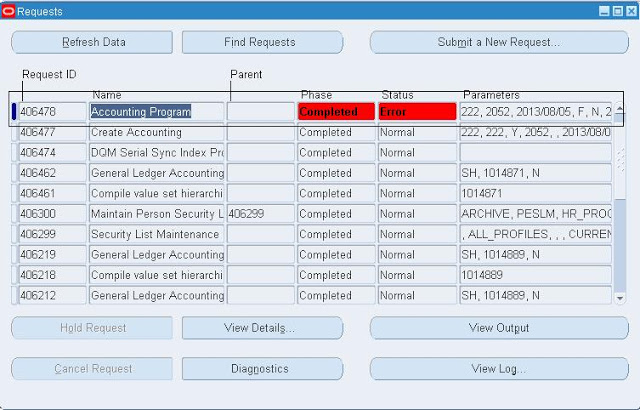
Ans. When we assign or enable “Third Party Control Segment Qualifier”. Here assigning or enabling means select option as “Yes” or “Supplier” or “Customer”. By using that natural account if journal is created then journal should contain “Party Information”. Party Information will be available for a journal when it is created from Sub-Ledgers. Incase Party information is missing for that natural account then the Accounting Program completes in error stating ” Party Information missing”. Normally for manual journals party information will not be available.

2. Who are all parties?

Ans. In R12 as per TCA all the suppliers and customers are treated as Parties.

3. What all the options available in “Third Party Control Segment Qualifiers”?

Ans. Prior to R12.1.3 version there are 4 options. They are

a. No (Default Value)
b. Yes
c. Supplier
d. Customer

In R12.1.3 one additional option is included it is

e. Restrict Manual Journals.

4. What is the Importance of the options available in “Third Party Control Segment Qualifiers”?

Ans.

Value “NO”

If we select option “No” means we are not using Third Party Control Segment Qualifier.

Value “Yes”

If we select option as “Yes” it means that value can be used in AP Sub Ledger (Supplier information is Available) and as well as in AR (Customer Information is available)

Value “Supplier”

If we select option as “Supplier” it means we are going to use this value in AP (Where Supplier information is available)

Value “Customer”

If we select option as “Customer” it means we are going to use this value in AR (Where Customer information is available)

Value ” Restrict Manual Journals”

If we select option as ” Restrict Manual Journals” where we can use this value in sub-ledger (With or with out party information ). But we can not use this value in General Ledger for Manual Journals.


Oracle ERP,Oracle ,ERP,Oracle ERP Application,Oracle Application,Oracle DBA,Oracle Forms,racle Apps,Apps DBA,Create Accounting concurrent program,Create Accounting, concurrent program,Third Party Control Segment Qualifier its Options and Usage,Third Party Control Segment Qualifier ,Options and Usage


5. Why  in R12.1.3 version New Option “Restrict Manual Journals” Option introduced?

Ans. Before R12.1.3 if we enabling Third Party Control for the value (Unidentified Cash) and by using the same value if we book Unidentified Receipt. We face issue while performing Create Accounting with error message (party information missing). Which is a bug because we book unidentified receipt where party information is not available. To over come this issue Oracle introduced new value called “Restrict Manual Journals”. By enabling this option we can create journals from sub ledger with out party information but we cannot book manual journal from General Ledger (GL) for the same value.

6. What is the use of “Third Party Control Segment Qualifier”

Ans If we are not enabling or not using “Third Party Control Segment Qualifier” for Control Accounts then we face issues while performing Reconciliation from Sub ledger to GL. Normally we perform periodical reconciliation for control accounts from sub ledger to GL. Due to non enabling “Third Party Control Segment Qualifier” user may pass manual journal entries using control account which will cause difference from Sub ledger to GL. To over come these issue it is suggested to enable “Third Party Control Segment Qualifier” for control Accounts.

7. In which all sub ledgers we can use “Third Party Control Segment Qualifier” for control accounts?

Ans. Prior to R12.1.3 we can use “Third Party Control Segment Qualifier” for control accounts related to Accounts Payables (AP) and Accounts Receivables (AR). But after R12.1.3 due to new option “Restrict Manual Journals” option we can use in all sub ledgers.

Share

ORA-00376 file 2 cannot be read at this time ORA-01548 UNDO Needs Recovery

February 27th, 2018, posted in Oracle Queries
Share

ORA-00376: file 2 cannot be read at this time ,

ORA-01548 UNDO “Needs Recovery”:

Error:

Wed May 21 07:52:20 2014
Errors in file c:\oracle\product\10.2.0\admin\ \bdump\ _cjq0_3412.trc:
ORA-00604: error occurred at recursive SQL level 1
ORA-00376: file 2 cannot be read at this time
ORA-01110: data file 2: ‘C:\ORACLE\ORADATA\ \DATA\ \UNDOTBS01.DBF’

Wed May 21 07:52:20 2014
Errors in file c:\oracle\product\10.2.0\admin\ \bdump\ _cjq0_3412.trc:
ORA-00604: error occurred at recursive SQL level 1
ORA-00376: file 2 cannot be read at this time
ORA-01110: data file 2: ‘C:\ORACLE\ORADATA\ \DATA\ \UNDOTBS01.DBF’

SQL> select file_name from dba_data_files where tablespace_name=’UNDOTBS1′;

FILE_NAME
 --------------------------------------------------------------------------------
 C:\ORACLE\ORADATA\ \DATA\ \UNDOTBS01.DBF
 C:\ORACLE\ORADATA\ \DATA\ \UNDOTBS02.DBF

SQL>

SQL> drop tablespace UNDOTBS1 including contents and datafiles;
 drop tablespace UNDOTBS1 including contents and datafiles
 *
 ERROR at line 1:
 ORA-01548: active rollback segment '_SYSSMU1$' found, terminate dropping tablespace

SQL>

Solution:

From the below SQL it shows that UNDOTBS1 contains a few corrupt undo segments

SQL> select segment_name,status,tablespace_name from  dba_rollback_segs where status not in (‘ONLINE’,’OFFLINE’);

SEGMENT_NAME                   STATUS           TABLESPACE_NAME
 ------------------------------ ---------------- ------------------------------
 _SYSSMU1$                      NEEDS RECOVERY   UNDOTBS1
 _SYSSMU2$                      NEEDS RECOVERY   UNDOTBS1
 _SYSSMU3$                      NEEDS RECOVERY   UNDOTBS1
 _SYSSMU4$                      NEEDS RECOVERY   UNDOTBS1
 _SYSSMU5$                      NEEDS RECOVERY   UNDOTBS1
 _SYSSMU6$                      NEEDS RECOVERY   UNDOTBS1
 _SYSSMU7$                      NEEDS RECOVERY   UNDOTBS1
 _SYSSMU8$                      NEEDS RECOVERY   UNDOTBS1
 _SYSSMU9$                      NEEDS RECOVERY   UNDOTBS1
 _SYSSMU10$                     NEEDS RECOVERY   UNDOTBS1

10 rows selected.

SQL>

ORA-00376 file 2 cannot be read at this time,ORA-01548 UNDO Needs Recovery,UNDO Needs Recovery,Needs Recovery,ORA-01548,ORA-00376,cannot be read at this time,Oracle dba,oracle apps,oracle database,oracle dba database,oracle need recovery,oracle recovery,database recovery,ORA 01548,ORA 00376,Ora error,apps dba,core dba,oracle dba,dba oracl,Oracle tablespace


To get past this problem:

  1. create a pfile from the current spfile,
  2. change UNDO_MANAGEMENT  to ‘MANUAL’ and UNDO_TABLESPACE to ‘SYSTEM’ in the pfile
  3. add the _corrupt_rollback_segments init parameter to the pfile    “_corrupted_rollback_segments=(_SYSSMU1$,_SYSSMU2$,_SYSSMU3$,_SYSSMU4$,_SYSSMU5$,_SYSSMU6$,_SYSSMU7$,_SYSSMU8$,_SYSSMU9$,_SYSSMU10$)”
  4. startup the database using “startup pfile=’<location/name of pfile>’ “;
  5. drop corrupt UNDOTBS1 uncluding contents and datafiles
  6. create a new UNDO tablespace
  7. shutdown database again, and startup using the existing spfile (not pfile)


SQL> create pfile from spfile;

File created.

SQL>

*.undo_management=’AUTO’
*.undo_tablespace=’UNDOTBS2′
_corrupted_rollback_segments=(_SYSSMU1$,_SYSSMU2$,_SYSSMU3$,_SYSSMU4$,_SYSSMU5$,_SYSSMU6$,_SYSSMU7$,_SYSSMU8$,_SYSSMU9$,_SYSSMU10$)


SQL> startup pfile=’C:\oracle\product\10.2.0\db_1\database\INITwicustest.ora’;

ORACLE instance started.

Total System Global Area 1258291200 bytes
Fixed Size                  2065408 bytes
Variable Size             788532224 bytes
Database Buffers          452984832 bytes
Redo Buffers               14708736 bytes
Database mounted.
Database opened.
SQL> drop tablespace UNDOTBS1 including contents and datafiles;

Tablespace dropped.

SQL> create UNDO tablespace UNDOTBS1 datafile ‘C:\ORACLE\ORADATA\ \DATA\ \UNDOTBS01.DBF’ size 250M;

Tablespace created.

SQL> shutdown immediate;
Database closed.
Database dismounted.
ORACLE instance shut down.
SQL> exit
Disconnected from Oracle Database 10g Enterprise Edition Release 10.2.0.4.0 – 64bit Production
With the Partitioning, OLAP, Data Mining and Real Application Testing options

C:\Users\Wicus>sqlplus sys as sysdba


SQL*Plus: Release 10.2.0.4.0 - Production on Wed May 21 07:56:13 2014

Copyright (c) 1982, 2007, Oracle.  All Rights Reserved.

Enter password:
 Connected to an idle instance.
SQL> startup
 ORACLE instance started.

Total System Global Area 1258291200 bytes
 Fixed Size                  2065408 bytes
 Variable Size             788532224 bytes
 Database Buffers          452984832 bytes
 Redo Buffers               14708736 bytes
 Database mounted.
 Database opened.
 SQL>


Share

APP-PAY-06153 System Error Procedure INITFORMS at Step 1

February 18th, 2018, posted in Oracle
Share

Problem : 


APP-PAY-06153: System Error : Procedure INIT_FORMS at Step 1

Cause: The procedure INIT_FORMS has created an error at Step 1.

Action : Contact your system administrator quoting the procedure INIT_FORMS and Step 1.

APP-PAY-06153,System Error,Procedure INIT_FORMS at Step 1,Step 1,Oracle Appps Error,APP-PAY Error,APP PAY 06153,Oracle Administrator,Oracle Apps,Oracle Application,Oracle EBS,Oracle Apps DBA,Oracle DBA,the procedure INIT_FORMS


Solution :

Navigate : System Administrator->Profile->System

APP-PAY-06153,System Error,Procedure INIT_FORMS at Step 1,Step 1,Oracle Appps Error,APP-PAY Error,APP PAY 06153,Oracle Administrator,Oracle Apps,Oracle Application,Oracle EBS,Oracle Apps DBA,Oracle DBA,the procedure INIT_FORMS

Click find

APP-PAY-06153,System Error,Procedure INIT_FORMS at Step 1,Step 1,Oracle Appps Error,APP-PAY Error,APP PAY 06153,Oracle Administrator,Oracle Apps,Oracle Application,Oracle EBS,Oracle Apps DBA,Oracle DBA,the procedure INIT_FORMS

Assign Site: FA: Vision Operations

Save and close

Navigate:->Human Resource->Work Structure->Organization

APP-PAY-06153,System Error,Procedure INIT_FORMS at Step 1,Step 1,Oracle Appps Error,APP-PAY Error,APP PAY 06153,Oracle Administrator,Oracle Apps,Oracle Application,Oracle EBS,Oracle Apps DBA,Oracle DBA,the procedure INIT_FORMS

Form is opened

Share

Query To Check Oracle Apps Modules Licensed Or Not

February 12th, 2018, posted in Oracle Queries
Share

Problem sys@standby> startup mount; ORACLE instance started. Total System Global Area 835104768 bytes Fixed Size 2217952 bytes Variable Size 490735648 bytes Database Buffers 335544320 bytes Redo Buffers 6606848 bytes Database mounted. sys@standby> alter database recover managed standby database using current logfile disconnect; alter database recover managed standby database using current logfile disconnect * ERROR at line 1: ORA-01153: an incompatible media recovery is active Cause This indicates a currently running media recovery process. Action sys@standby> alter database recover managed standby database cancel; sys@standby> alter database recover managed standby database using current logfile disconnect; Note When shutting down physical standby database, firstly turn off media recovery process. Otherwise the next time when starting up redo apply again, you will encounter error ORA-01153.The following is a Query to check if Oracle Apps Modules Licensed or not :


SELECT fat.application_name
      ,fa.application_id
      ,fpi.patch_level
      ,decode(fpi.STATUS,'I','Licensed', 'N','Not Licensed','S','Shared','Undetermined') STATUS
  FROM fnd_product_installations fpi
      ,fnd_application fa
      ,fnd_application_tl fat
 WHERE fpi.application_id = fa.application_id
   AND fat.application_id = fa.application_id
   AND fat.LANGUAGE = 'US';
Share

adcfgclone.pl dbTechStack – RC-50004 Error occurred in CloneContext Target System Domain Name

February 4th, 2018, posted in Oracle, Solaris
Share

RC-50004: Error occurred in CloneContext – Target System Domain Name in

adcfgclone.pl dbTechStack :

Error:

Target System Domain Name : worths.co.za
RC-50004: Error occurred in CloneContext: 
null
Check Clone Context logfile
/ebsdbprd_app/oracle/product/ebsdbprd/db/tech_st/11.2.0/appsutil/clone/bin/CloneContext_0418120037.log for details.

ERROR: Context creation not completed successfully.
For additional details review the file /tmp/adcfgclone_4849738.err if present.


adcfgclone.pl,oracle apps,oracle dba,oracle apps dba,oracle,dba,oracle error,ora error,oracle errors,adcfgclone.pl dbTechStack RC-50004 Error occurred in CloneContext Target System Domain Name,Target System Domain Name,adcfgclone.pl dbTechStack,RC-50004 Error,RC-50004,Error,clone error,oracle clone error,apps error,database error,oracle database,database oracle error,database,APPS-domain-50004,APPS domain 50004,RC 50004,RC 50004 Error


Solution :
Ensure that your hostname is fully populated in the /etc/hosts file

Not like this:

3 $ grep ebsdbprdp7 /etc/hosts
19.36.148.157   ebsdbprdp7
w@ebsdbprdp7:/
4 $

Should look like this

3 $ grep ebsdbprdp7 /etc/hosts
19.36.148.157   ebsdbprdp7.domain.co.za  ebsdbprdp7
w@ebsdbprdp7:/
4 $
Share