Archive for the ‘Oracle’ Category

ORACLE : How to call a report in Forms 10g ?

February 2nd, 2013, posted in Oracle
Share

Lets talk about version 10g Developer Suite.

In development environment you need to run report server manually but at Application Server it’s not needed.

How can we run report server manually ?
Just go to start menu >> run and type
rwserver SERVER=myserver
 
Where myserver is the server name.
Now reports server runs.
Make changes(Report Name) on following code and  try this in a Button trigger :
DECLARE
v_repid REPORT_OBJECT;
v_rep VARCHAR2(100);
v_rep_status VARCHAR2(100);
v_param VARCHAR2(200) := NULL;
v_valor VARCHAR2(200);
v_url VARCHAR2(2000);
v_repserver varchar2(20) := 'myserver';
v_report varchar2(100) := 'D:REPORT_NAME.REP';
v_PARAMETRO varchar2(100) := '';
BEGIN
v_repid := FIND_REPORT_OBJECT('MYREPORT'); -- report is an element from object navigator report
SET_REPORT_OBJECT_PROPERTY(v_repid, REPORT_FILENAME, v_report);
SET_REPORT_OBJECT_PROPERTY(v_repid, REPORT_EXECUTION_MODE, BATCH);
SET_REPORT_OBJECT_PROPERTY(v_repid, REPORT_COMM_MODE, SYNCHRONOUS);
SET_REPORT_OBJECT_PROPERTY(v_repid, REPORT_DESTYPE, cache);
SET_REPORT_OBJECT_PROPERTY(v_repid, REPORT_DESFORMAT, 'pdf' );
SET_REPORT_OBJECT_PROPERTY(v_repid, REPORT_DESNAME, v_report);
SET_REPORT_OBJECT_PROPERTY(v_repid, REPORT_SERVER, v_repserver);
SET_REPORT_OBJECT_PROPERTY(v_repid, REPORT_OTHER, 'paramform=no '||v_PARAMETRO);
v_rep := RUN_REPORT_OBJECT(v_repid);
v_rep_status := REPORT_OBJECT_STATUS(v_rep);
WHILE v_rep_status IN ('RUNNING','OPENING_REPORT','ENQUEUED') LOOP
v_rep_status := REPORT_OBJECT_STATUS(v_rep);
END LOOP;
IF v_rep_status = 'FINISHED' THEN
message(v_rep);
message(v_rep);
WEB.SHOW_DOCUMENT(v_url||'/reports/rwservlet/getjobid'||
SUBSTR(v_rep, INSTR(v_rep,'_', -1)+1)||'?'||'server='||v_repserver, '_blank');
END IF;
END;

*****************************************************************************************************************
Note : Please not do make backups before using these queries and also confirm them yourself or by aother means as
 well.
*****************************************************************************************************************

***
Share

ORACLE : How to Add or Remove List Text Anywhere from List Item?

January 30th, 2013, posted in Oracle
Share

Here we will talk a trick of Oracle List Item for Forms Version 10g and 6i.

If you want to remove list text and values from a oracle forms list item.
How will you do this ?
When there is no remove icons and Backspace and Delete key doesn’t work, both just lest blank spaces.

Try the following shortcut keys:

  • “Ctrl + Shift + >” – add list element.
  • “Ctrl + Shift + <” – remove list element.
  • Share

    ORACLE : How to Show / Get, Year Month and Date between two date ?

    January 28th, 2013, posted in Oracle Queries
    Share

    Use bellow sql to show year month and date :

    SELECT    TRUNC (MONTHS_BETWEEN (:END_DATE, :START_DATE) / 12) as YEARS,
    MOD(TRUNC (MONTHS_BETWEEN (:END_DATE, :START_DATE)), 12) as MONTHS,
    (  TO_DATE (:END_DATE)- ADD_MONTHS (:START_DATE,TRUNC (MONTHS_BETWEEN (:END_DATE, :START_DATE))))  as Date
    FROM DUAL;

    *********************************************************************************************************************
    Note : Please not do make backups before using these queries and also confirm them yourself or by aother means as
     well.
    *********************************************************************************************************************
    Share

    Toad : Toad For Oracle

    January 18th, 2013, posted in Oracle
    Share

    ToadReview

    As a beginner of Toad for Oracle. I came up with an issue. Maybe you guys mgiht go through same phase.

    So for this solution here is it :

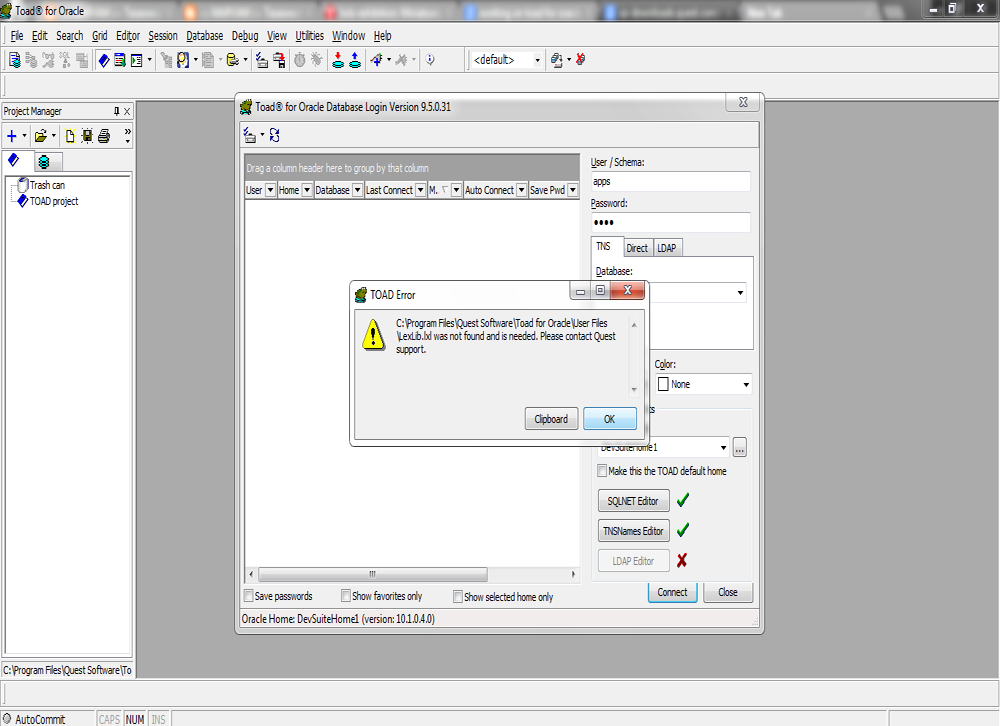
    After installing the Toad this was the issue came up. It was shutting down by the error.  Well this was the issue which came up as soon as Toad get started :

    C:Program FilesQuest SoftwareToad For Rracle user fileslexlib.lxl was not found and is needed. Please contact quest support.

    Output :

    oracle toad issue

    The Solution for the problem is quite simple. You might be running toad on Windows 7 or Vista. All you have to do is to run this application on Administartor mode. Thats it.

    Select Toad and right click on it and run it as Administrator.

    Try it and I hope it might work for you as well. Will be waiting for feedback . Have a good day

    *********************************************************************************************************************
    Note : Please not do make backups before using these queries and also confirm them yourself or by aother means as
     well.
    *********************************************************************************************************************
    Share

    Oracle : Built-in Data Types

    January 14th, 2013, posted in Oracle
    Share
    The built-in data types is twenty types but these divide in to six group in oracle :
    1. Character Datatypes           : CHAR, NCHAR, NVARCHAR2, VARCHAR2
    2. Number Datatypes               : NUMBER, BINARY_FLOAT, BINARY_DOUBLE
    3. Datetime Datatypes             : DATE, TIMESTAMP, INTERVAL YEAR TO MONTH, INTERVAL DAY TO SECOND
    4. Row ID Datatypes                 : ROWID, UROWID
    5. Long and Row Datatypes   : LONG, LONG RAW, RAW
    6. Large Object Datatypes      : BLOB, CLOB, NCLOB, BFILE
    Share