

Add this to your .profile or .bash_profile to increase the history size to 10000
export HISTFILESIZE=10000

APPS_TS_TX_DATA and APPS_TS_TX_IDX Size Keep On Increasing
Solution:
Step1:
You can truncate these tables for deleting entire data without any back up.The truncate is more faster compare to delete command because data in the table is not write to roll back segments.
SQL>truncate table xla.XLA_DIAG_SOURCES;
SQL>truncate table xla.XLA_DIAG_EVENTS;
Step2:
Turn OFF the “SLA: Diagnostics Enabled” profile option at all levels.
Step3:
Check the tables, tablespace and archive logs status
On popular demand from readers, I am going to cover Workflow Notification Mailer in Oracle Applications R12/12i.
Workflow notification mailer setup in R12 is similar to 11i ( In both release 11i (OWF.H and higher in 11i) & R12 are Java Mailer)
* Previous version of Notification Mailer in 11i was based on C also called as C Mailer
Things To Note :
1. You use Oracle Application Manager (OAM) to configure Workflow Notification Mailer.
2. There are two kind of Notification (Outbound & Inbound) in Workflow Mailer
3. For Outbound Notification, CM (Concurrent Manager) node should be able to connect to SMTP (Simple Mail Transfer Protocol) server/relay.
4. For Inbound Notification (Optional), CM node should be able to connect to IMAP (Internet Message Access Protocol) Server.
5. Log file for Workflow Mailer Notification are at $APPLCSF/$APPLLOG/FNDC*.txt
6. Workflow Notification Mailer in background run as Concurrent Manager (Workflow Mailer Service, Workflow Agent Listener Service)
7. If you don’t wish to send mail notification to end user (from Dev/Test instance) then configure Test Address in configuration screen.
Step to configure Workflow Notification Mailer :
1. Login to Apps R12 with System Administrator Reponsibility
2. under Workflow : Oracle Applications Manager click on Workflow Manager

If this is first time you are configuring Workflow Notification Mailer in Oracle Apps R12/12i you will see Notification Mailers as unavailable as shown in screenshot
Click on Notification Mailers
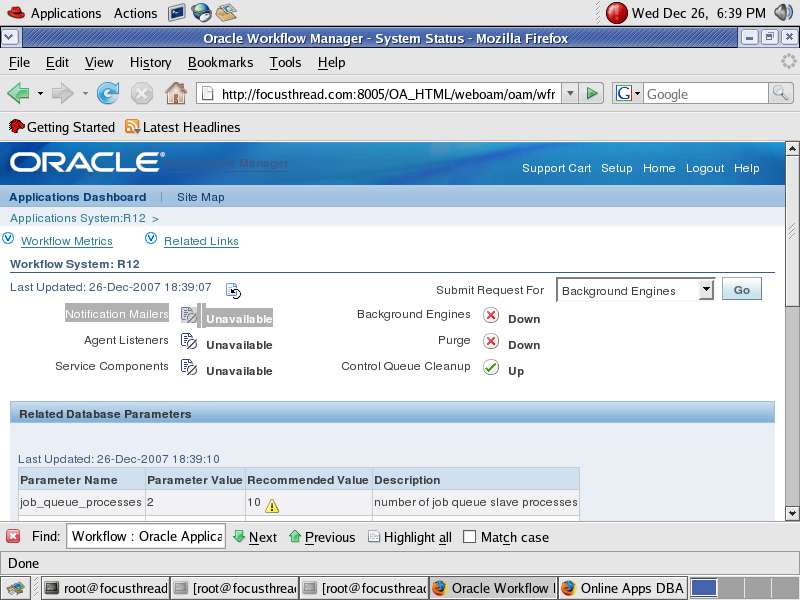
In next screen (as shown below, click on Edit Button)
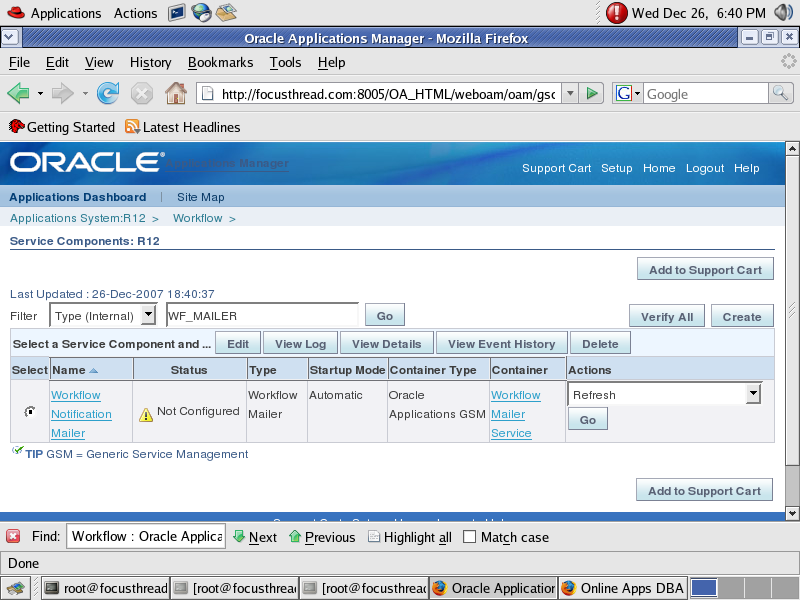
Here you have option to select Inbound notification setup or Just outgoing Notification Setup.
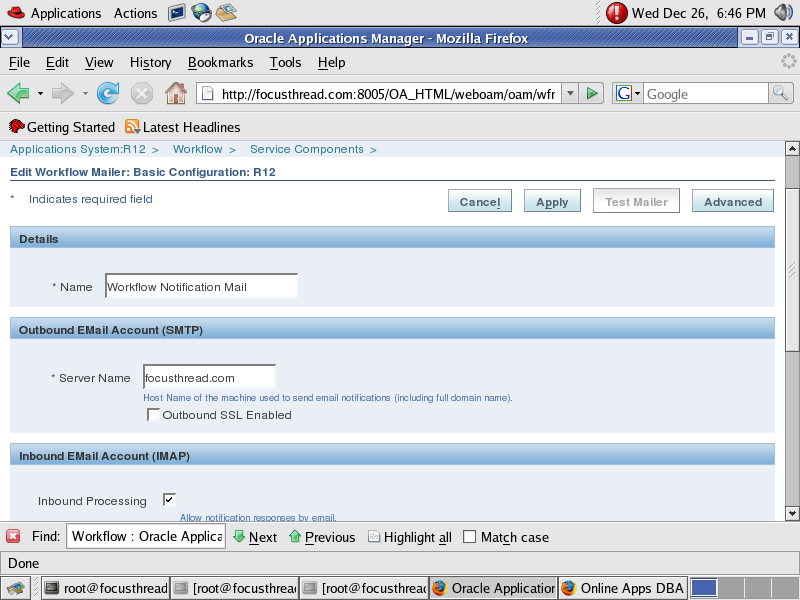
Provide SMTP Server Name (ensure that CM node should be able to connect to SMTP Server or SMTP Relay)
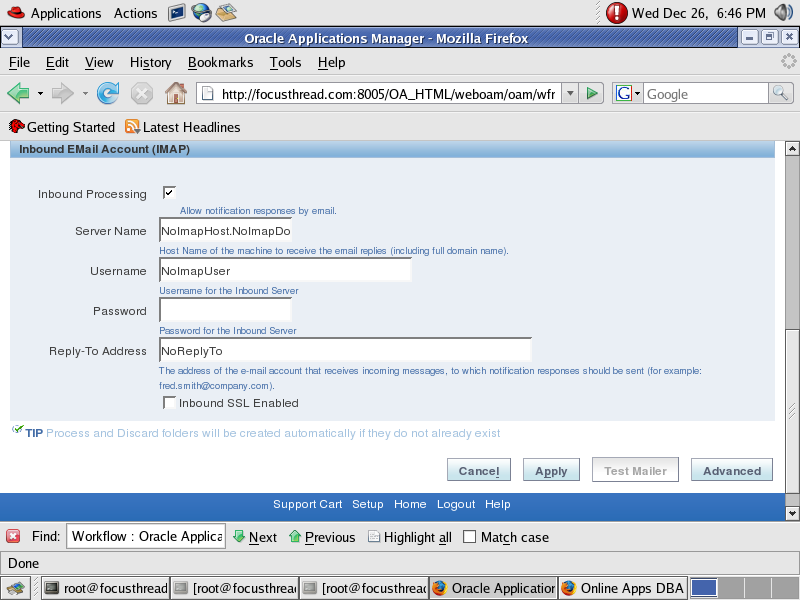
Uncheck Inbound Processing (from above screen), if you don’t wish to configure Inbound Notification Mailer.
If you wish to configure Inbound Notification as well then ensure IMAP Server should be configured with a valid user (create Inbox, Processed & Discard folder for this User)
Click on Apply button to finish configuration, at this stage Notification Mailer will test SMTP Server & IMAP Server connectivity.
For Advanced setup, click on Advanced at top right of configuration screen.
Metalink Notes for Notification Mailer
1. 453137.1 Oracle Workflow Best Practices Release 12 and Release 11i
2. 274764.1 Oracle Workflow Cartridge Workflow Java Mailer Setup Test
3. 433359.1 Tracking Workflow Notification Event Messages
4. 456921.1 Queries Related to Alert and Mailer Integration Post RUP4
5. 454706.1 How to Stop mails from Workflow Notification Mailer
So you have accidentally removed a datafile from your production database? First thing, DON’T PANIC !! There’s an easy way to recover deleted datafiles, for as long as your database remains up. The procedure below works on linux, however this method conceivably can work for other platforms.
This procedure will even work if your database is in NOARCHIVELOG mode.
You may have reached this posting through Google, and in a rush to get the solution right away, so here it is.
The recovery is done in two phases.
Phase 1: instant recovery to prevent Oracle errors (like ORA-27041 “unable to open file”, ORA-01110, ORA-01116)
PID of DBWRITER for the right database.
ps -ef | grep dbw0_SID_OF_YOUR_DB
oracle   12272     1  0 10:55 ?        00:00:00 ora_dbw0_test
oracle   12941 11501  0 12:36 pts/0    00:00:00 grep dbw0_test
DBWRITER process.
ls -l /proc/_PID_OF_DBWRITER/fd | grep deleted

lrwx------  1 oracle oinstall 64 Oct 15 11:24 10 -> /home/oracle/product/10.2.0.2/dbs/lkinsttest (deleted)
lrwx------  1 oracle oinstall 64 Oct 15 11:24 23 -> /ra5a/orabkp/test/TEST/datafile/o1_mf_lost_3k6xzjpm_.dbf (deleted)
ln -s /proc/PID_OF_DBWRITER/fd/23 /ra5a/orabkp/test/TEST/datafile/o1_mf_lost_3k6xzjpm_.dbf
That’s all. Now you are no longer going to get errors. However, if your database goes down now, you will lose that datafile for good.
Phase 2: restore the file
ARCHIVELOG database
alter system checkpoint;
rman target /
report schema;
backup as copy datafile YOUR_DATAFILE_NUMBER format '/location_of_your_database/new_name_for_File.dbf';
sql 'alter database datafile YOUR_DATAFILE_NUMBER offline';
switch datafile YOUR_DATAFILE_NUMBER to copy;
recover datafile YOUR_DATAFILE_NUMBER;
sql 'alter database datafile YOUR_DATAFILE_NUMBER online';
exit;
NOARCHIVELOG database
select distinct tablespace_name from dba_data_files where file_name = 'YOUR_DELETED_FILE';
alter tablespace THE_TABLESPACE read only;
cp SIM_LINK_DATA_FILE NEW_NAME_FOR_DATAFILE.dbf
/*WAIT FOR COPY!!!*/
shutdown abort;
rm -i SIM_LINK_DATA_FILE
mv NEW_NAME_FOR_DATAFILE.dbf SIM_LINK_DATA_FILE
startup
alter tablespace THE_TABLESPACE read write;
I hope this helps you to get out of a nasty situation.
Here’s both cases fully captured from terminal. Note, I am using Oracle-managed files. This doesn’t change the steps.
/ra5a/orabkp/test/TEST/datafile> sqlplus '/ as sysdba'

SQL*Plus: Release 10.2.0.2.0 - Production on Mon Oct 15 12:31:55 2007

Copyright (c) 1982, 2005, Oracle.  All Rights Reserved.

Connected to:
Oracle Database 10g Release 10.2.0.2.0 - 64bit Production

SQL>
SQL> select tablespace_name, file_name from dba_data_files

TABLESPACE_NAME                FILE_NAME
------------------------------ ------------------------------------------------------------
USERS                          /ra5a/orabkp/test/TEST/datafile/o1_mf_users_3k6xgwhb_.dbf
SYSAUX                         /ra5a/orabkp/test/TEST/datafile/o1_mf_sysaux_3k6xgwdf_.dbf
UNDOTBS1                       /ra5a/orabkp/test/TEST/datafile/o1_mf_undotbs1_3k6xgwg9_.dbf
SYSTEM                         /ra5a/orabkp/test/TEST/datafile/o1_mf_system_3k6xgwd4_.dbf
EXAMPLE                        /ra5a/orabkp/test/TEST/datafile/o1_mf_example_3k6xjdjw_.dbf
LOST                           /ra5a/orabkp/test/TEST/datafile/o1_mf_lost_3k74mq08_.dbf

6 rows selected.

SQL> select tablespace_name, table_name from dba_tables where owner = 'TESTING';

TABLESPACE_NAME                TABLE_NAME
------------------------------ ------------------------------
LOST                           LOST_TABLE

SQL> connect testing/testing
SQL> select count(*) from lost_table;

  COUNT(*)
----------
     50070

SQL> alter system flush buffer_cache;

System altered.

SQL> select count(*) from lost_table;

  COUNT(*)
----------
     50070

SQL> Disconnected from Oracle Database 10g Release 10.2.0.2.0 - 64bit Production

/ra5a/orabkp/test/TEST/datafile> ls -lF
total 1015132
-rw-r-----  1 oracle oinstall 157294592 Oct 15 12:22 o1_mf_example_3k6xjdjw_.dbf
-rw-r-----  1 oracle oinstall 104865792 Oct 15 12:22 o1_mf_lost_3k74mq08_.dbf
-rw-r-----  1 oracle oinstall 241180672 Oct 15 12:32 o1_mf_sysaux_3k6xgwdf_.dbf
-rw-r-----  1 oracle oinstall 503324672 Oct 15 12:32 o1_mf_system_3k6xgwd4_.dbf
-rw-r-----  1 oracle oinstall  20979712 Oct 15 10:17 o1_mf_temp_3k6xj9xn_.tmp
-rw-r-----  1 oracle oinstall  26222592 Oct 15 12:32 o1_mf_undotbs1_3k6xgwg9_.dbf
-rw-r-----  1 oracle oinstall   5251072 Oct 15 12:22 o1_mf_users_3k6xgwhb_.dbf

/ra5a/orabkp/test/TEST/datafile> rm o1_mf_lost_3k74mq08_.dbf
/ra5a/orabkp/test/TEST/datafile> sqlplus testing/testing

SQL*Plus: Release 10.2.0.2.0 - Production on Mon Oct 15 12:35:24 2007

Copyright (c) 1982, 2005, Oracle.  All Rights Reserved.

Connected to:
Oracle Database 10g Release 10.2.0.2.0 - 64bit Production

SQL> select count(*) from lost_table;

  COUNT(*)
----------
     50070

SQL> alter system flush buffer_cache;

System altered.

SQL> select count(*) from lost_table;
select count(*) from lost_table
*
ERROR at line 1:
ORA-01116: error in opening database file 6
ORA-01110: data file 6:
'/ra5a/orabkp/test/TEST/datafile/o1_mf_lost_3k74mq08_.dbf'
ORA-27041: unable to open file
Linux-x86_64 Error: 2: No such file or directory
Additional information: 3

SQL>
SQL> Disconnected from Oracle Database 10g Release 10.2.0.2.0 - 64bit Production

/ra5a/orabkp/test/TEST/datafile> ps -ef|grep dbw0_test
oracle   12272     1  0 10:55 ?        00:00:00 ora_dbw0_test
oracle   12941 11501  0 12:36 pts/0    00:00:00 grep dbw0_test
/ra5a/orabkp/test/TEST/datafile> ls -l /proc/12272/fd|grep deleted
lrwx------  1 oracle oinstall 64 Oct 15 11:24 10 -> /home/oracle/product/10.2.0.2/dbs/lkinsttest (deleted)
lrwx------  1 oracle oinstall 64 Oct 15 12:17 26 -> /ra5a/orabkp/test/TEST/datafile/o1_mf_lost_3k74mq08_.dbf (deleted)

/ra5a/orabkp/test/TEST/datafile> ln -s /proc/12272/fd/26 /ra5a/orabkp/test/TEST/datafile/o1_mf_lost_3k74mq08_.dbf

/ra5a/orabkp/test/TEST/datafile> ls -lF
total 912620
-rw-r-----  1 oracle oinstall 157294592 Oct 15 12:22 o1_mf_example_3k6xjdjw_.dbf
lrwxrwxrwx  1 oracle oinstall        17 Oct 15 12:37 o1_mf_lost_3k74mq08_.dbf -> /proc/12272/fd/26
-rw-r-----  1 oracle oinstall 241180672 Oct 15 12:32 o1_mf_sysaux_3k6xgwdf_.dbf
-rw-r-----  1 oracle oinstall 503324672 Oct 15 12:32 o1_mf_system_3k6xgwd4_.dbf
-rw-r-----  1 oracle oinstall  20979712 Oct 15 10:17 o1_mf_temp_3k6xj9xn_.tmp
-rw-r-----  1 oracle oinstall  26222592 Oct 15 12:32 o1_mf_undotbs1_3k6xgwg9_.dbf
-rw-r-----  1 oracle oinstall   5251072 Oct 15 12:22 o1_mf_users_3k6xgwhb_.dbf

/ra5a/orabkp/test/TEST/datafile> sqlplus testing/testing

SQL*Plus: Release 10.2.0.2.0 - Production on Mon Oct 15 12:38:18 2007

Copyright (c) 1982, 2005, Oracle.  All Rights Reserved.

Connected to:
Oracle Database 10g Release 10.2.0.2.0 - 64bit Production

SQL> select count(*) from lost_table;

  COUNT(*)
----------
     50070

SQL> alter system flush buffer_cache;

System altered.

SQL> select count(*) from lost_table;

  COUNT(*)
----------
     50070

SQL>
SQL> Disconnected from Oracle Database 10g Release 10.2.0.2.0 - 64bit Production

/ra5a/orabkp/test/TEST/datafile> rman target /

Recovery Manager: Release 10.2.0.2.0 - Production on Mon Oct 15 12:39:48 2007

Copyright (c) 1982, 2005, Oracle.  All rights reserved.

connected to target database: TEST (DBID=1934173752)

RMAN> report schema;

using target database control file instead of recovery catalog
Report of database schema

List of Permanent Datafiles
===========================
File Size(MB) Tablespace           RB segs Datafile Name
---- -------- -------------------- ------- ------------------------
1    480      SYSTEM               ***     /ra5a/orabkp/test/TEST/datafile/o1_mf_system_3k6xgwd4_.dbf
2    25       UNDOTBS1             ***     /ra5a/orabkp/test/TEST/datafile/o1_mf_undotbs1_3k6xgwg9_.dbf
3    230      SYSAUX               ***     /ra5a/orabkp/test/TEST/datafile/o1_mf_sysaux_3k6xgwdf_.dbf
4    5        USERS                ***     /ra5a/orabkp/test/TEST/datafile/o1_mf_users_3k6xgwhb_.dbf
5    150      EXAMPLE              ***     /ra5a/orabkp/test/TEST/datafile/o1_mf_example_3k6xjdjw_.dbf
6    100      LOST                 ***     /ra5a/orabkp/test/TEST/datafile/o1_mf_lost_3k74mq08_.dbf

List of Temporary Files
=======================
File Size(MB) Tablespace           Maxsize(MB) Tempfile Name
---- -------- -------------------- ----------- --------------------
1    20       TEMP                 32767       /ra5a/orabkp/test/TEST/datafile/o1_mf_temp_3k6xj9xn_.tmp

RMAN> backup as copy datafile 6 format '/ra5a/orabkp/test/TEST/datafile/lost.dbf';

Starting backup at 2007-10-15 12:40:45
allocated channel: ORA_DISK_1
channel ORA_DISK_1: sid=154 devtype=DISK
channel ORA_DISK_1: starting datafile copy
input datafile fno=00006 name=/ra5a/orabkp/test/TEST/datafile/o1_mf_lost_3k74mq08_.dbf
output filename=/ra5a/orabkp/test/TEST/datafile/lost.dbf tag=TAG20071015T124045 recid=13 stamp=636036046
channel ORA_DISK_1: datafile copy complete, elapsed time: 00:00:01
Finished backup at 2007-10-15 12:40:46

RMAN> sql 'alter database datafile 6 offline';

sql statement: alter database datafile 6 offline

RMAN> switch datafile 6 to copy;

datafile 6 switched to datafile copy "/ra5a/orabkp/test/TEST/datafile/lost.dbf"

RMAN> recover datafile 6;

Starting recover at 2007-10-15 12:41:07
using channel ORA_DISK_1

starting media recovery
media recovery complete, elapsed time: 00:00:00

Finished recover at 2007-10-15 12:41:07

RMAN> sql 'alter database datafile 6 online';

sql statement: alter database datafile 6 online

RMAN>

Recovery Manager complete.

/ra5a/orabkp/test/TEST/datafile> ls -lF
total 1015132
-rw-r-----  1 oracle oinstall 104865792 Oct 15 12:41 lost.dbf
-rw-r-----  1 oracle oinstall 157294592 Oct 15 12:22 o1_mf_example_3k6xjdjw_.dbf
lrwxrwxrwx  1 oracle oinstall        17 Oct 15 12:37 o1_mf_lost_3k74mq08_.dbf -> /proc/12272/fd/26
-rw-r-----  1 oracle oinstall 241180672 Oct 15 12:32 o1_mf_sysaux_3k6xgwdf_.dbf
-rw-r-----  1 oracle oinstall 503324672 Oct 15 12:38 o1_mf_system_3k6xgwd4_.dbf
-rw-r-----  1 oracle oinstall  20979712 Oct 15 10:17 o1_mf_temp_3k6xj9xn_.tmp
-rw-r-----  1 oracle oinstall  26222592 Oct 15 12:38 o1_mf_undotbs1_3k6xgwg9_.dbf
-rw-r-----  1 oracle oinstall   5251072 Oct 15 12:22 o1_mf_users_3k6xgwhb_.dbf

/ra5a/orabkp/test/TEST/datafile> rm o1_mf_lost_3k74mq08_.dbf
/ra5a/orabkp/test/TEST/datafile> sqlplus testing/testing

SQL*Plus: Release 10.2.0.2.0 - Production on Mon Oct 15 12:42:03 2007

Copyright (c) 1982, 2005, Oracle.  All Rights Reserved.

Connected to:
Oracle Database 10g Release 10.2.0.2.0 - 64bit Production

SQL> select count(*) from lost_table;

  COUNT(*)
----------
     50070

SQL> alter system flush buffer_cache;

System altered.

SQL> select count(*) from lost_table;

  COUNT(*)
----------
     50070