Archive for the ‘TEChNoLoGY’ Category

Solaris : Set the Date and Time

February 28th, 2015, posted in Solaris
Share

Add A User From The Command Line In Solaris,Add A User From The Command Line In Solaris 10,Add A User From The Command Line, In Solaris10 ,Add A User ,The Command Line In Solaris10,The Command Line In Solaris,solaris 10,

Setting the system date and time is fairly easy on solaris. Because you can easily set the time from the command line, you can set the time on a server remotely but you have to do it as superuser (root user).

date mmddhhmmyy

The date command takes the syntax mmddhhmmyy, or “month day hour minute year”. You have to be superuser to set the time.

Example:

# date 1201053112
Fri Dec  1 05:31:00 PST 2012


Set the Date and Time on Solaris,Set the Date and Time on Solaris 10, Solaris Set the Date and Time,Solaris 10 Set the Date and Time,Solaris ,Set the Date and Time,SolarisSet the Date ,Solaris Set the Time,

Share

Oracle LSNRCTL – Listener Shutdown and Startup Procedures

February 17th, 2015, posted in Linux OS, Oracle
Share

Starting up and shutting down the oracle listener is a routine task for a database administrator. However a Linux system Oracle LSNRCTL – Listener Shutdown and Startup Procedures,Oracle LSNRCTL,Listener Shutdown and Startup Procedures,Listener Shutdown and Startup, Procedures,Listener Shutdown ,Listener Startup, oracle lsnrctl ,Oracle,command,oracle commandadministrator or programmer may end-up doing some basic DBA operations on development database. It is critical for non-DBAs to understand the basic database admin activities.

In this article, let us review how to start, stop, check status of an oracle listener using Oracle listener control utility LSNRCTL.


How To Start, Stop and Restart Oracle Listener

1. Display Oracle Listener Status

Before starting, stopping or restarting make sure to execute lsnrctl status command to check the oracle listener status as shown below. Apart from letting us know whether the listener is up or down, you can also find the following valuable information from the lsnrctl status command output.

  • Listner Start Date and Time.
  • Uptime of listner – How long the listener has been up and running.
  • Listener Parameter File – Location of the listener.ora file. Typically located under $ORACLE_HOME/network/admin
  • Listener Log File – Location of the listener log file. i.e log.xml

If the Oracle listener is not running, you’ll get the following message.

lsnrctl status

LSNRCTL for Linux: Version 11.1.0.6.0 - Production on 04-APR-2009 16:27:39

Copyright (c) 1991, 2007, Oracle.  All rights reserved.

Connecting to (DESCRIPTION=(ADDRESS=(PROTOCOL=TCP)(HOST=192.168.1.2)(PORT=1521)))
TNS-12541: TNS:no listener
 TNS-12560: TNS:protocol adapter error
  TNS-00511: No listener
   Linux Error: 111: Connection refused
Connecting to (DESCRIPTION=(ADDRESS=(PROTOCOL=IPC)(KEY=EXTPROC)))
TNS-12541: TNS:no listener
 TNS-12560: TNS:protocol adapter error
  TNS-00511: No listener
   Linux Error: 2: No such file or directory

If the Oracle listener is running, you’ll get the following message.

$ lsnrctl status

LSNRCTL for Linux: Version 11.1.0.6.0 - Production on 04-APR-2009 16:27:02

Copyright (c) 1991, 2007, Oracle.  All rights reserved.

Connecting to (DESCRIPTION=(ADDRESS=(PROTOCOL=TCP)(HOST=192.168.1.2)(PORT=1521)))
STATUS of the LISTENER
------------------------
Alias                     LISTENER
Version                   TNSLSNR for Linux: Version 11.1.0.6.0 - Production
Start Date                29-APR-2009 18:43:13
Uptime                    6 days 21 hr. 43 min. 49 sec
Trace Level               off
Security                  ON: Local OS Authentication
SNMP                      OFF
Listener Parameter File   /u01/app/oracle/product/11.1.0/network/admin/listener.ora
Listener Log File         /u01/app/oracle/diag/tnslsnr/devdb/listener/alert/log.xml
Listening Endpoints Summary...
  (DESCRIPTION=(ADDRESS=(PROTOCOL=tcp)(HOST=192.168.1.2)(PORT=1521)))
  (DESCRIPTION=(ADDRESS=(PROTOCOL=ipc)(KEY=EXTPROC)))
Services Summary...
Service "devdb" has 1 instance(s).
  Instance "devdb", status UNKNOWN, has 1 handler(s) for this service...
Service "devdb.thegeekstuff.com" has 1 instance(s).
  Instance "devdb", status READY, has 1 handler(s) for this service...
Service "devdbXDB.thegeekstuff.com" has 1 instance(s).
  Instance "devdb", status READY, has 1 handler(s) for this service...
Service "devdb_XPT.thegeekstuff.com" has 1 instance(s).
  Instance "devdb", status READY, has 1 handler(s) for this service...
The command completed successfully

2. Start Oracle Listener

If the Oracle listener is not running, start the listener as shown below. This will start all the listeners. If you want to start a specific listener, specify the listener name next to start. i.e lsnrctl start [listener-name]

$ lsnrctl start

LSNRCTL for Linux: Version 11.1.0.6.0 - Production on 04-APR-2009 16:27:42

Copyright (c) 1991, 2007, Oracle.  All rights reserved.

Starting /u01/app/oracle/product/11.1.0/bin/tnslsnr: please wait...

TNSLSNR for Linux: Version 11.1.0.6.0 - Production
System parameter file is /u01/app/oracle/product/11.1.0/network/admin/listener.ora
Log messages written to /u01/app/oracle/diag/tnslsnr/devdb/listener/alert/log.xml
Listening on: (DESCRIPTION=(ADDRESS=(PROTOCOL=tcp)(HOST=192.168.1.2)(PORT=1521)))
Listening on: (DESCRIPTION=(ADDRESS=(PROTOCOL=ipc)(KEY=EXTPROC)))

Connecting to (DESCRIPTION=(ADDRESS=(PROTOCOL=TCP)(HOST=192.168.1.2)(PORT=1521)))
STATUS of the LISTENER
------------------------
Alias                     LISTENER
Version                   TNSLSNR for Linux: Version 11.1.0.6.0 - Production
Start Date                04-APR-2009 16:27:42
Uptime                    0 days 0 hr. 0 min. 0 sec
Trace Level               off
Security                  ON: Local OS Authentication
SNMP                      OFF
Listener Parameter File   /u01/app/oracle/product/11.1.0/network/admin/listener.ora
Listener Log File         /u01/app/oracle/diag/tnslsnr/devdb/listener/alert/log.xml
Listening Endpoints Summary...
  (DESCRIPTION=(ADDRESS=(PROTOCOL=tcp)(HOST=192.168.1.2)(PORT=1521)))
  (DESCRIPTION=(ADDRESS=(PROTOCOL=ipc)(KEY=EXTPROC)))
Services Summary...
Service "devdb" has 1 instance(s).
  Instance "devdb", status UNKNOWN, has 1 handler(s) for this service...
The command completed successfully

3. Stop Oracle Listener

If the Oracle listener is running, stop the listener as shown below. This will stop all the listeners. If you want to stop a specific listener, specify the listener name next to stop. i.e lsnrctl stop [listener-name]

$ lsnrctl stop

LSNRCTL for Linux: Version 11.1.0.6.0 - Production on 04-APR-2009 16:27:37

Copyright (c) 1991, 2007, Oracle.  All rights reserved.

Connecting to (DESCRIPTION=(ADDRESS=(PROTOCOL=TCP)(HOST=192.168.1.2)(PORT=1521)))
The command completed successfully

4. Restart Oracle Listener

To restart the listener use lsnrctl reload as shown below instead of lsnrctl stop and lsnrctl start. realod will read the listener.ora file for new setting without stop and start of the Oracle listener.

$ lsnrctl reload

LSNRCTL for Linux: Version 11.1.0.6.0 - Production on 04-APR-2009 17:03:31

Copyright (c) 1991, 2007, Oracle.  All rights reserved.

Connecting to (DESCRIPTION=(ADDRESS=(PROTOCOL=TCP)(HOST=192.168.1.2)(PORT=1521)))
The command completed successfully

Oracle Listener Help


1. View Available Listener Commands

lsnrctl help command will display all available listener commands. In Oracle 11g following are the available listener commands.

  • start – Start the Oracle listener
  • stop – Stop the Oracle listener
  • status – Display the current status of the Oracle listener
  • services – Retrieve the listener services information
  • version – Display the oracle listener version information
  • reload – This will reload the oracle listener SID and parameter files. This is equivalent to lsnrctl stop and lsnrctl start.
  • save_config – This will save the current settings to the listener.ora file and also take a backup of the listener.ora file before overwriting it. If there are no changes, it will display the message “No changes to save for LISTENER”
  • trace – Enable the tracing at the listener level. The available options are ‘trace OFF’, ‘trace USER’, ‘trace ADMIN’ or ‘trace SUPPORT’
  • spawn – Spawns a new with the program with the spawn_alias mentioned in the listener.ora file
  • change_password – Set the new password to the oracle listener (or) change the existing listener password.
  • show – Display log files and other relevant listener information.
$ lsnrctl help

LSNRCTL for Linux: Version 11.1.0.6.0 - Production on 04-APR-2009 16:12:09

Copyright (c) 1991, 2007, Oracle.  All rights reserved.

The following operations are available
An asterisk (*) denotes a modifier or extended command:

start               stop                status
services            version             reload
save_config         trace               spawn
change_password     quit                exit
set*                show*

2. Get More help on Specific Listener Command

You can get detailed help on a specific oracle listener command as shown below. In the following example, it gives all the available arguments/parameters that can be passed to the lsnrctl show command.

$ lsnrctl help show

LSNRCTL for Linux: Version 11.1.0.6.0 - Production on 04-APR-2009 16:22:28

Copyright (c) 1991, 2007, Oracle.  All rights reserved.

The following operations are available after show
An asterisk (*) denotes a modifier or extended command:

rawmode                     displaymode
rules                       trc_file
trc_directory               trc_level
log_file                    log_directory
log_status                  current_listener
inbound_connect_timeout     startup_waittime
snmp_visible                save_config_on_stop
dynamic_registration
Share

EBS — Datapump expdp error ORA-33272 , ZPB, DBMS_AW, dba_aws

January 31st, 2015, posted in Oracle Queries
Share

EBS -- Datapump expdp error,EBS ,Datapump expdp error,Datapump error,ORA-33272 ,Oracle,Oracle 9i,Oracle 10g,Oracle 11g,Ora Error,Oracle Error,Error In Oracle Export

While exporting an EBS 11i database using datapump , you can get ORA-33272 error on Analytical Workspaces..
This errors are mostly due to the versions of aw objects..
Suppose you have upgraded your Ebs database from 9i to 10g and the AW objects belong to 9i version of Oracle Database have remained in your database..  In such a situation, you can encounter ORA-33272 error on your future data pump exports..

An example for these kind of errors are below;

ORA-39127: unexpected error from call to export_string :=SYS.DBMS_AW_EXP.schema_info_exp(‘ZPB’,1,1,’10.02.00.00.00′,newblock)
ORA-33272: Analytic workspace ZPB.ZPBCODE cannot be opened.
ORA-00600: internal error code, arguments: [xschkmk:!dict], [], [], [], [], [], [], []
ORA-06512: at “SYS.DBMS_AW”, line 67
ORA-06512: at “SYS.DBMS_AW”, line 131
ORA-06512: at “SYS.DBMS_AW”, line 792
ORA-06512: at “SYS.DBMS_AW”, line 1142
ORA-06512: at “SYS.DBMS_AW_EXP”, line 517
ORA-06512: at line 1
ORA-06512: at “SYS.DB.


For the solution, use following query to list the version for the object in question;
select * from all_aws where owner=’ZPB’;  (ZPB is the schema name of failing objects in the example above)SQL> select * from dba_aws;
Example output:
OWNER AW_NUMBER AW_NAME AW_V PAGESPACES GENERATIONS FROZEN
———- ———- ——————– —- ———- ———– ——
ZPB 1000 ZPBCODE 9.1 292 2
SYS 129 AWREPORT 10.2 9 2
SYS 128 AWXML 10.2 64 2
ZPB 1001 ZPBANNOT 9.1 7 1
ZPB 1002 ZPBDATA 9.1 7 1
SYS 125 AWMD 10.2 363 2
SYS 124 EXPRESS 10.2 46 2
SYS 126 AWCREATE 10.2 21 2
SYS 127 AWCREATE10G 10.2 9 2
Analyze the output of the query and if you have older versions, delete them..
For the example above: the ZPB Aws are 9i and they are need to be deleted.

You can use dbms_aw.execute to do that..

exec dbms_aw.execute(‘aw delete zpb.zpbcode’);
exec dbms_aw.execute(‘aw delete zpb.zpbannot’);
exec dbms_aw.execute(‘aw delete zpb.zpbdata’);

Log in AS ZPB
SQL> set serverout on
SQL> call dbms_aw.execute(‘AW DELETE ZPBCODE’);
SQL> call dbms_aw.execute(‘AW DELETE ZPBANNOT’);
SQL> call dbms_aw.execute(‘AW DELETE ZPBDATA’);
If you receive errors deleting the AWs, drop the associated AW$ tables :
AS SYS:
SQL> drop table AW$ZPBCODE;
SQL> drop table AW$ZPBANNOT;
SQL> drop table AW$ZPBDATA;select * from dba_aws;SYS 125 AWREPORT 9.1 9 2
SYS 124 AWXML 9.1 50 2
SYS 123 AWCREATE10G 9.1 9 2
SYS 122 AWCREATE 9.1 18 2
SYS 121 AWMD 9.1 205 2
SYS 120 EXPRESS 9.1 38 2


Also if you have all 9i ‘s in awr$ table, then you may be need to -> Remove OLAP, Clean up Left Over Objects And Add It back (Doc ID 1560841.1)
———————————————————————————————————————————————————————————————————————-
Note : Before applying any of this. Do understand your problem and concern with some-else as well.
———————————————————————————————————————————————————————————————————————
Share

MacBook Pro (13-inch, Mid 2012) – Technical Specifications

January 30th, 2015, posted in Apple
Share

MacBook Pro (13-inch, Mid 2012) - Technical Specifications,MacBook Pro 13-inch, Mid 2012 , Technical Specifications,MacBook Pro 13-inch Mid 2012,Macbook Technical Specifications,Macbook Pro Technical Specifications,apple product,Macbook Pro Display,Macbook Pro Ram,Macbook Pro Speed,

Display

  • 13.3-inch (diagonal) LED-backlit glossy widescreen display with support for millions of colors
  • Supported resolutions: 1280 by 800 (native), 1152 by 720, 1024 by 640, and 800 by 500 pixels at 16:10 aspect ratio; 1024 by 768, 800 by 600, and 640 by 480 pixels at 4:3 aspect ratio; 1024 by 768, 800 by 600, and 640 by 480 pixels at 4:3 aspect ratio stretched; 720 by 480 pixels at 3:2 aspect ratio; 720 by 480 pixels at 3:2 aspect ratio stretched

Processor

  • 2.5GHz dual-core Intel Core i5 processor (Turbo Boost up to 3.1GHz) with 3MB L3 cache
  • 2.9GHz dual-core Intel Core i7 processor (Turbo Boost up to 3.6GHz) with 4MB L3 cache

Memory

  • 2.5GHz
    4GB of 1600MHz DDR3 memory
    Configurable to 8GB
  • 2.9GHz
    8GB of 1600MHz DDR3 memory

Storage1

  • 2.5GHz
    500GB 5400-rpm hard drive
    Configurable options:
  • 750GB 5400-rpm hard drive
  • 128GB solid-state drive
  • 256GB solid-state drive
  • 512GB solid-state drive
  • 2.9GHz
    750GB 5400-rpm hard drive
    Configurable options:

    • 1TB 5400-rpm hard drive
    • 128GB solid-state drive
    • 256GB solid-state drive
    • 512GB solid-state drive

Size and Weight

  • Height: 0.95 inch (2.41 cm)
  • Width: 12.78 inches (32.5 cm)
  • Depth: 8.94 inches (22.7 cm)
  • Weight: 4.5 pounds (2.06 kg)2MacBook Pro (13-inch, Mid 2012) - Technical Specifications,MacBook Pro 13-inch, Mid 2012 , Technical Specifications,MacBook Pro 13-inch Mid 2012,Macbook Technical Specifications,Macbook Pro Technical Specifications,

Graphics and Video Support

  • Intel HD Graphics 4000
  • Dual display and video mirroring: Simultaneously supports full native resolution on the built-in display and up to 2560 by 1600 pixels on an external display, both at millions of colors

Thunderbolt digital video output

  • Native Mini DisplayPort output
  • DVI output using Mini DisplayPort to DVI Adapter (sold separately)
  • VGA output using Mini DisplayPort to VGA Adapter (sold separately)
  • Dual-link DVI output using Mini DisplayPort to Dual-Link DVI Adapter (sold separately)
  • HDMI audio and video output using third-party Mini DisplayPort to HDMI Adapter (sold separately)

Camera

  • 720p FaceTime HD camera

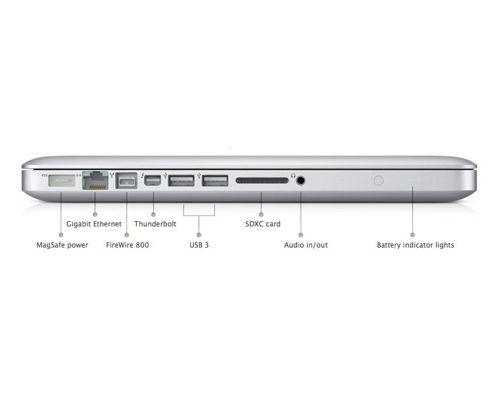
Connections and Expansion

  • MagSafe power port
  • Gigabit Ethernet port
  • FireWire 800 port (up to 800 Mbps)
  • Two USB 3 ports (up to 5 Gbps)
  • Thunderbolt port (up to 10 Gbps)
  • Headphone port
  • SDXC card slot
  • Kensington lock slot
  • 8x SuperDrive

Wireless

  • 802.11n Wi-Fi wireless networking;3 IEEE 802.11a/b/g compatible
  • Bluetooth 4.0 wireless technology

Audio

  • Stereo speakers with subwoofer
  • Omnidirectional microphone
  • Headphone port
    • Support for Apple iPhone headset with remote and microphone
    • Support for audio line out (digital/analog)

Keyboard and Trackpad

  • Full-size backlit keyboard with 78 (U.S.) or 79 (ISO) keys, including 12 function keys and 4 arrow keys (inverted “T” arrangement) with ambient light sensor
  • Multi-Touch trackpad for precise cursor control; supports inertial scrolling, pinch, rotate, swipe, three-finger swipe, four-finger swipe, tap, double-tap, and drag capabilities

Battery and Power4

  • Up to 7 hours wireless web
  • Built-in 63.5-watt-hour lithium-polymer battery
  • 60W MagSafe Power Adapter with cable management system; MagSafe power port

Electrical and Operating Requirements

  • Line voltage: 100V to 240V AC
  • Frequency: 50Hz to 60Hz
  • Operating temperature: 50° to 95° F (10° to 35° C)
  • Storage temperature: –13° to 113° F (–24° to 45° C)
  • Relative humidity: 0% to 90% noncondensing
  • Operating altitude: tested up to 10,000 feet
  • Maximum storage altitude: 15,000 feet
  • Maximum shipping altitude: 35,000 feet

Included Software OS X Lion

Includes Mail, Address Book, iCal, the Mac App Store, iTunes, Safari, Time Machine, FaceTime, Photo Booth, Mission Control, Launchpad, AirDrop, Resume, Auto Save, Versions, Quick Look, Spotlight, QuickTime, and more.

OS X Mountain Lion. Coming soon. Buy a new Mac now and get a free upgrade to the next release of OS X when it arrives this summer. Learn more.

iLife

Includes iPhoto, iMovie, and GarageBand. Learn more about iLife.

Limited Warranty and Service

Your MacBook Pro comes with 90 days of free telephone support and a one-year limited warranty. Purchase the AppleCare Protection Plan to extend your service and support to three years from your computer’s purchase date. Only the AppleCare Protection Plan provides you with direct telephone support from Apple technical experts and the assurance that repairs will be handled by Apple-authorized technicians using genuine Apple parts. For more information, visit Apple Support or call 800-823-2775.

MacBook Pro (13-inch, Mid 2012) - Technical Specifications,MacBook Pro 13-inch, Mid 2012 , Technical Specifications,MacBook Pro 13-inch Mid 2012,Macbook Technical Specifications,Macbook Pro Technical Specifications,apple product,Macbook Pro Display,Macbook Pro Ram,Macbook Pro Speed,

In the Box

  • MacBook Pro
  • Display cleaning cloth
  • 13-inch: 60W MagSafe Power Adapter, AC wall plug, and power cord
  • Printed and electronic documentation

Configure to Order

Configure your MacBook Pro to order with these options, only at the Apple Online Store:

  • 8GB memory upgrade (two 4GB)
  • 750GB 5400-rpm hard drive
  • 1TB 5400-rpm hard drive
  • 128GB, 256GB, or 512GB solid-state drive


MacBook Pro (13-inch, Mid 2012) - Technical Specifications,MacBook Pro 13-inch, Mid 2012 , Technical Specifications,MacBook Pro 13-inch Mid 2012,Macbook Technical Specifications,Macbook Pro Technical Specifications,apple product,Macbook Pro Display,Macbook Pro Ram,Macbook Pro Speed,MacBook Pro and the Environment

Apple takes a complete product life cycle approach to determining our environmental impact. Learn more.

MacBook Pro is designed with the following features to reduce environmental impact:

  • Highly recyclable aluminum enclosure
  • Mercury-free LED backlit display
  • Arsenic-free display glass
  • BFR-free
  • PVC-free5
  • Reduced packaging volume
  • Meets ENERGY STAR Version 5.2 requirements

Apple and the Environment

Learn more about Apple’s dedication to reducing the environmental impact of our products and process. TheApple Product Environmental Specification details the environmental attributes of our products.

Recycling

Apple takes a holistic view of materials management and waste minimization. Learn more about how to recycle your Mac.

Acoustic Performance

DECLARED NOISE EMISSIONS in accordance with ISO 9296

Sound Power Level
LWAd (B)
1 B = 10 dB
Sound Pressure Level
Operator Position
LpAm (dB)
13″ 2.9 GHz 13″ 2.5 GHz 13″ 2.9 GHz 13″ 2.5 GHz
Idle 2.7 2.7 16 16
Hard drive accessing 2.8 2.8 17 17
CD drive accessing N/A 3.2 N/A 28
  1. LWAd is the statistical upper-limit A-weighted sound power level (rounded to the nearest 0.1 B).
  2. LpAm is the mean A-weighted sound pressure level measured at the operator position (rounded to the nearest dB).
  3. 1 B (bel) = 10 dB (decibel).

Accessories

Mac Software

  • iWork
  • Aperture
  • Logic Pro
  • Final Cut Pro X

Displays and Adapters

  • Apple Thunderbolt Display
  • Apple Mini DisplayPort to DVI Adapter
  • Apple Mini DisplayPort to VGA
  • Adapter Apple Mini DisplayPort to Dual-Link DVI Adapter

AirPort and Wireless

  • AirPort Extreme Base Station
  • AirPort Express Base Station
  • Time Capsule
  • Apple Remote
  • Apple Wireless Keyboard
  • Apple Magic Mouse
  • Apple Magic Trackpad

MacBook Pro (13-inch, Mid 2012) - Technical Specifications,MacBook Pro 13-inch, Mid 2012 , Technical Specifications,MacBook Pro 13-inch Mid 2012,Macbook Technical Specifications,Macbook Pro Technical Specifications,apple product,Macbook Pro Display,Macbook Pro Ram,Macbook Pro Speed,


Other Accessories

  • 60W MagSafe Power Adapter (13-inch)
  • AppleCare Protection Plan

  1. 1GB=1 billion bytes; actual formatted capacity less.
  2. Actual weight varies by configuration and manufacturing process.
  3. Wireless Internet access requires a base station or other wireless access point and Internet access; fees may apply. Some ISPs are not currently compatible with AirPort.
  4. Wireless web testing conducted by Apple in May 2012 using preproduction 2.6GHz quad-core Intel Core i7–based 15-inch MacBook Pro units and preproduction 2.9GHz dual-core Intel Core i7–based 13-inch MacBook Pro units. The wireless web test measures battery life by wirelessly browsing 25 popular websites with display brightness set to 50%. Battery life varies by use and configuration. See www.apple.com/batteries for more information.
  5. PVC-free AC power cord is available in the U.S., Canada, Mexico, Colombia, El Salvador, Guatemala, Panama, Peru, Puerto Rico, U.S. Virgin Islands, and Venezuela.
Share

Apple MacBook Pro, 13-inch specs

January 29th, 2015, posted in Apple
Share

MacBook Pro (13-inch, Mid 2012) - Technical Specifications,MacBook Pro 13-inch, Mid 2012 , Technical Specifications,MacBook Pro 13-inch Mid 2012,Macbook Technical Specifications,Macbook Pro Technical Specifications,apple product,Macbook Pro Display,Macbook Pro Ram,Macbook Pro Speed,

MANUFACTURER’S DESCRIPTION

The inside story. And the outside story, too.

With its durable unibody enclosure, LED-backlit display, and Multi-Touch trackpad, MacBookPro looks beautiful. And works beautifully.

Strength. Lightness. Beauty. Seamlessly integrated.

MacBook Pro is machined from a single piece of aluminum, an engineering breakthrough that replaced many parts with just one. It’s called the unibody. And the first time you pick up aMacBook Pro you’ll notice the difference it makes. The entire enclosure is thinner and lighter than other notebooks. It looks polished and refined. And it feels strong and durable – perfect for life inside (and outside) your briefcase or backpack.


THE SPECS

Pricing
Part Number MD101LZ/A
Battery Information
Battery Chemistry Lithium Polymer (Li-Polymer)
Maximum Battery Run Time 7 Hour
Interfaces/Ports
FireWire/i.LINK Yes
Total Number of USB Ports 2
Number of USB 3.0 Ports 2
Audio Line Out Yes
Thunderbolt Yes
Display & Graphics
Screen Size 13.30 “
Display Screen Type Active Matrix TFT Color LCD
Aspect Ratio 16:10
Screen Mode WXGA
Screen Resolution 1280 x 800
Backlight Technology LED
Graphics Controller Manufacturer Intel
Graphics Controller Model HD 4000
Graphics Memory Technology DDR3 SDRAM
Graphics Memory Accessibility Shared
Storage
Storage Size 500 GB
Hard Drive Interface Serial ATA
Hard Drive RPM 5400
Optical Drive Type DVD-Writer
General Information
Manufacturer Apple, Inc
UPC Code 2003BB
Manufacturer Part Number MD101LZ/A
Brand Name Apple
Product Name MacBook Pro, 13-inch
Marketing Information The inside story. And the outside story, too.With its durable unibody enclosure, LED-backlit display, and Multi-Touch trackpad,MacBook Pro looks beautiful. And works beautifully.Strength. Lightness. Beauty. Seamlessly integrated.MacBook Pro is machined from a single piece of aluminum, an engineering breakthrough that replaced many parts with just one. It’s called the unibody. And the first time you pick up a MacBook Pro you’ll notice the difference it makes. The entire enclosure is thinner and lighter than other notebooks. It looks polished and refined. And it feels strong and durable – perfect for life inside (and outside) your briefcase or backpack.
Product Model MD101LZ/A
Product Type Notebook
Manufacturer Website Address http://www.apple.com
Product Line MacBook Pro
Memory
Memory Card Supported Secure Digital Extended Capacity (SDXC)
Standard Memory 4 GB
Maximum Memory 8 GB
Memory Technology DDR3 SDRAM
Memory Standard DDR3-1600/PC3-12800
Memory Card Reader Yes
Miscellaneous
Package Contents
  • MacBook Pro, 13-inch
  • Lithium Polymer Battery
  • 60W MagSafe Power Adapter
  • AC Wall Plug
  • Power Cord
  • Accessory Kit
  • Display Cleaning Cloth
  • Printed and Electronic Documentation
Network & Communication
Wireless LAN Yes
Wireless LAN Standard IEEE 802.11a/b/g/n
Ethernet Technology Gigabit Ethernet
Bluetooth Yes
Bluetooth Standard Bluetooth 4.0
Physical Characteristics
Height 1.0″
Width 12.8″
Depth 8.9″
Weight (Approximate) 72.0 oz
Built-in Devices
Webcam Yes
Microphone Yes
Speakers Yes
Processor & Chipset
Processor Manufacturer Intel
Processor Type Core i5
Processor Speed 2.50 GHz
Processor Core Dual-core (2 Core)
Cache 3 MB
Software
Operating System Mac OS X 10.7 Lion
Input Devices
Keyboard Backlight Yes
Pointing Device Type Track Pad
TouchPad Features Multi-touch Gesture
Share