Posts Tagged ‘Oracle Database’

RC-00118 Error Occurred During Creation Of Database

December 10th, 2017, posted in Oracle
Share

I was cloning PROD to DEV instance … when I am configuring DEV instance , got following errors.

==================================================================================

ORACLE instance started.

Total System Global Area 1068937216 bytes
Fixed Size                  2235208 bytes
Variable Size             427820216 bytes
Database Buffers          624951296 bytes
Redo Buffers               13930496 bytes

Control file created.

alter database open resetlogs
*
ERROR at line 1:
ORA-01194: file 1 needs more recovery to be consistent
ORA-01110: data file 1: '/u02/oracle/DEV/oradata/DEV/system01.dbf'


alter tablespace TEMP1 add tempfile '/u02/oracle/DEV/oradata/DEV/temp01.dbf' REUSE
*
ERROR at line 1:
ORA-01109: database not open


alter tablespace TEMP2 add tempfile '/u02/oracle/DEV/oradata/DEV/temp02.dbf' REUSE
*
ERROR at line 1:
ORA-01109: database not open


ALTER DATABASE RENAME GLOBAL_NAME TO "DEV.localhost"
                                     *
ERROR at line 1:
ORA-01109: database not open

ORA-01109: database not open


Error Running create/replace library with adupdlib.sql
ORA-01109: database not open

PL/SQL procedure successfully completed.

Disconnected from Oracle Database 11g Enterprise Edition Release 11.2.0.3.0 - 64bit Production
With the Partitioning, OLAP, Data Mining and Real Application Testing options
exit_code=0

Checking for errors ...

The database has not been successfully created. Shutting down the instance ...

SQL*Plus: Release 11.2.0.3.0 Production on Sat Nov 1 01:26:22 2014

Copyright (c) 1982, 2011, Oracle.  All rights reserved.

Connected.
ORACLE instance shut down.
Disconnected from Oracle Database 11g Enterprise Edition Release 11.2.0.3.0 - 64bit Production
With the Partitioning, OLAP, Data Mining and Real Application Testing options

.end std out.

.end err out.

---------------------------------------------------------------
                   ADX Database Utility
---------------------------------------------------------------

getConnectionUsingAppsJDBCConnector() -->
    APPS_JDBC_URL='null'
    Trying to get connection using SID based connect descriptor
getConnection() -->
    sDbHost    : localhost
    sDbDomain  : localhost.domain.com
    sDbPort    : 1530
    sDbSid     : DEV
    sDbUser    : apps
    Trying to connect using SID...
getConnectionUsingSID() -->
    JDBC URL: jdbc:oracle:thin:@localhost:1530:DEV
    Exception occurred: java.sql.SQLException: ORA-01034: ORACLE not available
ORA-27101: shared memory realm does not exist
Linux-x86_64 Error: 2: No such file or directory

    Trying to connect using SID as ServiceName
getConnectionUsingServiceName() -->
    JDBC URL: jdbc:oracle:thin:@(DESCRIPTION=(ADDRESS=(PROTOCOL=tcp)(HOST=localhost)(PORT=1530))(CONNECT_DATA=(SERVICE_NAME=DEV)))
    Exception occurred: java.sql.SQLException: ORA-01034: ORACLE not available
ORA-27101: shared memory realm does not exist
Linux-x86_64 Error: 2: No such file or directory

    Trying to connect using SID as ServiceName.DomainName
getConnectionUsingServiceName() -->
    JDBC URL: jdbc:oracle:thin:@(DESCRIPTION=(ADDRESS=(PROTOCOL=tcp)(HOST=localhost)(PORT=1530))(CONNECT_DATA=(SERVICE_NAME=DEV.localhost)))
    Exception occurred: java.sql.SQLException: Listener refused the connection with the following error:
ORA-12514, TNS:listener does not currently know of service requested in connect descriptor

    Connection could not be obtained; returning null

-------------------ADX Database Utility Finished---------------

RC-00118: Error occurred during creation of database
Raised by oracle.apps.ad.clone.ApplyDatabase


StackTrace:
java.lang.Exception: Control file creation failed
        at oracle.apps.ad.clone.ApplyDatabase.doConf(ApplyDatabase.java:635)
        at oracle.apps.ad.clone.ApplyDatabase.doApply(ApplyDatabase.java:473)
        at oracle.apps.ad.clone.ApplyDatabase.<init>(ApplyDatabase.java:366)
        at oracle.apps.ad.clone.ApplyDBTier.<init>(ApplyDBTier.java:110)
        at sun.reflect.NativeConstructorAccessorImpl.newInstance0(Native Method)
        at sun.reflect.NativeConstructorAccessorImpl.newInstance(NativeConstructorAccessorImpl.java:39)
        at sun.reflect.DelegatingConstructorAccessorImpl.newInstance(DelegatingConstructorAccessorImpl.java:27)
        at java.lang.reflect.Constructor.newInstance(Constructor.java:501)
        at oracle.apps.ad.clone.util.CloneProcessor.run(CloneProcessor.java:67)
        at java.lang.Thread.run(Thread.java:637)


==================================================================================

In my case, control file were created successfully, but above error indicates that database was not created successfully.

I found root of this issue that when i had copied PROD binaries and data files at same time some services were running using ORACLE user.

Note: You would get this error if oracle database was not properly shutdown when you copied the files.

All my stuff were wasted.
So, I have copied only datafiles again from PROD to DEV.
And ran adcfgclone.pl dbTier again and cloning has been completed successfully without any error !!

Share

Disable Auditing In A 11G Database

November 18th, 2017, posted in Oracle Queries
Share

In a RAC Database :


SQL> ALTER SYSTEM SET audit_trail=NONE SCOPE=spfile sid='*';
System altered.
SQL>

Note : Restart the database to have the change take affect, or do a rolling restart, one instance at a time.


In a Single Instance Database :


SQL> ALTER SYSTEM SET audit_trail=NONE SCOPE=spfile ;
System altered.
SQL>

Note : Restart the database to have the change take affect.

Share

FRM-92102 : A Network Error Has Occured

September 19th, 2017, posted in Oracle, Solaris
Share

FRM-92102 is Gerneric Error maybe occur for more than one reasons :

1-Network 
2-Proxy
3-http
4-Session Time 


But today i will discuss the problem On oracle Application server 10g .
Description for the problem like the following when you try to connect on your deploy application On OAS 10g it’s gives the above error from 1-5 minutes.

I will give you more than one solution maybe it will be related to the above problem and you try them separately to see which one will be valid for you : 

1-Netowrk Parameters :

You will find it $ORACLE_HOME/forms/server/default.env
Just increase the value .

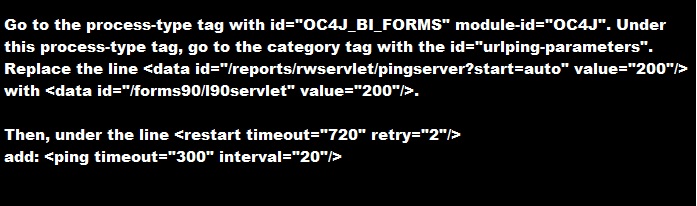
2-do the following change in opmn.xml (under $ORACLE_HOME/opmn/conf/):


3-SET Inbound_connection_timeout In sqlnet.ora to ZERO .

Sqlnet.Inbound_connection_timeout = 0

Note : if your can’t find this parameter in the SQLNET.ORA you cant add it .

5- Change the following $ORACLE_HOME/opmn/conf/opmn.xml


Hope this will work 

Share

Oracle EBS Upgrade 12.1.1 to 12.1.3

September 18th, 2017, posted in Oracle Queries
Share

oracle dba,oracle apps dba,apps dba,dba,oracle application,oracle database,oracle,Oracle EBS Upgrade 12.1.1 to 12.1.3,Oracle EBS Upgrade,12.1.1 to 12.1.3,Oracle EBS Upgrade DBA,DBA EBS Upgrade 12.1.1 to 12.1.3,EBS Upgrade,oracle ebs,oracle upgrade,

Some Links To Oracle EBS Upgrade 12.1.1 to 12.1.3 :

http://sankaramaddi.blogspot.com/2015/11/ebs-upgrade-1211-to-1213.html

http://ermanarslan.blogspot.com/2013/09/ebs-1211-to-1213-upgrade-steps.html

https://oracleminds.wordpress.com/2011/12/22/how-did-i-upgrade-our-oracle-ebs-from-r12-1-1-to-12-1-3/

http://otn-world.blogspot.com/2013/12/upgrade-oracle-ebs-r1211-to-1213.html

http://oracledbawings.blogspot.com/2011/07/upgrade-ebs-1211-to-1213.html

http://chandrasekarsivasamy.blogspot.com/2012/08/oracle-applications-upgrade-from-1211.html

Share

ORA-00265: Instance recovery required cannot set ARCHIVELOG mode

June 3rd, 2016, posted in Oracle Queries
Share

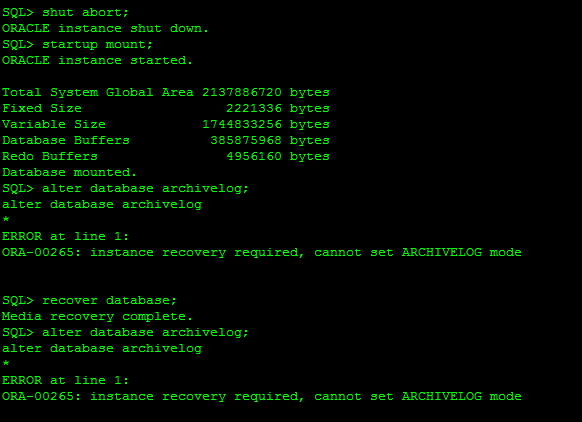
Today, I came across the “ORA-00265: instance recovery required, cannot set ARCHIVELOG mode” while
converting database into archive log mode.Problem sys@standby> startup mount; ORACLE instance started. Total System Global Area 835104768 bytes Fixed Size 2217952 bytes Variable Size 490735648 bytes Database Buffers 335544320 bytes Redo Buffers 6606848 bytes Database mounted. sys@standby> alter database recover managed standby database using current logfile disconnect; alter database recover managed standby database using current logfile disconnect * ERROR at line 1: ORA-01153: an incompatible media recovery is active Cause This indicates a currently running media recovery process. Action sys@standby> alter database recover managed standby database cancel; sys@standby> alter database recover managed standby database using current logfile disconnect; Note When shutting down physical standby database, firstly turn off media recovery process. Otherwise the next time when starting up redo apply again, you will encounter error ORA-01153.

This error usually caused when database crashed unfortunately or we shutdown database with the help of database shutdown command as: shutdown abort, startup force mount or shutdown abort. These types of command will required instance recovery in next startup. In short it need clean database startup.


SQL> alter database archivelog;
alter database archivelog
*
ERROR at line 1:
ORA-00265: instance recovery required, cannot set ARCHIVELOG mode

Reason :

ORA-00265: instance recovery required, cannot set ARCHIVELOG mode
 *Cause:  The database either crashed or was shutdown with the ABORT
          option. Media recovery cannot be enabled because the online
          logs may not be sufficient to recover the current datafiles.
 *Action: Open the database and then enter the SHUTDOWN command with the
          NORMAL or IMMEDIATE option.


ORA-00265: Instance recovery required cannot set ARCHIVELOG mode,ORA-00265,Instance recovery required, cannot set ARCHIVELOG mode,ARCHIVELOG mode,ARCHIVELOG Error,Oracle DBA,Oracle Database,Oracle Archive issue,Oracle Ora,

Solution:

SQL> select status from v$instance;
STATUS
————————————
MOUNTED

SQL> alter database open;
Database altered.

SQL> shutdown immediate;
Database closed.
Database dismounted.
ORACLE instance shut down.
SQL> startup mount;
ORACLE instance started.
Total System Global Area 293601280 bytes
Fixed Size 1248600 bytes
Variable Size 88081064 bytes
Database Buffers 197132288 bytes
Redo Buffers 7139328 bytes
Database mounted.
SQL> alter database archivelog;
Database altered.
SQL> alter database open;
Database altered.
Share