
Rename anyone of the report under INV_TOP and try to recreate it using adadmin.

[applvision@apps US]$ ls -tlrh /apps/vision/apps/apps_st/appl/inv/12.0.0/reports/US/INVIRSLO.rdf
-rw-r--r-- 1 applvision applmgr 184K Mar  9  2013 /apps/vision/apps/apps_st/appl/inv/12.0.0/reports/US/INVIRSLO.rdf
[applvision@apps US]$ mv /apps/vision/apps/apps_st/appl/inv/12.0.0/reports/US/INVIRSLO.rdf /apps/vision/apps/apps_st/appl/inv/12.0.0/reports/US/INVIRSLO.rdf_15sep2013
[applvision@apps US]$ ls -tlrh /apps/vision/apps/apps_st/appl/inv/12.0.0/reports/US/INVIRSLO.rdf
ls: /apps/vision/apps/apps_st/appl/inv/12.0.0/reports/US/INVIRSLO.rdf: No such file or directory
[applvision@apps US]$


[applvision@apps ~]$ adadmin

                     Copyright (c) 2002 Oracle Corporation
                        Redwood Shores, California, USA

                     Oracle Applications AD Administration

                                 Version 12.0.0

NOTE: You may not use this utility for custom development
      unless you have written permission from Oracle Corporation.

Your default directory is '/apps/vision/apps/apps_st/appl'.
Is this the correct APPL_TOP [Yes] ?

AD Administration records your AD Administration session in a text file
you specify.  Enter your AD Administration log file name or press [Return]
to accept the default file name shown in brackets.

Filename [adadmin.log] : practice.log

************* Start of AD Administration session *************
AD Administration version: 12.0.0
AD Administration started at: Mon Sep 16 2013 00:59:44

APPL_TOP is set to /apps/vision/apps/apps_st/appl

You can be notified by email if a failure occurs.
Do you wish to activate this feature [No] ?

Please enter the batchsize [1000] :


Please enter the name of the Oracle Applications System that this
APPL_TOP belongs to.

The Applications System name must be unique across all Oracle
Applications Systems at your site, must be from 1 to 30 characters
long, may only contain alphanumeric and underscore characters,
and must start with a letter.

Sample Applications System names are: "prod", "test", "demo" and
"Development_2".

Applications System Name [vision] : vision *


NOTE: If you do not currently have certain types of files installed
in this APPL_TOP, you may not be able to perform certain tasks.

Example 1: If you don't have files used for installing or upgrading
the database installed in this area, you cannot install or upgrade
the database from this APPL_TOP.

Example 2: If you don't have forms files installed in this area, you cannot
generate them or run them from this APPL_TOP.

Example 3: If you don't have concurrent program files installed in this area,
you cannot relink concurrent programs or generate reports from this APPL_TOP.


Do you currently have files used for installing or upgrading the database
installed in this APPL_TOP [YES] ? YES *


Do you currently have Java and HTML files for HTML-based functionality
installed in this APPL_TOP [YES] ? YES *


Do you currently have Oracle Applications forms files installed
in this APPL_TOP [YES] ? YES *


Do you currently have concurrent program files installed
in this APPL_TOP [YES] ? YES *


Please enter the name Oracle Applications will use to identify this APPL_TOP.

The APPL_TOP name you select must be unique within an Oracle Applications
System, must be from 1 to 30 characters long, may only contain
alphanumeric and underscore characters, and must start with a letter.

Sample APPL_TOP Names are: "prod_all", "demo3_forms2", and "forms1".

APPL_TOP Name [apps] : apps *


You are about to use or modify Oracle Applications product tables
in your ORACLE database 'vision'
using ORACLE executables in '/apps/vision/apps/tech_st/10.1.2'.

Is this the correct database [Yes] ?

AD Administration needs the password for your 'SYSTEM' ORACLE schema
in order to determine your installation configuration.

Enter the password for your 'SYSTEM' ORACLE schema:


The ORACLE username specified below for Application Object Library
uniquely identifies your existing product group: APPLSYS

Enter the ORACLE password of Application Object Library [APPS] :

AD Administration is verifying your username/password.
The status of various features in this run of AD Administration is:

                                           <-Feature version in->
Feature                          Active?   APPLTOP    Data model    Flags
------------------------------   -------   --------   -----------   -----------
CHECKFILE                        Yes       1          1             Y N N Y N Y
PREREQ                           Yes       6          6             Y N N Y N Y
CONCURRENT_SESSIONS              No        2          2             Y Y N Y Y N
PATCH_TIMING                     Yes       2          2             Y N N Y N Y
PATCH_HIST_IN_DB                 Yes       6          6             Y N N Y N Y
SCHEMA_SWAP                      Yes       1          1             Y N N Y Y Y
JAVA_WORKER                      Yes       1          1             Y N N Y N Y
CODELEVEL                        Yes       1          1             Y N N Y N Y


Identifier for the current session is 16762

Reading product information from file...

Reading language and territory information from file...

Reading language information from applUS.txt ...

AD Administration warning:
 Product Data File
 /apps/vision/apps/apps_st/appl/admin/zfaprod.txt
 does not exist for product "zfa".
This product is registered in the database but the
above file does not exist in APPL_TOP.  The product
will be ignored without error.


AD Administration warning:
 Product Data File
 /apps/vision/apps/apps_st/appl/admin/zsaprod.txt
 does not exist for product "zsa".
This product is registered in the database but the
above file does not exist in APPL_TOP.  The product
will be ignored without error.


AD Administration warning:
 Product Data File
 /apps/vision/apps/apps_st/appl/admin/jtsprod.txt
 does not exist for product "jts".
This product is registered in the database but the
above file does not exist in APPL_TOP.  The product
will be ignored without error.


Reading database to see what industry is currently installed.

Reading FND_LANGUAGES to see what is currently installed.
Currently, the following language is installed:

Code   Language                                Status
----   --------------------------------------- ---------
US     American English                        Base

Your base language will be AMERICAN.

Setting up module information.
Reading database for information about the modules.
Saving module information.
Reading database for information about the products.
Reading database for information about how products depend on each other.
Reading topfile.txt ...

Saving product information.

AD code level : [B.1]

            AD Administration Main Menu
   --------------------------------------------------

   1.    Generate Applications Files menu

   2.    Maintain Applications Files menu

   3.    Compile/Reload Applications Database Entities menu

   4.    Maintain Applications Database Entities menu

   5.    Change Maintenance Mode

   6.    Exit AD Administration

Enter your choice [5] :1
         Generate Applications Files
   ----------------------------------------

   1.    Generate message files

   2.    Generate form files

   3.    Generate report files

   4.    Generate product JAR files

   5.    Return to Main Menu


Enter your choice [5] : 3


AD utilities can support a maximum of 999 workers. Your
current database configuration supports a maximum of 84 workers.
Oracle recommends that you use between 8 and 16 workers.


Enter the number of workers [8] : 6

Your current character set is "US7ASCII".

Do you want to generate Oracle Reports objects
using this character set [Yes] ?


Do you want to regenerate Oracle Reports PL/SQL library files [Yes] ?

Do you want to regenerate Oracle Reports executable files [Yes] ?

Enter list of products ('all' for all products) [all] : inv

Generate specific reports objects for each selected product [No] ? yes


The current set of installed languages is: US

Please select languages for generating Oracle Reports files.
You may select all of the above languages, or just a subset.

Enter list of languages ('all' for all of the above) [all] : US


You selected the following languages: US

Is this the correct set of languages [Yes] ?


You selected the following languages: US

Is this the correct set of languages [Yes] ?

Reading product report information...

Selecting Oracle Reports PL/SQL library files to generate...


Selecting library files for Inventory...

List of libraries in Inventory :

   INVISMMX.pll        inv.pll

Enter libraries to generate, or enter 'all' [all] :


Selecting product reports to generate...


Selecting reports for Inventory...

List of reports in Inventory :

   INVARAAS.rdf   INVARADV.rdf   INVARCLI.rdf   INVARCPA.rdf   INVARCTA.rdf
   INVARHMA.rdf   INVARORE.rdf   INVARPAR.rdf   INVARPIA.rdf   INVARPMT.rdf
   INVARPSL.rdf   INVARPTP.rdf   INVARPTS.rdf   INVARRTA.rdf   INVARUIR.rdf
   INVCCIER.rdf   INVCCTCA.rdf   INVCHGPU.rdf   INVDRRSV.rdf   INVGCORP.rdf
   INVINPSR.rdf   INVIRCAT.rdf   INVIRCIT.rdf   INVIRCOC.rdf   INVIRCXR.rdf
   INVIRDIS.rdf   INVIRDST.rdf   INVIRILC.rdf   INVIRISQ.rdf   INVIRITD.rdf
   INVIRITS.rdf   INVIRRCR.rdf   INVIRRIT.rdf   INVIRSIQ.rdf   INVIRSLO.rdf
   INVIRSNO.rdf   INVIRTMP.rdf   INVIRXRF.rdf   INVISMMX.rdf   INVKBCPR.rdf
   INVM2MQT.rdf   INVMRMQT.rdf   INVMSCHR.rdf   INVMSWHU.rdf   INVMVTEX.rdf
   INVONHSP.rdf   INVORGES.rdf   INVPOPSR.rdf   INVPRFDH.rdf   INVPRFRL.rdf
   INVRCWSR.rdf   INVSRAAL.rdf   INVSRFRT.rdf   INVSRIOS.rdf   INVSRISA.rdf
   INVSRLOC.rdf   INVSROPT.rdf   INVSRPLN.rdf   INVSRSPT.rdf   INVSRSUB.rdf
   INVSRUOM.rdf   INVSTMVT.rdf   INVTOPKL.rdf   INVTRACS.rdf   INVTRCLS.rdf
   INVTRDST.rdf   INVTRELT.rdf   INVTRHAN.rdf   INVTRLNT.rdf   INVTRREG.rdf
   INVTRSHS.rdf   INVTRSNT.rdf   INVTRSTS.rdf   INVTRVLT.rdf

Enter reports to generate, or enter 'all' [all] :


Generating Oracle Reports objects...


Creating the AD_UTIL_PARAMS table...
Table AD_UTIL_PARAMS already exists, so dropping the table and recreating it.

Creating FND_INSTALL_PROCESSES table...

Writing dependencies of jobs to run to appldep.txt file...

There are now 76 jobs remaining (current phase=admin):
    0 running, 2 ready to run and 74 waiting.

Reading completed jobs from restart file (if any).

There are now 76 jobs remaining (current phase=admin):
    0 running, 2 ready to run and 74 waiting.


Determining which java executables are supported by adJavaWorker...

Starting worker processes.

Worker process 1 started.

Worker process 2 started.

************* Start of AD Worker session *************
AD Worker version: 12.0.0
AD Worker started at: Mon Sep 16 2013 02:34:08

APPL_TOP is set to /apps/vision/apps/apps_st/appl

************* Start of AD Worker session *************
AD Worker version: 12.0.0
AD Worker started at: Mon Sep 16 2013 02:34:08

APPL_TOP is set to /apps/vision/apps/apps_st/appl

Worker process 3 started.

************* Start of AD Worker session *************
AD Worker version: 12.0.0
AD Worker started at: Mon Sep 16 2013 02:34:08

APPL_TOP is set to /apps/vision/apps/apps_st/appl

Worker process 4 started.

************* Start of AD Worker session *************
AD Worker version: 12.0.0
AD Worker started at: Mon Sep 16 2013 02:34:08

APPL_TOP is set to /apps/vision/apps/apps_st/appl

Worker process 5 started.

************* Start of AD Worker session *************
AD Worker version: 12.0.0
AD Worker started at: Mon Sep 16 2013 02:34:08

APPL_TOP is set to /apps/vision/apps/apps_st/appl

Worker process 6 started.

Checking if all jobs have their actual and symbolic arguments in sync....

Done.

Writing jobs to run to restart file.

Reading jobs from FND_INSTALL_PROCESSES table ...


Done reading jobs from FND_INSTALL_PROCESSES table ...

Telling workers to read 'todo' restart file.
************* Start of AD Worker session *************

Done.AD Worker version: 12.0.0
AD Worker started at: Mon Sep 16 2013 02:34:08

APPL_TOP is set to /apps/vision/apps/apps_st/appl


Starting phase 1000 (admin): Generate Report Libraries


There are now 76 jobs remaining (current phase=admin):
    0 running, 2 ready to run and 74 waiting.

 Assigned: file INVISMMX.pll on worker  1 for product au  username APPLSYS.
 Assigned: file inv.pll      on worker  2 for product au  username APPLSYS.
Completed: file inv.pll      on worker  2 for product au  username APPLSYS.
Completed: file INVISMMX.pll on worker  1 for product au  username APPLSYS.

Starting phase 1001 (admin+1): Generate Report Files


There are now 74 jobs remaining (current phase=admin+1):
    0 running, 74 ready to run and 0 waiting.

 Assigned: file INVARAAS.rdf on worker  1 for product inv username INV.
 Assigned: file INVARADV.rdf on worker  2 for product inv username INV.
 Assigned: file INVARCLI.rdf on worker  3 for product inv username INV.
 Assigned: file INVARCPA.rdf on worker  4 for product inv username INV.
 Assigned: file INVARCTA.rdf on worker  5 for product inv username INV.
 Assigned: file INVARHMA.rdf on worker  6 for product inv username INV.
Completed: file INVARAAS.rdf on worker  1 for product inv username INV.
 Assigned: file INVARORE.rdf on worker  1 for product inv username INV.
Completed: file INVARHMA.rdf on worker  6 for product inv username INV.
 Assigned: file INVARPAR.rdf on worker  6 for product inv username INV.
Completed: file INVARCLI.rdf on worker  3 for product inv username INV.
Completed: file INVARCPA.rdf on worker  4 for product inv username INV.
 Assigned: file INVARPIA.rdf on worker  3 for product inv username INV.
 Assigned: file INVARPMT.rdf on worker  4 for product inv username INV.
Completed: file INVARADV.rdf on worker  2 for product inv username INV.
 Assigned: file INVARPSL.rdf on worker  2 for product inv username INV.
Completed: file INVARCTA.rdf on worker  5 for product inv username INV.
 Assigned: file INVARPTP.rdf on worker  5 for product inv username INV.
Completed: file INVARPIA.rdf on worker  3 for product inv username INV.
 Assigned: file INVARPTS.rdf on worker  3 for product inv username INV.

There are now 67 jobs remaining (current phase=admin+1):
    6 running, 61 ready to run and 0 waiting.

Completed: file INVARORE.rdf on worker  1 for product inv username INV.
 Assigned: file INVARRTA.rdf on worker  1 for product inv username INV.
Completed: file INVARPMT.rdf on worker  4 for product inv username INV.
 Assigned: file INVARUIR.rdf on worker  4 for product inv username INV.
Completed: file INVARPTP.rdf on worker  5 for product inv username INV.
 Assigned: file INVCCIER.rdf on worker  5 for product inv username INV.
Completed: file INVARPAR.rdf on worker  6 for product inv username INV.
 Assigned: file INVCCTCA.rdf on worker  6 for product inv username INV.
Completed: file INVARRTA.rdf on worker  1 for product inv username INV.
 Assigned: file INVCHGPU.rdf on worker  1 for product inv username INV.
Completed: file INVARUIR.rdf on worker  4 for product inv username INV.
 Assigned: file INVDRRSV.rdf on worker  4 for product inv username INV.
Completed: file INVCCTCA.rdf on worker  6 for product inv username INV.
 Assigned: file INVGCORP.rdf on worker  6 for product inv username INV.
Completed: file INVARPSL.rdf on worker  2 for product inv username INV.
Completed: file INVARPTS.rdf on worker  3 for product inv username INV.
 Assigned: file INVINPSR.rdf on worker  2 for product inv username INV.
 Assigned: file INVIRCAT.rdf on worker  3 for product inv username INV.
Completed: file INVCCIER.rdf on worker  5 for product inv username INV.
 Assigned: file INVIRCIT.rdf on worker  5 for product inv username INV.

There are now 57 jobs remaining (current phase=admin+1):
    6 running, 51 ready to run and 0 waiting.
Completed: file INVTRLNT.rdf on worker  2 for product inv username INV.
Completed: file INVTRSHS.rdf on worker  4 for product inv username INV.
 Assigned: file INVTRVLT.rdf on worker  2 for product inv username INV.
Completed: file INVTRSNT.rdf on worker  1 for product inv username INV.
Completed: file INVTRREG.rdf on worker  3 for product inv username INV.
Completed: file INVTRSTS.rdf on worker  6 for product inv username INV.
Completed: file INVTRHAN.rdf on worker  5 for product inv username INV.
Completed: file INVTRVLT.rdf on worker  2 for product inv username INV.

Telling workers to quit...

5 workers have quit.  Waiting for 1 more.

All workers have quit.


Dropping FND_INSTALL_PROCESSES table...


FND_INSTALL_PROCESSES table dropped.


Dropping AD_DEFERRED_JOBS table...


AD_DEFERRED_JOBS table dropped.


Copying files to destination ...

Done copying files to destination.


Review the messages above, then press [Return] to continue.


Now check generated report which we moved.
========================================

[applvision@apps US]$ ls -tlrh /apps/vision/apps/apps_st/appl/inv/12.0.0/reports/US/INVIRSLO.rdf
ls: /apps/vision/apps/apps_st/appl/inv/12.0.0/reports/US/INVIRSLO.rdf: No such file or directory
[applvision@apps US]$ date
Mon Sep 16 02:37:02 IST 2013
[applvision@apps US]$


Note :
We cannot generate reports by using above procedure.
It is done through rwcon60 in oracle application 11i .

Posts Tagged ‘Oracle EBS’
How Can We Generate Reports For Specific Product Top In Oracle EBS
December 19th, 2021, posted in Oracle EBS ApplicationChange Allowed In Items Primary UOM in Oracle EBS R12.2.9 And Higher Versions
December 1st, 2020, posted in Oracle EBS ApplicationAllowed to change Item’s Primary UOM in Oracle EBS R12.2.9 and higher versions
Prior to Oracle EBS R12.2.9, Item’s Primary Unit Of Measure(UOM) can be selected only at the time of item creation and cannot be updated once the item is saved.
There is a new feature added in Oracle EBS 12.2.9 latest version, where it is allowed change item’s primary UOM after the item is created When no transactions exist like material transactions, Sales Orders, Purchase Orders, Work Orders, Onhand etc.,
Item’s UOM won’t be updated if there are transactions or related records exists. This is to Maintain data Integrity and avoid corruption.
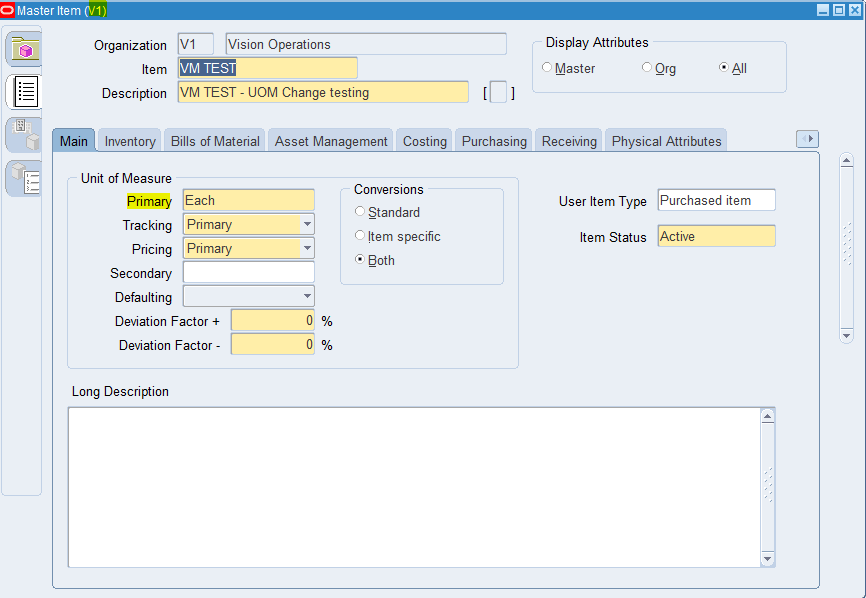
- Creating “VM TEST” master item with primary uom as Each.
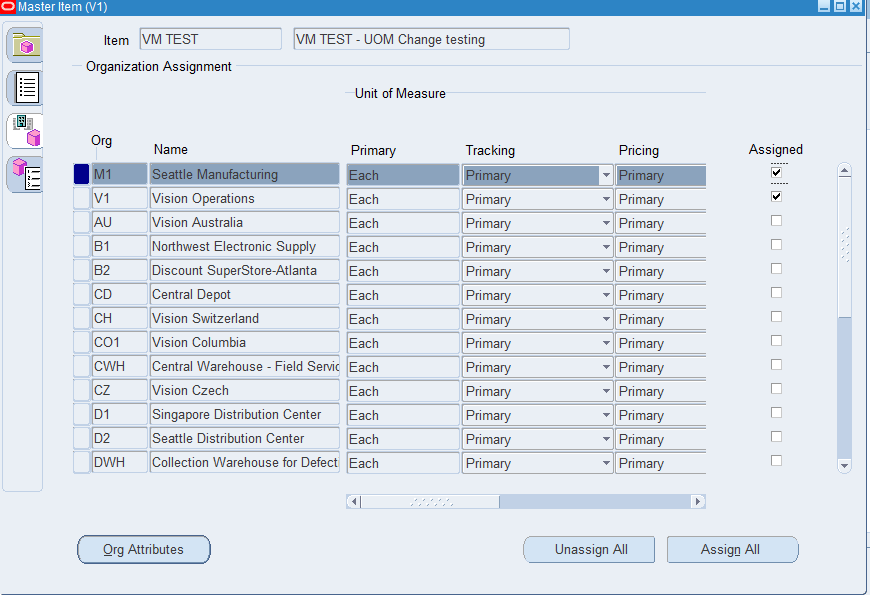
2. Extending “VM TEST” item to M1 inventory org.
3. Query “VM TEST” item in M1 inventory org.
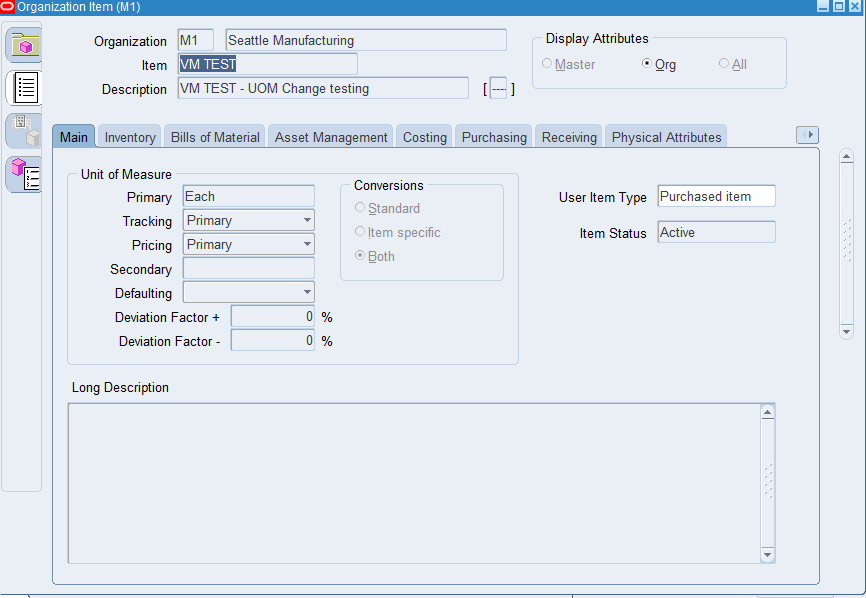
Initially the item is created with primary UOM as “Each”. This item is newly created and there are no transactions exist.
4. Change primary uom from EACH to EA in the master item form ( primary UOM is master controlled item attribute) -> A concurrent request will be submitted when UOM is changed and saved.
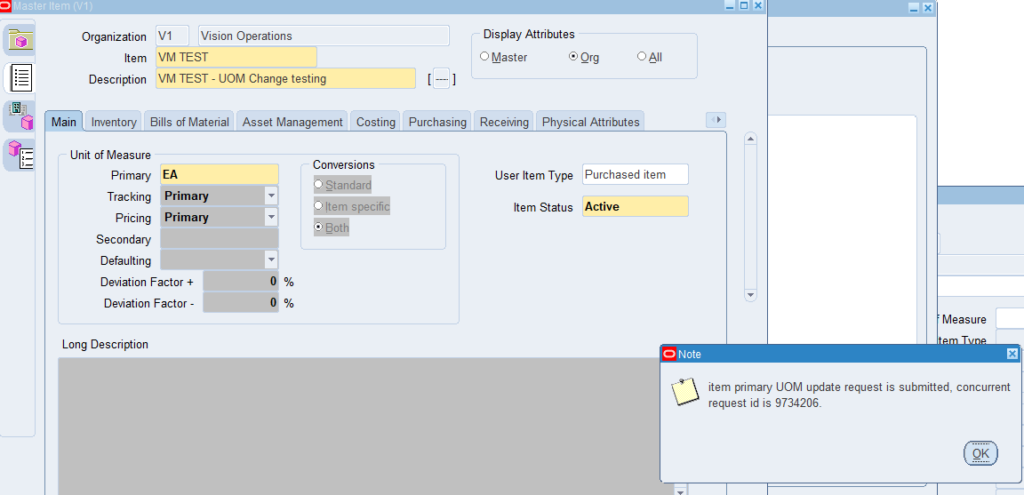
5. It runs “EGO Spreadsheet Java Concurrent Program” process and completes normal when the UOM is changed.
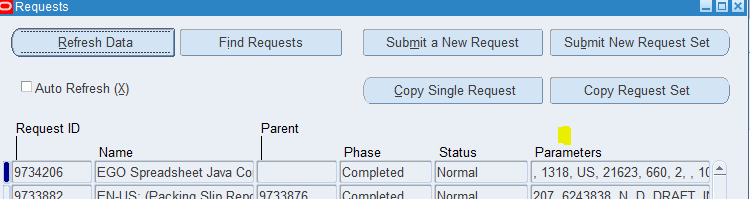
Note: The concurrent program will have error like below if there are any transactions exists.
MESSAGE NAME: INV_UOM_CANNOT_UPDATE
ERROR MESSAGE : You cannot update UOM field when the inventory transactions exist in current or one of child orgs.
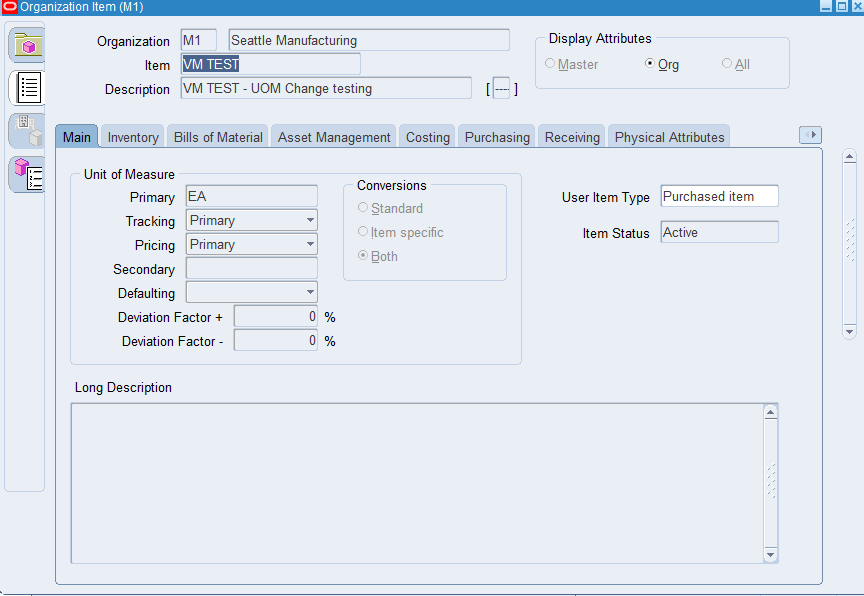
6. Re-Query “VM TEST” in the organization items form for M1 inventory org. You can see that primary UOM is changed to EA
Decoded INST_TOP Oracle R12 INSTANCE_HOME
June 13th, 2020, posted in Oracle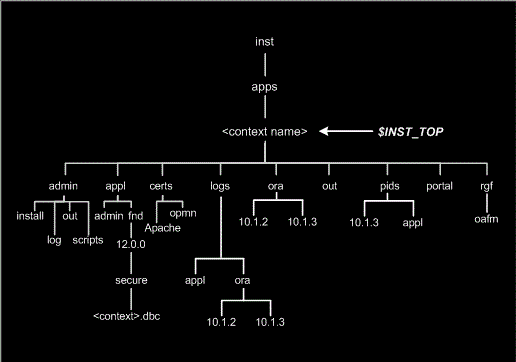
Features on this R12 INST_TOP
-All the logs files have been moved from APPL_TOP,ORACLE_HOME to this to top
- All configuration files have been moved to INST_TOP
like
DBc file
All the http related config files
appsweb.cfg
All the start or stop scripts
all the OC4J related config files
-we can now share the Apps and technology stack among multiple nodes and even instances (Dev,Test, Production) as all the log and config are located in this top.We will have INST_TOP for each context.
-Configuration and log files are co-located
-Easier collection of instance state
-Minimize disk usage and maximize performance
Filesystem look
/inst/apps/ ($INST_TOP)
• /admin
• /scripts ($ADMIN_SCRIPTS_HOME) All the start and stop are here
• /appl ($APPL_CONFIG_HOME) All the apps env are here
• /fnd/12.0.0/secure ($FND_SECURE) dbc file lis located here
• /certs
• /logs ($LOG_HOME) all the logs are located
• /ora ($ORA_CONFIG_HOME)
/10.1.2
/10.1.3 ($ORACLE_CONFIG_HOME) all the techstack(oacore,forms) related config files
• /pids
• /portal
• /rgf
Some more changes to variable
OA_HTML =$COMMON_TOP/webapps/oacore/html
JAVA_TOP=$COMMON_TOP/java/classes
AF_JLIB=$COMMON_TOP/java/lib
JAVA_BASE=$COMMON_TOP/java/
Advantage of INST_TOP
-Clear distinction between the shared file system and the file system unique to an instance
-Ability to share code (Apps, technology stack) among multiple nodes and even instances (Development ,Test, Production)
-Enables split ownership of applications and technology stack file systems
-Improves code safety by making shared file system read-only while not patching
-Configuration and log files are co-located
-Easier collection of instance state
-Ability to use network or local storage for various file system portions
-Minimize disk usage and maximize performance
R12.2 Changes
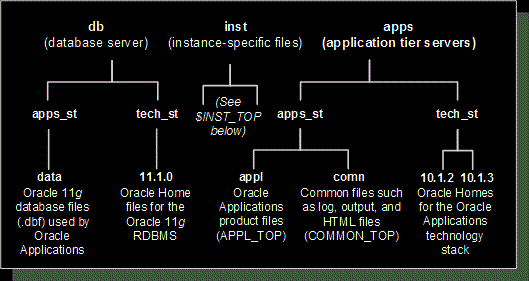
-R12.2 contains the Fusion Middleware 11g tech-stack. The logfile and configuration files is located in that Oracle Home
–Concurrent Manager log/out files have been moved in Non editioned File system
It is recommended to put INST_TOP on local filesystem in shared APPL_TOP filesystem architecture. This is because of the Apache mutex problem.Apache performance is highly sensitive to mutex file access latency, and at higher loads is also sensitive to I/Os per second. In case you have INST_TOP on shared filesystem, it is suggested to point these context variable to local file-system
s_lock_pid_dir
s_pids_dir
s_web_pid_file
Conclusion
Hope you like the post on R12 INST_TOP, all the advantages and R12.2 changes. Please do provide the feedback.
Query To Find Legal Entity Organization Company Code
February 3rd, 2020, posted in Oracle QueriesSELECT xep.legal_entity_id "Legal Entity ID", xep.name "Legal Entity", hr_outl.name "Organization Name", hr_outl.organization_id "Organization ID", hr_loc.location_id "Location ID", hr_loc.country "Country Code", hr_loc.location_code "Location Code", glev.flex_segment_value "Company Code" FROM xle_entity_profiles xep, xle_registrations reg, -- hr_operating_units hou, -- hr_all_organization_units hr_ou, hr_all_organization_units_tl hr_outl, hr_locations_all hr_loc, -- gl_legal_entities_bsvs glev WHERE 1=1 AND xep.transacting_entity_flag = 'Y' AND xep.legal_entity_id = reg.source_id AND reg.source_table = 'XLE_ENTITY_PROFILES' AND reg.identifying_flag = 'Y' AND xep.legal_entity_id = hou.default_legal_context_id AND reg.location_id = hr_loc.location_id AND xep.legal_entity_id = glev.legal_entity_id -- -- AND hr_ou.organization_id = hou.business_group_id AND hr_outl.organization_id = hou.organization_id ORDER BY hr_outl.name
RC-20200: Fatal: Could not find Unzip. At this time only Native UnZip 5.X is supported
September 2nd, 2018, posted in Oracle, Solaris
[orastg@eboso bin]$ perl adcfgclone.pl dbconfig /clone/oracle/product/11.2.0/appsutil/CLONE_ebso.xml

                      Copyright (c) 2002 Oracle Corporation

                        Redwood Shores, California, USA

                         Oracle Applications Rapid Clone

                                  Version 12.0.0

                       adcfgclone Version 120.31.12010000.8

 Enter the APPS password :

 Running Rapid Clone with command:

perl /clone/oracle/product/11.2.0/appsutil/clone/bin/adclone.pl java=/clone/oracle/product/11.2.0/appsutil/clone/bin/../jre mode=apply stage=/clone/oracle/product/11.2.0/appsutil/clone component=dbconfig method=CUSTOM dbctxtg=/clone/oracle/product/11.2.0/appsutil/CLONE_ebso.xml showProgress contextValidated=false

Running:

perl /clone/oracle/product/11.2.0/appsutil/clone/bin/adclone.pl java=/clone/oracle/product/11.2.0/appsutil/clone/bin/../jre mode=apply stage=/clone/oracle/product/11.2.0/appsutil/clone component=dbconfig method=CUSTOM dbctxtg=/clone/oracle/product/11.2.0/appsutil/CLONE_ebso.xml showProgress contextValidated=false

APPS Password :

 Beginning dbconfig Apply – Fri May 17 01:37:14 2013

 /clone/oracle/product/11.2.0/appsutil/clone/bin/../jre/bin/java -Xmx600M -DCONTEXT_VALIDATED=false  -Doracle.installer.oui_loc=/clone/oracle/product/11.2.0/oui -classpath /clone/oracle/product/11.2.0/appsutil/clone/jlib/xmlparserv2.jar:/clone/oracle/product/11.2.0/appsutil/clone/jlib/ojdbc5.jar:/clone/oracle/product/11.2.0/appsutil/clone/jlib/java:/clone/oracle/product/11.2.0/appsutil/clone/jlib/oui/OraInstaller.jar:/clone/oracle/product/11.2.0/appsutil/clone/jlib/oui/ewt3.jar:/clone/oracle/product/11.2.0/appsutil/clone/jlib/oui/share.jar:/clone/oracle/product/11.2.0/appsutil/clone/jlib/oui/srvm.jar:/clone/oracle/product/11.2.0/appsutil/clone/jlib/ojmisc.jar  oracle.apps.ad.clone.ApplyDatabase -e /clone/oracle/product/11.2.0/appsutil/CLONE_ebso.xml -stage /clone/oracle/product/11.2.0/appsutil/clone   -showProgress   -noRmanRecovery yes -checkDBConnection

APPS Password : Log file located at /clone/oracle/product/11.2.0/appsutil/log/CLONE_ebso/ApplyDatabase_05170137.log

  |      0% completed       RC-20200: Fatal: Could not find Unzip. At this time only Native UnZip 5.X is supported.

Please make sure you have UnZip 5.X in your path and try again…

 ERROR while running Apply…

 ERROR: Failed to execute /clone/oracle/product/11.2.0/appsutil/clone/bin/adclone.pl

  Please check logfile.

[orastg@ebso bin]$
Summary
During the post cloning steps at the dbTier of an E-Business Suite R12.1.3 i get the error:
RC-20200 Fatal: Could Not Find Unzip. At This Time Only Native UnZip 5.X is Supported
I check my unzip version:
$ unzip -version
$ which uzip
And i found out that i have Unzip version 6 !!
But at the “source“ system i do have the version UnZip 5.52
Workaround:
Copy from the “source“ system the unzip version 5.52 and put it under “target“ system:
/usr/bin/unzip
/system_base_directory/db/tech_st/11.2.0/bin/unzip
MyOracle Support offers a solution with a patch:
RC-20200: Fatal: Could not find Unzip. At this time only Native UnZip 5.X is supported [ID 1410514.1]
Tip:
After solving the issue with unzip and running again the dbTier post cloning steps you might get the error:
[AutoConfig Error Report]
The following report lists errors AutoConfig encountered during each
phase of its execution.  Errors are grouped by directory and phase.
The report format is:


  [INSTANTIATE PHASE]
  AutoConfig could not successfully instantiate the following files:
    Directory: /u01/saudi_arabia_ar/db/tech_st/11.2.0/appsutil/install/PRODAR_ebsdbprd
      adcrdb.sh               INSTE8


AutoConfig is exiting with status 1

RC-50014: Fatal: Execution of AutoConfig was failed
Raised by oracle.apps.ad.clone.ApplyDBTechStack
The problem now is that the file:
/u01/saudi_arabia_ar/db/tech_st/11.2.0/appsutil/template/adcrdb.sh is Deleted from the first failed clone process.
Workaround:
Copy again all the template directory from the “source“ system and put it to the “target” system.
Run again $ perl adcfgclone.pl dbTier