Archive for the ‘Linux OS’ Category

oc4j_socket_recvfull Timed Out

December 20th, 2017, posted in Oracle, Solaris
Share
[Wed Nov 1 11:37:28 2016][warn] [client 10.10.1.61] oc4j_socket_recvfull timed out
[Wed Nov 1 11:37:28 2016] [error] [client 10.10.1.61] [ecid: 1509525146:10.10.7.85:1275:0:45,0] mod_oc4j:
request to OC4J bi.erp.com:21500 failed: recv failed (errno=4)


Troubleshooting MOD_OC4J_0080 MOD_OC4J_0058 MOD_OC4J_0035 MOD_OC4J_0121 MOD_OC4J_0013 Errors In the HTTP Server error_log file [ID 329456.1]

The MOD_OC4J* errors basically convey that the HTTP Server (through mod_oc4j) is unable to communicate with the OC4J instance in question. Some of the possible causes are :

  • 1. Internet Explorer (KeepAlive) Bug
  • 2. Firewalls
  • 3. Connection timeouts between HTTP Server/mod_oc4j & OC4J
  • 4. OC4J instance running short on memory
  • 5. OC4J JVMs loaded
  • 6. Application(s) blocking up OC4J

Connection timeouts between HTTP Server/mod_oc4j & OC4J

In $ORACLE_HOME/Apache/Apache/conf/httpd.conf, increase the Timeout directive value to, say, 600 seconds. (This should be smaller than the Firewall timeout setting, if any)

In $ORACLE_HOME/Apache/Apache/conf/mod_oc4j.conf below the tag add the following:

Oc4jCacheSize 0

Oc4jConnTimeout 600 (This is again in seconds &, again, should be smaller than the Firewall timeout setting, if any)

Update the configuration as follows:

$ORACLE_HOME/dcm/bin/dcmctl updateconfig -ct ohs
$ORACLE_HOME/opmn/bin/opmnctl restartproc process-type=HTTP_Server

Share

Out Of Memory Not Enough Space Solaris 11

December 17th, 2017, posted in Oracle, Solaris
Share
SQL> startup mount ;Out Of Memory Not Enough Space Solaris 11,Out Of Memory , Not Enough Space Solaris 11,Solaris 11,Solaris 10,Oracle 12c on Solaris 11.3,Oracle 12c,Solaris 11.3,
ORA-27102: out of memory
SVR4 Error: 12: Not enough space
Additional information: 1671
Additional information: 16106127360
Additional information: 64424509440


The Above error appeared When trying to start Oracle 12c on Solaris 11.3, this is published bug
Bug:20635316 – 12C DATABASE INSTANCE STARTUP FAILS WITH ORA-27102: OUT OF MEMORY
Solaris using something called OSM , Optimized Shared memory You can know more about it here 


To avoid this error as workaround just set the parameter
_use_osm=FALSE
Share

Oracle 12.2 is Now Available on E-delivery

November 13th, 2017, posted in Linux OS, Oracle
Share

Oracle Just Announced the availability of Oracle database 12cR2 Exadata/SuperCluster On their website, In Case you want to upgrade

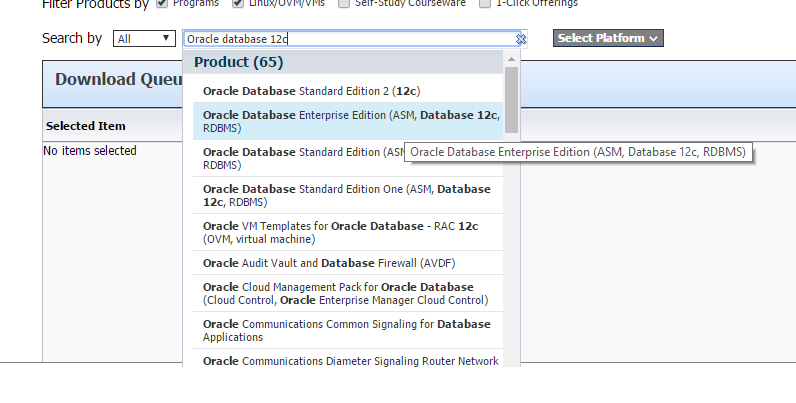
You can download oracle Enterprise edition 12cR2 from Oracle E delivery
 Here 

Follow the steps :-

Oracle Database 12c,Oracle Database 12c download,download Oracle Database 12c,Oracle Database download,download Oracle Database,Oracle 12c download,download Oracle 12c,Oracle 12.2 is Now Available on E-delivery,Oracle 12.2, Now Available on E-delivery,Oracle 12.2 is Now Available,E-delivery,

Oracle Database 12c,Oracle Database 12c download,download Oracle Database 12c,Oracle Database download,download Oracle Database,Oracle 12c download,download Oracle 12c,Oracle 12.2 is Now Available on E-delivery,Oracle 12.2, Now Available on E-delivery,Oracle 12.2 is Now Available,E-delivery,

Share

Oracle Database 12c Release 2

November 12th, 2017, posted in Linux OS, Oracle
Share
Oracle Database 12c,Oracle Database 12c download,download Oracle Database 12c,Oracle Database download,download Oracle Database,Oracle 12c download,download Oracle 12c,Oracle Database 12c Release 2 is now available for Linux, Oracle Solaris SPARC, Oracle Solaris Intel 
To Download Just access here 
Share

FRM-92102 : A Network Error Has Occured

September 19th, 2017, posted in Oracle, Solaris
Share

FRM-92102 is Gerneric Error maybe occur for more than one reasons :

1-Network 
2-Proxy
3-http
4-Session Time 


But today i will discuss the problem On oracle Application server 10g .
Description for the problem like the following when you try to connect on your deploy application On OAS 10g it’s gives the above error from 1-5 minutes.

I will give you more than one solution maybe it will be related to the above problem and you try them separately to see which one will be valid for you : 

1-Netowrk Parameters :

You will find it $ORACLE_HOME/forms/server/default.env
Just increase the value .

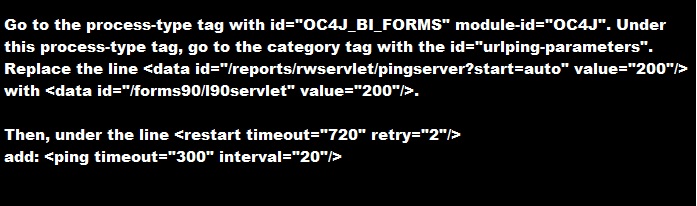
2-do the following change in opmn.xml (under $ORACLE_HOME/opmn/conf/):


3-SET Inbound_connection_timeout In sqlnet.ora to ZERO .

Sqlnet.Inbound_connection_timeout = 0

Note : if your can’t find this parameter in the SQLNET.ORA you cant add it .

5- Change the following $ORACLE_HOME/opmn/conf/opmn.xml


Hope this will work 

Share